electerm
electerm brings terminal sessions and remote file management together in a free, open-source client under the MIT License.
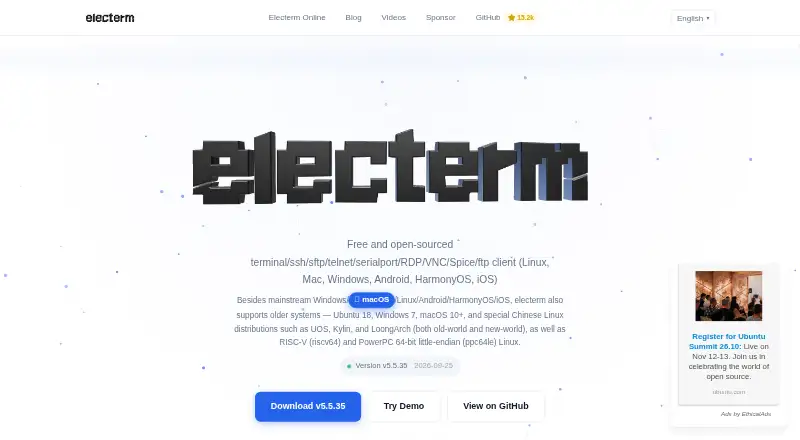
What electerm is
electerm brings terminal sessions and remote file management together in a free, open-source client under the MIT License. It connects over SSH, SFTP, FTP, Telnet, serial, RDP, VNC, and Spice, and is listed for Android, iOS, Linux, macOS, web, and Windows. The terminal supports multiple tabs, split panes, sending quick input to one or all terminals, and a global visibility hotkey. Its SFTP manager can edit remote files directly and transfer them by drag and drop. Authentication options include passwords and public keys, along with SSH tunnels and global or session proxies. An AI assistant can generate commands, explain them, and create scripts using OpenAI Chat Completions, OpenAI Responses, and Anthropic Messages formats. The free AI service may be subject to usage limits; users can configure their own API key. Bookmarks, themes, and quick commands can sync using GitHub or Gitee secret gists, WebDAV, custom servers, or electerm cloud. It also offers an MCP widget and deep links such as ssh:// and telnet://.
Good
- Free and open-source under the MIT License.
- Supports SSH, SFTP, FTP, Telnet, RDP, VNC, and Spice.
- SFTP manager edits and transfers remote files.
- Terminal tabs, split panes, and quick input.
- Syncs bookmarks, themes, and quick commands.
Watch out
- Free AI service may have usage limits.
- Release notes report fixes for unsafe transfer paths and command execution.
Who it suits
electerm suits people who work across remote terminals and files and want those tools in one client. Its listed desktop, mobile, and web platforms may fit users who need access from different device types.
Verdict
electerm combines terminal access, remote file management, and workflow tools across a broad set of listed platforms. The free AI service may have usage limits, while users can supply their own API key.
Plans and prices
From electerm's own pricing page, checked 4 Oct 2026.
| Plan | Price | What it gives you |
|---|---|---|
| Electerm | Free | Free and open-source client · free AI service may have usage limits |
The facts
Each one read from electerm's own pages, with the date it was checked.
What it does
- AI integrations
- Its AI assistant supports OpenAI Chat Completions, OpenAI Responses, and Anthropic Messages formats for command generation, explanations, and scripts.checked 4 Oct 2026
- AI service limit
- The free AI service uses free-tier accounts and may have usage limits; users can configure their own API key.checked 4 Oct 2026
- Authentication
- It supports public-key and password authentication, SSH tunnels, and global or session proxies.checked 4 Oct 2026
- External integrations
- Electerm offers an MCP widget for AI assistants and external tools, plus deep links such as ssh:// and telnet://.checked 4 Oct 2026
- License
- The software is free and open-source under the MIT License.checked 4 Oct 2026
- Maintainer
- Electerm is created and maintained by ZHAO Xudong.checked 4 Oct 2026
- Purpose
- Electerm combines a terminal emulator and graphical SFTP file manager with SSH, SFTP, FTP, Telnet, serial port, RDP, VNC, and Spice clients.checked 4 Oct 2026
- Remote files
- Its SFTP file manager supports directly editing remote files and transferring files with drag and drop.checked 4 Oct 2026
- Security updates
- The v5.5.66 release notes report fixes for unsafe remote file-transfer path resolution and unsafe command execution through deep links and quick-connect options.checked 4 Oct 2026
- Support
- The project provides documentation, issue reporting, GitHub Discussions, video guides, and a WeChat community for support and updates.checked 4 Oct 2026
- Sync integrations
- Bookmarks, themes, and quick commands can sync through GitHub or Gitee secret gists, WebDAV, custom servers, or electerm cloud.checked 4 Oct 2026
- Terminal workflow
- The app supports multiple terminal tabs, split panes, quick input to one or all terminals, and a global visibility hotkey.checked 4 Oct 2026
- Website privacy
- The privacy policy says the website uses essential and Google Analytics cookies and may collect IP address, browser, operating system, page, referral, and device information.checked 4 Oct 2026
Where it runs
- Platforms
- The maker lists Windows, macOS, Linux, Android, iOS, and HarmonyOS, including Windows 7 and older Linux systems.checked 4 Oct 2026
The full review of electerm
electerm is a free, open-source client for remote connections, terminal work, and file management. It is best suited to people who work across different protocols and want shared workflow tools across desktop and mobile platforms. Its range is a clear strength, though the free AI service may have usage limits.
Overview
electerm combines a terminal emulator with a graphical SFTP file manager and clients for SSH, SFTP, FTP, Telnet, serial, RDP, VNC, and Spice. HTTP and HTTPS are also supported. Public-key or password authentication, SSH tunnels, and global or session proxies give users several ways to handle access to remote environments. This breadth makes electerm a practical choice for varied connection needs; people who use only one protocol may prefer a more focused tool.
Key features
The SFTP manager can edit remote files directly and transfer them by drag and drop. That keeps common file tasks close to terminal work, which is useful when maintaining a remote system involves both commands and files. Multiple terminal tabs, split panes, and quick input to one or all terminals suit users switching among sessions or repeating commands. A global visibility hotkey makes the app quicker to bring forward.
The AI assistant can generate commands, explain them, and draft scripts using OpenAI Chat Completions, OpenAI Responses, and Anthropic Messages formats. The free AI service uses free-tier accounts and may have usage limits, so it is best treated as a convenience rather than a guaranteed source of ongoing capacity. Users can configure their own API key for provider access.
Bookmarks, themes, and quick commands can sync through GitHub or Gitee secret gists, WebDAV, custom servers, or electerm cloud. An MCP widget connects AI assistants and external tools, while deep links such as ssh:// and telnet:// can open connections from other applications. These integrations help users fit electerm into an existing workflow, though the number of sync choices may be unnecessary for a single-device setup.
Electerm is maintained by ZHAO Xudong and is released under the MIT License. Support includes documentation, issue reporting, GitHub Discussions, video guides, and a WeChat community. The v5.5.66 release notes report fixes addressing unsafe remote file-transfer path resolution and unsafe command execution through deep links and quick-connect options.
Pricing
The Electerm plan costs nothing and provides a free, open-source client. There is no free trial because the software is free to use. No paid tier is needed to access the client; the caveat is that the free AI service may have usage limits. Users who want to use their own provider access can configure an API key.
Platforms
electerm supports Android, iOS, Linux, macOS, web, and Windows. Desktop support covers Windows, macOS, and Linux, with mobile apps also available. This range suits people who move between desktop and mobile devices and want to keep a familiar remote-access workflow.
Who it's for
Choose electerm if your work spans several remote protocols, requires both terminal sessions and graphical SFTP file handling, or benefits from syncing bookmarks and quick commands. Its tabs, split panes, and multi-terminal input are especially useful for managing several sessions. If you need only a basic terminal, or expect regular AI assistance without possible free-service limits, electerm's breadth may not be the deciding advantage.
Pros and cons
- Pro: Broad protocol support, including SSH, RDP, VNC, serial, and Spice, fits mixed remote environments.
- Pro: Direct remote-file editing and drag-and-drop transfers keep SFTP tasks alongside terminal work.
- Pro: Cross-platform apps and several sync options support a portable workflow.
- Con: The free AI service may have usage limits, which can interrupt reliance on its AI features.
- Con: Its extensive protocol and workflow toolkit may be more than a single-protocol user needs.
Alternatives
Remote Connection Manager Software is a category overview for comparing tools in this space.
BURSU Connection Manager is another free option across desktop, mobile, and web; its optional BURSUcloud sync and team sharing may suit readers focused on those collaboration options.
Devolutions Remote Desktop Manager offers a free edition for individual use, including commercial use, and a free trial. It may suit people who do not need to share connections or credentials.
Nexterm is a free, MIT-licensed option with web and self-hosted platform support, making it an alternative for readers seeking those deployment choices.
Conduit has a free plan with unlimited connections, an MCP server capped at 50 tool calls per day, and a one-day cloud backup. Its Pro plan is 10. Readers comparing a plan with stated connection and MCP allowances can consider it.
Royal TS offers a free Lite plan limited to 10 connections, 10 credentials, and one document, as well as a €49, paid once single-user license. It may fit readers whose connection needs stay within Lite's caps or who prefer a one-time license.
MremoteGO is a free, MIT-licensed option for Linux, macOS, and Windows.
Remote Commander is a free, MIT-licensed option for Linux, macOS, and Windows.
uniTerm is a free option for Android, Linux, macOS, and Windows.
Verdict
electerm is a strong choice for users who need one client for a broad mix of remote protocols, terminal sessions, and graphical SFTP work. Its free, open-source license and cross-platform reach make it easy to adopt across devices. Look elsewhere if you need a simpler single-purpose tool or depend on AI service capacity that must be predictable.
Getting started
- Visit the electerm website.
- Choose the client for a listed platform: Android, iOS, Linux, macOS, web, or Windows.
- Connect using a supported protocol such as SSH, SFTP, FTP, Telnet, serial, RDP, VNC, or Spice.
- Choose public-key or password authentication as appropriate.
- Configure your own API key if you do not want to rely on the free AI service's free-tier accounts.
Limits worth knowing
The client is free, but its free AI service uses free-tier accounts and may have usage limits. Users can configure their own API key.
Questions
Is electerm free?
Yes. Electerm is free and open-source under the MIT License.
Which platforms are listed?
Electerm is listed for Android, iOS, Linux, macOS, web, and Windows.
Which connection protocols does it support?
Listed protocols include SSH, Telnet, VNC, RDP, Spice, serial, FTP, and HTTP/HTTPS. The product purpose also lists SFTP.
Can electerm work with remote files?
Its SFTP file manager supports direct editing of remote files and drag-and-drop transfers.
Does the AI assistant have usage limits?
The free AI service uses free-tier accounts and may have usage limits. Users can configure their own API key.
Who maintains electerm?
Electerm is created and maintained by ZHAO Xudong.
Alternatives to electerm
- 1

Royal TS
Free planAndroidiOSAPIExtension8.1€49 one-time - 2

Nexterm
Free planOpen sourceAndroidiOSWebAPI7.7Free plan - 3

BURSU Connection Manager
Free planAndroidiOSWebAPI7.4Free plan - 4

MobaXterm
Free planWindows7.4From $69 a year - 5

Conduit
Free planiOSWebLinuxmacOS7.2From $10 a month - 6

Keeper Connection Manager
AndroidiOSWebLinux6.9