
Devolutions Remote Desktop Manager
Devolutions Remote Desktop Manager centralizes remote connections, credentials and sessions in one application for IT professionals.
What Devolutions Remote Desktop Manager is
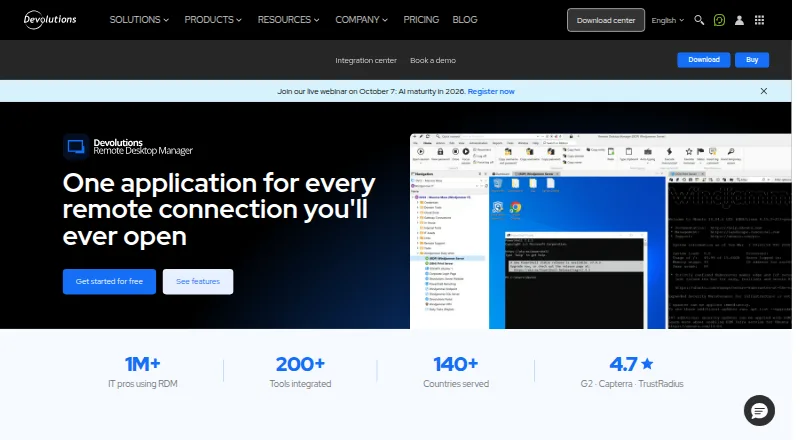
Devolutions Remote Desktop Manager centralizes remote connections, credentials and sessions in one application for IT professionals. It supports more than 150 connection protocols, including RDP, SSH, VNC and VPN. Session tools include credential injection, quick connect, multi-monitor and tabbed sessions, screen sharing and file transfer. Credentials can be managed in a centralized password workspace or alongside external password managers such as KeePass, Bitwarden, 1Password and Keeper.
For teams, Remote Desktop Manager provides role-based access controls, account brokering, two-factor authentication and an encrypted offline cache. Activity logs, audit trails, real-time connection visibility and custom reports support oversight. The Integration Center lists connections to tools including Active Directory, AWS, Azure Key Vault, TeamViewer and VMware. Data can be stored locally, in a self-hosted Devolutions Server workspace or in Devolutions Cloud; Devolutions says its cloud infrastructure is SOC 2 Type II and ISO 27001 certified. The free edition is for individual use, including commercial use, but does not allow sharing connections or credentials with a team. A 14-day trial is listed, and paid plans start at $30/user/mo (annual).
Good
- Supports more than 150 remote connection protocols.
- Includes credential injection, tabbed sessions and file transfer.
- Works with KeePass, Bitwarden, 1Password and Keeper.
- Offers local, self-hosted and cloud storage options.
- Available on Windows, macOS, Linux, Android and iOS.
Watch out
- The free edition does not support team sharing of connections or credentials.
- Paid plans start at $30/user/mo (annual).
Who it suits
Remote Desktop Manager suits IT professionals who need a single application for managing remote sessions, credentials and connections. The free edition is for individual use, while teams that need shared connections, credentials and access controls can consider the Team edition.
Verdict
Choose Remote Desktop Manager if you need broad protocol support and want to centralize remote sessions and credentials. Its free edition fits individual use, but teams needing shared connections or credentials must use a team offering; paid plans start at $30/user/mo (annual).
Plans and prices
From Devolutions Remote Desktop Manager's own pricing page, checked 28 Sep 2026.
| Plan | Price | What it gives you |
|---|---|---|
| Free | Free | Individual use · free edition includes commercial use · designed for users who do not need to share connections or credentials with a team |
| Team edition | Priced on request | Shared connections, credentials, and access controls · 14-day trial · priority support |
The facts
Each one read from Devolutions Remote Desktop Manager's own pages, with the date it was checked.
What it does
- Access controls
- Team capabilities include role-based access controls, account brokering, two-factor authentication, and encrypted offline cache.checked 28 Sep 2026
- Auditing
- RDM provides activity logs, audit trails, real-time connection visibility, and custom reports.checked 28 Sep 2026
- Cloud compliance
- Devolutions says its Cloud infrastructure is SOC 2 Type II and ISO 27001 certified.checked 28 Sep 2026
- Credential management
- RDM includes a centralized password workspace and integrates with external password managers including KeePass, Bitwarden, 1Password, and Keeper.checked 28 Sep 2026
- Integrations
- The Integration Center lists connections to tools including Active Directory, AWS, Azure Key Vault, Bitwarden, KeePass, TeamViewer, and VMware.checked 28 Sep 2026
- Intended users
- Devolutions describes its solutions as serving organizations of all sizes, including small and mid-sized businesses, and says its tools are used by IT professionals.checked 28 Sep 2026
- Product purpose
- Remote Desktop Manager centralizes and manages remote connections, credentials, and sessions in one application.checked 28 Sep 2026
- Protocols
- The product supports more than 150 remote connection protocols, including RDP, SSH, VNC, and VPN connections.checked 28 Sep 2026
- Session features
- It offers credential injection, quick connect, multi-monitor and tabbed sessions, screen sharing, and file transfer.checked 28 Sep 2026
- Storage options
- Users can store data locally, in a self-hosted Devolutions Server workspace, or in Devolutions Cloud.checked 28 Sep 2026
- Support
- Free users can use the forum, documentation, and Academy, while the Team edition adds priority support from in-house specialists.checked 28 Sep 2026
The company
- Company
- Devolutions says it has served users since 2010 and is proudly founded in Québec, Canada.checked 28 Sep 2026
- Founded
- 2004checked 23 Sep 2026
- Headquarters
- Lavaltrie, Quebec, Canadachecked 23 Sep 2026
Money
- Free edition limit
- The free edition is for individual IT professionals and does not support sharing connections or credentials with a team.checked 28 Sep 2026
The full review of Devolutions Remote Desktop Manager
Overview
Devolutions Remote Desktop Manager brings remote connections, credentials, and sessions into one application, with support for more than 150 protocols. It is best suited to IT professionals managing varied systems, especially teams that need shared access and oversight; solo users can start with the free edition, but team collaboration requires a paid offering.
Its breadth is a strength when remote work spans multiple tools and environments, though it may be more than occasional users need. Individuals can use it commercially for free, while teams must weigh custom-priced sharing and controls against their needs.
Key features
- Broad protocol support: RDP, SSH, VNC, VPN, ARD, FTP, FTPS, SFTP, Telnet, Citrix, VMware, Hyper-V, TeamViewer, and more are covered among 150-plus protocols. That range makes RDM a practical hub for mixed environments; it is less compelling if you only need one basic connection type.
- Session workflow: Quick connect, credential injection, tabbed and multi-monitor sessions, screen sharing, file transfer, and session recording support day-to-day remote work. These tools matter most to people handling several active sessions rather than occasional access.
- Credentials and integrations: A centralized password workspace can connect with KeePass, Bitwarden, 1Password, and Keeper. The Integration Center also includes Active Directory, AWS, Azure Key Vault, TeamViewer, and VMware, reducing the need to manage each related tool in isolation.
- Team controls and visibility: Role-based access controls, account brokering, two-factor authentication, encrypted offline cache, activity logs, audit trails, real-time connection visibility, and custom reports give organizations ways to manage and review access. These capabilities are aimed at shared administration, not the free individual edition.
- Storage choice: Data can remain local, reside in a self-hosted Devolutions Server workspace, or use Devolutions Cloud. Devolutions says its Cloud infrastructure is SOC 2 Type II and ISO 27001 certified, a relevant assurance for organizations considering its hosted option.
Pricing
Remote Desktop Manager uses a freemium model. The Free plan is free, includes commercial use, and is intended for individual use without team sharing of connections or credentials. It suits independent IT professionals, but the inability to share means it is not a team plan in disguise.
The Team edition has custom pricing and adds shared connections, shared credentials, access controls, and priority support from in-house specialists. A 14-day trial lets teams evaluate that offering before committing. Paid plans start at $30/user/mo (annual), so organizations should account for per-user cost rather than treating the free edition as a route to team collaboration.
Free users can turn to the forum, documentation, and Academy; priority specialist support is reserved for the Team edition. That distinction may matter for teams that rely on timely help as well as shared access.
Platforms
Desktop apps are available for Windows, macOS, and Linux, with mobile apps for Android and iOS. This spread suits administrators who move between desktop and mobile devices, though the product’s strongest case remains managing a broad remote-access workload.
Who it's for
RDM is a strong fit for IT professionals and organizations of different sizes that need one workspace for heterogeneous connections, credentials, and session oversight. Small and mid-sized businesses can benefit when several people need shared access and controls; individual professionals can use the free edition if they manage their own connections.
It is a weaker fit for someone who only needs occasional remote access, or for a team that needs sharing but cannot justify custom-priced plans starting at $30/user/mo (annual). Its company, Devolutions, is based in Lavaltrie, Quebec, and was founded in 2004.
Pros and cons
- Pro: Support for more than 150 protocols makes it useful across varied remote environments instead of forcing separate connection managers for each type.
- Pro: Credential integrations, session tools, and centralized storage bring connection work into a single application.
- Pro: Team access controls, auditing, and connection visibility address operational oversight alongside connection setup.
- Con: The free edition cannot share connections or credentials, so teams must move to a paid offering for collaboration.
- Con: The Team edition uses custom pricing, and the stated starting price of $30/user/mo (annual) can be a meaningful commitment for teams with many users.
- Con: The broad feature set is unnecessary overhead for people who only need a simple, occasional remote connection.
Alternatives
For a wider comparison, browse Remote Connection Manager Software.
- BURSU Connection Manager is worth considering if you want a free desktop app and can make optional BURSUcloud sync and team sharing work for your needs.
- electerm is a free, open-source client for readers who prefer that model; its free AI service may have usage limits.
- Nexterm is a free, MIT-licensed open-source option for readers seeking that licensing model.
- Conduit may fit readers who want a free tier with unlimited connections, while its MCP server is capped at 50 tool calls per day and cloud backup lasts one day.
- Royal TS offers a free Lite tier capped at 10 connections, 10 credentials, and one document, making it an option for users whose needs stay within those limits.
- MremoteGO is a free, MIT-licensed open-source option for users working on Linux, macOS, or Windows.
- Remote Commander is a free MIT-licensed choice for users who value the ability to use, modify, and redistribute the software, including commercially.
- uniTerm is a free Apache 2.0 option for users on Android, Linux, macOS, or Windows.
Verdict
Choose Remote Desktop Manager if you need broad protocol coverage and want connections, credentials, and session oversight in one place. Its individual free edition is useful for solo IT work, while teams gain meaningful sharing and control features only through a paid plan. If your needs are narrow or team pricing is hard to justify, a simpler free alternative may be the better fit.
Getting started
- Visit https://devolutions.net/remote-desktop-manager/.
- Choose the free edition for individual use or start the 14-day Team edition trial.
- Install it on Windows, macOS or Linux, or use the Android or iOS app.
- Choose local storage, a self-hosted Devolutions Server workspace or Devolutions Cloud.
Limits worth knowing
The free edition is for individual use and does not support sharing connections or credentials with a team. Paid plans start at $30/user/mo (annual).
Questions
Is Remote Desktop Manager free?
Yes. The Free edition is free and includes commercial use for individuals.
How much do paid plans cost?
Paid plans start at $30/user/mo (annual).
Is there a free trial?
Yes. The Team edition lists a 14-day trial.
Which platforms does it support?
It supports Android, iOS, Linux, macOS and Windows.
Can teams share connections on the free edition?
No. The free edition does not support sharing connections or credentials with a team.
Where can data be stored?
Users can store data locally, in a self-hosted Devolutions Server workspace or in Devolutions Cloud.
Alternatives to Devolutions Remote Desktop Manager
- 1

Royal TS
Free planAndroidiOSAPIExtension8.1€49 one-time - 2

Nexterm
Free planOpen sourceAndroidiOSWebAPI7.7Free plan - 3

BURSU Connection Manager
Free planAndroidiOSWebAPI7.4Free plan - 4

MobaXterm
Free planWindows7.4From $69 a year - 5
Conduit
Free planiOSWebLinuxmacOS7.2From $10 a month - 6

Keeper Connection Manager
AndroidiOSWebLinux6.9