EarTrumpet
EarTrumpet is a free Windows volume control app for adjusting sound across individual apps and playback devices.
What EarTrumpet is
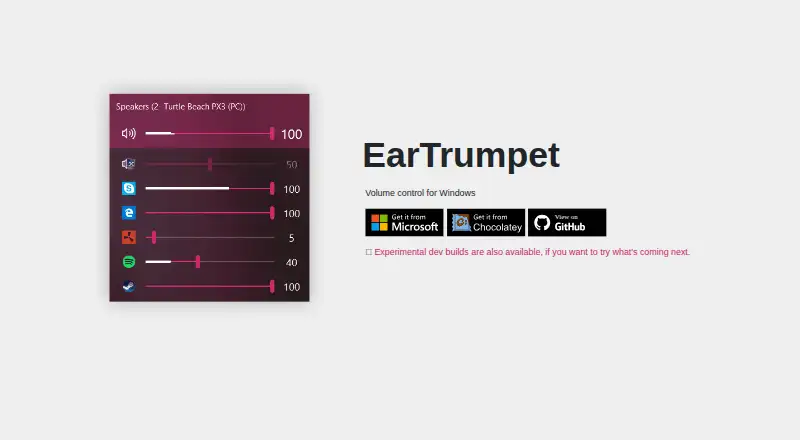
EarTrumpet is a free Windows volume control app for adjusting sound across individual apps and playback devices. Its standalone mixer provides per-app volume controls, and users can move apps between playback devices. Other listed audio tools include multi-channel aware audio peaking, audio routing, and default playback device management. The interface can be set to light or dark mode, with accent colors, configurable hotkeys, and modern context menus. EarTrumpet supports more than 20 languages and runs on Windows 10 versions 1803 through 22H2 and Windows 11. Installation options include the Microsoft Store, winget, and Chocolatey; installations through the Microsoft Store receive automatic updates. Experimental development builds are available through a dev channel, where builds are released automatically when the dev branch is committed. The privacy document says crash-time information may be collected through Bugsnag, including exception details, app state, and Windows configuration. It also says the app is provided as is without warranty. EarTrumpet has a free plan and no free trial.
Good
- Provides per-app volume controls.
- Can move apps between playback devices.
- Supports light and dark modes.
- Available through three listed installation options.
Watch out
- Windows-only support.
- Crash-time information may be collected through Bugsnag.
- Provided as is without warranty.
Who it suits
EarTrumpet suits Windows users who want separate volume controls for apps or need to move apps between playback devices. It may also appeal to users who want customizable controls and interface options.
Verdict
EarTrumpet focuses on app-level volume control and audio device management for Windows. Its privacy notice describes possible crash reporting, and the app is supplied without warranty.
Plans and prices
From EarTrumpet's own pricing page, checked 10 Oct 2026.
| Plan | Price | What it gives you |
|---|---|---|
| EarTrumpet | Free | Windows volume control app |
The facts
Each one read from EarTrumpet's own pages, with the date it was checked.
What it does
- Audio visualization
- The app supports multi-channel aware audio peaking.checked 10 Oct 2026
- Crash reporting
- The privacy document says EarTrumpet may collect crash-time information through Bugsnag, including exception details, app state, and Windows configuration.checked 10 Oct 2026
- Customization
- The feature list includes light and dark mode, accent colors, configurable hotkeys, and modern context menus.checked 10 Oct 2026
- Development builds
- Experimental dev builds are available through a dev channel, with new builds released automatically when the dev branch is committed.checked 10 Oct 2026
- Distribution
- The project lists the Microsoft Store, winget, and Chocolatey as installation options.checked 10 Oct 2026
- Languages
- The project says it supports more than 20 languages.checked 10 Oct 2026
- Purpose
- EarTrumpet describes itself as volume control for Windows.checked 10 Oct 2026
- System support
- The project lists Windows 10 versions from 1803 through 22H2 and Windows 11 as supported operating systems.checked 10 Oct 2026
- Updates
- The feature list says EarTrumpet receives automatic updates through the Microsoft Store.checked 10 Oct 2026
- Warranty
- The privacy document says EarTrumpet is provided as is without warranty.checked 10 Oct 2026
Where it runs
- Device management
- EarTrumpet supports default playback device management.checked 10 Oct 2026
- Per app controls
- The project lists a standalone volume mixer and the ability to move apps between playback devices.checked 10 Oct 2026
Alternatives to EarTrumpet
- 1

Krisp AI Meeting Assistant
AndroidiOSExtensionmacOS7.8From $8 a month - 2

RØDE UNIFY
Free planmacOSWindows7.4From $45.31 a year - 3
DTS Sound Unbound
Free planWindows7.1$19.99 one-time - 4
FxSound
Free planOpen sourceWindows7.1Free plan - 5
MicMixer
Free planOpen sourceWindows7.0Free plan - 6
VB-CABLE
Free planmacOSWindows6.6$5 one-time