
DiffiCat
DiffiCat compares source and target websites during migrations, checking whether pages exist and whether their content and appearance match.
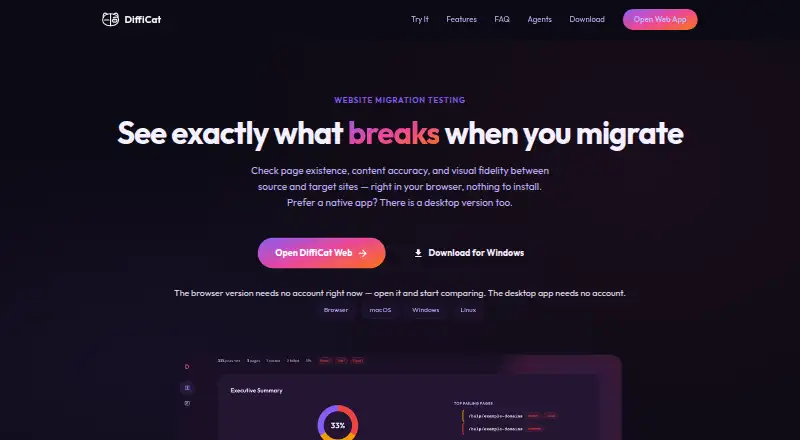
What DiffiCat is
DiffiCat compares source and target websites during migrations, checking whether pages exist and whether their content and appearance match. It checks HTTP status codes, broken redirects, authentication walls, and server errors. Content checks compare titles, headings, meta descriptions, and body text against a 90% word-overlap threshold. For visual regression, DiffiCat captures full-page screenshots and compares pixels using a configurable threshold that defaults to 0%. Viewport presets are 375px, 768px, and 1440px, with custom widths from 320px to 2560px. A run can cover up to 10,000 pages; leaving the page limit blank removes the cap on discovered pages. It can render JavaScript-driven pages and supports HTTP basic authentication for both sites. The desktop app has no telemetry, uploads no URLs or screenshots, and keeps outputs on the user's disk. The browser version stores reports and screenshots in Google Cloud Storage for the browser session. Desktop use is unlimited for personal purposes; browser limits apply, and commercial use requires a license.
Good
- Checks page status and redirect problems.
- Compares text using a 90% overlap threshold.
- Captures full-page screenshots for pixel comparison.
- Supports JavaScript-driven pages and basic authentication.
- Desktop app has no telemetry.
Watch out
- Commercial use requires a license.
- Browser runs have hourly and daily limits.
- Browser files reside in Google Cloud Storage during the session.
Who it suits
DiffiCat may suit teams checking site migrations for broken pages, changed content, or visual regressions. Desktop use is described as unlimited for personal use; commercial use requires a license.
Verdict
DiffiCat covers existence, content, and visual checks, with a desktop option that keeps outputs on the user's disk. Choose between that and browser use with its stated run limits and session storage.
Plans and prices
From DiffiCat's own pricing page, checked 1 Oct 2026.
| Plan | Price | What it gives you |
|---|---|---|
| Free | Free | Desktop app has no usage limits · Browser: 500 comparison runs/hour · 200 page discoveries/hour · 2,000 pages/day · Commercial use requires a license · Free for Personal Use |
| Free trial | Free | 100 captured pages without sign-in or 500 when signed in · up to 100 pairs per run · all checks and viewport widths · one-time allowance |
| Agent API screenshot | $0.02, paid once | POST /api/v1/screenshots · full-page screenshot of one URL · per call in USDC on Base |
| Agent API comparison | $0.02, paid once | POST /api/v1/jobs · no subscription or minimum · status/report reads free · per page for first 1,000 pages; $0.01/page thereafter |
| Agent API discovery | $0.05, paid once | POST /api/v1/discover · page discovery · per call in USDC on Base |
| Pro | $29 a month | 5,000 captured pages/month shared by web app and Agent API · overage $0.01/page under $50 default cap · up to 10,000 pairs/run · commercial license · monthly |
| Pro annual | $290 a year | 5,000 captured pages/month shared by web app and Agent API · overage $0.01/page under $50 default cap · up to 10,000 pairs/run · commercial license · annual (save $58) |
The facts
Each one read from DiffiCat's own pages, with the date it was checked.
What it does
- Analytics
- The website and browser app load Google Analytics 4 and use cookies for usage measurement.checked 15 Oct 2026
- API charge limitation
- Settled charges are final; cancellation, failed jobs or partial results do not reduce the charge.checked 15 Oct 2026
- API documentation
- The linked OpenAPI document provides routes, schemas, examples and live x-payment-info pricing.checked 15 Oct 2026
- API execution limits
- A job can name at most 20 hosts and three jobs may run concurrently per caller.checked 15 Oct 2026
- API payment
- Paid API calls use HTTP 402 payment challenges and can be settled with USDC on Base or prepaid keys.checked 15 Oct 2026
- Authentication
- HTTP Basic Authentication credentials can be entered separately for source and target sites and persist for the run.checked 15 Oct 2026
- Commercial licensing
- The Pro subscription supplies the commercial license, while free browser and desktop use is described as personal use.checked 15 Oct 2026
- Content checks
- It compares titles, headings, meta descriptions, and body text using a 90% word-overlap threshold.checked 1 Oct 2026
- Content comparison
- It compares page titles, headings, meta descriptions and body text using a 90% word-overlap threshold with word-level differences.checked 15 Oct 2026
- Credentials handling
- Desktop credentials remain local, while browser credentials are used during fetching and are not stored with reports.checked 15 Oct 2026
- Desktop privacy
- The desktop app reports no telemetry or analytics, uploads no URLs or reports, and keeps output on the local disk.checked 15 Oct 2026
- Downloads
- The latest release provides macOS DMG files, a Windows 64-bit EXE installer, and a Linux x64 AppImage; releases include code signing, macOS notarization, SHA-256 checksums, and GPG signatures.checked 1 Oct 2026
- Existence check
- It compares HTTP status responses, detecting 404s, broken redirects, authentication walls, redirect loops and server errors.checked 15 Oct 2026
- Existence checks
- It checks HTTP status codes, broken redirects, authentication walls, and server errors.checked 1 Oct 2026
- Export
- Exports are ZIP files containing report.txt plus captured PNG screenshots.checked 15 Oct 2026
- MCP integration
- A stateless Streamable HTTP MCP endpoint is available at https://app.difficat.com/mcp with named comparison and reporting tools.checked 15 Oct 2026
- Network restriction
- Requests to localhost, loopback, and private-network addresses are refused.checked 1 Oct 2026
Money
- API free allowance
- Unauthenticated clients receive a daily allowance of 10 comparison pages, three discoveries and three screenshots per client address.checked 15 Oct 2026
Where it runs
- Browser data storage
- Browser comparisons are fetched by DiffiCat servers and reports and screenshots are stored in Google Cloud Storage for the session.checked 15 Oct 2026
- Browser limits
- The browser trial allows up to 100 pairs per run, while the overall run ceiling is 10,000 pairs.checked 15 Oct 2026
- Browser storage
- The browser version stores reports and screenshots in Google Cloud Storage for the duration of the browser session.checked 1 Oct 2026
- Desktop application
- Native downloads are provided for macOS, Windows 64-bit and Linux x64 AppImage.checked 15 Oct 2026
- JavaScript apps
- The product uses Playwright to render JavaScript-driven pages before extracting content and screenshots.checked 15 Oct 2026
The company
- Maker identity
- The product identifies itself publicly as DiffiCat; no legal company name, headquarters or founding year is stated on the opened maker pages.checked 15 Oct 2026
The full review of DiffiCat
Overview
DiffiCat is a website comparison tool for teams checking a migration or auditing pages for content and visual changes. It is strongest when a project needs large-scale page coverage alongside several kinds of checks in one run.
Its desktop app is the better fit for work that must keep outputs on the user’s disk. The browser option trades that control for session-based storage and defined usage limits.
Key features
DiffiCat checks HTTP status codes, broken redirects, authentication walls and server errors, then compares titles, headings, meta descriptions and body text at a 90% word-overlap threshold. Pairing availability checks with content comparisons helps catch both failed routes and meaningful copy drift; the overlap threshold gives teams a consistent bar for flagging differences.
Visual checks use full-page screenshots and pixel-by-pixel comparison. The threshold defaults to 0%, so even small changes can register; teams that want to filter minor pixel differences can configure it. Preset viewport widths are 375px, 768px and 1440px, with custom widths from 320px to 2560px. That range supports mobile, tablet and desktop checks without restricting a team to the presets.
A comparison can cover up to 10,000 pages per run, and a blank page limit means discovered pages are not capped. This is a substantial advantage for large migrations. Screenshot mode can also capture one or more URLs without a second site, which makes it useful for visual snapshots beyond source-to-target comparisons.
Playwright renders JavaScript-driven pages before content extraction and screenshot capture, making the checks applicable to single-page apps as well as pages served as static HTML. HTTP basic authentication is supported for both source and target sites. Requests to localhost, loopback and private-network addresses are refused, so DiffiCat is not suitable for checking those internal targets.
Exports are ZIP files containing a plain-text report and captured PNGs. The desktop app has no telemetry, uploads neither URLs nor screenshots, and keeps outputs on disk. The browser version stores reports and screenshots in Google Cloud Storage for the browser session, making it the less private choice for work involving sensitive URLs or captures.
Pricing
Free: free, billed Free for Personal Use. The desktop app has no usage limits; browser use allows 500 comparison runs per hour, 200 page discoveries per hour and 2,000 pages per day. Commercial use requires a license.
The no-limit desktop option suits personal projects with substantial page counts, while the browser plan’s quotas suit lighter or occasional checks. The free terms are explicitly for personal use, so businesses should account for the commercial license requirement rather than treating the desktop app’s lack of usage limits as a commercial entitlement.
Platforms
DiffiCat supports Linux, macOS, Windows and the web. Desktop downloads include macOS DMG files, a Windows 64-bit EXE installer and a Linux x64 AppImage. Releases include code signing, macOS notarization, SHA-256 checksums and GPG signatures.
Automated test execution is supported, with desktop, mobile and tablet device coverage through configurable viewport widths.
Who it's for
DiffiCat is a good fit for migration teams that need to check routes, content and appearance across many pages, especially when they want local desktop outputs or need JavaScript-rendered pages checked. It is also useful for personal audits and screenshot capture that does not require a second site.
It is a weaker fit for commercial users unwilling to obtain a license, teams that need browser-based checks beyond the stated quotas, or anyone whose target pages are on a private network.
Pros and cons
- Pros: One workflow checks page availability, content and visual differences, reducing the need to rely on screenshots alone.
- Pros: Up to 10,000 pages per run and no discovered-page cap when the page limit is blank suit broad migrations.
- Pros: The desktop app keeps URLs and outputs off uploaded storage, with no telemetry.
- Pros: Playwright rendering and basic authentication support cover JavaScript-driven and protected source or target sites.
- Cons: Browser use has hourly and daily quotas, unlike the desktop app’s stated lack of usage limits.
- Cons: Commercial use requires a license, so the free personal-use plan is not a business plan.
- Cons: Browser reports and screenshots go to Google Cloud Storage for the session, which may not suit sensitive work.
- Cons: Private-network and localhost targets are refused, and the default 0% visual threshold may flag small changes.
Alternatives
Browser Testing Software is the category directory for comparing browser-testing options.
Choose TestCafe instead if an open-source, MIT-licensed test runner is a better match; its framework plan is free.
CloudQA may suit teams prioritizing API testing: its free Kickstart plan includes unlimited API tests, local execution, seven days of test history and Chrome.
Choose Percy if a screenshot-focused service with published monthly screenshot allowances is a better fit: Desktop is $199 a month, billed annually, for 10,000 screenshots per month, while Desktop & Mobile is $599 a month, billed annually, for 25,000.
Browserling is another freemium option for readers comparing browser-testing products.
Happo is worth considering for a free visual and accessibility testing plan, which includes 5,000 snapshots per month, Chrome, and no credit card or time limit.
Mobitru is a paid alternative created by EPAM and developed by a team within EPAM.
Screenster has a free plan for readers comparing per-tester visual test capacity: it allows one concurrent test and one user, with 100 local or 50 cloud runs per user per month.
Selenium is a free, open-source browser automation tools and libraries option for readers who prefer that approach.
Verdict
Choose DiffiCat for personal migration work that needs broad page coverage, content and visual checks, and desktop outputs kept on disk. Its main draw is the combination of those checks with a 10,000-page run capacity; look elsewhere if commercial use without a separate license, private-network targets or browser-based work beyond the quotas is central to the job.
Getting started
- Visit https://difficat.com/.
- Choose the desktop app for Linux, macOS, or Windows, or use the web version.
- For desktop, download the release for your operating system: macOS DMG, Windows 64-bit EXE, or Linux x64 AppImage.
- Select a source and target site for a comparison, or capture URLs without a second site.
- Set page and viewport options, then export the results as a ZIP.
Limits worth knowing
The free plan is for personal use; commercial use requires a license. Browser use allows 500 comparison runs per hour, 200 page discoveries per hour, and 2,000 pages per day; desktop use has no usage limits.
Questions
Is DiffiCat free?
Yes. Its Free plan costs nothing and is for personal use; commercial use requires a license.
Which platforms does DiffiCat support?
It supports Linux, macOS, web, and Windows.
What does DiffiCat compare?
It checks page existence, content accuracy, and visual changes between source and target websites. It can also capture one or more URLs without a second site.
Does DiffiCat support JavaScript pages and authentication?
Yes. It uses Playwright to render JavaScript-driven pages and supports HTTP basic authentication for both source and target sites.
Where does DiffiCat store screenshots and reports?
The desktop app keeps outputs on the user's disk and uploads no URLs or screenshots. The browser version stores reports and screenshots in Google Cloud Storage for the duration of the browser session.
What does DiffiCat export?
Export creates a ZIP containing a plain-text report and captured PNG screenshots.
Alternatives to DiffiCat
- 1

TestCafe
Free planOpen sourceAndroidiOSWebAPI8.7From $20 a month - 2

TestMu AI
Free planAndroidiOSWebAPI8.3From $17 a month - 3

Testsigma
Open sourceAndroidiOSWebAPI8.3From $14 a month - 4

Browserling
Free planAndroidiOSWebAPI8.1From $9 a month - 5

Happo
Free planAndroidiOSWebAPI8.1From $149 a month - 6
Percy
Free planAndroidiOSWebAPI8.0From $199 a month