
Browserling
Browserling provides cloud-hosted virtual browsers for checking websites and links across browsers and operating systems.
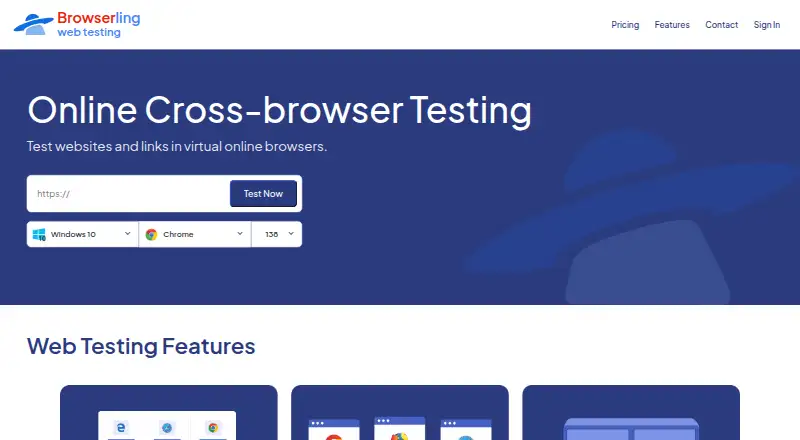
What Browserling is
Browserling provides cloud-hosted virtual browsers for checking websites and links across browsers and operating systems. Its listed coverage includes Chrome, Firefox, Safari, Edge, Opera, and Internet Explorer on real operating systems, with mobile-browser testing on Android and iOS, including iPhones and iPads. Responsive testing lets users inspect different screen sizes, resolutions, and device viewports. SSH tunnels provide a way to reach private or local development sites. Other tools include screenshots, file transfers, geo-browsing, extensions, and bookmarklets. The Live API can embed interactive browsers in applications and supports automation, continuous integration, and SIEM/SOAR workflows. Browserling offers a free sandbox for opening a URL in an isolated remote session. It says sessions use virtual machines that are destroyed afterward, traffic uses TLS 1.2 or higher, and session data and files are not persistently retained.
Good
- Tests across six listed browsers on real operating systems
- Supports Android and iOS mobile browser testing
- SSH tunnels reach private and local sites
- Free sandbox opens URLs in an isolated session
- Enterprise tier lists SSO and team management
Watch out
- Enterprise pricing is not listed
- Starter is limited to Windows 10, Chrome, and Edge
Who it suits
Browserling suits developers and teams who need to check sites across browsers, operating systems, or device viewports, including private and staging sites. Its API and enterprise options also suit teams that need embedded browser sessions, automation, or centralized access controls.
Verdict
Browserling brings cross-browser, mobile, responsive, and local-site testing into a cloud-hosted browser service. The free sandbox offers a way to open a URL remotely, while paid tiers add broader platform coverage and team features.
Plans and prices
From Browserling's own pricing page, checked 15 Oct 2026.
| Plan | Price | What it gives you |
|---|---|---|
| Free | Free | Limited live sessions · Windows 10 · no credit card |
| Starter | $9 a month | No time limit · Windows 10 · Chrome and Edge · up to 2K · screenshots · sound · email support · billed annually (regularly $12/month) |
| Developer | $19 a month | Windows 11-XP · Android · Windows and Android browsers · up to 4K · 20-country geo-browsing · datacenter/custom/BYOIP IPs · SSH local testing · 500 uploads/month · app launching · billed annually (regularly $24/month) |
| Team Starter | $19 a month | Windows 10/11 · Windows browsers · up to 2K · screenshots · sound · 5-country geo-browsing · 100 uploads/user/month · team panel · unified billing · per user, billed annually (regularly $29/user/month) |
| Developer Pro | $29 a month | macOS and iOS · iPhone/iPad · native Safari · Linux via WSL · 50+ countries · residential/mobile/Tor IPs · unlimited uploads/downloads · admin rights · VM reboot · BIOS · TPM/Secure Boot · billed annually (regularly $39/month) |
| Team Plus | $39 a month | All Windows versions · Android · Windows/Android browsers · up to 4K · 25-country geo-browsing · datacenter/custom/BYOIP IPs · SSH tunnels · 1,000 uploads/user/month · app launching · per user, billed annually (regularly $49/user/month) |
| Team Pro | $59 a month | macOS/iOS · iPhone/iPad · native Safari · Linux via WSL · 50+ countries · residential/mobile/Tor IPs · unlimited transfers · admin rights · VM reboot · BIOS · TPM/Secure Boot · per user, billed annually (regularly $79/user/month) |
| Live API | $99 a month | Live API access · 1 parallel session · Starting price; 1 parallel session |
| Enterprise | Priced on request | Custom pricing · unlimited users · all platforms and browsers · 50+ countries · all IP types · unlimited transfers · 2FA · RBAC · SSO · custom SLA · dedicated support |
The facts
Each one read from Browserling's own pages, with the date it was checked.
What it does
- Additional testing tools
- The page lists screenshots, file uploads and downloads, geo-browsing, and browser extensions and bookmarklets.checked 30 Sep 2026
- API and integrations
- The Live API embeds interactive browsers in applications and supports browser automation, continuous integration, and SIEM/SOAR workflows.checked 30 Sep 2026
- API authentication
- Clients request one-use session tokens through GET /liveapi_v1_session using a Browserling-Api-Key header.checked 15 Oct 2026
- API controls
- The JavaScript API documents navigation, mouse, keyboard, screen resolution, clipboard and session-ending controls through BrowserlingIframe.checked 15 Oct 2026
- API limitations
- Browserling marks headless-browser and screenshot APIs as forthcoming rather than generally available.checked 15 Oct 2026
- Documentation and support
- Documentation includes API setup, session tokens, browser configuration and interaction methods; support is offered by email and a forum.checked 15 Oct 2026
- Encryption and retention
- Its security overview states that network traffic uses TLS 1.2 or higher and that URLs, session content, and files are not persistently retained.checked 30 Sep 2026
- Enterprise access
- Enterprise features listed include unlimited users, team management, SSO, custom SLAs, and priority enterprise support.checked 30 Sep 2026
- Extensions
- Browserling publishes one-click extensions for Chrome, Firefox, Opera and Safari plus bookmarklets.checked 15 Oct 2026
- File transfer
- Paid tiers support browser-session file uploads and downloads, with unlimited transfers on top individual and team tiers.checked 15 Oct 2026
- Founding history
- Browserling says it started in 2010, was co-founded in 2011 by Peter Krumins and James Halliday, and is located in Oakland, California.checked 15 Oct 2026
- Funding disclosure
- Seedtable reports a $55,000 seed round in March 2011 led by David E. Weekly with Ulrich Gall.checked 15 Oct 2026
- Geo testing
- Geo-browsing supports country-specific testing, with higher plans offering more than 50 countries and multiple IP types.checked 15 Oct 2026
- Limit: feature gaps
- Reviewers cite missing video recording, lack of simultaneous side-by-side browsers and limited or outdated browser choices on lower tiers.checked 15 Oct 2026
- Limit: performance
- Independent reviews mention slow loading, lag during tests and an old-fashioned or clunky interface.checked 15 Oct 2026
- Live API
- The Live API embeds interactive browsers in applications, supports JavaScript automation and permits white-label or resale use.checked 15 Oct 2026
Where it runs
- Browser coverage
- Its web testing page lists Chrome, Firefox, Safari, Edge, Opera, and Internet Explorer on real operating systems.checked 30 Sep 2026
The company
- Company
- Browserling says it started in 2010, was co-founded in 2011 by Peter Krumins and James Halliday, and is located in Oakland, California.checked 30 Sep 2026
- Company identity
- Crunchbase lists the legal name as Browserling Inc., a privately held for-profit company founded by James Halliday and Peteris Krumins.checked 15 Oct 2026
- Company location and size
- LinkedIn lists Browserling as privately held, headquartered in San Jose, California, founded in 2011, with 11-50 employees.checked 15 Oct 2026
- Founded
- 2010checked 28 Sep 2026
- Headquarters
- Oakland, Californiachecked 28 Sep 2026
Money
- Free access
- The product page offers a free sandbox for entering a URL and opening it in a remote isolated browser session.checked 30 Sep 2026
- Limit: support and billing
- Some reviewers report unanswered support requests, difficulty cancelling subscriptions and disputes over money-back guarantees.checked 15 Oct 2026
The full review of Browserling
Overview
Browserling provides remote browser sessions for checking websites and links across browsers running on real operating systems. It covers Chrome, Firefox, Safari, Edge, Opera, and Internet Explorer, and supports both manual checks and automated test execution. A free sandbox lets you enter a URL and open it in an isolated browser session.
Browserling says it began in 2010, was co-founded in 2011 by Peter Krumins and James Halliday, and is located in Oakland, California. It is listed across web, Windows, macOS, Linux, Android, iOS, API, and extension platforms.
For category browsing, see Cross-Browser Testing Software and Browser Testing Software.
Key features
Desktop, mobile, and responsive checks
Browserling offers desktop browser testing and mobile browser testing on Android and iOS, including iPhones and iPads. Responsive testing covers different screen sizes, resolutions, and device viewports, giving teams a way to check how a site presents across device configurations.
Private sites and testing tools
SSH tunnels provide access to private development and staging sites. The listed supporting tools include screenshots, file uploads and downloads, geo-browsing, browser extensions, and bookmarklets. The service also supports automated test execution and visual comparison.
Live API and security
The Live API can embed interactive browser sessions in applications and supports browser automation, continuous integration, and SIEM/SOAR workflows. Browserling says sessions run in isolated virtual machines that are destroyed afterward, and session content is not normally accessible to staff. Its security overview says traffic uses TLS 1.2 or higher and that URLs, session content, and files are not persistently retained. Browserling also says its data practices align with GDPR and CCPA/CPRA, with a DPA available on request.
Pricing
Browserling has a free plan, with paid plans starting at $9 a month billed annually. The product page also displays higher monthly figures alongside several annual-billing prices; the rates below preserve the listed billing terms.
| Plan | Price and billing | Listed details |
|---|---|---|
| Starter | $9 a month, billed annually; page also shows $12 | No time limit, Windows 10, Chrome and Edge, up to 2k, screenshots, email support |
| Developer | $19 a month, billed annually; page also shows $24 | All Windows versions, Android, up to 4k, geo-browsing in 20 countries, 500 uploads/month, SSH tunnels |
| Team Starter | $19 per user per month, billed annually; page also shows $29/user/month | Windows 10 and 11, all Windows browsers, geo-browsing in 5 countries, 100 uploads/user/month, team management |
| Developer Pro | $29 a month, billed annually; page also shows $39 | macOS and iOS browsers, native Safari, geo-browsing in 50+ countries, unlimited uploads and downloads, premium support |
| Team Plus | $39 per user per month, billed annually; page also shows $49/user/month | Windows and Android browsers, up to 4k, geo-browsing in 25 countries, 1,000 uploads/user/month, SSH tunnels |
| Team Pro | $59 per user per month, billed annually; page also shows $79/user/month | macOS and iOS browsers, native Safari, geo-browsing in 50+ countries, unlimited uploads and downloads, premium support |
| Live API | $99 a month starting price | Live API access, 1 parallel session |
| Enterprise | Custom pricing; price not listed | Unlimited users, all platforms, SSO, custom SLAs, dedicated account manager |
Support varies by plan: Starter lists email support, Developer lists standard support, and Developer Pro lists premium support. Enterprise features also include team management and priority enterprise support.
Platforms
Browserling is listed for web, Windows, macOS, Linux, Android, and iOS, with API and extension access also noted. Its browser coverage spans desktop browsers and mobile browsers on Android and iOS. Plan details specify that macOS and iOS browsers, including native Safari, are included in Developer Pro and Team Pro.
Who it's for
Browserling is relevant to developers and QA teams checking sites across browser and operating-system combinations, including teams that need mobile viewport coverage or access to private staging environments. Its SSH tunnel support can accommodate local and private sites, while the Live API targets applications and automated workflows involving browser sessions. Team plans add per-user billing and team management; Enterprise adds unlimited users, SSO, custom SLAs, and a dedicated account manager.
Pros and cons
Pros
- Coverage includes major desktop browsers and mobile browsers on Android and iOS.
- SSH tunnels support testing private development and staging sites.
- Free sandbox access is available, and paid plans start at $9 a month billed annually.
- Isolation, TLS 1.2 or higher, and non-persistent retention are described in its security overview.
Cons
- Plan capabilities differ, so access to particular operating systems, browsers, upload allowances, and geo-browsing coverage depends on the selected plan.
- Enterprise pricing is custom and not listed.
Alternatives
Other options to consider include TestMu AI, Katalon TestCloud, CodeRush, Selenium, Aerokube Moon, BrowseEmAll, Digital.ai TeamForge, and pCloudy.
Verdict
Browserling brings remote browser access, mobile and responsive checks, local-site access through SSH tunnels, and API support together in one service. Its free sandbox offers a way to open a URL in a remote session, while paid plans separate browser and operating-system access, team features, and support levels. The main consideration is choosing a plan that matches the required browser coverage, upload limits, geo-browsing range, or team controls.
Getting started
- Open the Browserling web testing page
- Enter a URL in the free sandbox
- Open the site in a remote isolated browser session
- Choose a paid plan when you need additional browsers, uploads, geo-browsing, or team features
- Use SSH tunnels for private or local development sites
- Connect the Live API for embedded browsers and automated workflows
Limits worth knowing
The free option is a sandbox for entering a URL and opening it in a remote isolated browser. Starter costs $9 a month billed annually and lists Windows 10, Chrome and Edge, and up to 2k; higher quotas, platforms, uploads, tunnels, and features require other plans.
Questions
Is Browserling free?
Yes. Browserling offers a free plan and a free sandbox for opening a URL in a remote isolated browser.
What does the cheapest paid plan cost?
Starter is $9 a month, billed annually; the page also shows $12.
Which platforms does Browserling support?
Listed platforms include Android, iOS, Linux, macOS, Windows, web, API, and extension access.
Can it test local or private websites?
Yes. SSH tunnels allow testing private and local development sites.
Does Browserling provide an API?
The Live API embeds interactive browsers in applications and supports browser automation, continuous integration, and SIEM/SOAR workflows.
Are sessions retained?
Browserling says sessions run in isolated virtual machines destroyed afterward, with URLs, session content, and files not persistently retained.
Alternatives to Browserling
- 1

TestCafe
Free planOpen sourceAndroidiOSWebAPI8.7From $20 a month - 2

TestMu AI
Free planAndroidiOSWebAPI8.3From $17 a month - 3

Testsigma
Open sourceAndroidiOSWebAPI8.3From $14 a month - 4

Happo
Free planAndroidiOSWebAPI8.1From $149 a month - 5
Percy
Free planAndroidiOSWebAPI8.0From $199 a month - 6
Perfecto
AndroidiOSWebAPI7.9From $83 a month