dict.cc
dict.cc is an online dictionary for translation lookup across language pairs such as English-German and English-French.
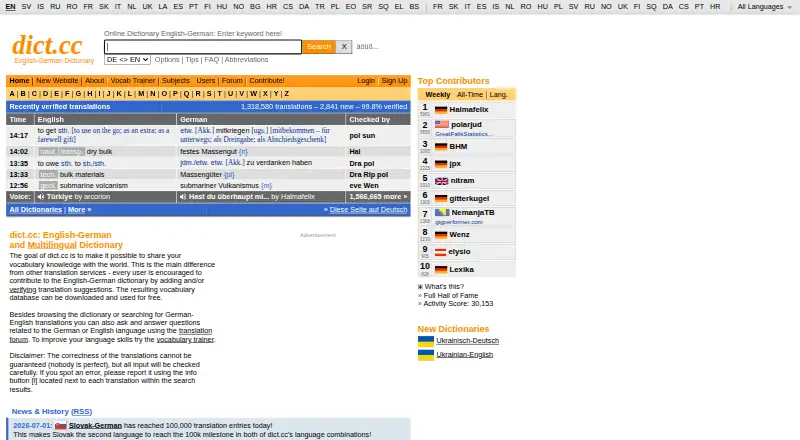
What dict.cc is
dict.cc is an online dictionary for translation lookup across language pairs such as English-German and English-French. Its vocabulary is maintained by volunteer contributors, and users can suggest, correct, or confirm entries without registering to help with corrections. The web dictionary is free for private and business use. The maker says the Android and iPhone or iPad apps include the complete vocabulary for offline use. For desktop users, dict.cc does not provide its own offline software, but offers the vocabulary database as a text file for personal use. The Mac download page lists a third-party dictionary plugin for Mac OS X 10.5 and later, with separate downloads for versions 10.5 and 10.6. The FAQ provides code for adding a search field or iframe translation box to another website. Automated server-side parsing is not allowed, and the FAQ says no API is available or planned. dict.cc uses cookies for settings, vocabulary lists, and login status; registered-user details, postings, and vocabulary trainer lists are stored permanently. The site credits vocabulary from TU Chemnitz and Mr Honey's Business Dictionary.
Good
- Mobile apps provide the complete vocabulary offline.
- Users can correct entries without registering.
- Web use is free for private and business purposes.
- Offers code for embedding search on other websites.
Watch out
- No desktop offline software is provided by dict.cc.
- No API is available or planned.
- Automated server-side parsing is not allowed.
- Registered-user details and trainer lists are stored permanently.
Who it suits
dict.cc suits people looking up translations in supported language pairs and users who want mobile offline vocabulary. It may also interest contributors who want to suggest or correct dictionary entries without registering.
Verdict
dict.cc combines translation lookup with community-maintained entries and offline vocabulary in its mobile apps. Desktop offline software and automated access are limited, so check those constraints if they matter to your use.
Plans and prices
From dict.cc's own pricing page, checked 3 Oct 2026.
| Plan | Price | What it gives you |
|---|---|---|
| dict.cc web dictionary | Free | Free use in a web browser for private and business purposes |
The facts
Each one read from dict.cc's own pages, with the date it was checked.
What it does
- API and automated access
- The FAQ says server-side or automated parsing is not allowed and that no API is available or planned.checked 3 Oct 2026
- Community
- The dictionary is maintained by a community of volunteers, and users can participate in correcting entries even without registering.checked 3 Oct 2026
- Data retention
- The privacy page says registered-user details, postings, and vocabulary trainer lists are stored permanently.checked 3 Oct 2026
- Desktop offline limits
- dict.cc says it does not provide its own offline software for desktop PCs, but offers its vocabulary database as a text file for personal use.checked 3 Oct 2026
- Languages
- The site offers dictionary pages for multiple language pairs, including English-German and English-French.checked 3 Oct 2026
- Mobile offline use
- The maker says its iPhone, iPad, and Android apps provide the complete vocabulary offline.checked 3 Oct 2026
- Privacy
- The privacy page says dict.cc uses cookies for user settings, vocabulary lists, and login status, and stores registered users' encrypted passwords and email addresses.checked 3 Oct 2026
- Product
- dict.cc is an online dictionary and a platform where users can suggest, correct, and confirm translations.checked 3 Oct 2026
- Support
- The FAQ directs users to the maintainer by email for cooperation requests and asks users to read the FAQ before contacting him.checked 3 Oct 2026
- Translation data
- The site credits vocabulary from TU Chemnitz and Mr Honey's Business Dictionary.checked 3 Oct 2026
- Vocabulary data
- The maker says the vocabulary database can be downloaded, and its download page links to a vocabulary database file.checked 3 Oct 2026
- Website integration
- The FAQ provides code for a search field and an iframe-based translation box that can be integrated into other websites for free.checked 3 Oct 2026
The company
- Founded
- The maker says dict.cc was started in late 2002.checked 3 Oct 2026
- Headquarters
- Vienna, Austriachecked 28 Sep 2026
- Maker and location
- The about page identifies the maker as dict.cc GmbH and lists Paul Hemetsberger at an address in Vienna, Austria.checked 3 Oct 2026
Where it runs
- macOS download
- The download page lists a third-party dictionary plugin for Mac OS X 10.5 and later, with separate downloads for 10.5 and 10.6.checked 3 Oct 2026
The full review of dict.cc
dict.cc is a broad, community-maintained translation dictionary for people who need quick lookups across many language pairs. It is especially suitable for mobile users who want the full vocabulary available offline and for contributors willing to improve entries. Its strongest case is practical, context-rich lookup; desktop offline and automated-access restrictions narrow its fit for some workflows.
Overview
Founded in 2002, dict.cc is made by dict.cc GmbH in Vienna, Austria. The service covers 26 languages, with pairs including English-German and English-French, and credits vocabulary from TU Chemnitz and Mr Honey's Business Dictionary.
This is more than a static reference. Users can suggest, correct, and confirm translations, and correction participation does not require registration. That openness can help entries evolve, although readers who require a tightly controlled editorial process may prefer a publisher-led dictionary. For more options, browse our Online Dictionaries directory.
Key features
Translation lookup with context
Translation lookup is the central experience, supplemented by audio pronunciation and usage examples. Those additions make it easier to hear a term and understand how it appears in context instead of relying on an isolated equivalent. The range of language pairs makes dict.cc more useful for multilingual households and learners than a single-pair dictionary.
Community contributions
Anyone can propose or review translations, including users who do not create an account. This participatory model is a practical advantage when uncommon wording needs community attention. Registered users can keep vocabulary-trainer lists, but the privacy policy says those lists, postings, email addresses, and encrypted passwords are stored permanently, which matters to readers who want limited data retention.
Offline and downloadable vocabulary
The maker says its iPhone, iPad, and Android apps include the complete vocabulary offline. That is the clearest reason to choose dict.cc for travel or unreliable connectivity. On desktop PCs, dict.cc does not provide its own offline application; it offers the vocabulary database as a text file for personal use instead. The download page also lists a third-party dictionary plug-in for Mac OS X 10.5 and later, with separate downloads for versions 10.5 and 10.6, so current Mac users should not assume a modern native desktop app.
Website integration
Free code is provided for embedding a search field or an iframe translation box in another website. This suits publishers or internal sites that need a simple lookup component. Server-side or automated parsing is not allowed, and no API is available or planned, ruling dict.cc out for software projects that require programmatic translation queries.
Pricing
The dict.cc web dictionary plan costs free and permits private and business use in a web browser. The pricing model is freemium, with a 7-day trial also stated. There are no paid seat limits or usage quotas given, so the free browser plan is the sensible choice for ordinary lookup and embedded-site use. Readers seeking a formal API, automated access, or maker-supported desktop offline software will not find those capabilities by moving to a higher tier.
Platforms
dict.cc is offered on web, Android, iOS, and macOS. Mobile apps are the strongest platform option because they carry the complete vocabulary offline. Web access is convenient for private or business browser use. macOS support is less straightforward: the listed desktop plug-in is third-party software for Mac OS X 10.5 and later, while desktop users can alternatively work with the downloadable vocabulary text file.
Who it's for
Choose dict.cc if you want broad multilingual translation lookup, pronunciation and examples, and dependable offline access on a phone or tablet. It also fits users who value contributing corrections or maintaining personal vocabulary lists. Look elsewhere if your workflow depends on an official desktop offline application, an API, automated parsing, or limited retention of account and learning data.
Pros and cons
- Pro: 26-language coverage and multiple language pairs support varied translation needs.
- Pro: Audio and usage examples add pronunciation and context to basic lookup.
- Pro: iPhone, iPad, and Android apps provide the complete vocabulary offline.
- Pro: Community suggestions and corrections allow users to improve entries, even without registering.
- Con: There is no maker-provided desktop offline software; desktop users get a text database or a legacy third-party Mac plug-in.
- Con: No API is available, and automated or server-side parsing is prohibited.
- Con: Registered-user details, postings, and vocabulary-trainer lists are stored permanently.
Alternatives
MDBG Chinese Dictionary is the better pick when Chinese-focused dictionary and learning tools, including Android, iOS, desktop, browser, and extension access, are the priority.
ABBYY Lingvo suits readers seeking a freemium dictionary available across mobile and desktop platforms.
Oxford Learner’s Dictionaries is preferable for Oxford learner-dictionary content, text checking, and word lists through free online access.
The Free Dictionary fits users who want a broad free reference site combining dictionaries, thesauri, encyclopedias, and translation content.
WordWeb is an alternative for Windows users seeking definitions, synonyms, examples, basic AI suggestions, and translations under its free-version terms.
Larousse Dictionaries is worth considering for Larousse reference resources, with most online content free and a 99.00 premium subscription.
Linguee is a free Android, iOS, and web option for readers who prefer its translation service.
Duden-Mentor is aimed at German writing support through browser, extension, macOS, and Windows access.
Verdict
dict.cc is a strong choice for multilingual learners, travelers, and contributors who want free lookup with examples, pronunciation, and complete mobile offline vocabulary. Choose it primarily for that combination and its participatory dictionary model. Look elsewhere when official desktop offline software, automated integration, or non-permanent user-data storage is essential.
Alternatives to dict.cc
- 1
MDBG Chinese Dictionary
Free planAndroidiOSWebAPI8.0$15.95 one-time - 2

Oxford Learner’s Dictionaries
Free planAndroidiOSWebAPI8.0From $9.99 a year - 3

The Free Dictionary
Free planAndroidiOSWebAPI8.0$9.99 one-time - 4

Duden-Mentor
Free planWebAPIExtensionmacOS7.7From €2.99 a month - 5
ABBYY Lingvo
Free planAndroidiOSmacOSWindows7.34,018 RUB one-time - 6
WordWeb
Free planAndroidiOSmacOSWindows7.3From $1.50 a month