DesktopShelves
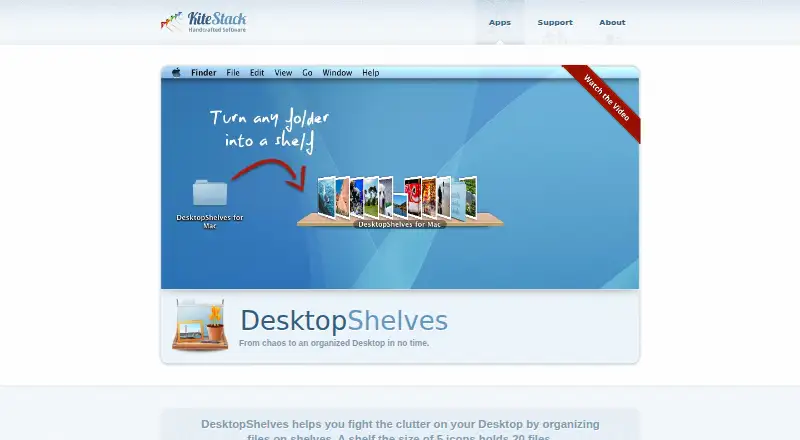
The facts below are what the maker publishes about DesktopShelves, checked and dated. Our editors have not written about it yet.
The facts
Each one read from DesktopShelves's own pages, with the date it was checked.
What it does
- Capacity
- A shelf the size of five icons holds 20 files.checked 9 Oct 2026
- Create files from text
- Dropping a text selection onto a shelf creates a new file.checked 9 Oct 2026
- Design gallery
- The gallery invites users to browse designs and share their own.checked 9 Oct 2026
- Documentation
- The maker provides DesktopShelves tutorials covering shelf basics, drag and drop, text snippets, folder browsing, Finder labels, designs, and sorting.checked 9 Oct 2026
- Drag and drop
- Files can be dropped from the desktop or Finder onto shelves and dragged from shelves into other apps.checked 9 Oct 2026
- File movement limit
- Files dragged onto a shelf must be on the same volume as the shelf folder.checked 9 Oct 2026
- Finder integration
- The Finder context menu can open any folder as a shelf on the desktop.checked 9 Oct 2026
- Founder
- Rico Gundermann founded Kitestack after working as a software engineer at HP.checked 9 Oct 2026
- Hotkey access
- A hotkey provides access to shelves while other apps are running.checked 9 Oct 2026
- Purpose
- DesktopShelves organizes files on shelves on the Mac desktop.checked 9 Oct 2026
- Quick Look
- A single click on a shelf file opens a Quick Look preview.checked 9 Oct 2026
- Security
- The opened maker pages provide no security or compliance details for DesktopShelves.checked 9 Oct 2026
- Shelf access
- Shelves can be accessed with a hotkey while other apps are running.checked 9 Oct 2026
- Shelf designs
- The app includes shelf designs and offers more designs through its gallery.checked 9 Oct 2026
- Support
- DesktopShelves users can report problems through the app's built-in feedback mechanism or contact support by email.checked 9 Oct 2026
- Text capture
- Dropping a text selection onto a shelf creates a new file.checked 9 Oct 2026
- Text formats
- Dropping selected text creates a .txt, .rtf, or .rtfd file depending on the text format.checked 9 Oct 2026
- Text snippets
- Right-clicking and dragging a file away from a shelf pastes its text contents into another app.checked 9 Oct 2026
The company
- Company location
- Kitestack describes itself as a small company based in Luebeck, Germany.checked 9 Oct 2026
- Headquarters
- Luebeck, Germanychecked 28 Sep 2026
- Maker location
- Kitestack describes itself as a small company based in Luebeck, Germany, making Mac applications.checked 9 Oct 2026
Where it runs
- Platform
- The maker describes Kitestack as building software for Mac, and DesktopShelves is presented as a Mac desktop app.checked 9 Oct 2026
Alternatives to DesktopShelves
- 1
BitDock
Free planWindows7.2Free plan - 2
DeskBox
Free planOpen sourceWindows7.0Free plan - 3
iTop Easy Desktop
Free planWindows6.6From $11.99 a year - 4
Tabbles
Free planAPIExtensionWindows6.6From €3 a year - 5

AutoShelf
Free planmacOS6.5$19.99 one-time - 6
Right Click Enhancer
Free planWindows6.5$9.99 one-time