
Designsystemet Theme Builder
Designsystemet Theme Builder is a free web tool for adapting Designsystemet to an organization’s visual identity.
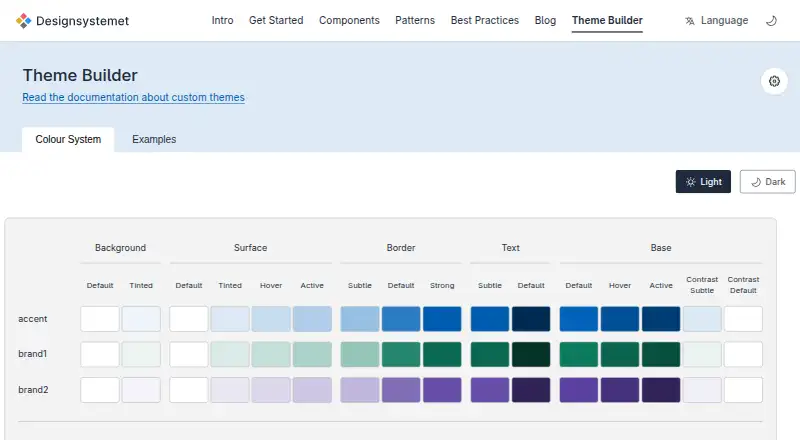
What Designsystemet Theme Builder is
Designsystemet Theme Builder is a free web tool for adapting Designsystemet to an organization’s visual identity. Users configure colors, sizes, typography, border radius, and other properties, then create semantic design tokens for design tools and code. Color controls include overrides for light and dark modes, while token structures can support light, dark, and contrast modes across multiple themes. The color system is described as maintaining sufficient text and background contrast across brand colors. Generated output includes JSON and CSS, and the documented CLI can produce tokens and CSS from a theme configuration. That workflow requires Node.js 20 or higher and a Git repository. Figma users can combine the Community component library with Tokens Studio and import theme variables into the Core UI Kit. Components are available for Figma, CSS, framework-independent web, and React, with accessibility guidance aligned to WCAG.
Good
- Free for public and private organizations
- Generates JSON and CSS outputs
- Supports light, dark, and contrast modes
- Figma and Tokens Studio workflow
- Includes accessibility checks
Watch out
- Token workflow requires Node.js 20+
- Requires a Git repository for tokens
- Shared foundation may not cover every need
- Custom systems require ongoing specialists
Who it suits
It suits public or private organizations building digital services and wanting shared, adaptable tokens. Teams maintaining their own system need a dedicated designer and frontend developer.
Verdict
Theme Builder provides configurable brand tokens, contrast-aware colors, and code-oriented exports for Designsystemet users. Its shared-foundation scope means organizations may still need their own components and maintenance resources.
The facts
Each one read from Designsystemet Theme Builder's own pages, with the date it was checked.
What it does
- Accessibility
- Designsystemet says its components are tested and meet accessibility requirements, with guidance aligned to WCAG.checked 7 Oct 2026
- Code output
- The documented CLI can generate design tokens and CSS from the theme configuration.checked 7 Oct 2026
- Color contrast
- The color system is described as ensuring sufficient text and background contrast across brand colors.checked 7 Oct 2026
- Color controls
- The builder includes color controls and token color overrides for light and dark modes.checked 7 Oct 2026
- Developer requirements
- The documented token-generation workflow requires Node.js version 20 or higher and a Git repository for the tokens.checked 7 Oct 2026
- Development options
- Designsystemet components are available for Figma, CSS, a framework-independent web package, and React.checked 7 Oct 2026
- Figma integration
- The setup guide describes using the Figma Community component library and Tokens Studio to synchronize design tokens between Figma and code.checked 7 Oct 2026
- Figma workflow
- Teams can import variables from their theme into the Designsystemet Core UI Kit in Figma.checked 7 Oct 2026
- Generated output
- After configuring a theme, users copy a code snippet into a terminal to apply their brand colors to components.checked 7 Oct 2026
- Intended users
- Designsystemet is open to anyone building digital services and is free for public and private organizations.checked 7 Oct 2026
- Known scope limit
- Designsystemet is a shared foundation and is not intended to cover every need within a solution.checked 7 Oct 2026
- Maintenance requirement
- Organizations creating their own design system need a dedicated designer and frontend developer to set it up and maintain it.checked 7 Oct 2026
- Modes
- The token structure supports multiple themes and modes, including light, dark, and contrast.checked 7 Oct 2026
- Purpose
- Theme Builder helps organizations customize Designsystemet to match their brand.checked 7 Oct 2026
- Scope
- Designsystemet is a shared foundation and does not cover every need in every solution, so organizations may build their own components and patterns on top.checked 7 Oct 2026
- Support
- Users can ask questions in the community Slack channel or report bugs and suggestions on GitHub.checked 7 Oct 2026
- Support and community
- The maker directs users to its Slack community and invites bug reports and suggestions through GitHub.checked 7 Oct 2026
- Theme configuration
- A theme can define colors, sizes, typography, and other visual properties.checked 7 Oct 2026
- Theme options
- The builder exposes color and dimension controls, including border radius, and offers color-system and example tabs.checked 7 Oct 2026
- Theme setup
- It lets users configure a theme and generate design tokens for use in design tools and code.checked 7 Oct 2026
- Token modes
- The token structure supports multiple themes and modes, including light, dark, and contrast.checked 7 Oct 2026
- Token structure
- The theme builder helps create a semantic token structure that organizations can adapt to their visual profile.checked 7 Oct 2026
The company
- Founded
- 2025checked 28 Sep 2026
- Headquarters
- Norwaychecked 28 Sep 2026
Alternatives to Designsystemet Theme Builder
- 1
Pantone Connect Palette Generator
Free planAndroidiOSWebExtension8.0Free plan - 2
PaletteWB
Free planWindows7.1$14.99 one-time - 3

Colorfool
Free planWeb6.6Free plan - 4
qualpal
Open sourceWebAPILinuxmacOS6.6 - 5

ColorDesigner
Free planWebExtension6.5From $37.20 a year - 6
ColorPalette Pro
Free planWeb6.5Free plan