Designs.ai Videomaker
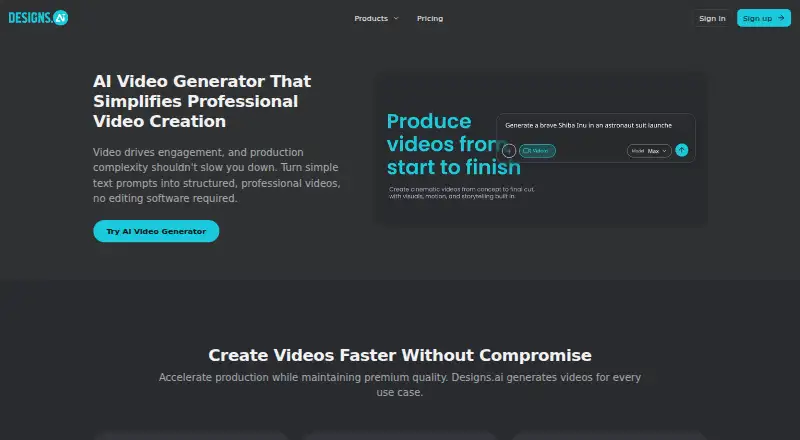
Designs.ai Videomaker turns text prompts or images into structured videos in a browser, without requiring editing experience or installed editing software.
What Designs.ai Videomaker is
Designs.ai Videomaker turns text prompts or images into structured videos in a browser, without requiring editing experience or installed editing software. The tool supports text-to-video and image-to-video, allows commercial use, and lists a maximum video length of 0.5 and maximum resolution of 720p. Named uses include product explainers, marketing ads, campaign launches, training materials, internal communications, and event announcements. Its Brand Kit applies logos, brand colors, and fonts, while one-click brand extraction can use a company URL to identify those elements and visual style. Videomaker belongs to Designs.ai, a broader platform for copy, visuals, video, audio, presentations, and branded content. The service is presented for solo creators, marketing, sales, and HR teams, plus enterprises. Enterprise features include scalable workspaces, shared projects and asset libraries, templates, role-based access, and admin controls; granular controls and auditability are available in enterprise plans. Designs.ai states that users retain intellectual property rights to designs, brand assets, and data. Pricing is available on request.
Good
- Supports text-to-video and image-to-video
- Requires no editing experience
- Includes logo, color, and font controls
- Allows commercial use
- Works in a browser without installation
Watch out
- Maximum resolution is 720p
- Maximum listed video length is 0.5
- Pricing is available only on request
- Web platform only
Who it suits
Videomaker suits solo creators, marketing, sales, HR teams, and enterprises needing browser-based generated videos. It is useful when brand elements must be applied consistently.
Verdict
Designs.ai Videomaker focuses on prompt-driven video creation with built-in brand controls and commercial use. Its browser access and enterprise administration features broaden deployment, while output length and resolution remain limited as listed.
The facts
Each one read from Designs.ai Videomaker's own pages, with the date it was checked.
What it does
- Brand extraction
- Designs.ai says its one-click brand extraction can use a company URL to identify its logo, colors, fonts, and visual style for a Brand Kit.checked 11 Oct 2026
- Brand Kit
- A Brand Kit applies logo placement, brand colors, and fonts to keep videos visually consistent.checked 11 Oct 2026
- Commercial use
- Yeschecked 19 Sep 2026
- Compliance claims
- Designs.ai's About page lists GDPR compliance, and the site displays a SOC-compliant badge.checked 11 Oct 2026
- Editing experience
- The page says users can generate structured videos directly from text prompts without editing experience.checked 11 Oct 2026
- Enterprise controls
- The About page lists role-based access and admin controls, and says granular admin controls and auditability are available in enterprise plans.checked 11 Oct 2026
- Enterprise features
- The About page lists scalable workspaces, shared projects and asset libraries, templates, and role-based access and admin controls for enterprise teams.checked 11 Oct 2026
- Image-to-video
- Yeschecked 19 Sep 2026
- Intended users
- The video tool is presented for solo creators and marketing, sales, and HR teams, as well as enterprises.checked 11 Oct 2026
- Maximum resolution
- 720pchecked 19 Sep 2026
- Maximum video length
- 0.5checked 19 Sep 2026
- No editing experience
- The page says users can generate structured videos directly from text prompts without editing experience.checked 11 Oct 2026
- Privacy
- The privacy policy says account profile data is deleted within 30 days after an account is closed, subject to stated legal and other exceptions.checked 11 Oct 2026
- Security
- The About page states that Designs.ai uses cloud infrastructure with encryption at rest and in transit and provides GDPR compliance.checked 11 Oct 2026
- Support
- The pricing page lists email and chat support for Go and Plus, priority email and chat support for Pro, and 24/7 dedicated support for Enterprise.checked 11 Oct 2026
- Text-to-video
- The video generator turns text prompts into structured videos without requiring editing software.checked 11 Oct 2026
- Use cases
- The product page lists product explainers, marketing ads, campaign launches, training materials, internal communications, and event announcements as use cases.checked 11 Oct 2026
- What it does
- Designs.ai Video turns text prompts into structured professional videos without requiring editing software.checked 11 Oct 2026
Where it runs
- Browser access
- Designs.ai describes its platform as browser-based and says no installation is required to create and manage content across devices.checked 11 Oct 2026
- Unified platform
- Designs.ai describes itself as a unified AI productivity platform for creating copy, visuals, video, audio, presentations, and branded content.checked 11 Oct 2026
The company
- Company attribution
- The site footer identifies Designs.ai as “Designs.ai by Pixlr.”checked 11 Oct 2026
- Data ownership
- Designs.ai states that users retain intellectual property rights to their designs, brand assets, and data.checked 11 Oct 2026
- Maker
- The site identifies Designs.ai as Designs.ai by Pixlr; the privacy policy names Pixlr Pte. Ltd. and gives a Singapore postal address.checked 11 Oct 2026
Alternatives to Designs.ai Videomaker
- 1

PixVerse
Free planAndroidiOSWebAPI9.2From $8 a month - 2

HeyGen
Free planAndroidiOSWebAPI9.1From $24 a month - 3

Kling AI
Free planAndroidiOSWebAPI9.0From $6.99 a month - 4

InVideo AI
Free planAndroidiOSWebAPI9.0From $4 a month - 5

Pollo AI
Free planAndroidiOSWebAPI9.0Free plan - 6
Visla AI Video Agent
Free planAndroidiOSWebAPI8.9Free plan