CUERipper
CUERipper is a free CD audio extraction program included in the CUETools package.
What CUERipper is
CUERipper is a free CD audio extraction program included in the CUETools package. It can save a disc as one image or as separate tracks, with lossy or lossless output. Supported formats include WAV, FLAC, APE, lossyWAV, ALAC, TTA, and WavPack. For disc information and verification, it supports MusicBrainz and freeDB metadata, plus AccurateRip and CTDB. Extraction choices include Burst, Secure, and Paranoid modes; Secure and Paranoid can retry sections when results differ or the drive reports C2 errors. Test & Copy checks tracks before extraction and records Test CRC values in the EAC-style log. Other options include track indexes, M3U playlists, album-art search, and preserving hidden track one audio from the first-track pregap. The download is an archive that can be unpacked without setup, and portable use is available by changing a profile file. Windows requires Microsoft .NET Framework 4.x, and external encoder programs must be downloaded separately. The maker describes CUERipper as having fewer settings than EAC and being somewhat easier to use.
Good
- Free and included in CUETools
- Supports single-image or separate-track output
- Offers Secure and Paranoid retry modes
- Supports AccurateRip and CTDB
- Portable use is available
Watch out
- Windows requires .NET Framework 4.x
- External encoder executables are not included
- FFmpeg plugin requires additional DLL files
Who it suits
It suits people who want to extract CDs with selectable output formats, metadata lookup, and different read-error handling modes. Users needing external encoders should expect to obtain those separately.
Verdict
CUERipper offers several extraction modes and metadata and verification options in a free package. Check its Windows prerequisite and separate encoder requirements before setting it up.
Plans and prices
From CUERipper's own pricing page, checked 3 Oct 2026.
| Plan | Price | What it gives you |
|---|---|---|
| CUERipper | Free | Included in the CUETools package · Windows download |
The facts
Each one read from CUERipper's own pages, with the date it was checked.
What it does
- Album art
- Album art search can be disabled, limited to the selected metadata, or expanded to CDTOC-associated art and fuzzy search.checked 2 Oct 2026
- Cover art
- CUERipper can search for album art, embed it when the output format permits, and choose thumbnail or full-size image searches.checked 3 Oct 2026
- Disc databases
- It supports MusicBrainz and freeDB metadata databases, plus AccurateRip and CTDB.checked 2 Oct 2026
- Ease of use
- The maker says it has fewer configuration options than EAC and is somewhat easier to use.checked 3 Oct 2026
- External encoders
- External encoder executables are not included and must be downloaded separately by the user.checked 2 Oct 2026
- Extraction modes
- It can rip to a single image or to separate track files, with selectable lossless or lossy output.checked 3 Oct 2026
- Extraction output
- Users can choose lossy or lossless output and extract a disc as one image or as separate track files.checked 2 Oct 2026
- Gap and hidden audio
- Options include detecting track indexes and preserving Hidden Track One Audio from the first track pregap.checked 3 Oct 2026
- Included software
- CUERipper is included in the CUETools package.checked 2 Oct 2026
- Known issues
- The maker says known issues are tracked on GitHub and the Hydrogenaudio forum.checked 2 Oct 2026
- Known issues and support
- The maker directs users to GitHub and the Hydrogenaudio forum for known issues and discussion.checked 3 Oct 2026
- Logs and playlists
- Options include EAC-style extraction logs and creation of M3U playlists.checked 2 Oct 2026
- Metadata and verification
- It supports MusicBrainz and freeDB metadata, plus AccurateRip and CTDB.checked 3 Oct 2026
- Metadata search
- Metadata search can use MusicBrainz, Discogs and freeDB, with Fast, Default and Extensive search modes.checked 2 Oct 2026
- Optional codec dependency
- Using the FFmpeg plugin requires additional DLL files to be copied into its x64 or win32 plugin directory.checked 3 Oct 2026
- Paranoid extraction
- Paranoid mode retries sections up to 61 more times when read results differ or the drive reports C2 errors.checked 2 Oct 2026
- Portability
- The download is an archive that can be unpacked without setup, and removing user_profiles_enabled makes settings save in the install folder for portable use.checked 3 Oct 2026
- Portable use
- The download page says CUERipper can run portably from a USB stick by removing the user_profiles_enabled file.checked 2 Oct 2026
- Privacy detail
- CTDB submission logs include contributor IP addresses and CD drive models, which the database page says are used to screen submissions.checked 3 Oct 2026
- Purpose
- CUERipper extracts digital audio from CDs and is described as an open-source alternative to EAC.checked 3 Oct 2026
- Read-error handling
- Burst, Secure, and Paranoid extraction modes use progressively more retries when results differ or the drive reports C2 errors.checked 3 Oct 2026
- Rip checks
- Test & Copy tests all tracks before extraction and adds Test CRC values to the EAC-style log.checked 3 Oct 2026
Where it runs
- Platform and prerequisites
- The download page provides a Windows release and lists Microsoft .NET Framework 4.x as a prerequisite; it also notes that Windows 8, 10 or 11 should include it.checked 2 Oct 2026
- Platform requirement
- The download page lists Microsoft .NET Framework 4.x as a prerequisite and says it should be preinstalled on Windows 8, 10, or 11.checked 3 Oct 2026
The full review of CUERipper
CUERipper is a free CD-ripping tool bundled with CUETools, aimed at listeners who want control over disc extraction and verification. It suits people building a local music library from CDs; its useful retry and output choices come with a Windows .NET prerequisite and separate encoder setup.
Overview
As an open-source alternative to EAC, CUERipper favors a narrower set of configuration choices and a somewhat easier setup. That balance works well for archivists who want secure extraction, metadata lookup and verification without extensive tweaking. Readers who need deeper configuration should consider EAC instead.
It is a disc-ripping application, not a cloud conversion service. You can save a disc as one image or as separate track files, choosing lossy or lossless output. Supported formats include WAV, FLAC, APE, lossyWAV, ALAC, TTA and WavPack, covering a useful range of library preferences. Batch conversion and quality controls are supported, but external encoder executables are not bundled, so some formats require separate downloads.
Key features
MusicBrainz and freeDB provide metadata, while searches can also include Discogs. Fast, Default and Extensive search modes let users trade search breadth for speed. Album-art lookup can be disabled, restricted to the selected metadata, or broadened to CDTOC-associated art and fuzzy search; thumbnail and full-size searches are supported, and art can be embedded when the output format permits.
AccurateRip and CTDB provide verification options. Test & Copy checks tracks before extraction and adds Test CRC values to the EAC-style log, a useful way to keep a record alongside a rip. Burst, Secure and Paranoid modes increase read-error handling progressively: Secure retries affected sections up to 30 more times, and Paranoid up to 61 more times when results differ or the drive reports C2 errors. Those extra attempts favor careful recovery over speed.
Track options include detecting indexes and preserving Hidden Track One Audio from the first track pregap, either separately as track 00 in tracks mode or as part of the chosen extraction workflow. EAC-style logs and M3U playlists round out the library-management options. CTDB submission logs include contributor IP addresses and CD drive models, which the database uses to screen submissions.
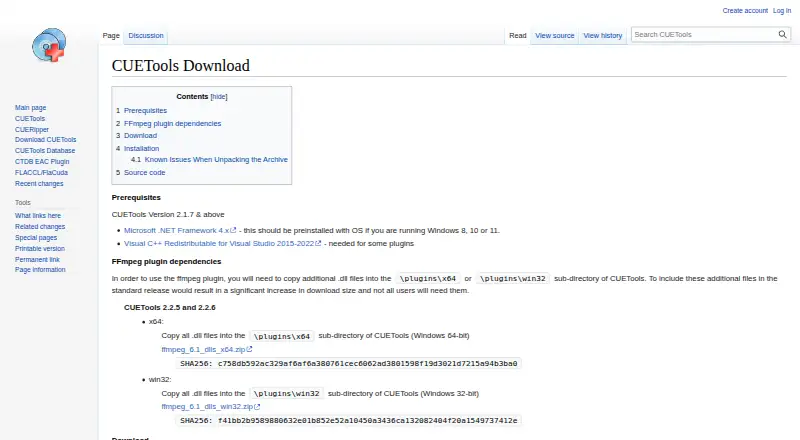
The download is an archive that can be unpacked without installation. Removing the user_profiles_enabled file makes settings save in the install folder, allowing portable use from a USB stick. The Windows release requires Microsoft .NET Framework 4.x, which should already be included with Windows 8, 10 and 11. The optional FFmpeg plugin also needs additional DLL files copied into its x64 or win32 plugin directory.
Pricing
CUERipper is free: the CUERipper plan costs nothing and is included in the CUETools package. There is no paid tier or trial to weigh, making it a straightforward choice for personal disc-ripping workflows. The practical caveat is setup rather than price: external encoders must be sourced separately, and the optional FFmpeg plugin requires extra DLLs.
Platforms
CUERipper supports Linux and Windows, with the download page providing a Windows release and its .NET Framework 4.x prerequisite. Windows 8, 10 and 11 should include that framework. The archive-based distribution and portable settings option are convenient for users who want to run it from removable storage.
Who it's for
Choose CUERipper if you rip CDs into a local library and value format flexibility, verification, retry controls and metadata support more than extensive configuration. Its image-or-track output and hidden-track options also suit users who care about preserving disc structure. Look elsewhere if you need cloud conversion, want a broad set of configuration controls, or prefer a tool that includes external encoders out of the box.
Pros and cons
- Pros: Secure and Paranoid modes offer progressively more retries for discrepant reads or C2 errors, which helps prioritize careful extraction.
- Pros: Image and track output, lossy and lossless formats, and hidden-track handling accommodate different archiving choices.
- Pros: Metadata search, AccurateRip and CTDB support, Test & Copy, logs and playlists give a rip workflow useful checks and records.
- Cons: External encoder executables must be obtained separately, adding setup work for users who need them.
- Cons: Windows users need .NET Framework 4.x, and the optional FFmpeg plugin needs additional DLL files.
- Cons: Its smaller configuration set is a drawback for users who want EAC-level tuning.
Alternatives
For broader audio conversion rather than disc extraction, browse Audio Converter Software. fre:ac is another free, open-source option with no adware for Linux, macOS and Windows. If your priority is free conversion across desktop and mobile platforms, Red Panda Compress Audio Converter offers unlimited use, no watermark or signup, and desktop/mobile file-size limits of 8GB and 2GB respectively. LuminaAudio Audio Converter is another free cross-platform converter, with six conversion paths and no stated limits. For occasional non-commercial use on Android, macOS or Windows, Switch Audio File Converter has a free version with standard features that does not expire.
Free YouTube to MP3 Converter is the more relevant pick for batch YouTube downloads; its free version has no daily download limit and offers most options and formats. MediaHuman Audio Converter is a free audio-conversion alternative for Linux, macOS and Windows. For desktop YouTube-to-MP3 conversion, MediaHuman YouTube to MP3 Converter is free, with TurboBoost as a paid option. Lacuna is an alternative with no further comparison warranted here.
Verdict
CUERipper is a strong free choice for listeners who want to archive CDs with flexible output, metadata and verification without EAC’s larger configuration burden. Its retry modes and Test & Copy are the main reasons to choose it. Look elsewhere if you need extensive tuning, cloud conversion, or encoders ready to use without separate downloads.
Alternatives to CUERipper
- 1
Lacuna
Free planiOSWebAPIExtension8.2From $9.50 a month - 2
Avidemux
Free planOpen sourceWebLinuxmacOSWindows7.3Free plan - 3

MediaCoder
Free planAPISelf-hostedWindows7.3A$189 one-time - 4
MediaHuman YouTube to MP3 Converter
Free planLinuxmacOSWindows7.3$29.99 one-time - 5

FFmpeg
Free planLinuxmacOSSelf-hostedWindows7.0Free plan - 6
Red Panda Compress Audio Converter
Free planAndroidiOSWebLinux6.8Free plan