CrossHook
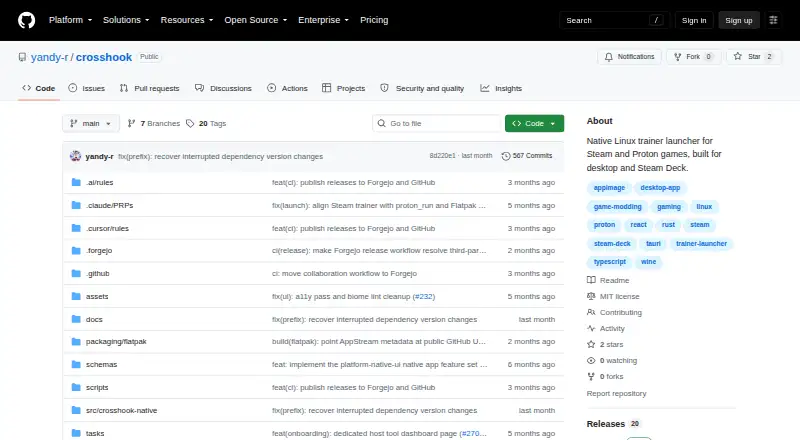
CrossHook is free, open-source Linux software for launching trainers, mods, and patches with Steam and Proton games, including on Steam Deck.
What CrossHook is
CrossHook is free, open-source Linux software for launching trainers, mods, and patches with Steam and Proton games, including on Steam Deck. It supports Steam App Launch, direct Proton Run, and native Linux launches, while discovering Steam libraries, installed games, App IDs, Proton versions, and compatdata paths. Profiles retain game, trainer, and launch settings for reuse. Users can browse, import, export, and sync profiles through Git-based community taps, with commit pinning for reproducible installs. The editor can show ProtonDB compatibility tiers and community suggestions for games with Steam App IDs. CrossHook previews commands, offers curated Proton optimizations, and installs Windows games through Proton Run with profile review before saving. Diagnostics can be exported, and trainer scripts use owner-only 0700 permissions. Public releases are Flatpak bundles for x86_64 Linux. Native launch cannot run the two-step trainer workflow because those trainers require Proton.
Good
- Free and MIT-licensed open source
- Steam and Proton discovery
- Reusable game and trainer profiles
- Steam Deck controller and touchscreen support
- Command previews and diagnostic exports
Watch out
- Linux-only platform
- Flatpak is the supported package format
- Native launch lacks two-step trainer workflow
- No automatic updates
Who it suits
CrossHook suits Linux and Steam Deck players managing trainers, mods, and patches for Steam or Proton games. It is for users comfortable with Flatpak and community profiles.
Verdict
CrossHook offers a focused Linux launcher with profile sharing, Steam discovery, and Steam Deck controls. Its native-launch limitation and Linux-only distribution matter for trainer workflows and platform choice.
The facts
Each one read from CrossHook's own pages, with the date it was checked.
What it does
- Community integrations
- Users can browse, import, export, and sync shared profiles from Git repository taps.checked 4 Oct 2026
- Community sharing
- Users can browse, import, and export profiles through Git-based community taps, with commit pinning for reproducible installs.checked 9 Oct 2026
- Diagnostics
- It includes a profile health dashboard, post-launch failure diagnostics, a console log viewer, and diagnostic bundle export.checked 9 Oct 2026
- Distribution
- The supported packaged distribution is a Flatpak bundle, and releases provide bundles for x86_64 Linux.checked 9 Oct 2026
- Launch controls
- CrossHook can preview the commands it will execute and offers curated Proton launch optimizations with vendor-specific options.checked 9 Oct 2026
- Launch modes
- It supports Steam App Launch, Proton Run, and native Linux process launch modes.checked 9 Oct 2026
- License
- CrossHook is open-source software under the MIT License.checked 9 Oct 2026
- Limit
- The native launch mode does not support the two-step trainer workflow because trainers are Windows executables that need Proton.checked 4 Oct 2026
- Profiles
- Users can save and load per-game launch profiles, duplicate or rename them, and pin favorites.checked 9 Oct 2026
- ProtonDB
- The profile editor can show ProtonDB compatibility tiers and advisory community suggestions for games with a Steam App ID.checked 4 Oct 2026
- Purpose
- CrossHook is a native Linux launcher for trainers, mods, and patches for Steam and Proton games, including on Steam Deck.checked 9 Oct 2026
- Release status
- The releases page lists v0.6.0, dated 2026-07-02, as the latest release.checked 9 Oct 2026
- Security
- Exported trainer scripts are written with owner-only 0700 permissions because they may contain sensitive environment variable values.checked 4 Oct 2026
- Support and contributions
- The README directs bug reports and feature requests to Forgejo issue templates and welcomes contributions on Forgejo.checked 9 Oct 2026
- What it does
- CrossHook is a native Linux launcher for trainers, mods, and patches used with Steam and Proton games.checked 4 Oct 2026
Where it runs
- macOS status
- The README says macOS support is planned for a future release.checked 9 Oct 2026
- Windows game installation
- An Install Game flow installs Windows games through proton run and lets users review the generated profile before saving it.checked 9 Oct 2026
The company
- Steam Deck
- CrossHook supports Steam Deck, including controller and touchscreen navigation in Gaming Mode.checked 4 Oct 2026
- Steam Deck controls
- Its adaptive Deck layout supports gamepad navigation and touchscreen use in Steam Deck Gaming Mode.checked 9 Oct 2026
- Steam discovery
- It automatically discovers installed Steam games, App IDs, Proton versions, and compatdata paths.checked 9 Oct 2026
Alternatives to CrossHook
- 1
Cheat Happens
Free planAndroidiOSWebLinux8.0From $39.95 a year - 2

WeMod
Free planAndroidWindows7.4From $59.99 a year - 3

PLITCH
Free planAndroidiOSWindows7.2From zł199.92 a year - 4
Rival Gaming
Free planWebmacOSWindows7.0Free plan - 5
ArtMoney
Free planWindows6.5$24.90 one-time - 6
AurorAI
Free planAndroidiOSWindows6.4Free plan