
Corrector.app
Corrector.app checks text for spelling, grammar, and punctuation errors, then suggests corrections.
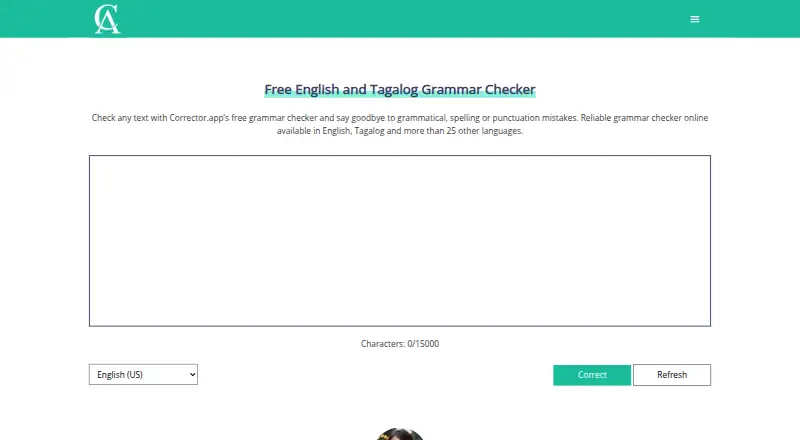
What Corrector.app is
Corrector.app checks text for spelling, grammar, and punctuation errors, then suggests corrections. It can also offer alternative words that may better suit a sentence and its intended message. The maker says the checker supports more than 27 languages, and the site includes a free AI content detector for identifying AI-generated text. The checker displays a 15,000-character input limit and does not require account registration. It can be used on the web or through a mobile browser, and the download page links to Chrome, Firefox, and Edge extensions as well as iOS and Android apps. The listed platforms are Android, extension, iOS, and web, although the maker states there is no mobile app. The free plan includes grammar and spelling checks. The privacy policy says the service collects usage data, uses cookies and similar tracking technologies, and cannot guarantee absolute security of electronically transmitted or stored data. The maker says support emails are read and answered within 24 hours.
Good
- Checks spelling, grammar, and punctuation.
- Supports more than 27 languages, according to the maker.
- No account registration is required.
- Includes a free AI content detector.
Watch out
- Checker input is limited to 15,000 characters.
- The maker says there is no mobile app.
- Absolute data security is not guaranteed.
Who it suits
Corrector.app suits students and professionals who want free writing checks without registering an account. Browser users can also access it through extensions or a mobile browser.
Verdict
Corrector.app offers free text checks and word suggestions without an account requirement. Keep its input limit and stated privacy caveat in mind when deciding whether it fits your writing needs.
Plans and prices
From Corrector.app's own pricing page, checked 21 Oct 2026.
| Plan | Price | What it gives you |
|---|---|---|
| Free | Free | No registration · instant checks · ads displayed · Free access; advertising funds operation |
The facts
Each one read from Corrector.app's own pages, with the date it was checked.
What it does
- Account requirement
- The maker says the grammar checker does not require users to register an account.checked 11 Oct 2026
- Advertising model
- Corrector.app says Google AdSense and Ezoic advertising revenue pays for servers, development, localization, SEO and support.checked 21 Oct 2026
- AI content tool
- The site also offers a free AI content detector for identifying AI-generated text.checked 11 Oct 2026
- AI detector
- A separate free tool estimates the share of text generated by systems including ChatGPT and GPT-4.checked 21 Oct 2026
- AI detector languages
- The AI detector says it can analyze many languages, including Chinese, Hindi, Spanish, French, Arabic, Portuguese, Russian, German, Japanese and Indonesian.checked 21 Oct 2026
- AI detector method
- The AI detector describes using natural-language processing, syntax and semantic analysis, machine learning and GPT-related classifiers.checked 21 Oct 2026
- Character limit
- GetApp reports that the input field accepts up to 15,000 characters per session.checked 21 Oct 2026
- Chrome integration
- The Chrome extension sends selected text to Corrector.app's editor, where users choose a language and run correction.checked 21 Oct 2026
- Data collected
- The privacy policy says usage data may include IP address, browser details, visited pages, timestamps, device identifiers and mobile operating-system information.checked 21 Oct 2026
- Developer support
- The maker publishes [email protected] for developer enquiries and states that support emails are answered within 24 hours.checked 21 Oct 2026
- English variants
- Its checker includes regional English variants such as US, UK, Australian, Canadian, Indian, Pakistani, Philippine, Nigerian, Singaporean, South African, New Zealand and Irish English.checked 21 Oct 2026
- Firefox licence
- Mozilla lists the extension licence as All Rights Reserved.checked 21 Oct 2026
- Firefox permissions
- The Firefox add-on requires access to browser tabs and data on all websites.checked 21 Oct 2026
- Funding
- The maker says advertising from Google AdSense and Ezoic helps fund site costs, development, localization, SEO and technical support.checked 11 Oct 2026
- Grammar feature
- The grammar analysis examines tense, word order, agreement and sentence structure.checked 21 Oct 2026
- Integrations
- The download page lists browser extensions and mobile apps; it does not list other product integrations.checked 11 Oct 2026
- Languages
- The service supports English, Tagalog and more than 25 additional languages.checked 21 Oct 2026
- Launch chronology
- Planning began in June 2021, beta launched in December 2021 and the English site launched in March 2022.checked 21 Oct 2026
Where it runs
- Browser extensions
- The download page links extensions for Chrome, Firefox and Edge.checked 21 Oct 2026
- GetApp customer profile
- GetApp lists freelancers, small businesses, midsize businesses and enterprises among typical customers, with proofreading as the primary use case.checked 21 Oct 2026
- GetApp feature feedback
- GetApp users rate problem-area alerts 4.0/5 from 19 ratings and text review 4.4/5 from 21 ratings.checked 21 Oct 2026
The company
- Company headquarters
- The maker's site gives 23 New Drum Street, London, England, E1 7AY as its address.checked 21 Oct 2026
- Company registration
- UK Companies House lists Grammar Buddies LTD as incorporated on 15 February 2022 and dissolved on 25 July 2023.checked 21 Oct 2026
Money
- Free plan
- Yeschecked 20 Sep 2026
The full review of Corrector.app
Corrector.app is a free writing checker for spelling, grammar and punctuation, with wording suggestions and a separate AI-generated-content detector. It is a sensible fit for students and professionals checking ordinary passages without opening an account. The 15,000-character ceiling and privacy limitations make it less suitable for long or confidential documents.
Overview
Corrector.app combines conventional proofreading with suggestions for alternative words that may better match a sentence and its intended message. Support for more than 27 languages gives it broader reach than a single-language checker, while the separate free AI content detector adds a useful screening task for writers and educators. No registration is required for the grammar checker, so a quick check does not require creating or maintaining a profile.
Grammar Buddies LTD operates the service from 23 New Drum Street, London, England, E1 7AY. The company says Google AdSense and Ezoic advertising fund site operations, development, localization, search optimization and technical support. Its privacy policy says it collects usage data and uses cookies and similar tracking technologies, and does not guarantee absolute security for data transmitted or stored electronically. That is a meaningful drawback when the text contains confidential, personal or commercially sensitive material.
Key features
Proofreading and phrasing help
The checker identifies spelling, grammar and punctuation errors and proposes corrections. Alternative-word suggestions can improve diction after the mechanical errors are fixed, making the service more useful for revision than a spelling-only tool. Results are constrained by the displayed 15,000-character input limit; longer essays, reports or manuscripts must be divided into multiple checks.
Language coverage and AI detection
The maker says more than 27 languages are supported, which suits multilingual students and professionals who work across languages. A free AI content detector is offered alongside the checker, so users can screen text for signs of AI generation without paying for a separate service. The checker itself does not require an account.
Browser access and support
Chrome, Firefox and Edge extensions are linked from the download page. iOS and Android apps are also linked, and the checker can be used in a mobile browser. The download page does not identify other product integrations. Support contacts include general and developer email addresses, with a stated response time of within 24 hours.
Pricing
| Plan | Price | What you get |
|---|---|---|
| Free | free | Free grammar and spelling checks, no account registration, and a displayed 15,000-character input limit |
There is no paid tier or free trial. The free plan is therefore the only choice, and its lack of registration is convenient for occasional checks. Users who need larger single submissions, stronger confidentiality assurances or paid workflow controls will need a different service.
Platforms
Corrector.app is offered on the web, Android and iOS, with browser extensions for Chrome, Firefox and Edge. Although mobile apps are linked, the checker also works through a mobile browser. No desktop-native application or additional integration is identified.
Who it's for
Students and professionals are the stated audience, particularly those who want quick multilingual proofreading, wording alternatives and occasional AI-text screening at no cost. It works best for short or segmented passages and users comfortable with an advertising-funded service. It is a poor match for lengthy drafts that should be processed in one piece or for sensitive writing where the privacy policy's security caveat is unacceptable.
Pros and cons
- Pros: spelling, grammar and punctuation checks are combined with alternative-word suggestions, so revision goes beyond error removal.
- Pros: support for more than 27 languages broadens its usefulness for multilingual work.
- Pros: the checker requires no account, and browser extensions plus mobile apps cover common access points.
- Pros: a free AI content detector adds a second practical use.
- Cons: the 15,000-character limit forces users to split longer documents.
- Cons: usage tracking, cookies and the absence of an absolute security guarantee argue against submitting confidential text.
- Cons: advertising supports the service, and no other integrations are identified.
Alternatives
For a wider comparison of proofreading tools, see Grammar checkers. If AI-text screening is the priority, browse AI Content Detection Software.
- TrustOriginality.ai is a freemium web, Android, iOS and API option with one free text analysis per month and paid multimodal verification, better suited when verification quotas and API access matter.
- Trinka is a freemium checker spanning web, extensions, Windows, macOS, API and self-hosting, worth considering when broader deployment options are important.
- Ahrefs is a freemium web/API SEO platform, so choose it for site data and audits rather than general proofreading.
- SlopTotal is a free detector with no account, credit card or scan limits, making it preferable when unrestricted AI-text scanning is the main need.
- AI Detect is a free local-use detector with no API key or usage limits.
- GPTZero offers freemium AI detection with a 10,000-word monthly free allowance and browser/API access, useful when a defined monthly quota is acceptable.
- AI or Not combines free AI-text and image checks with API access, fitting users who also need image analysis.
- Hive AI-Generated Content Detection provides developer access to multiple Hive models through credits and pay-as-you-go limits.
Verdict
Choose Corrector.app for free, accountless proofreading of short passages, especially when multilingual checks and wording alternatives are useful. Look elsewhere if you routinely handle long drafts, require stronger privacy assurances or need integrations beyond browser extensions and mobile apps.
Alternatives to Corrector.app
- 1

AI Detector Pro
Free planAndroidWebAPImacOS8.1Free plan - 2

Humbot
Free planAndroidiOSWebAPI8.1From $7.99 a month - 3

TrustOriginality.ai
Free planAndroidiOSWebAPI8.0From €4.99 a month - 4

Ahrefs
Free planWebAPI7.6From $29 a month - 5

AI or Not
Free planiOSWebAPIExtension7.6From $5 a month - 6

Originality.ai
Free planWebAPIExtension7.6From $12.95 a month