
Colorfor.ai
Colorfor.ai is a free color workspace for creating palettes, building interface themes, checking contrast, previewing designs, and exporting color tokens.
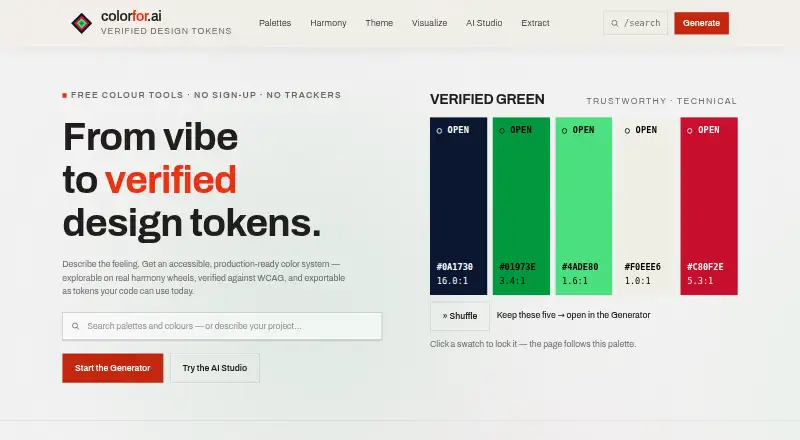
What Colorfor.ai is
Colorfor.ai is a free color workspace for creating palettes, building interface themes, checking contrast, previewing designs, and exporting color tokens. Its AI Studio turns a written brief into Safe, Expressive, and Distinctive directions, while a deterministic engine computes and verifies colors. The theme builder uses up to three brand colors to generate 40 semantic UI roles, with light and dark modes. Contrast & Vision checks WCAG 2.2 ratios and offers seven color-vision simulations. Exports include CSS variables, Tailwind, shadcn, SCSS, design tokens, SVG, PNG, and JSON. The service also provides a keyless REST API, an MCP server for AI agents, and embeddable SVG palette badges. Palettes and settings stay in browser local storage, and uploaded images are processed on-device. AI Studio sends brief text to its provider through OpenRouter only after explicit opt-in; palettes and images are not sent. The public API has a limit of 120 requests per minute per IP. The free plan covers tools, API, MCP server, widgets, and exports, subject to fair-use limits.
Good
- Free access to tools, API, MCP server, widgets, and exports
- Builds 40 semantic UI roles from up to three brand colors
- Checks WCAG 2.2 ratios and seven color-vision simulations
- Uploaded images are processed on-device
Watch out
- Public API limited to 120 requests per minute per IP
- Fair-use limits apply
- AI brief text is sent to a provider after opt-in
Who it suits
Colorfor.ai suits designers and developers creating interface palettes or themes, checking contrast, and exporting color values into their workflows. Its API, MCP server, and widgets are also available for personal and commercial use without an account or watermarks.
Verdict
Colorfor.ai covers palette creation, interface themes, accessibility checks, and exports in a free workspace. Note the API rate limit and that using AI Studio involves sending brief text to its provider after opting in.
Plans and prices
From Colorfor.ai's own pricing page, checked 29 Sep 2026.
| Plan | Price | What it gives you |
|---|---|---|
| Free | Free | All tools, API, MCP server, widgets and exports · fair-use limits apply |
The facts
Each one read from Colorfor.ai's own pages, with the date it was checked.
What it does
- Accessibility
- Contrast & Vision checks WCAG 2.2 ratios and includes seven color-vision simulations.checked 29 Sep 2026
- AI data handling
- AI Studio sends brief text to its provider via OpenRouter only after explicit opt-in; palettes and images are not sent.checked 29 Sep 2026
- AI palette generation
- AI Studio interprets a written brief into Safe, Expressive and Distinctive directions while the deterministic engine computes and verifies the colors.checked 29 Sep 2026
- API limit
- The public API is limited to 120 requests per minute per IP.checked 29 Sep 2026
- Audience
- The tools, API, MCP server, widgets and exports are free for personal and commercial use, with no account or watermarks.checked 29 Sep 2026
- Exports
- Exports include CSS variables, Tailwind, shadcn, SCSS, design tokens, SVG, PNG and JSON.checked 29 Sep 2026
- Integrations
- The service offers a keyless REST API, an MCP server for AI agents and embeddable SVG palette badges.checked 29 Sep 2026
- Privacy
- Palettes and settings are stored in browser local storage, while uploaded images are processed on-device and not sent to a server.checked 29 Sep 2026
- Product
- Colorfor.ai is a free color workspace for generating palettes, building UI themes, checking contrast, previewing designs and exporting color tokens.checked 29 Sep 2026
- Site Recolour data
- Site Recolour sends the submitted public page address to the service for rendering, and its screenshots are cached for about 24 hours.checked 29 Sep 2026
- Support
- The About page lists [email protected] as the contact for any matter, including copyright.checked 29 Sep 2026
- Theme builder
- The theme builder generates 40 semantic UI color roles from up to three brand colors and supports light and dark modes.checked 29 Sep 2026
The full review of Colorfor.ai
Colorfor.ai is a free web workspace and API for creating palettes, building interface themes, checking accessibility, and exporting color assets. It suits designers and developers who need those jobs in one place, especially when they want reusable UI roles or programmatic access. Its main trade-off is a public API capped at 120 requests per minute per IP, while AI Studio requires an explicit opt-in to send brief text to its provider.
Overview
Colorfor.ai brings palette generation, theme construction, contrast and color-vision checks, previews, and exports into a single workspace. The combination is useful when a project needs more than a set of attractive swatches: semantic UI colors, accessibility checks, and files ready for design or code workflows are part of the same toolkit. The public API, MCP server, and SVG badges extend that utility beyond the web interface.
Privacy boundaries differ by tool. Palettes and settings stay in browser local storage, and uploaded images are processed on-device rather than sent to a server. AI Studio sends brief text to its provider through OpenRouter only after opt-in; palettes and images are not sent. Site Recolour sends the submitted public page address for rendering, and its screenshots are cached for about 24 hours.
Key features
Palette and theme creation
AI Studio turns a written brief into Safe, Expressive, and Distinctive directions, while a deterministic engine calculates and verifies the colors. That pairing gives users several creative directions without making the color computation itself dependent on the AI. Those who do not want to opt in to sending brief text can skip AI Studio.
The theme builder turns up to three brand colors into 40 semantic UI roles and supports light and dark modes. This is more useful for interface work than a palette alone: it provides a broader set of roles to carry a brand through a product theme. Image color extraction and eight harmony modes add other ways to develop a palette.
Accessibility and output
Contrast & Vision checks WCAG 2.2 ratios and includes seven color-vision simulations. That makes accessibility review a built-in step rather than a separate handoff, though it does not replace the broader judgment required when choosing interface colors.
Exports cover CSS variables, Tailwind, shadcn, SCSS, design tokens, SVG, PNG, and JSON. This range suits both implementation and design handoffs, and the keyless REST API, MCP server for AI agents, and embeddable SVG palette badges provide additional ways to use the workspace. The public API limit of 120 requests per minute per IP matters for high-volume integrations.
Pricing
Free — free. All tools, API, MCP server, widgets, and exports are included for personal and commercial use, with no account or watermarks. Fair-use limits apply. This is an unusually complete free workspace for individual creators and teams that can work within those limits; there is no paid tier or free-trial decision to weigh. The API's stated per-IP rate limit is the clearest constraint for automated use.
Platforms
Colorfor.ai is available on the web and through an API. Browser-local storage keeps palettes and settings in the browser; uploaded images are processed on-device. The API, MCP server, and embeddable SVG badges also suit workflows that need to carry palettes into other tools or agent-based setups.
Who it's for
Choose Colorfor.ai if you want a no-account, no-cost toolkit spanning palette work, UI themes, accessibility checks, and production-oriented exports. It is particularly suited to designers and developers building branded interfaces, and to users who can benefit from its API or MCP server. Look elsewhere if your integration needs exceed 120 API requests per minute per IP, or if you need a palette tool that does not offer an AI workflow involving brief text sent to a provider after opt-in.
Pros and cons
- Pros: A single free workspace covers palette creation, 40-role light and dark themes, WCAG 2.2 checks, and a broad set of exports, so interface color work can move from exploration toward implementation without switching tools.
- Pros: Personal and commercial use, API, MCP server, widgets, and exports are free without an account or watermarks, lowering barriers for solo projects and commercial work.
- Pros: Browser-local palette storage and on-device image processing keep those inputs out of the service; AI Studio separately requires opt-in before sending brief text.
- Cons: The public API's 120-requests-per-minute-per-IP cap may constrain high-volume integrations.
- Cons: AI Studio sends brief text to its provider after opt-in, so users who prefer not to share a brief should avoid that feature.
- Cons: Site Recolour sends a submitted public page address for rendering, and screenshots remain cached for about 24 hours.
Alternatives
For a broader shortlist, see AI Color Palette Generators.
- ColorUI Prompt Palette Studio is worth considering if you want a free option with no LLM or API keys, or need Android, iOS, extension, or self-hosted platforms.
- Color Palette Generator AI may fit better if unlimited generations and shareable links matter more than Colorfor.ai's broader theme and accessibility toolkit.
- AIColors is a web alternative with unlimited palette generation and no account required.
- KColor is a free web and extension alternative from a solo developer.
- Pantone Connect Palette Generator is a freemium alternative whose Basic plan requires an account and provides access to 15,000+ colors plus Search, Pick, and Measure tools.
- ColorBrew is a free web and extension option; everything it offers today is free.
- Coolors is a freemium web and iOS alternative; its Pro plan is $3 a month and removes ads.
- DuckColor is a free web palette generator with no login, though usage limits such as rate limits or daily quotas may apply.
Verdict
Colorfor.ai is a strong choice for designers and developers who want a free, no-account workspace that takes color from palette exploration into accessible, exportable interface themes. Its breadth and commercial-use terms are the main reasons to choose it. Look elsewhere if your API workload needs a higher rate limit or you do not want to use an AI feature that sends brief text to a provider after opt-in.
Alternatives to Colorfor.ai
- 1

Pantone Connect Palette Generator
Free planAndroidiOSWebExtension8.0Free plan - 2

ColorUI Prompt Palette Studio
Free planOpen sourceAndroidiOSWebAPI7.7Free plan - 3
Perception
Free planWeb7.2From $14 a month - 4

Color Utility
Free planWeb6.6Free plan - 5
Chromos
Free planWeb6.4From $20 a month - 66.2From $19 a month