
codoc
codoc lets publishers and creators add paid content and subscriptions to websites through an embedded tag or WordPress plugin.
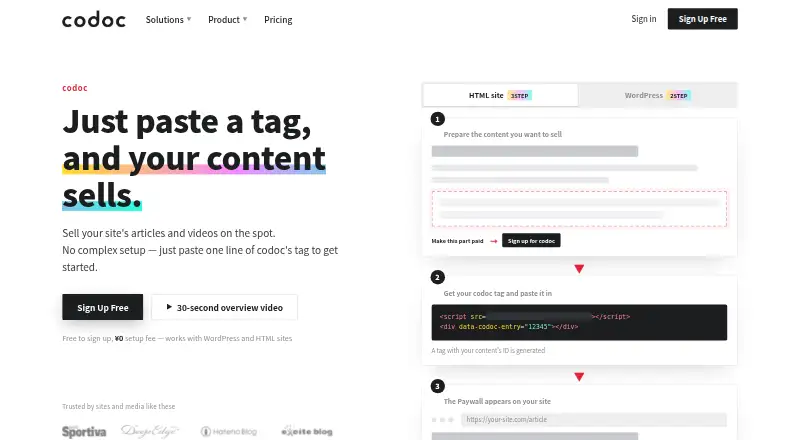
What codoc is
codoc lets publishers and creators add paid content and subscriptions to websites through an embedded tag or WordPress plugin. It supports individual sales of articles, videos, and audio, as well as one-time purchases, monthly or annual subscriptions, and tips. Creators can offer a subscription trial to buyers; billing begins automatically afterward unless the buyer cancels during the trial. Payments can be made by credit or debit card, prepaid credit card, Apple Pay, Google Pay, or convenience store payment. codoc works with WordPress and HTML sites, and also supports Hatena Blog and custom HTML or CMS sites. Paid content is delivered by codoc and appears through JavaScript after payment or login authentication. Card details are sent directly to Stripe or CREDIX, not stored on codoc's servers. The free plan is free, with a 15% sales fee and a 300円 transfer fee per payout. codoc pro costs ¥9,800 a month and adds REST API access, buyer email access, interface design changes, and private accounts. API access for managing articles and subscription plans requires pro.
Good
- Sells articles, videos, and audio individually.
- Supports one-time sales, subscriptions, and tips.
- Works with WordPress, Hatena Blog, and custom sites.
- Offers multiple payment methods, including Apple Pay.
- Paid content appears after payment or authentication.
Watch out
- Free plan charges a 15% sales fee.
- Each payout has a 300円 transfer fee.
- API management requires a pro contract.
- Standard accounts limit item and subscription prices to 50,000円.
Who it suits
codoc suits publishers, bloggers, and web service operators who want to take direct payments for content. It can fit sites using WordPress, Hatena Blog, or custom HTML or CMS.
Verdict
codoc provides several ways to sell content directly through a website, with a free plan and paid pro option. Review the sales fee, transfer fee, and standard account limits when choosing how to use it.
Plans and prices
From codoc's own pricing page, checked 14 Oct 2026.
| Plan | Price | What it gives you |
|---|---|---|
| codoc | Free | Individual and subscription sales · tips · standard limits · No setup, monthly, annual or registration fee; 15% of sales |
| codoc pro trial | Free | All pro features during trial · 14-day free trial |
| codoc pro | ¥9,800 a month | API · purchaser emails · private accounts · test environment · higher limits · dedicated support · ¥9,800/month; 15% sales fee |
| enterprise | Priced on request | Negotiated sales-fee reduction and enterprise features · Contact codoc |
The facts
Each one read from codoc's own pages, with the date it was checked.
What it does
- Affiliate feature
- Creators can issue referral links and set the commission rate paid when referred content sells.checked 14 Oct 2026
- API
- Account linking and API integration can embed content sales into another web service; API access requires codoc pro.checked 14 Oct 2026
- API documentation
- codoc says API documentation is provided after signup or a codoc pro contract.checked 14 Oct 2026
- API limitation
- REST API access for managing article and subscription plan information requires a codoc pro contract.checked 7 Oct 2026
- Cloud hosting
- codoc states that its server architecture uses AWS and is designed to scale out.checked 14 Oct 2026
- Content protection
- The pro page says paid content is stored and delivered by codoc and is shown through JavaScript only after payment or login authentication.checked 7 Oct 2026
- Creator eligibility
- The WordPress listing says creators must live in Japan, the United States or the European Union and hold a bank account in the relevant country.checked 14 Oct 2026
- Documentation and support
- The site provides creator and purchaser FAQs; codoc pro adds a dedicated email support channel and setup assistance.checked 14 Oct 2026
- External content
- HTML pages or selected areas can be protected by codoc authentication, including full-page coverage and redirects.checked 14 Oct 2026
- Independent business description
- Compalyze describes codoc as a content-sales and billing platform for publishers, web media, blog services, UGC platforms and individual creators.checked 14 Oct 2026
- Individual sales
- Creators can price and sell individual articles, videos or audio items.checked 14 Oct 2026
- Infrastructure
- The codoc pro page says its server infrastructure uses AWS and is designed to scale out.checked 7 Oct 2026
- Integrations
- Official integrations include WordPress plus examples involving Hatena Blog, Excite Blog and Kotobank.checked 14 Oct 2026
- Intended users
- The maker presents codoc for publishers, bloggers, and web service operators who want to monetize content through direct reader payments.checked 7 Oct 2026
- Limited-quantity sales
- Creators can cap the number of sales for an offering.checked 14 Oct 2026
- Limit: paywall styling
- The FAQ says direct paywall display-format customization is not supported, although themes and CSS options are described elsewhere.checked 14 Oct 2026
- Limit: refund policy
- The creator FAQ says refunds are not supported.checked 14 Oct 2026
The company
- Company headquarters
- The operator lists 7A R-Gotanda, 8-2-12 Nishigotanda, Shinagawa-ku, Tokyo 141-0031, Japan.checked 14 Oct 2026
- Company legal name
- The operator is codoc株式会社 (codoc Inc.), represented by CEO Naoto Ishikawa.checked 14 Oct 2026
- Company size indicator
- Compalyze reports one social-insurance-covered employee in September 2026 and ¥5 million capital.checked 14 Oct 2026
- Founded
- Compalyze lists codoc株式会社 as established in April 2019.checked 14 Oct 2026
- Headquarters
- Shinagawa, Tokyo, Japanchecked 28 Sep 2026
Money
- Free trials
- Creators can configure a free trial for paid subscription plans.checked 14 Oct 2026
- Free trials for buyers
- Creators can configure a free trial for a paid subscription, after which billing starts automatically unless the subscriber cancels during the trial.checked 7 Oct 2026
The full review of codoc
Overview
codoc adds reader payments to an existing website, giving publishers and creators a way to sell individual content, subscriptions, and tips. It suits operators who want to monetize a site they already run; its free entry point is useful, but a 15% sales fee applies on both plans.
Content can be offered through an embedded tag on WordPress or HTML sites, with a WordPress plugin also available. Hatena Blog and custom HTML or CMS sites are supported. This keeps codoc relevant to publishers who want to retain their current publishing setup, rather than move sales to a separate storefront.
Key features
Creators can sell articles, videos, and audio as one-time purchases, offer monthly or annual subscriptions, and accept tips. Subscription trials are configurable for buyers, but billing starts automatically when the trial ends unless the subscriber cancels. That can help encourage sign-ups, provided the transition to paid billing is made clear to readers.
Payment options include credit and debit cards, prepaid credit cards, Apple Pay, Google Pay, and convenience store payment. Card details go directly to Stripe or CREDIX and are not stored on codoc’s servers. Paid content is stored and delivered by codoc, then shown through JavaScript after payment or login authentication.
REST API access for managing articles and subscription plans requires codoc pro, as does access to buyer email addresses, buyer UI design changes, and private accounts. Pro infrastructure uses AWS and is designed to scale out; Pro also includes a dedicated email support desk. Paid WordPress setup and design customization services are offered, but they add to the cost.
Pricing
The free codoc plan costs nothing. It includes general sales functions, but content gifts and buyer messages have quantity limits. Sales carry a 15% fee, and each payout has a 300円 transfer fee. This is a low-cost way to start selling, but the percentage fee and payout charge matter when estimating what creators will keep.
codoc pro costs ¥9,800 a month (billed 9,800円/月). It adds API use, buyer email access, buyer UI design changes, and private accounts; the sales fee remains 15%. Pro is aimed at publishers that need these controls or deeper CMS integration, not simply those seeking a lower transaction rate. Its standard account limits include a 50,000円 maximum price for an individual item or subscription, a 10,000円 tip cap, and a limit of 100 messages per send.
codoc is freemium and offers a 14-day trial. The free plan gives up the Pro tools, while neither plan removes the 15% sales fee. Publishers should weigh the monthly Pro charge against the value of its additional integration and account features.
Platforms
codoc is available on web, as an API, and as an extension. It supports WordPress, Hatena Blog, and custom HTML or CMS sites. Pro API access is required to manage article and subscription plan information through the REST API.
Who it's for
codoc is a practical fit for publishers, bloggers, and web service operators with an existing site and an audience willing to pay for individual media, ongoing access, or tips. The free plan is suited to trying direct reader sales while accepting its fees and quantity limits. Pro makes more sense when API-based CMS work, buyer email access, private accounts, or buyer-facing design changes are important. It is less compelling for publishers whose economics cannot accommodate a 15% sales fee or who need prices above the stated caps.
Pros and cons
- Pros: Individual sales, subscriptions, and tips cover several ways to monetize content without replacing an existing site.
- Pros: Multiple payment methods, including Apple Pay, Google Pay, and convenience store payment, give readers several ways to pay.
- Pros: Card details are sent to Stripe or CREDIX rather than stored on codoc’s servers.
- Cons: The 15% sales fee applies to both plans, and the free plan also charges 300円 per payout.
- Cons: The 9,800円/月 Pro subscription is necessary for REST API management and several account and design controls.
- Cons: Standard account price and message caps constrain higher-priced offers and larger sends.
Alternatives
Paywall Software is a useful category starting point for comparing options. Choose Pelcro instead if its freemium plans and support for Android, iOS, API, and web suit a broader platform mix; its free plan covers 100 customers, while Advanced costs $450 per month for up to 2,000 customers.
Cleeng may suit publishers seeking global payment processing, automatic local tax calculation, and fraud and chargeback management on its free Merchant Basic plan, which covers up to 10k subscribers. Content Credits SDK is another option for readers considering a free API, extension, and web product based on the Content Credits idea.
Pay-To-View Lite is worth considering for WordPress users who want a fixed rental price and duration on a free, limited plan; its Pro plan is a one-time $29.00 payment. Pigeon offers a free WordPress demo mode that allows no transactions, alongside a Publishers plan at $99.00 per month.
Steady may fit publishers wanting a free web and API option with no audience limits, though it takes 10% of earnings plus variable payment-provider fees and applicable VAT. Uix Page Builder and Milkie are other free options to consider.
Verdict
Choose codoc if you want to add paid content, subscriptions, or tips to a site you already operate, and value its range of payment methods and WordPress or HTML integration. The free plan keeps the starting cost down, but its 15% sales fee and 300円 payout charge deserve close attention. Look elsewhere if those charges undermine your margins, or if your offers exceed codoc’s standard price caps.
Getting started
- Open https://codoc.jp/
- Choose the free codoc plan or codoc pro
- Add the codoc tag to a WordPress or HTML site
- Alternatively install the WordPress plugin
- Create one-time products, subscriptions, or tip options
- Set payment and buyer trial rules for your content
Limits worth knowing
The free codoc plan charges a 15% sales fee and 300円 per payout, with limits on content gifts and buyer messages. Standard account limits include 50,000円 maximum prices for single items and subscriptions, 10,000円 tips, and 100 messages per send.
Questions
How much does codoc cost?
The codoc plan costs nothing and charges a 15% sales fee plus 300円 per payout. codoc pro costs ¥9,800 a month and also charges a 15% sales fee.
Which websites can use codoc?
You can add codoc to WordPress and HTML sites with a tag. It also supports Hatena Blog and custom HTML or CMS sites, and offers a WordPress plugin.
What can creators sell?
Creators can sell articles, videos, and audio as individual items, offer one-time purchases, create monthly or annual subscriptions, and accept tips.
Can buyers receive a free subscription trial?
Creators can configure a free trial for a paid subscription. Billing begins automatically afterward unless the subscriber cancels during the trial.
Which payment methods are supported?
Buyers can pay with credit, debit, or prepaid cards, Apple Pay, Google Pay, or convenience store payment.
What does codoc pro add?
codoc pro adds REST API access, buyer email address access, buyer interface design changes, and private accounts.
Alternatives to codoc
- 1

Pelcro
Free planAndroidiOSWebAPI8.0From $450 a month - 2

Cleeng
Free planAndroidiOSWebAPI6.8Free plan - 3
Leaky Paywall
AndroidiOSWebAPI6.8From $299 a month - 4
Wallkit
AndroidiOSWebAPI6.7From $799 a month - 5
Pay-To-View Lite
Free planWeb6.6$29 one-time - 6
PaywallProject
AndroidiOSWeb6.6From $10 a month