CNI Plugins
CNI Plugins is a free collection of reference and example network plugins for configuring Linux and Windows container networking.
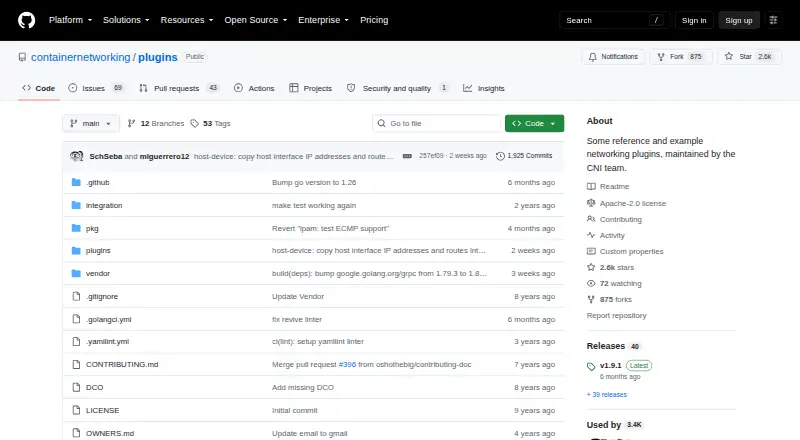
What CNI Plugins is
CNI Plugins is a free collection of reference and example network plugins for configuring Linux and Windows container networking. The CNI project supplies a specification and libraries, as well as a Go library for application integration and a command-line tool for running plugins. Interface plugins cover bridge, ipvlan, loopback, macvlan, point-to-point, VLAN, host-device, and dummy setups; Windows-specific options include win-bridge and win-overlay. IPAM choices include DHCP, host-local allocation tracking, and static IPv4 or IPv6 allocation. Meta plugins provide interface tuning, port mapping, bandwidth limiting, source-based routing, and firewall rules. A sample plugin offers an example for building a custom plugin. CNI focuses on container connectivity and removing allocated resources when a container is deleted. The repository uses the Apache License, Version 2.0, and the project is part of the Cloud Native Computing Foundation. The latest release page lists Linux archives for amd64, arm, and arm64. The project directs technical questions to its cni-dev mailing group or the #cni channel on CNCF Slack.
Good
- Free under the Apache License, Version 2.0.
- Includes Linux and Windows container networking plugins.
- Supports DHCP and static IPv4 or IPv6 allocation.
- Meta plugins cover port mapping and bandwidth limits.
- Provides a sample for building custom plugins.
Watch out
- Latest listed release archives are for Linux builds.
- Security issues must be reported privately through OWNERS-listed addresses.
Who it suits
CNI Plugins suits developers and platform teams configuring network interfaces for Linux or Windows containers. It may also help developers integrating CNI into applications or creating custom plugins.
Verdict
CNI Plugins offers a broad set of container networking components, including Windows-specific plugins and IPAM options. Its scope is container connectivity and cleanup, so teams should check that their network needs fit that role.
Plans and prices
From CNI Plugins's own pricing page, checked 4 Oct 2026.
| Plan | Price | What it gives you |
|---|---|---|
| Free | Free | Reference and example CNI network plugins · Apache-2.0 license |
The facts
Each one read from CNI Plugins's own pages, with the date it was checked.
What it does
- Additional plugins
- Meta plugins provide interface tuning, port mapping, bandwidth limiting, source-based routing, and firewall rules.checked 4 Oct 2026
- CNI integration
- The CNI project includes a Go library for integrating CNI into applications and a command-line tool for executing plugins.checked 4 Oct 2026
- CNI role
- CNI provides a specification and libraries for configuring network interfaces in Linux and Windows containers, along with supported plugins.checked 4 Oct 2026
- Container networking scope
- CNI focuses on container network connectivity and removing allocated resources when a container is deleted.checked 4 Oct 2026
- Downloads
- The latest release page lists downloadable Linux plugin archives, including amd64, arm, and arm64 builds.checked 4 Oct 2026
- IP address allocation
- IPAM plugins include DHCP, host-local allocation tracking, and static IPv4 or IPv6 allocation.checked 4 Oct 2026
- License
- The repository is distributed under the Apache License, Version 2.0.checked 4 Oct 2026
- Maintainer organization
- CNI is a Cloud Native Computing Foundation project.checked 4 Oct 2026
- Networking features
- Interface plugins include bridge, ipvlan, loopback, macvlan, point-to-point, VLAN, host-device, and dummy.checked 4 Oct 2026
- Purpose
- CNI Plugins is a collection of reference and example network plugins maintained by the containernetworking team.checked 4 Oct 2026
- Sample plugin
- A sample plugin provides an example for building a custom plugin.checked 4 Oct 2026
- Security reporting
- The project asks that security issues be reported privately to the email addresses listed in its OWNERS file.checked 4 Oct 2026
- Support
- The project directs questions to the cni-dev mailing group or the #cni channel on CNCF Slack.checked 4 Oct 2026
Where it runs
- Windows plugins
- The project includes Windows-specific win-bridge and win-overlay plugins.checked 4 Oct 2026
The full review of CNI Plugins
CNI Plugins is an open-source collection for configuring container network interfaces and managing their allocated resources. It suits teams building or integrating container networking around the CNI specification, especially those that need a choice of interface and IPAM plugins. Its breadth and free Apache 2.0 license are compelling; the trade-off is that teams must select and assemble the components that fit their network.
Overview
CNI handles connecting Linux and Windows containers to networks and removing allocated resources when a container is deleted. The project combines reference plugins with a Go library for application integration and a command-line tool for executing plugins. That makes it useful both to operators choosing components and developers incorporating CNI into their own applications, rather than a single packaged networking product with one prescribed workflow.
The project is maintained under the Cloud Native Computing Foundation and distributed under the Apache License, Version 2.0. Its scope is deliberately focused on container connectivity and cleanup; teams seeking a broader networking system should consider other options.
Key features
Interface plugins cover bridge, ipvlan, loopback, macvlan, point-to-point, VLAN, host-device and dummy networking. This range gives teams building blocks for different interface arrangements, but the choice and composition of plugins remain operational decisions.
IPAM plugins offer DHCP, host-local allocation tracking, and static IPv4 or IPv6 allocation. Meta plugins add interface tuning, port mapping, bandwidth limiting, source-based routing and firewall rules, extending the collection beyond basic interface setup. A sample plugin provides a starting point for teams developing a custom plugin, though it is an example rather than a ready-made solution for a particular network requirement.
For Windows containers, the project includes win-bridge and win-overlay. The latest release page provides Linux plugin archives for amd64, arm and arm64; Windows support is part of the project, but those Linux downloads do not serve Windows deployments.
The CNI library and command-line tool support application integration and plugin execution. Security issues should be reported privately to the email addresses in the OWNERS file; project questions go to the cni-dev mailing group or the #cni channel on CNCF Slack.
Pricing
CNI Plugins is free: the Free plan costs nothing and includes reference and example CNI network plugins under the Apache-2.0 license. There is no paid tier or trial to weigh against it. The absence of a license charge is a clear advantage for teams assembling their own container networking, while the cost in practice is the work of selecting, integrating and operating the components.
Platforms
CNI Plugins supports Linux and Windows. Linux release archives include amd64, arm and arm64 builds, while Windows-specific win-bridge and win-overlay plugins extend the project to Windows containers. The available release archives are Linux builds, so teams should choose deployment components accordingly.
Who it's for
This is a strong fit for developers integrating CNI into an application, and for infrastructure teams that want modular plugins for container interfaces, address allocation and related network functions. The sample plugin also makes the collection relevant to teams creating their own CNI plugin.
It is a weaker fit for readers who want a turnkey network product rather than reference components and tools, or who need a complete operational workflow in one package. CNI's defined job is container connectivity and cleanup, not a substitute for every networking need.
Pros and cons
- Pros: A wide selection of interface, IPAM and meta plugins lets teams compose the capabilities they need.
- Pros: Windows-specific plugins and Linux archives for amd64, arm and arm64 provide options across supported container platforms and Linux architectures.
- Pros: The Go library, command-line tool and sample plugin support both application integration and custom development.
- Cons: The collection is modular rather than a turnkey networking product, so teams must choose and integrate components themselves.
- Cons: The release downloads described are Linux archives, which do not provide Windows plugin archives.
- Cons: Its focused scope is container connectivity and resource cleanup, so it may not meet needs beyond that role.
Alternatives
Compare container networking software if you want to weigh CNI Plugins against options across the category. Canal is another free Apache-2.0 project, with Linux, macOS, API and self-hosted platform support. VMware Workstation Pro is free for Linux or Windows hosts and requires no subscription or license key; its stated host requirement is a 64-bit Intel or AMD PC.
Calico Open Source is worth considering for community-driven support and maintenance, in-memory data retention and unlimited clusters. Flannel is a free Apache 2.0 open-source Kubernetes networking project. kube-network-policies focuses on Kubernetes network policy implementation and can be installed with raw manifests or Helm.
Antrea is a free Apache License 2.0 option for Linux and Windows, but requires a Kubernetes cluster and the Open vSwitch kernel module on every Kubernetes node. Cello CNI is another free Apache 2.0 project, with Volcengine ECS, Kubernetes and Helm 3.0 requirements. DANM is a free Kubernetes network management option for Linux and self-hosted environments.
Verdict
Choose CNI Plugins if you need free, Apache-licensed building blocks for container connectivity, including IPAM choices, Windows-specific plugins or a library and tool for CNI integration. Its main advantage is the breadth of components within a focused container-networking role. Look elsewhere if your priority is a single turnkey product rather than the work of choosing and assembling plugins.
Getting started
- Open the CNI Plugins GitHub repository
- Choose Linux or Windows as your platform
- Download a suitable Linux archive when applicable
- Select interface and IPAM plugins for your container setup
- Use the command-line tool or Go library to execute or integrate plugins
Limits worth knowing
The project focuses on container network connectivity and cleanup when containers are deleted. Linux downloads are listed for amd64, arm, and arm64 builds.
Questions
Is CNI Plugins free?
Yes. It has a free plan listed as free and uses the Apache License, Version 2.0.
Which operating systems are supported?
Linux and Windows are supported.
What IP address allocation methods are available?
IPAM plugins provide DHCP, host-local allocation tracking, and static IPv4 or IPv6 allocation.
Does it include Windows networking plugins?
Yes. The collection includes win-bridge and win-overlay plugins.
Can developers create custom plugins?
A sample plugin provides an example for building a custom plugin.
Where can users get support?
Questions are directed to the cni-dev mailing group or the #cni channel on CNCF Slack.
Alternatives to CNI Plugins
- 1
Antrea
Free planOpen sourceAPILinuxSelf-hostedWindows7.2Free plan - 2
Network Service Mesh
Free planOpen sourceAPILinuxSelf-hosted7.0Free plan - 3

Aviatrix Kubernetes Firewall
WebSelf-hosted6.2 - 4
kube-network-policies
Free planLinuxSelf-hosted6.2Free plan - 5

Calico Open Source
Free planLinuxSelf-hostedWindows6.1Free plan - 6

Cilium
Free planLinuxSelf-hosted6.0Free plan