CFS 941/940
CFS 941/940 is Windows software for after-the-fact payroll processing and employment tax forms.
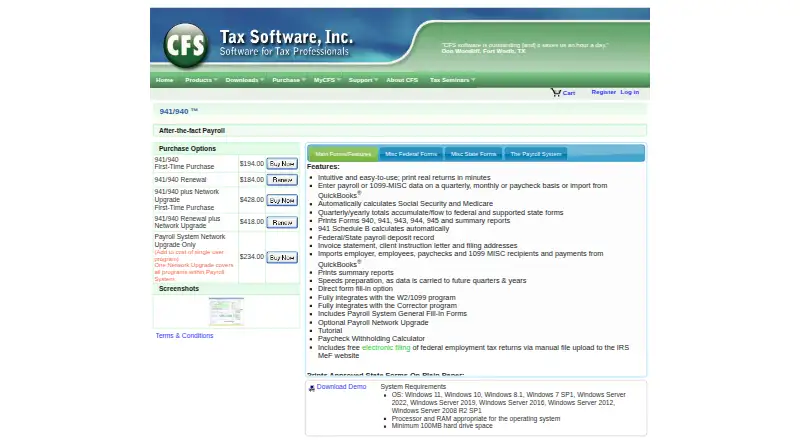
What CFS 941/940 is
CFS 941/940 is Windows software for after-the-fact payroll processing and employment tax forms. Payroll or 1099-MISC data can be entered by paycheck, month, or quarter, or imported from QuickBooks. The program calculates Social Security and Medicare and completes 941 Schedule B automatically. Totals accumulate by quarter and year, flow into federal and supported state forms, and carry into later periods. It prints Forms 940, 941, 943, 944, and 945, plus summary reports. Listed approved state payroll forms print on plain paper, while other states receive generic quarterly printouts; coverage includes 22 states. Federal employment tax returns can be filed electronically for free through manual upload to the IRS MeF website. CFS says the software integrates with its W2/1099 and Payroll Corrector programs. An optional network upgrade adds multi-user access, a central client database, configurable directory paths, and file locking. A first-time single-user purchase is $194, paid once; renewal is $184, paid once. Releases are scheduled for mid-January each year.
Good
- Imports payroll data from QuickBooks
- Automatically calculates Social Security and Medicare
- Prints federal forms 940, 941, 943, 944, and 945
- Carries totals into future quarters and years
- Free electronic filing through manual IRS MeF upload
Watch out
- Windows-only software
- Coverage lists 22 states
- Electronic filing requires manual IRS MeF upload
- Network access requires an optional upgrade
Who it suits
CFS 941/940 suits payroll professionals and businesses preparing federal and supported state employment tax forms on Windows. It also fits users importing QuickBooks data or needing optional network access.
Verdict
CFS 941/940 focuses on recurring payroll tax preparation, carry-forward totals, and printed forms. QuickBooks import, federal e-filing upload, and the optional network upgrade support different office workflows, with Windows and state coverage limits to consider.
Plans and prices
From CFS 941/940's own pricing page, checked 8 Oct 2026.
| Plan | Price | What it gives you |
|---|---|---|
| 941/940 — Renewal | $184, paid once | Renewal |
| 941/940 PSAF — First-Time Purchase | $194, paid once | Single-user program |
| Payroll System PS Network Upgrade Only | $234, paid once | Add to cost of single user program; one upgrade covers all programs within Payroll System |
| 941/940 Renewal plus Network Upgrade | $418, paid once | Renewal; includes Network Upgrade |
| 941/940 PSAF plus Network Upgrade — First-Time Purchase | $428, paid once | Includes Network Upgrade |
The facts
Each one read from CFS 941/940's own pages, with the date it was checked.
The company
- Company
- CFS Tax Software, Inc. lists its office address as 1445 Los Angeles Ave., Suite 214, Simi Valley, California 93065.checked 8 Oct 2026
- Headquarters
- Simi Valley, California, United Stateschecked 28 Sep 2026
What it does
- Data carry-forward
- Payroll data accumulates into quarterly and yearly totals, flows to federal and supported state forms, and carries to future quarters and years.checked 8 Oct 2026
- Electronic filing
- Federal employment tax returns can be filed electronically for free through manual file upload to the IRS MeF website.checked 8 Oct 2026
- Forms and reports
- It prints Forms 940, 941, 943, 944, 945, and summary reports.checked 8 Oct 2026
- Hardware requirements
- CFS lists a minimum of 100 MB of hard drive space and processor and RAM appropriate for the operating system.checked 8 Oct 2026
- Integrations
- CFS says 941/940 fully integrates with its W2/1099 and Payroll Corrector programs.checked 8 Oct 2026
- Network option
- The optional network upgrade provides multi-user access, a central client database, configurable directory paths, and file locking.checked 8 Oct 2026
- Payroll calculations
- The program automatically calculates Social Security and Medicare, and its 941 Schedule B calculates automatically.checked 8 Oct 2026
- Payroll entry
- Payroll or 1099-MISC data can be entered quarterly, monthly, or by paycheck, or imported from QuickBooks.checked 8 Oct 2026
- Privacy and security
- CFS says it uses security measures including internal reviews, physical safeguards, monitored data centers, regular audits, and access restrictions for personal information.checked 8 Oct 2026
- Product type
- CFS describes 941/940 as after-the-fact payroll software.checked 8 Oct 2026
- Release schedule
- CFS says 941/940 is released in mid-January each year.checked 8 Oct 2026
- State forms
- The product prints listed approved state payroll forms on plain paper and provides generic quarterly printouts for other states.checked 8 Oct 2026
- Support
- CFS lists customer service and technical support at 800-343-1157 and office hours of Monday through Friday, 8:00 a.m.–4:30 p.m. PDT, extended to 5:00 p.m. in December and January.checked 8 Oct 2026
Where it runs
- Platform requirements
- The product page lists Windows 11, 10, 8.1, 7 SP1, and specified Windows Server versions as supported operating systems.checked 8 Oct 2026
Alternatives to CFS 941/940
- 1

TaxBandits
Free planAndroidiOSWebAPI8.2From $199 a year - 2
efile4Biz
Free planAndroidiOSWebAPI8.1From $149 a year - 3

Yearli
WebAPIWindows7.6From $129 a year - 4
TaxZerone
Free planAndroidiOSWebAPI7.5From $179.99 a year - 5
Auris Tax Compliance
AndroidiOSWeb7.3From $89 a month - 6
PayFit
AndroidiOSWebAPI7.3From €16 a month