
CarbonInk
CarbonInk is a free, open-source desktop tool for greenhouse-gas accounting on macOS and Windows.
What CarbonInk is
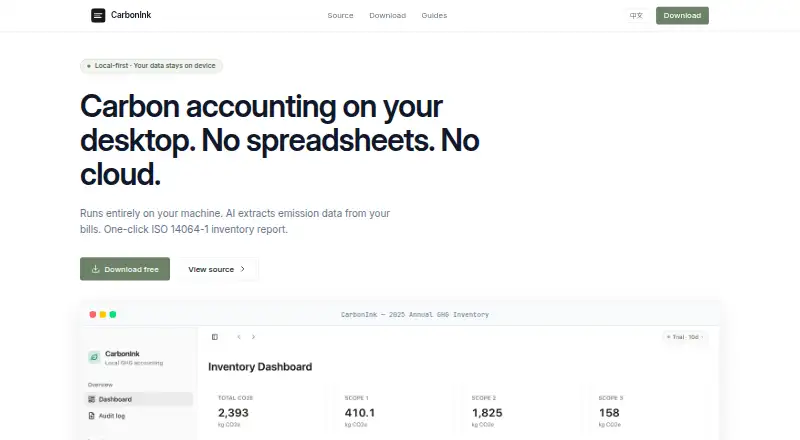
CarbonInk is a free, open-source desktop tool for greenhouse-gas accounting on macOS and Windows. It runs fully offline, and its README says user data stays on the device. The inventory tracks emission sources, activity data, and pinned emission factors across Scope 1, 2, and 3. Users can apply their own LLM API key to extract activity data from utility bills, fuel receipts, freight, travel, and purchase documents. The inventory can also support customer or rating-agency disclosure forms and collection of supplier data for Scope 3 Category 1. For reporting, CarbonInk generates an ISO 14064-1 inventory report in PDF format with one click. Pinned emission factors and calculation snapshots provide an audit trail. A built-in MCP server exposes inventory data to Claude, Cursor, and Pi. CarbonInk is licensed under MIT. The Free plan costs nothing; there is no free trial. The README points users to the releases page for macOS and Windows builds and says no activation key is required.
Good
- Runs fully offline on macOS and Windows.
- Tracks Scope 1, 2, and 3.
- Creates ISO 14064-1 PDF reports.
- Includes pinned factors and calculation snapshots.
- Free plan costs nothing.
Watch out
- AI extraction requires your own LLM API key.
- No free trial is listed.
Who it suits
CarbonInk suits individuals or teams that need offline greenhouse-gas accounting across Scope 1, 2, and 3. It may be useful to people preparing disclosure forms or collecting supplier emissions data.
Verdict
CarbonInk combines offline emissions tracking, disclosure workflows, and PDF reporting in a free desktop tool. Its AI extraction depends on supplying your own LLM API key.
Plans and prices
From CarbonInk's own pricing page, checked 8 Oct 2026.
| Plan | Price | What it gives you |
|---|---|---|
| Free | Free | No account · no cloud · no subscription |
The facts
Each one read from CarbonInk's own pages, with the date it was checked.
What it does
- AI extraction
- AI can extract activity data from utility bills, fuel receipts, freight, travel, and purchase documents using the user's own LLM API key.checked 8 Oct 2026
- Audit trail
- The inventory includes pinned emission factors and audit-grade calculation snapshots.checked 8 Oct 2026
- Disclosure workflows
- Users can fill customer or rating-agency disclosure forms from their inventory and collect supplier Scope 3 Category 1 data.checked 8 Oct 2026
- Download
- The README directs users to the releases page for macOS and Windows builds and says no activation key is required.checked 8 Oct 2026
- Integrations
- A built-in MCP server exposes inventory data to Claude, Cursor, and Pi.checked 8 Oct 2026
- Inventory
- It tracks emission sources, activity data, and pinned emission factors for Scope 1, 2, and 3.checked 8 Oct 2026
- License
- CarbonInk is licensed under the MIT License.checked 8 Oct 2026
- Offline use
- The app runs fully offline, and its README says user data never leaves the device.checked 8 Oct 2026
- Purpose
- CarbonInk is a free, open-source desktop tool for greenhouse-gas accounting.checked 8 Oct 2026
- Reporting
- The app produces a one-click ISO 14064-1 inventory report in PDF format.checked 8 Oct 2026
The full review of CarbonInk
CarbonInk is a free, open-source desktop application for building greenhouse-gas inventories and preparing disclosures. It is best suited to organizations that need local control over Scope 1, 2, and 3 data rather than a browser-based collaboration hub. Its strongest case is a no-subscription workflow with traceable calculations; the main compromises are desktop-only access and bringing your own LLM API key for document extraction.
Overview
CarbonInk keeps the accounting workflow on a macOS or Windows computer and runs fully offline. User data stays on the device, a meaningful advantage for organizations with strict data-residency or connectivity requirements. The same design rules out browser access and makes it less suitable when several people need a shared, always-online workspace.
The MIT License permits use and modification without a commercial subscription. Installation comes from the macOS and Windows releases, and no activation key is required. AI-assisted intake is optional, but using it requires an LLM API key supplied by the user rather than a bundled service.
Key features
Scope 1–3 inventory with traceability
The inventory records emission sources, activity data, and pinned emission factors across all three GHG scopes. Pinned factors preserve the basis used for calculations, while audit-grade calculation snapshots provide a point-in-time record for review. That combination is valuable when figures must be explained or revisited; users seeking only a quick, lightweight estimate may find the accounting structure more than they need.
AI document extraction
CarbonInk can extract activity data from utility bills, fuel receipts, freight, travel, and purchase documents. This can reduce manual transcription across varied records, but the bring-your-own-key model adds setup and an external API dependency. It is therefore a fit for organizations comfortable managing their own LLM access, not for buyers expecting an included AI allowance.
Disclosures, suppliers, and reports
Inventory data can populate customer or rating-agency disclosure forms, and the app can collect supplier data for Scope 3 Category 1. A one-click ISO 14064-1 inventory report in PDF gives users a defined reporting output instead of leaving them to assemble a document manually. The built-in MCP server also exposes inventory data to Claude, Cursor, and Pi, extending the data into those tools while preserving CarbonInk as the inventory source.
Pricing
CarbonInk has one plan: Free at free. It includes no account, no cloud service, and no subscription, with Scope 1–3 coverage, automated data collection, and supplier engagement. There is no free trial because the product is already free. The absence of accounts and cloud hosting suits individuals or organizations that want a self-contained installation, while teams needing centralized administration or shared browser access should look elsewhere.
Platforms
Desktop builds are provided for macOS and Windows. CarbonInk does not offer a web platform or mobile application, so access depends on having one of those supported computers.
Who it's for
Choose CarbonInk if you need a no-cost Scope 1–3 inventory, supplier Category 1 collection, disclosure preparation, and ISO 14064-1 PDF reporting while keeping records offline. Its pinned factors and calculation snapshots are particularly relevant where traceability matters. It is a weaker choice for distributed teams that require browser collaboration, or for users who do not want to obtain and manage an LLM API key for AI extraction.
Pros and cons
- Pros: Fully offline operation keeps user data on the device.
- Pros: Scope 1–3 tracking includes pinned factors and audit-grade calculation snapshots.
- Pros: Disclosure forms, supplier Scope 3 Category 1 collection, and one-click ISO 14064-1 PDF reporting cover downstream workflow needs.
- Pros: MIT licensing, no account, no cloud, and no subscription remove financial and access barriers.
- Cons: macOS and Windows are the only supported platforms, with no browser workspace.
- Cons: AI extraction requires the user's own LLM API key rather than an included service.
Alternatives
For a broader directory of options, see Carbon Accounting Software.
- Carbonfact is the better choice when you need API and web access, with a free supplier exchange and paid product-LCA capabilities.
- CarbonTool suits organizations wanting a web/API service with a 30-day full-access starter period and paid Core plan.
- EcoReko fits users who prefer a web app with a forever-free single-user, single-site tier and paid expansion.
- Greenio is preferable for web/API deployment with unlimited data entry, four free PDF reports per year, and AI recommendations on its free tier.
- Hedgehog Carbon Platform offers a web-based free tier limited to five emission sources, one user, and one entity.
- Persefoni provides a free self-service web/API plan for one user with unlimited assets and historical reporting years.
- Vaayu is an alternative web/API platform with scope depending on the selected plan and paid pricing available on request.
- 50X Impact is a web-based alternative.
Verdict
CarbonInk is a strong recommendation for organizations that want free, offline Scope 1–3 accounting with supplier collection, disclosures, traceable calculations, and PDF reporting. Look elsewhere if browser collaboration, broader platform support, or an included AI service is more important than local control and zero subscription cost.
Alternatives to CarbonInk
- 1
Carbonfact
Free planWebAPI7.0Free plan - 2
NetNada
WebAPISelf-hosted6.9From $199 a month - 3
CarbonTool
Free planWebAPI6.7From €2,000 a year - 4
 6.6From $1,000 a month
 - 5
EcoReko
Free planWeb6.6From €4,500 a year - 6
Greenio
Free planWebAPI6.6From ₹2,999 a month