CaptionMaker
CaptionMaker is paid Windows software for authoring and editing captions and subtitles across projects from meetings to broadcasts.
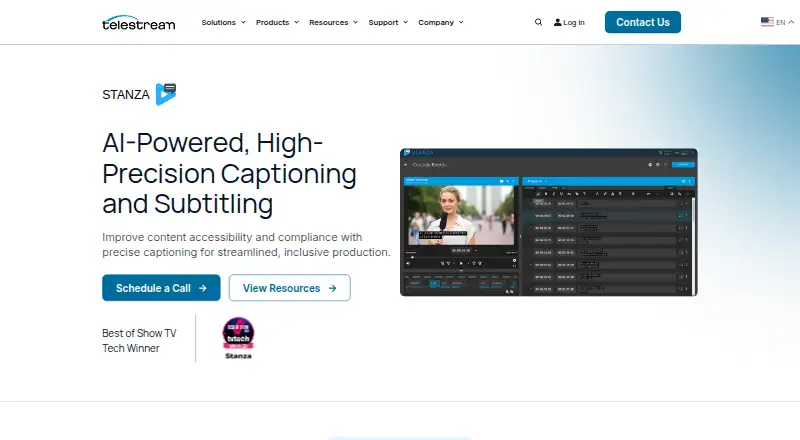
What CaptionMaker is
CaptionMaker is paid Windows software for authoring and editing captions and subtitles across projects from meetings to broadcasts. It automatically transcribes speech to text, while AI is used to improve captioning speed, accuracy, and workflow efficiency. Subtitle translation supports reaching worldwide audiences, and exports include SRT and VTT. CaptionMaker works with popular video and audio formats and does not require proxy transcoding for supported media. Users can customize caption formatting and keyboard shortcuts. The product is positioned around accessibility and regulatory requirements for global media programming. It also fits Telestream workflows: Vantage handles media processing workflows, while DIVA asset management can complement caption operations. Plans are organized by workflow scope. Desktop covers caption and subtitling authoring and editing. Pro adds quality control, asset management, and TV broadcast exports. Enterprise covers automation and high-volume caption and subtitle asset delivery. CaptionMaker is headquartered in Nevada City, California, United States. There is no free plan, and listed plan prices are not provided. Telestream lists support with download and contact options.
Good
- Automatically transcribes speech for captions
- Supports subtitle translation and SRT/VTT export
- Works with popular media formats
- Offers customizable formatting and shortcuts
- Integrates with Vantage and DIVA workflows
Watch out
- Windows is the only listed platform
- No free plan is available
Who it suits
It suits Windows users creating captions or subtitles for anything from meetings to broadcast projects. Teams needing translation, quality control, asset management, or high-volume delivery can choose among its listed plans.
Verdict
CaptionMaker covers transcription, translation, formatting, export, and workflow integration for caption production. Its Desktop, Pro, and Enterprise plans separate basic authoring from quality control, broadcast export, and automation needs.
Plans and prices
From CaptionMaker's own pricing page, checked 20 Sep 2026.
| Plan | Price | What it gives you |
|---|---|---|
| Desktop | — | Caption and subtitling authoring and editing |
| Pro | — | Authoring and editing · Quality control · Asset management · TV broadcast exports |
| Enterprise | — | Automation and high-volume caption and subtitle asset delivery |
The facts
Each one read from CaptionMaker's own pages, with the date it was checked.
What it does
- Accessibility Focus
- The product is positioned to improve content accessibility and compliance.checked 28 Sep 2026
- AI Captioning
- Uses AI to improve captioning speed, accuracy, and workflow efficiency.checked 28 Sep 2026
- Auto-captioning
- Yeschecked 20 Sep 2026
- Custom Formatting
- Offers customizable caption formatting.checked 28 Sep 2026
- DIVA Integration
- Complements DIVA asset management with media processing workflows.checked 28 Sep 2026
- Format Support
- Supports popular video and audio formats.checked 28 Sep 2026
- Industry Recognition
- The page identifies it as a Best of Show TV Tech Winner.checked 28 Sep 2026
- Keyboard Shortcuts
- Provides customizable shortcuts for faster captioning workflows.checked 28 Sep 2026
- Language Translation
- Supports translation for connecting with worldwide audiences.checked 28 Sep 2026
- Media Interoperability
- Includes interoperability as a captioning workflow benefit.checked 28 Sep 2026
- No Proxy Transcoding
- Does not require transcoding proxies for supported media formats.checked 28 Sep 2026
- Project Scaling
- Handles projects ranging from meetings to broadcasts.checked 28 Sep 2026
- Regulatory Compliance
- Meets caption regulatory requirements for global media programming.checked 28 Sep 2026
- Speech To Text
- Automatically transcribes speech to text for captioning.checked 28 Sep 2026
- SRT export
- Yeschecked 20 Sep 2026
- Subtitle translation
- Yeschecked 20 Sep 2026
- Vantage Workflows
- Works with Vantage for media processing workflows.checked 28 Sep 2026
- VTT export
- Yeschecked 20 Sep 2026
The company
- CaptionMaker Support
- Telestream lists CaptionMaker support with download and contact options.checked 28 Sep 2026
- Headquarters
- Nevada City, California, United Stateschecked 28 Sep 2026
Money
- Free plan
- Nochecked 20 Sep 2026
Alternatives to CaptionMaker
- 1
OOONA
Free planAndroidiOSWebAPI7.6Free plan - 2

SRTGen
Free planWebAPI7.5From $4 a month - 3

Editsub
Free planWebLinuxmacOSWindows7.4From $4 a month - 4
Avidemux
Free planOpen sourceWebLinuxmacOSWindows7.3Free plan - 5
Jubler
Free planOpen sourceAPILinuxmacOSWindows7.3Free plan - 6
Subvideo.ai
Free planWeb7.1From $9.99 a month