Bounce Metronome Pro
Bounce Metronome Pro is a visual metronome for musicians working on rhythm and tempo.
What Bounce Metronome Pro is
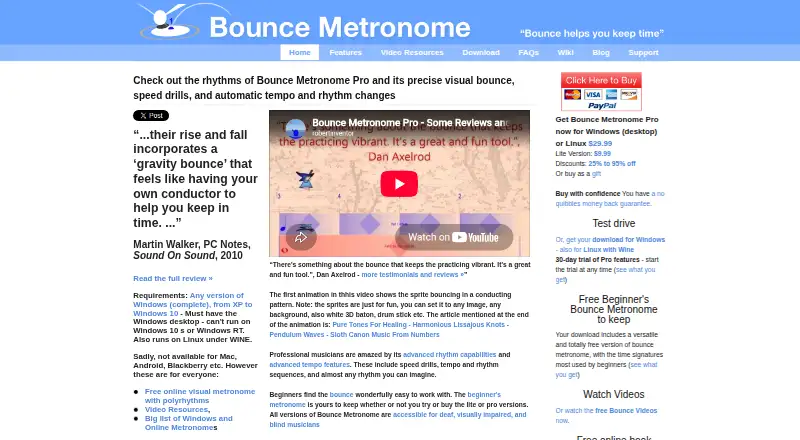
Bounce Metronome Pro is a visual metronome for musicians working on rhythm and tempo. Its Pro tools cover odd time signatures, flexible subdivisions, swing, drum rudiments, polyrhythms, additive patterns, and less common rhythms. Tempo controls include tap tempo, fractional BPM, gradual changes, silent intervals, speed drills, and automatic switching between tempos and rhythms. Musicians can follow bouncing visuals, conducting patterns, and beat or sub-beat counts, or use silent metronome mode. Sound options include accents, selectable instruments, chord accompaniment, stereo panning, and MIDI output for VSTi and sound fonts. The maker describes accessibility features for blind, visually impaired, and deaf musicians. The download includes a full-featured 30-day Pro trial that users can start when they choose. After the trial, animations pause every few seconds and audio stops after a few minutes unless an unlock key is purchased. The Pro plan costs $29.99, paid once for Windows desktop; the current download can run on Linux using Wine. The maker says the downloadable programs do not collect data, include spyware, or show ads.
Good
- Supports odd meters, polyrhythms, and additive rhythms.
- Includes tap tempo and gradual tempo changes.
- Offers bouncing visuals and conducting patterns.
- Provides MIDI output for VSTi and sound fonts.
- Includes a 30-day Pro trial.
Watch out
- After the trial, audio times out after a few minutes.
- After the trial, animations pause every few seconds.
- Current download is for Windows; Linux use requires Wine.
- Older 32-bit Mac beta does not run on High Sierra or later.
Who it suits
It suits musicians who want visual rhythm guidance and advanced tempo or subdivision controls. Its accessibility features may also suit blind, visually impaired, and deaf musicians.
Verdict
Bounce Metronome Pro offers extensive rhythm and tempo tools alongside visual and audio options. The trial is time-limited, and continued use without interruptions requires an unlock key.
Plans and prices
From Bounce Metronome Pro's own pricing page, checked 14 Oct 2026.
| Plan | Price | What it gives you |
|---|---|---|
| Free Beginner’s Bounce Metronome | Free | common beginner meters 2/4, 3/4, 4/4, 6/8, 9/8 and 12/8 · up to four subdivisions · basic drum machine · Free to keep |
| Bounce Metronome Lite | $9.99, paid once | all time signatures including odd · unlimited subdivisions · basic tempo and bounce features · $9.99 |
| Bounce Metronome Pro | $29.99, paid once | polyrhythms · polymeters · additive rhythms · drum rudiments · swing · advanced tempo automation · MIDI output · $29.99 |
The facts
Each one read from Bounce Metronome Pro's own pages, with the date it was checked.
What it does
- Accessibility
- The maker says all editions are usable by deaf, visually impaired and blind musicians.checked 14 Oct 2026
- Change-log history
- The maker publishes links to previous uploads and maintains a separate change-log page.checked 14 Oct 2026
- Compatibility
- The current download is for Windows and can run on Linux using Wine; the maker says the older 32-bit Mac beta does not run on macOS High Sierra or later.checked 3 Oct 2026
- Current download
- The download page identifies version 4.7, updated 5 February 2019, with a 20 MB installer.checked 14 Oct 2026
- Documentation
- The wiki provides searchable help for windows, main views, tutorials, background material and a feature wish list.checked 14 Oct 2026
- Independent listing details
- Apponic lists Bounce Metronome version 4.1 from 19 August 2010 as trial software for Windows 2000, XP, Vista and 7, with no additional system requirements.checked 14 Oct 2026
- Independent listing: shareware
- Ivertech lists Bounce Metronome as shareware for Windows and describes support for any meter, swing, subdivisions, polyrhythms and arbitrary tempo.checked 14 Oct 2026
- Independent praise: visual timing
- Apponic describes the gravity-bounce display as enabling practice without audible clicks and helping users anticipate irregular or swung beats.checked 14 Oct 2026
- Installer behavior
- The installer unpacks program files, optionally creates shortcuts and file associations, and installs the Bach musicological font.checked 14 Oct 2026
- Limit: complexity
- A PG Music forum user described the Pro configuration and presentation options as excessive for their needs, despite finding Lite sufficient.checked 14 Oct 2026
- Limit: reported bugs
- A PG Music forum user said an earlier version had been buggy and that this affected their willingness to buy it at the time.checked 14 Oct 2026
- Limit: visual reliance
- Another PG Music forum participant complained that the visual approach lacked the desired audio subdivision feature and found watching the display distracting.checked 14 Oct 2026
- MIDI extensibility
- MIDI output can drive VST instruments and sound fonts.checked 14 Oct 2026
- Notable update
- Version 4.7 added easier tempo adjustment, notation display, improved MIDI alignment for DAWs and additional Tune Smithy transformation windows on 16 June 2017.checked 14 Oct 2026
- Payment processing
- Purchases are handled by external processors such as PayPal, FastSpring, RegNow, Plimus or eSellerate, so the maker says it never sees card numbers.checked 14 Oct 2026
- Praise: complex meters
- The same TalkBass discussion points to mixed meters such as 4/4 plus 7/8 and polyrhythms such as 4/4 over 4/3 as useful for jazz practice.checked 14 Oct 2026
- Praise: swing practice
- A TalkBass discussion highlights that the bounce visuals make swung notes easier to anticipate and that swing amount can range from gentle lilt to hard swing.checked 14 Oct 2026
Money
- Free edition
- The included beginner edition remains usable after download and covers common meters plus a simple drum machine.checked 14 Oct 2026
- Post-trial limits
- After the trial, the free taster remains available while paid-mode animations pause periodically and sound stops after several minutes.checked 14 Oct 2026
Where it runs
- Linux support
- The Windows build can run on Linux through Wine.checked 14 Oct 2026
- Mac limitation
- The old 32-bit Mac beta does not run on macOS High Sierra or later because Apple ended 32-bit support.checked 14 Oct 2026
The company
- Maker
- The site identifies the maker as Robert Walker and lists a postal address on the Isle of Mull, Scotland, United Kingdom.checked 3 Oct 2026
- Maker identity
- Robert Walker identifies himself as the mathematician and music-software developer who authors Bounce Metronome.checked 14 Oct 2026
- Maker location
- The maker lists a home software business address on the Isle of Mull, Scotland, United Kingdom.checked 14 Oct 2026
The full review of Bounce Metronome Pro
Bounce Metronome Pro is a visual metronome for musicians who need unusually precise control over meter, subdivisions and practice tempo. It suits players studying complex rhythms or integrating a click with software instruments better than people seeking a simple pulse. The main trade-off is a Windows-centered release and restrictive behavior once the trial ends.
Overview
Bounce Metronome Pro combines visual timing cues with an extensive rhythmic and audio toolkit. Its support for uncommon meters, polyrhythms and programmed tempo work makes it a serious practice aid rather than a basic click track. The depth is valuable for advanced practice, but beginners may find the range of controls excessive.
Key features
Pro supports odd time signatures, arbitrary subdivisions, swing, drum rudiments, polyrhythms, additive rhythms and rare rhythms. That vocabulary is a clear advantage for musicians working beyond standard 4/4 exercises. Tap tempo, fractional BPM and an unlimited tempo range allow fine setup, while gradual tempo changes, silent intervals, speed drills and automatic tempo or rhythm switching can structure demanding routines without constant manual adjustment.
Bouncing visuals, conducting patterns, beat and sub-beat counts and a silent metronome mode provide alternatives to listening for every pulse. Audio controls cover beat and subdivision accents, rhythm auto-accents, selectable instruments, chord accompaniment and stereo panning. MIDI output can feed VSTi and sound fonts, so Pro fits a software-based practice or performance setup better than a standalone click. The maker also describes accessibility features for blind, visually impaired and deaf musicians.
The maker says the downloadable programs collect no data, contain no spyware or ads, and connect online only when requested. Payment agents handle card details, while the maker says it does not see credit-card numbers. Email support, tutorials, a wiki and a forum are provided, along with a no-quibbles money-back guarantee.
Pricing
The Free Beginner’s Bounce Metronome costs nothing and covers common beginner time signatures, up to four subdivisions and a basic drum machine. It is a sensible starting point, but its rhythmic ceiling is much lower than Pro’s.
Bounce Metronome Lite costs $9.99, paid once for Windows desktop, with Linux use through Wine. Bounce Metronome Pro costs $29.99, paid once, also for Windows desktop and Linux via Wine. Pro is the plan for odd meters, advanced subdivisions, polyrhythms, detailed tempo drills and MIDI; Lite is the cheaper route when those capabilities are not required.
The download includes a fully featured 30-day Pro trial, which starts when the user chooses. Afterward, Basic and Pro animations pause every few seconds and audio stops after a few minutes unless an unlock key is purchased. That makes the free tier suitable for limited use, not uninterrupted long-term practice.
Platforms
The current download targets Windows. It can run on Linux using Wine, but the older 32-bit Mac beta does not run on macOS High Sierra or later. Windows users get the clearest compatibility path; Linux users should be comfortable with Wine, and Mac users should look elsewhere.
Who it's for
Choose Pro if you practice polyrhythms, additive or rare meters, need controlled tempo progression, or want MIDI output alongside visual and audio cues. The free beginner plan fits basic meter work, while Lite suits Windows or Linux users who want a paid desktop metronome without Pro’s full rhythmic range. It is a poor match for Mac users on modern macOS or anyone who only needs an uncomplicated click.
Pros and cons
- Pros: unusually broad support for complex rhythms and subdivisions; precise tap, fractional and unlimited tempo control; visual, silent and audio practice modes; MIDI output for VSTi and sound fonts; accessibility features described for blind, visually impaired and deaf musicians; one-time Pro pricing and a 30-day full trial.
- Cons: current distribution is Windows-focused; Linux requires Wine; the old Mac beta fails on macOS High Sierra and newer; post-trial animations and audio are deliberately interrupted without an unlock key; the full feature set can overwhelm users seeking only basic timekeeping.
Alternatives
Browse the Metronome Apps list for a wider comparison. Easy Metronome is a better fit when Android or iOS support matters; its free app spans Android, iOS, macOS and Windows, with optional sound-pack purchases. Pick MagicBPM for Android, iOS, macOS or web access and a free core app, accepting ads on its iPhone and Android versions.
Metronome Beats suits users who want Android, iOS, macOS or web availability and a free app, though the free version contains ads and in-app purchases. True Metronome is a cross-platform option with a free trial and a free tier covering 20–400 BPM, all time signatures and background playback. Choose PolyMetronome when Android, iOS or web access and specialized Poly, Alphabet or Score modes matter more than a Windows desktop program.
The Metronome by Soundbrenner offers a free core app on Android, iOS and macOS. Chronal is a free, ad-free, donation-funded Android app for users who want simplicity without a trial. Metronome Time provides all current features free on Android, iOS and web, with optional premium features planned.
Verdict
Bounce Metronome Pro is the right choice for serious rhythm practice that demands uncommon meters, programmable tempo work, visual guidance and MIDI integration. Its 29.99 USD one-time Pro price and full 30-day trial strengthen the case. Look elsewhere if you need modern macOS support, broad mobile or web coverage, or a metronome that remains uninterrupted after the trial without an unlock purchase.
Alternatives to Bounce Metronome Pro
- 1

True Metronome
Free planAndroidiOSWebmacOS8.0Free plan - 2

Easy Metronome
Free planAndroidiOSmacOSWindows7.9$1.49 one-time - 3
Avidemux
Free planOpen sourceWebLinuxmacOSWindows7.3Free plan - 4
Metronome Beats
Free planAndroidiOSWebmacOS7.3$8.99 one-time - 5
Tempo by Frozen Ape
Free planAndroidiOS7.0$1.49 one-time - 6
Pro Metronome
Free planAndroidiOS6.9From $3.99 a year