Bookmark OS
Bookmark OS brings bookmarks, browser tabs, tasks, notes, and files together in a customizable desktop-style interface.
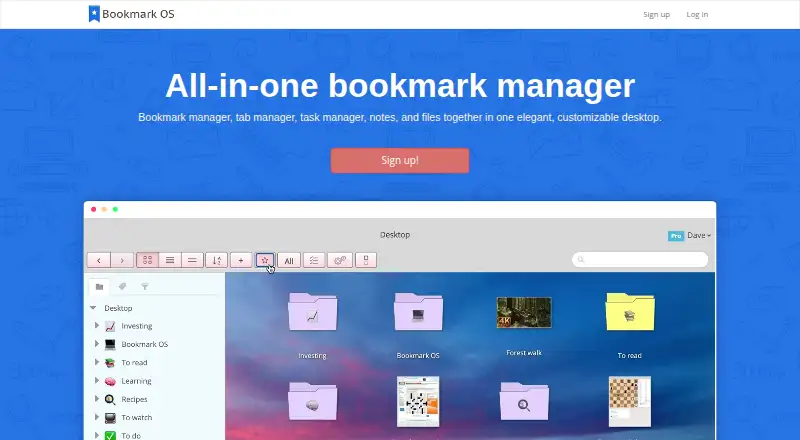
What Bookmark OS is
Bookmark OS brings bookmarks, browser tabs, tasks, notes, and files together in a customizable desktop-style interface. Its responsive website is designed for use on a laptop, phone, or tablet, and browser tools include Chrome and Firefox extensions plus a bookmarklet for other browsers. Bookmark organization includes tags, sorting, type filters, search, duplicate resolution, and AI-powered folder suggestions. Users can save the open tabs from a browser session into a folder, manage tasks with due dates and nested organization, and create notes with tables, code blocks, smart links, and images. Bookmarks can be imported from major services or exported as an HTML file. Folders can be shared publicly, and collaboration currently applies to bookmarks. Items are private by default unless placed in a public folder. A free plan includes unlimited bookmarks, 30 screenshot icons per month, 500MB of uploads, and a 5MB file limit. Pro lists 20GB of uploads and unlimited screenshot icons; pricing is shown as $36/year limited-time offer and also $60/year.
Good
- Free plan includes unlimited bookmarks.
- Search, filters, and duplicate resolution aid organization.
- Save a browser session's tabs into a folder.
- Notes support tables, code blocks, links, and images.
- Import bookmarks and export them as HTML.
Watch out
- No dedicated mobile app is currently available.
- Free uploads are limited to 500MB.
- Free files are limited to 5MB each.
- Pro pricing is shown as both $36/year and $60/year.
Who it suits
Bookmark OS suits people who want bookmarks alongside tabs, tasks, notes, and files in one interface. It may also suit users who want to access a responsive website from multiple device types without a dedicated mobile app.
Verdict
Bookmark OS combines bookmark organization with tab, task, note, and file tools. Its free plan covers core bookmarking, while users needing more upload capacity can consider Pro, whose listed yearly prices differ across the page.
Plans and prices
From Bookmark OS's own pricing page, checked 4 Oct 2026.
| Plan | Price | What it gives you |
|---|---|---|
| Free | Free | Unlimited bookmarks · 30 screenshot icons/month · 500MB uploads · 5MB per file · $0 per year |
| Pro | — | 20GB uploads · Unlimited screenshot icons · No file size limit · $36/year limited-time offer; page also shows $60/year |
The facts
Each one read from Bookmark OS's own pages, with the date it was checked.
What it does
- Access
- The responsive website is described as usable on a laptop, phone, or tablet.checked 4 Oct 2026
- Bookmark organization
- Features include tags, sorting, type filters, powerful search, duplicate resolution, and AI-powered folder suggestions.checked 4 Oct 2026
- Import and export
- Users can import bookmarks from major services and export them as an HTML file for use elsewhere.checked 4 Oct 2026
- Integrations
- The service supports weekly Dropbox backup of an exported bookmark HTML file; IFTTT integration is marked upcoming.checked 4 Oct 2026
- Payment security
- The FAQ says credit card processing uses Stripe and card details do not touch Bookmark OS servers.checked 4 Oct 2026
- Privacy
- The FAQ says items are private by default and become public when placed in a folder made public for sharing.checked 4 Oct 2026
- Product
- Bookmark OS combines a bookmark manager, tab manager, task manager, notes, and files in a customizable desktop-style interface.checked 4 Oct 2026
- Sharing
- Users can make folders public for sharing, and folder collaboration currently works for bookmarks.checked 4 Oct 2026
- Support and refunds
- The contact page directs users to the FAQ or dave at bookmarkos dot com, and the FAQ offers a three-day refund grace period by email.checked 4 Oct 2026
- Tab management
- Users can save current browser tabs from a session into a folder.checked 4 Oct 2026
- Tasks and notes
- Tasks support due dates and nested organization, while notes support tables, code blocks, smart links, and images.checked 4 Oct 2026
Where it runs
- Browser tools
- The FAQ says Chrome and Firefox extensions are available and a bookmarklet works for other browsers; the tools page describes saving pages with the bookmarklet.checked 4 Oct 2026
- Mobile app
- The FAQ says no app is currently available, but the responsive website can be added to a mobile home screen and used like a native app.checked 4 Oct 2026
The company
- Company
- The terms identify the service operator as Bookmark OS, LLC.checked 4 Oct 2026
Alternatives to Bookmark OS
- 1

Raindrop.io
Free planOpen sourceAndroidiOSWebAPI8.6From $27.99 a year - 2

Delinqs
Free planAndroidiOSWebAPI7.8From $9.99 a month - 3
Diigo
Free planAndroidiOSWebExtension7.4From $5 a month - 4

Karakeep
Free planAndroidiOSWebAPI7.4From $4 a month - 5
Avidemux
Free planOpen sourceWebLinuxmacOSWindows7.3Free plan - 6
LinkAce
Free planAndroidiOSWebAPI7.3From €4 a month