
Raindrop.io
Raindrop.io is a bookmark manager for saving and organizing material found while browsing, including articles, books, and songs.
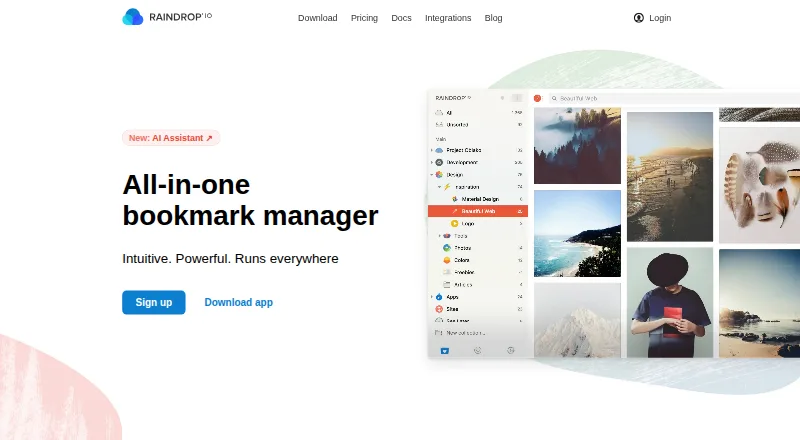
What Raindrop.io is
Raindrop.io is a bookmark manager for saving and organizing material found while browsing, including articles, books, and songs. Users can group saved items into collections, add tags, and filter by type, tag, or domain. Article and video previews are available, and the library can be shown in Grid, Headlines, Masonry, or List views. Collaboration is available on the free plan: collection permissions control access, and public collections can be shared with visitors who do not need to sign up. Free includes unlimited bookmarks, collections, highlights, and devices, plus 100 MB of file uploads per month. Pro adds full-text search across saved pages, PDFs, and YouTube videos, including spoken words, as well as web archiving, reminders, annotations, an AI assistant and suggestions, daily backups, and priority email support. No Pro price amount is listed. The service is available on Android, iOS, macOS, Windows, web, and browser extensions. The maker says collections are private by default and data is stored on AWS servers in Frankfurt, Germany.
Good
- Free includes unlimited bookmarks and collections.
- Public collections can be shared without sign-up.
- Pro search covers saved pages, PDFs, and YouTube videos.
- Available across mobile, desktop, web, and extensions.
Watch out
- Free file uploads are limited to 100 MB monthly.
- Pro price amount is not listed.
- iOS requires version 17.4 or later.
Who it suits
Raindrop.io suits people who want to organize saved web material across devices, or share selected collections with others. Pro may appeal to users who need full-text search or saved copies of web pages.
Verdict
Raindrop.io offers substantial organization and sharing tools on its free plan, with search and archiving among Pro additions. Check the listed device requirements and note that no Pro price amount is provided.
Plans and prices
From Raindrop.io's own pricing page, checked 14 Oct 2026.
| Plan | Price | What it gives you |
|---|---|---|
| Free | Free | unlimited bookmarks · unlimited collections · unlimited highlights · unlimited devices · 100 MB file uploads/month · sharing and collaboration |
| Pro monthly | $2.99 a month | AI assistant · full-text search · web archive · reminders · annotations · duplicate and broken-link finder · daily backups · 10 GB uploads/month · priority email support · monthly |
| Pro yearly | $27.99 a year | AI assistant · full-text search · web archive · reminders · annotations · duplicate and broken-link finder · daily backups · 10 GB uploads/month · priority email support · yearly |
| Pro | — | 10 GB file uploads/month · AI assistant and suggestions · Full-text search · Web archive · Reminders · Annotations · Daily backups · Priority email support · Yearly; the page shows a ~20% yearly discount but no price amount |
The facts
Each one read from Raindrop.io's own pages, with the date it was checked.
What it does
- Account protection
- Two-factor authentication is available, and uploaded-file links require authentication and expire after 10 minutes.checked 14 Oct 2026
- API authentication
- Third-party applications must be registered and use OAuth; ordinary access tokens expire after two weeks.checked 14 Oct 2026
- API rate limit
- OAuth clients may make up to 120 API requests per minute per authenticated user.checked 14 Oct 2026
- Archive
- Pro saves copies of web pages so they remain accessible if the originals are deleted or changed.checked 29 Sep 2026
- Automation
- The integrations page says glue apps can connect Raindrop.io with more than 1,000 other apps.checked 29 Sep 2026
- Backup limitation
- Account backups include bookmarks, collections, tags, highlights and notes but exclude uploaded files, which must be downloaded separately as a ZIP.checked 14 Oct 2026
- Backups
- Data is continuously backed up and can be restored to a point within the past year.checked 29 Sep 2026
- Collaboration
- Users can collaborate on the free plan, control collection access with permissions, and share public collections without requiring visitors to sign up.checked 29 Sep 2026
- Collections
- Users can group bookmarks into collections and choose from thousands of collection icons.checked 14 Oct 2026
- Documentation and support
- The help center covers getting started, saving, organization, search, sharing, account administration, troubleshooting and export, with support by email.checked 14 Oct 2026
- Duplicate and broken-link tools
- The product can identify duplicate bookmarks and pages that are no longer accessible.checked 14 Oct 2026
- Full-text search
- Pro accounts can search the contents of saved webpages, PDFs and YouTube transcripts.checked 14 Oct 2026
- Highlights
- Users can annotate passages in saved web content and revisit those highlights later.checked 14 Oct 2026
- Integrations
- The free plan advertises more than 2,600 integrations, including workflows through services such as IFTTT and Zapier.checked 14 Oct 2026
- Licence
- The main web and extension repository is released under the MIT licence.checked 14 Oct 2026
- Limit: automation and AI maturity
- G2 reviewers report no automatic sorting into meaningful collections and say AI tagging can be immature and create extra manual work.checked 14 Oct 2026
- Limit: export and restore problems
- Trustpilot reviewers report failed ZIP exports, iOS Safari login problems and restore/import operations that lose folder placement or icons.checked 14 Oct 2026
- Notion integration
- The Notion integration imports a My Links.csv export and can synchronize links and highlights between Notion and Raindrop.io.checked 14 Oct 2026
- Offline limitation
- The mobile app requires an internet connection to synchronize changes and save new bookmarks.checked 14 Oct 2026
The company
- Company
- The maker describes Raindrop.io as an independent, bootstrapped product with no investors or corporate parent.checked 29 Sep 2026
- Company size
- Crunchbase lists Raindrop as a private company headquartered in Astana, Kazakhstan, with 1–10 employees.checked 14 Oct 2026
- Headquarters
- Astana, Kazakhstanchecked 23 Sep 2026
Money
- Free and Pro limits
- Free users get 100 MB of uploads per month and 100 MB per file, while Pro allows 10 GB per month and 300 MB per file.checked 14 Oct 2026
Where it runs
- Limit: Android feature gaps
- Google Play reviewers mention editing and search bugs and request multi-tag searching.checked 14 Oct 2026
The full review of Raindrop.io
Overview
Raindrop.io is a bookmark manager for people who want to build an organized library from things they find while browsing, rather than leave saved items in a browser list. Its collections, tags, previews, and sharing make it a strong fit for personal research and collaborative collections; Pro is the better fit when searchable page contents and preserved copies matter.
It supports books, songs, articles, and other saved items, with filters by type, tag, or domain and four library views. The product is independent and bootstrapped, with headquarters in Astana, Kazakhstan.
Key features
Organization and discovery
Collections provide a practical structure for separating bookmarks by topic or purpose, while tags and filters add ways to narrow a large library. Grid, Headlines, Masonry, and List views let readers choose how to scan it, and article and video previews provide more context than a title alone. Duplicate detection is also included, a useful safeguard when saving items through multiple devices or workflows.
Search and preservation
Pro searches the full text of saved web pages, PDFs, and YouTube videos, including spoken words. That is a meaningful upgrade for research libraries where titles and tags are not enough to retrieve a source. Pro also archives web pages, preserving a copy if the original changes or disappears. These are compelling reasons to upgrade, but users who only need to save and sort links can stay on Free.
Sharing and connected services
Free users can collaborate, manage collection access with permissions, and share public collections that visitors can open without signing up. Listed integrations include Apple Shortcuts, IFTTT, Make, Zapier, ChatGPT, Claude, Notion, Readwise, Dropbox, Google Drive, and OneDrive. Glue apps can connect Raindrop.io to more than 1,000 other apps, making it a plausible hub for users who already rely on automation or cloud services.
Privacy and reliability
The maker says collections are private by default, file links require authentication and expire after 10 minutes, and it does not advertise, track, or sell user data. Data is stored on AWS servers in Frankfurt, Germany, with three copies maintained across distributed data centers in Germany. Continuous backups can be restored to a point within the past year; Pro adds daily backups. These are reassuring safeguards, though users should distinguish the maker's stated practices from a guarantee of uninterrupted access.
Pricing
Raindrop.io uses a freemium model. Free costs nothing, is billed Free indefinitely, and allows 100 MB of file uploads per month alongside unlimited bookmarks, collections, highlights, and devices. For anyone primarily collecting links and organizing them, those unlimited core quantities make Free a substantial starting plan. Its main trade-off is the lower upload allowance and lack of Pro-only search, archiving, reminders, annotations, AI assistant and suggestions, and daily backups.
Pro is billed yearly, with a roughly 20% yearly discount, and is custom pricing. It raises file uploads to 10 GB per month and adds the AI assistant and suggestions, full-text search, web archive, reminders, annotations, daily backups, and priority email support. Choose it when those research and preservation tools justify a paid annual plan; the upload increase is also relevant for people storing files regularly. Priority support is by email at [email protected]. Free is billed indefinitely, while Pro is yearly; no other renewal terms are given.
Platforms
Raindrop.io is available on Android, iOS, macOS, Windows, and the web, with browser extensions and an API. The download page requires iOS 17.4 or later, Android 7.0 or later, macOS Monterey 12 or later, and Windows 10 or later. Check those minimums before choosing it for an older device.
Who it's for
Raindrop.io suits readers, researchers, and teams who want collections, tags, filters, and sharing in one bookmark library, especially when they need to access that library across devices. Free is a sensible choice for broad link saving with a modest file-upload quota. Pro is for people who need to search inside saved material, retain page copies, or use its additional annotation and reminder tools. It is less compelling for someone who wants only a lightweight start page or a self-hosted archive.
Pros and cons
- Pros: Unlimited bookmarks, collections, highlights, and devices on Free make it practical for a large link library without a per-bookmark cap.
- Pros: Free collaboration, permissions, and public collections support sharing without requiring visitors to sign up.
- Pros: Pro search reaches page text, PDFs, and spoken words in YouTube videos, while its archive can preserve changed or deleted pages.
- Pros: Multiple views, previews, broad integrations, and duplicate detection support both browsing and maintenance of a growing collection.
- Cons: Free file uploads stop at 100 MB per month, so frequent file savers may need Pro's 10 GB monthly allowance.
- Cons: Full-text search and web archiving are reserved for Pro, limiting Free for users who need to retrieve or preserve source contents.
- Cons: Pro is billed yearly, so it is a less flexible fit for readers who want monthly billing.
Alternatives
Browse Bookmark Managers for more options. Choose Diigo if its free allowance of 1,000 bookmarks or notes, 200 highlights, 50 screenshots or images, five outliners, and one private group with three members fits better; its free plan does not include PDF annotation.
Karakeep is worth considering if self-hosting matters: it offers a free self-hosted plan, while its free hosted plan is limited to 10 bookmarks and 20 MB. Pick LinkAce when a self-hosted bookmark archive is the priority; it also offers hosting for €4 a month.
Start.me may fit better when the goal is a start page rather than a bookmark library: its free plan allows three pages, basic widgets, and includes advertising, while PRO costs $25 a year. Delinqs is an alternative for small teams, with a free plan for up to three users and unlimited bookmarks; its Team plan costs $9.99 a month per seat.
LinkBoard is a web-only option with 150 saved links, one directory, and 10 calendar events per month on Free; its Pro plan costs $4.99 a month and offers unlimited links and directories. Atavi is a free alternative for web, iOS, and Android. floccus is a free alternative for iOS and Android.
Verdict
Raindrop.io is the right choice for people who want a cross-device bookmark library with meaningful free organization and sharing, and a clear upgrade path to full-text search and web archiving. Its main reason to look elsewhere is Pro's annual billing, or the 100 MB monthly upload limit on Free for file-heavy use. Choose Free for link collection and collaboration; pay for Pro when searching inside saved sources or keeping page copies is central to the work.
Getting started
- Visit the Raindrop.io website or choose an app or browser extension.
- Install or open it on a supported platform.
- Create collections and organize saved items with tags.
- Share a collection or set its access permissions if collaborating.
- Choose Free or Pro based on the upload allowance and features you need.
Limits worth knowing
Free includes 100 MB of file uploads per month. Pro lists 10 GB of monthly uploads; its price amount is not shown.
Questions
Is Raindrop.io free?
Yes. Free is listed as free, with unlimited bookmarks, collections, highlights, and devices, plus 100 MB of monthly file uploads.
What platforms are supported?
Platforms include Android, iOS, macOS, web, Windows, and browser extensions. Listed minimums are Android 7.0, iOS 17.4, macOS Monterey 12, and Windows 10 or later.
What does Pro add?
Pro lists 10 GB of monthly file uploads, full-text search, web archive, reminders, annotations, an AI assistant and suggestions, daily backups, and priority email support.
How much does Pro cost?
The Pro plan is billed yearly and shows a yearly discount, but no price amount is listed.
Who makes Raindrop.io?
The maker describes Raindrop.io as an independent, bootstrapped product with no investors or corporate parent. Its headquarters are listed as Astana, Kazakhstan.
Alternatives to Raindrop.io
- 1

Delinqs
Free planAndroidiOSWebAPI7.8From $9.99 a month - 2
Diigo
Free planAndroidiOSWebExtension7.4From $5 a month - 3

Karakeep
Free planAndroidiOSWebAPI7.4From $4 a month - 4
Avidemux
Free planOpen sourceWebLinuxmacOSWindows7.3Free plan - 5
LinkAce
Free planAndroidiOSWebAPI7.3From €4 a month - 6

Start.me
Free planAndroidiOSWebExtension7.3From $25 a year