
Bentodoro
Bentodoro is a free online Pomodoro timer aimed at students and board exam reviewers.
What Bentodoro is
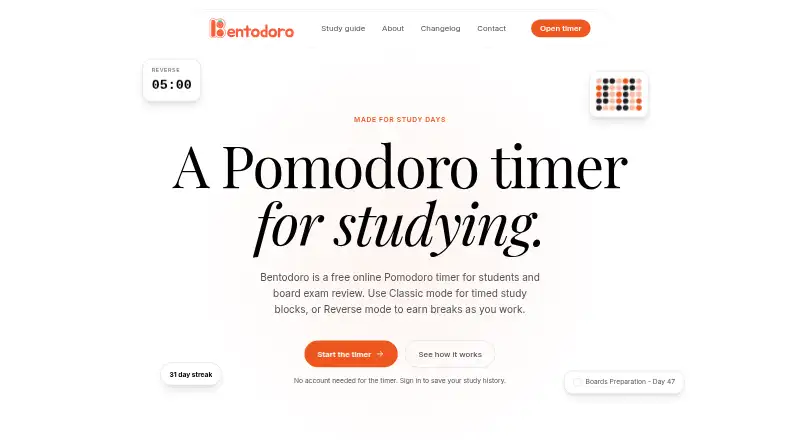
Bentodoro is a free online Pomodoro timer aimed at students and board exam reviewers. Classic mode counts down from a chosen work duration, while Reverse mode counts up and earns break time as the session continues. The timer works without an account, but saving study activity and plans requires sign-in. Signed-in users can track subjects and topics, save sessions, and schedule review tasks on a calendar. Statistics include streaks, weekly activity, an activity heatmap, subject breakdowns, session modes, the most productive day, and monthly trends. On supported browsers, Mini timer opens a small Picture-in-Picture window; the changelog specifies Chrome and Edge. Google Sign-In is available. Supabase handles sign-in and saved study data, while timer settings, layout, appearance, and sign-in information are stored in the browser. The privacy policy says collected information may include email, username, sessions, tasks, settings, timestamps, and analytics data. The free plan includes both timer modes and study tracking features.
Good
- Two timer modes: Classic countdown and Reverse count-up
- Timer usable without an account
- Signed-in users can track subjects and schedule reviews
- Statistics include streaks, heatmaps, and monthly trends
- Free plan includes both modes and study tracking
Watch out
- Saving activity and plans requires sign-in
- Mini timer is limited to supported browsers
- Privacy policy lists collected account and activity data
- Absolute security cannot be guaranteed
Who it suits
Bentodoro suits students and board exam reviewers who want a timer alongside records of subjects, topics, and review plans. It can be used without an account, though saving activity and plans requires sign-in.
Verdict
Bentodoro combines a no-account-needed timer with study tracking and detailed activity statistics for signed-in users. Check the sign-in requirement for saved plans and the listed data handling if those matter to you.
Plans and prices
From Bentodoro's own pricing page, checked 2 Oct 2026.
| Plan | Price | What it gives you |
|---|---|---|
| Free | Free | Both timer modes · study tracking features |
The facts
Each one read from Bentodoro's own pages, with the date it was checked.
What it does
- Account requirement
- The timer can be used without an account; saved activity and plans require sign-in.checked 2 Oct 2026
- Data collected
- The privacy policy says collected information can include email address, username if provided, Pomodoro sessions, tasks, settings, timestamps, and analytics data.checked 2 Oct 2026
- Integrations
- The privacy policy names Spotify as a focus music player and says embedded media can connect to its providers and use cookies or identifiers.checked 2 Oct 2026
- Intended users
- The maker says Bentodoro began as a personal project for board exam review and is also used by other students and board exam reviewers.checked 2 Oct 2026
- Mini timer
- On supported browsers, Mini timer opens a small Picture-in-Picture window; the changelog says it works in Chrome and Edge.checked 2 Oct 2026
- Privacy and storage
- Supabase handles account sign-in and stores saved study data, while timer settings, layout, appearance, and sign-in information are stored in the browser.checked 2 Oct 2026
- Purpose
- Bentodoro is a free online Pomodoro timer made for students and board exam review.checked 2 Oct 2026
- Security
- Bentodoro says it uses commercially acceptable measures to protect personal data but cannot guarantee absolute security.checked 2 Oct 2026
- Sign-in
- Google Sign-In is available on the sign-in and sign-up screens.checked 2 Oct 2026
- Statistics
- The statistics page includes streaks, a weekly overview, an activity heatmap, subject breakdowns, session modes, a most productive day, and a monthly trend.checked 2 Oct 2026
- Study records
- Signed-in users can save study activity, track subjects and topics, and put review tasks on a calendar.checked 2 Oct 2026
- Support
- The maker invites users to message him about problems or suggestions and lists [email protected] for privacy questions.checked 2 Oct 2026
- Timer modes
- Classic counts down from a set work time, while Reverse counts up as you work and earns break time.checked 2 Oct 2026
Where it runs
- Platforms
- Bentodoro works in desktop and mobile browsers, and its initial release notes say it is installable as a PWA on any device.checked 2 Oct 2026
Alternatives to Bentodoro
- 1

Brainscape
Free planAndroidiOSWebAPI8.2From $7.99 a month - 2

Forest
Free planAndroidiOSWebExtension8.1From $35.99 a year - 3
Study Bunny
Free planAndroidiOSmacOS7.8$1.99 one-time - 4
Cloud Outliner
Free planiOSmacOS7.7$4.99 one-time - 5
FLIP
Free planAndroidiOS7.4From $8.99 a year - 6
FlashPrep
Free planAndroidWeb7.3From ₹499 a year