bemenu
bemenu is a dynamic menu library and client program inspired by dmenu.
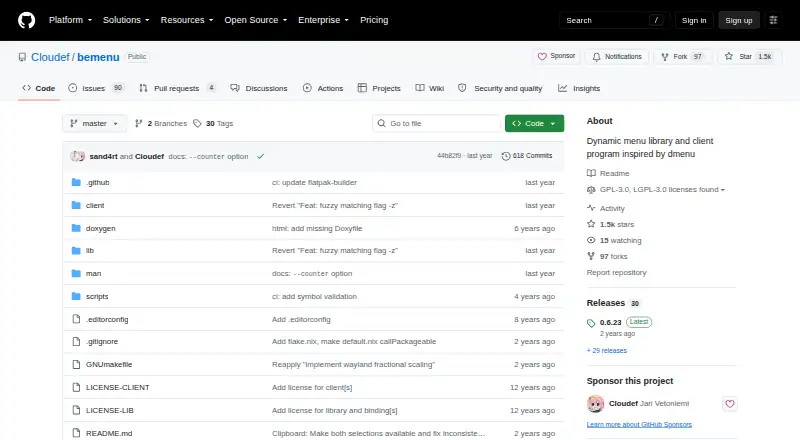
What bemenu is
bemenu is a dynamic menu library and client program inspired by dmenu. The project provides bemenu and bemenu-run clients, with build targets for curses, X11, and Wayland backends. Users can configure environment variables for options, backend selection, renderer paths, and rendering scale. Default keyboard controls are documented, with optional Vim-style bindings enabled through --binding vim. Wayland use requires a compositor implementing the wlr-layer-shell protocol, typically one based on wlroots. Clipboard pasting uses wl-paste and xclip at runtime, tried in that order. Building requires a C compiler, and scdoc is needed to generate the man page. The project documents macOS build instructions using Homebrew prerequisites and build-osx.sh; its provided Nix expression installs only the curses backend. The client program and most sources use GNU GPLv3 or later, while the library and bindings use GNU LGPLv3 or later. It is free and open source, with no paid plans or usage limits stated.
Good
- Includes bemenu and bemenu-run clients.
- Offers curses, X11, and Wayland build targets.
- Optional Vim-style keyboard bindings are available.
- Clipboard pasting supports wl-paste and xclip.
Watch out
- Wayland requires wlr-layer-shell support.
- Building requires a C compiler.
- scdoc is needed to generate the man page.
- The provided Nix expression installs only curses.
Who it suits
bemenu suits Linux or macOS users looking for a configurable menu client and library. Wayland users need a compositor that implements wlr-layer-shell.
Verdict
bemenu offers multiple backends and configurable keyboard behavior for a dynamic menu workflow. Check the backend and compositor requirements before choosing a build.
Plans and prices
From bemenu's own pricing page, checked 10 Oct 2026.
| Plan | Price | What it gives you |
|---|---|---|
| bemenu | Free | No paid plans or usage limits stated; GPLv3 client and LGPLv3 library |
The facts
Each one read from bemenu's own pages, with the date it was checked.
What it does
- Additional integration
- The project lists pinentry-bemenu, a Pinentry implementation based on bemenu, as a project using it.checked 10 Oct 2026
- Backends
- The available build targets include X11, Wayland, and curses backends.checked 10 Oct 2026
- Build options
- The documented build targets include the bemenu and bemenu-run clients and curses, X11, and Wayland backends.checked 9 Oct 2026
- Build requirements
- Building requires a C compiler, and scdoc is needed to generate the man page.checked 10 Oct 2026
- Clients
- The project provides the bemenu and bemenu-run clients.checked 10 Oct 2026
- Clipboard
- Clipboard pasting uses wl-paste and xclip at runtime, attempted in that order.checked 9 Oct 2026
- Clipboard integration
- Clipboard pasting uses wl-paste and xclip at runtime, attempted in that order.checked 10 Oct 2026
- Customization
- Environment variables can set options, choose a backend, select renderer paths, and override rendering scale.checked 10 Oct 2026
- Install scope
- The README says the provided Nix expression installs only the curses backend.checked 9 Oct 2026
- Integration
- The README lists pinentry-bemenu as a project using bemenu.checked 9 Oct 2026
- Keyboard controls
- Default keybindings support navigation, filtering, selection, execution, and multi-selection.checked 10 Oct 2026
- Licensing
- The client program and other sources are under GNU GPLv3 or later, while the library and bindings are under GNU LGPLv3 or later.checked 10 Oct 2026
- Purpose
- bemenu is a dynamic menu library and client program inspired by dmenu.checked 10 Oct 2026
- Release security
- The README says releases are signed with the listed PGP key and published on GitHub.checked 10 Oct 2026
- Release signing
- The README says releases are signed with key 29317348D687B86B and published on GitHub.checked 9 Oct 2026
- Vim bindings
- Vim-style normal-mode bindings can be enabled with the --binding vim option.checked 10 Oct 2026
- Wayland compatibility
- Wayland support requires a compositor implementing the wlr-layer-shell protocol, typically a wlroots-based compositor.checked 9 Oct 2026
- Wayland support
- Wayland is supported only by compositors implementing the wlr-layer-shell protocol, typically wlroots-based compositors.checked 10 Oct 2026
Where it runs
- macOS build
- The README provides macOS build instructions using Homebrew prerequisites and build-osx.sh.checked 9 Oct 2026
- macOS installation
- The README documents building on OSX with Homebrew prerequisites GNU Make and pkg-config, and also provides a build-osx.sh flow.checked 10 Oct 2026
The full review of bemenu
bemenu is a dynamic, keyboard-driven menu library and client program for people who prefer assembling a launcher around their own desktop stack. It fits Linux users who can compile software and verify compositor support, while macOS users have a documented build path. It is a strong choice for configurable command launching, but a poor match for anyone expecting integrated file search or workflow automation.
Overview
The project supplies two clients, bemenu and bemenu-run, and lets a build target curses, X11, or Wayland. That breadth makes it adaptable across terminal and graphical environments, although it also makes setup part of the experience rather than an afterthought. Building requires a C compiler, and scdoc is needed to generate the man page. The provided Nix expression installs only the curses backend, an important limitation for users who expect a graphical interface from that route.
Command launching is supported, but file search and workflow support are not. The project also lists pinentry-bemenu, a Pinentry implementation based on bemenu, as a practical integration for users who want the menu in credential-entry workflows.
Key features
Backends and clients
Curses, X11, and Wayland targets let users select an interface appropriate to their environment, while bemenu and bemenu-run cover the available client roles. Wayland support is conditional: the compositor must implement the wlr-layer-shell protocol, as is typical of wlroots-based compositors. Users on a different Wayland compositor should treat that requirement as a compatibility gate, not a minor configuration detail.
Configuration and keyboard control
Documented environment variables expose options, backend selection, renderer paths, and rendering scale. Default keyboard bindings are documented, and --binding vim enables Vim-style normal-mode controls. This is valuable for keyboard-first users who want predictable interaction and rendering adjustments, but it assumes willingness to manage configuration rather than rely on a polished preferences window.
Clipboard and builds
Clipboard pasting invokes wl-paste and xclip at runtime, attempted in that order, so the relevant utility must be present for clipboard behavior to work. macOS users can follow the documented Homebrew prerequisites, GNU Make and pkg-config, together with the build-osx.sh flow. Releases are published on GitHub and signed with key 29317348D687B86B.
Pricing
bemenu is open source and free: the bemenu plan costs free. There are no paid plans, usage quotas, trial period, seat charges, or renewal terms. The client program and other sources, except the library and bindings, use GNU GPLv3 or later; the library and bindings use GNU LGPLv3 or later. That licensing split matters if you plan to embed the library or redistribute a client.
Platforms
bemenu supports Linux and macOS, with cross-platform support expressed through its available builds. Linux users can choose curses, X11, or Wayland where the compositor satisfies wlr-layer-shell. macOS has a documented source-build procedure rather than a turnkey installation experience.
Who it's for
Choose bemenu if you want a free, source-available menu that launches commands and can be shaped around keyboard habits, backend preference, and renderer settings. It is especially appropriate for Linux users running X11, curses, or a wlroots-style Wayland compositor, and for technically confident macOS users comfortable building from source. Look elsewhere if you need built-in file search, workflow extensions, cloud synchronization, or a graphical setup flow.
Pros and cons
- Pros: Three backend targets cover curses, X11, and compatible Wayland desktops.
- Pros: Environment-variable configuration and optional Vim bindings give keyboard-oriented users meaningful control.
- Pros: The software is free and open source, with clearly separated GPLv3 and LGPLv3 licensing.
- Cons: Wayland works only with wlr-layer-shell compositors, excluding other Wayland arrangements.
- Cons: Compilation needs a C compiler and scdoc, and the Nix expression provides only curses.
- Cons: There is no file search or workflow support, limiting it as a general productivity launcher.
Alternatives
See the App Launcher Software list for broader comparisons.
- Raycast is the better pick for a polished macOS or Windows launcher with extensions, a free tier, and a free trial.
- Launchy suits users wanting a free launcher across Android, Linux, macOS, and Windows with a pay-what-you-want model.
- Alfred is preferable on macOS when app launching and file searching matter, with a free core and a $34.00 one-time single license.
- Cerebro offers a free, MIT-licensed open-source alternative for Linux, macOS, and Windows.
- Ueli is a free option for Linux, macOS, and Windows without paid plans or usage limits stated.
- Appetizer is a free, open-source choice focused on Windows and self-hosted use.
- Dropzone is a macOS freemium option with app, folder, and action grids plus a Drop Bar.
- PortableApps.com Platform is a free, open-source launcher platform spanning Linux, macOS, and Windows.
Verdict
bemenu is best for technically capable users who want a lightweight, configurable command menu and control over the backend and keyboard model. Its main reason to choose it is that flexibility at no cost; its main reason to look elsewhere is the build work and strict Wayland compositor requirement, especially when file search or richer workflows are essential.
Getting started
- Open the bemenu GitHub project
- Install a C compiler and scdoc
- Choose a curses, X11, or Wayland build target
- For macOS, install Homebrew prerequisites including GNU Make and pkg-config
- Build with the documented process or build-osx.sh on macOS
- Use bemenu or bemenu-run
Questions
Is bemenu free?
Yes. bemenu is free and open source, with no paid plans or usage limits stated.
Which platforms does bemenu support?
The listed platforms are Linux and macOS. Its supported backends include curses, X11, and Wayland.
What does Wayland support require?
Wayland requires a compositor implementing the wlr-layer-shell protocol, typically a wlroots-based compositor.
Can bemenu use Vim-style controls?
Yes. Vim-style normal-mode bindings can be enabled with the --binding vim option.
How does clipboard pasting work?
At runtime, clipboard pasting tries wl-paste first and xclip second.
What licenses apply?
The client program and other sources except the library and bindings use GNU GPLv3 or later. The library and bindings use GNU LGPLv3 or later.
Alternatives to bemenu
- 1

Raycast
Free planiOSAPIExtensionmacOS8.7From $96 a year - 2

Alfred
Free planiOSAPImacOS8.5£34 one-time - 3
Launchy
Free planOpen sourceAndroidAPILinuxmacOS8.4Free plan - 4
PortableApps.com Platform
Free planOpen sourceLinuxmacOSWindows8.2Free plan - 5
Dropzone
Free planAPImacOS8.1Free plan - 6
dmenu
Free planOpen sourceLinuxmacOSSelf-hosted7.8Free plan