
Ueli
Ueli is a free keystroke launcher for Linux, macOS and Windows.
What Ueli is
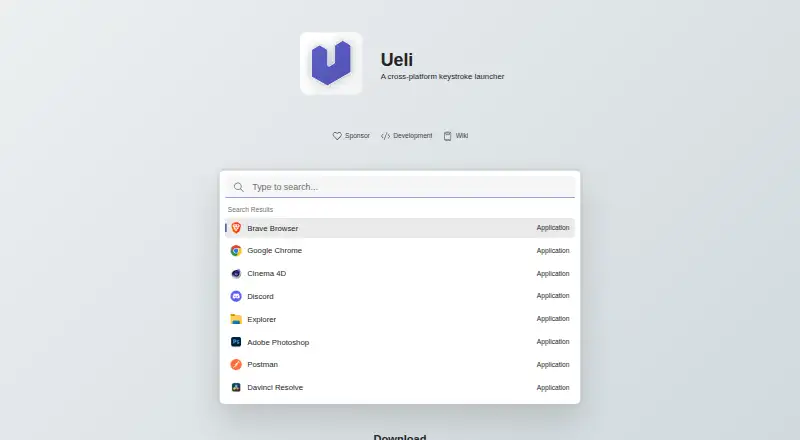
Ueli is a free keystroke launcher for Linux, macOS and Windows. Users can type to find items, show or hide the app with a hotkey, and press Enter to launch a selected result. Frequently used items can be placed in Favorites so they appear first in search results. A selected result can also offer further actions, opened with Cmd+K on macOS or Ctrl+K on Windows and Linux. Listed extensions include application search, browser bookmarks, calculator, currency conversion, DeepL Translator, file search, terminal launching, Visual Studio Code and web search. Each enabled extension has its own settings section, where users can configure or disable it. Ueli is available for Windows through the Microsoft Store or winget using the Microsoft Store source; Linux and macOS downloads are also provided. The privacy statement says Ueli does not collect, store or share personal, usage, device or location data, and does not share information with third-party services. The README notes platform-specific installation and hotkey caveats: unsigned Windows binaries may be blocked, macOS builds are unsigned and not notarized, and global hotkeys may fail in Wayland sessions.
Good
- Free, with no paid plans or usage limits stated.
- Favorites appear first in search results.
- Extensions cover search, calculations and translation.
- Privacy statement says it does not collect personal or usage data.
Watch out
- Windows binaries downloaded manually are unsigned.
- macOS binaries are unsigned and not notarized.
- Global hotkeys may fail in Wayland sessions.
Who it suits
Ueli suits people who want a keyboard-driven way to search for and launch items across Linux, macOS or Windows. Its listed extensions can add tools such as file search, calculations and web search.
Verdict
Ueli offers a free launcher with configurable extensions across three desktop platforms. Check the signing and Wayland caveats before choosing a download or relying on global hotkeys.
Plans and prices
From Ueli's own pricing page, checked 3 Oct 2026.
| Plan | Price | What it gives you |
|---|---|---|
| Free | Free | No paid plans or usage limits stated |
The facts
Each one read from Ueli's own pages, with the date it was checked.
What it does
- Actions
- Users can open additional actions for a selected search result with Cmd+K on macOS or Ctrl+K on Windows and Linux.checked 3 Oct 2026
- Configurable extensions
- Users can enable or disable extensions and configure each enabled extension in its own settings section.checked 3 Oct 2026
- Extensions
- Listed extensions include application search, browser bookmarks, calculator, currency conversion, DeepL Translator, file search, terminal launcher, Visual Studio Code, and web search.checked 3 Oct 2026
- Extension settings
- The README says enabled extensions add a navigation item where users can configure that extension.checked 3 Oct 2026
- Favorites
- Users can add frequently used items to Favorites, which places them first in the search results.checked 3 Oct 2026
- How to use
- Users can open or hide Ueli with the Alt+Space hotkey, search, and launch a selected result with Enter.checked 3 Oct 2026
- Privacy statement
- The privacy statement says Ueli does not collect, store, or share personal data, usage data, device information, or location data.checked 3 Oct 2026
- Product
- Ueli describes itself as a cross-platform keystroke launcher.checked 3 Oct 2026
- Search
- The launcher lets users type to find items and use a hotkey to show or hide the app.checked 3 Oct 2026
- Support
- For troubleshooting, the README directs users to Settings and Debug, where logs may help identify problems.checked 3 Oct 2026
- Third-party data sharing
- The privacy statement says Ueli does not share information with third-party services.checked 3 Oct 2026
Where it runs
- Linux availability
- The maker provides Linux downloads.checked 3 Oct 2026
- Linux limitation
- Global hotkeys may not work in Wayland sessions; the README suggests configuring a system shortcut as a workaround.checked 3 Oct 2026
- macOS availability
- The maker provides macOS downloads, which are unsigned and not notarized, so macOS may block them until the user allows opening the app in Privacy & Security settings.checked 3 Oct 2026
- macOS signing
- The README says the macOS binaries are neither signed nor notarized and macOS may block them from opening.checked 3 Oct 2026
- Platforms
- The installation instructions provide versions for Windows, macOS, and Linux.checked 3 Oct 2026
- Windows availability
- Ueli is available from the Microsoft Store and can also be installed with winget using the Microsoft Store source.checked 3 Oct 2026
- Windows signing
- The README says manually downloaded Windows binaries are not signed and Windows may prevent installation or opening.checked 3 Oct 2026
The full review of Ueli
Ueli is a keyboard-driven launcher for people who want to find and open desktop items without navigating menus. It is best suited to users who want one configurable launcher on Linux, macOS and Windows. Its extension range and free plan make it a practical option, provided you can work around platform-specific installation or hotkey snags.
Overview
Press Alt+Space to show or hide Ueli, type to search, then press Enter to launch a result. That keeps common desktop tasks within a compact keyboard flow, while additional actions on selected results give the launcher a role beyond opening items.
Ueli’s privacy statement says it does not collect, store or share personal data, usage data, device information or location data, and does not share information with third-party services. That is a meaningful assurance for software used to search across desktop items.
Key features
Extensions cover application search, browser bookmarks, file search, web search, a terminal launcher and Visual Studio Code, as well as a calculator, currency conversion and DeepL Translator. Users can enable or disable extensions and configure each enabled one in its own settings section. This breadth makes Ueli adaptable to different routines; the ability to turn extensions off helps keep the launcher focused on the tools you actually use.
Favorites put frequently used items first in search results, which is useful when the same targets recur. For more control over a result, Cmd+K on macOS or Ctrl+K on Windows and Linux opens additional actions. These shortcuts add flexibility without changing the core search-and-launch flow.
Pricing
Ueli is free: its Free plan costs nothing. There is no free trial because there are no paid plans to try, and no usage limits are stated. That makes it an easy fit for anyone seeking a no-cost desktop launcher, rather than a product whose core value depends on moving to a subscription.
Platforms
Ueli supports Linux, macOS and Windows. Windows users can install it from the Microsoft Store or with winget using the Microsoft Store source. Manually downloaded Windows binaries are unsigned, and Windows may prevent installation or opening. The Store route is the straightforward availability option.
The maker provides macOS downloads, but those binaries are unsigned and not notarized. macOS may block them until you allow the app to open in Privacy & Security settings, a friction point for users who prefer software to launch without a security override.
Linux downloads are available, though global hotkeys may fail in Wayland sessions. Configuring a system shortcut is the suggested workaround. If reliable global hotkeys are essential and you use Wayland, that extra setup may make Ueli a less convenient choice.
Who it's for
Ueli suits people who prefer keyboard access to applications, files and other searchable items, especially those who want to tune the launcher with extensions or use it across different desktop platforms. Its privacy position and free price also suit users looking for a lightweight way to bring several common tasks into one search interface.
It is less compelling for anyone who expects a smooth, signed installation on macOS or manually downloaded Windows builds, or who depends on global hotkeys working without configuration in Wayland. For troubleshooting, Ueli directs users to Settings and Debug, where logs may help identify problems.
Pros and cons
- Pros: Free use across Linux, macOS and Windows makes it accessible to users on all three desktop platforms.
- Pros: Extensions span search, utilities and translation, and can be individually enabled and configured.
- Pros: Favorites prioritize recurring targets, while keyboard shortcuts expose search and additional result actions.
- Pros: The privacy statement rules out collection, storage or sharing of personal, usage, device and location data.
- Cons: Unsigned Windows downloads and unsigned, unnotarized macOS binaries can trigger operating-system blocks or extra steps.
- Cons: Wayland users may need to configure a system shortcut if global hotkeys do not work.
Alternatives
Compare app launcher software if you want to weigh Ueli against a broader set of launchers.
- Raycast is worth considering if its freemium plan, free trial and thousands of extensions better fit your needs; its free plan includes three months of Clipboard History and five Notes.
- Launchy is another free option for Linux, macOS and Windows, and also supports Android; its pay-what-you-want plan is downloadable free, with a recommended value of $10 USD and a suggestion to consider paying $3.
- Alfred is a macOS-focused alternative with free app launching and file searching. Its Single License costs $34, paid once for one user’s two own Macs and the current version.
- dmenu is a free Linux option built as an X11 dynamic menu under the MIT/X Consortium License.
- foot is a free Wayland terminal emulator under the MIT license, rather than a cross-platform launcher.
- Rofi is a free Linux and macOS alternative; its development version has no tarball release.
- Executor is a free Windows and self-hosted alternative under the MIT license, with commercial use allowed.
- GiMeSpace QuickMenu is a free Windows program for Windows XP and up, with two downloads for different display resolutions.
Verdict
Choose Ueli if you want a free, configurable keyboard launcher with useful extensions and support across Linux, macOS and Windows. Its main advantage is bringing varied search and utility extensions into one interface; its main drawback is the potential setup friction from unsigned installers and Wayland hotkey limitations. If those caveats suit your platform and tolerance for configuration, Ueli is a sensible choice; if not, compare alternatives for a better fit.
Alternatives to Ueli
- 1

Raycast
Free planiOSAPIExtensionmacOS8.7From $96 a year - 2

Alfred
Free planiOSAPImacOS8.5£34 one-time - 3
Launchy
Free planOpen sourceAndroidAPILinuxmacOS8.4Free plan - 4
PortableApps.com Platform
Free planOpen sourceLinuxmacOSWindows8.2Free plan - 5
Dropzone
Free planAPImacOS8.1Free plan - 6
dmenu
Free planOpen sourceLinuxmacOSSelf-hosted7.8Free plan