
Apexo
Apexo is an open-source dental practice manager for clinics that need scheduling, patient records, and operational reporting.
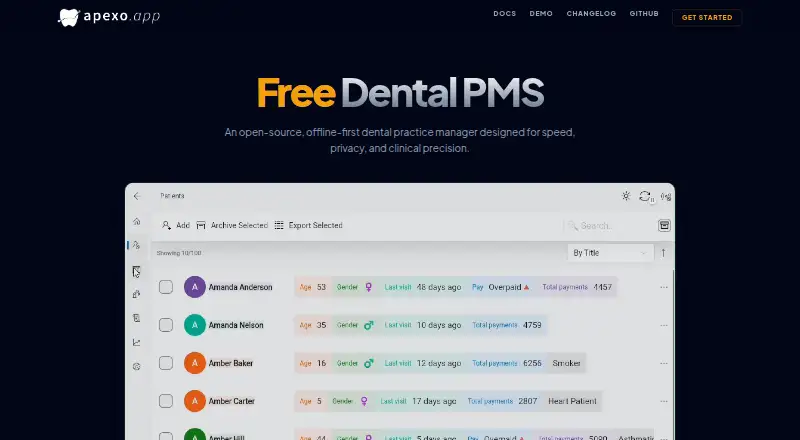
What Apexo is
Apexo is an open-source dental practice manager for clinics that need scheduling, patient records, and operational reporting. Its calendar is built for scheduling in busy clinics, while patient profiles can hold medical and dental records. Automated financial reports and clinic health statistics help organize practice information.
The app is designed to keep data local and work offline, then sync across endpoints. Clinics can host the required PocketBase backend themselves; on first login, Apexo creates the collections and values it needs. The manual also describes scheduled or manual backups, with an option to store backup files through an S3 provider. Other documented capabilities include AI voice transcription and receipt scanning, with a privacy notice that data is not used for training. On Windows, Apexo can monitor folders for DICOM X-ray files from RVG sensors and sync imported images through PocketBase. Its documented integrations include PocketBase, SMTP email, and S3-compatible storage. Apexo is free under GNU GPLv3 and is available for Android, iOS, macOS, web, and Windows. The current rewrite cannot import data from the earlier Apexo application.
Good
- Open-source and free under GNU GPLv3.
- Works offline and syncs data across endpoints.
- Includes medical and dental patient records.
- Automates financial reports and clinic health statistics.
- Supports scheduled and manual backups.
- Available on Android, iOS, macOS, web, and Windows.
Watch out
- Clinics must host their own PocketBase server.
- Data cannot be migrated from the earlier Apexo application.
- Apexo can monitor Windows folders for the described DICOM import.
Who it suits
Apexo suits dental clinics that want patient records, busy-clinic scheduling, and financial and clinic-health reporting in one system. It is a fit for practices prepared to host a PocketBase backend and manage their own server-side data.
Verdict
Choose Apexo if your clinic wants an open-source practice manager with offline operation, patient records, and reporting, and can run its own PocketBase backend. Look elsewhere if you need to migrate data from the earlier Apexo application.
Plans and prices
From Apexo's own pricing page, checked 11 Oct 2026.
| Plan | Price | What it gives you |
|---|---|---|
| Free | Free | Free dental PMS; open source under GNU GPLv3; requires a PocketBase server that users host themselves |
The facts
Each one read from Apexo's own pages, with the date it was checked.
What it does
- AI features
- The manual describes AI voice transcription and receipt scanning, with a privacy notice stating that data is not used for training.checked 11 Oct 2026
- Backups
- The manual says users can schedule automatic backups, create manual backups, and optionally store backup files with an S3 provider.checked 11 Oct 2026
- Hosting
- The maker says users can host their own PocketBase backend, and the app creates its required collections and values on first login.checked 11 Oct 2026
- Integrations
- The manual documents PocketBase for the backend, SMTP for email, and S3-compatible storage for backups and uploaded photos.checked 11 Oct 2026
- Languages
- The homepage lists English, Arabic, Spanish, Polish, and Kurdish.checked 11 Oct 2026
- Notable migration limit
- The maker says data cannot be migrated from the earlier Apexo application because the current version is a rewrite.checked 11 Oct 2026
- Patient records
- It tracks comprehensive medical and dental records for patients.checked 11 Oct 2026
- Product
- Apexo is an open-source, offline-first dental practice manager designed for speed, privacy, and clinical precision.checked 11 Oct 2026
- Reporting
- It provides automated financial reports and clinic health statistics.checked 11 Oct 2026
- Scheduling
- Its calendar is optimized for scheduling in high-traffic clinics.checked 11 Oct 2026
- Security
- The homepage says clinic data lives on the user's own servers; the manual advises using HTTPS and describes account permissions and backups.checked 11 Oct 2026
- Support
- The project directs users to report bugs or submit contributions through GitHub, and the maker says development is done in free time at their own clinic.checked 11 Oct 2026
- Sync and offline
- The product describes local-first data that works without internet and syncs across endpoints.checked 11 Oct 2026
- X-ray import
- Apexo can watch folders on Windows for DICOM X-ray files from RVG sensors and sync imported images to other devices through PocketBase.checked 11 Oct 2026
The company
- Headquarters
- Mosul, Iraqchecked 28 Sep 2026
- Maker location
- The project README says Apexo was built in Mosul, Iraq.checked 11 Oct 2026
The full review of Apexo
Apexo is a free, open-source dental practice manager for clinics that want scheduling, clinical records, reporting, and offline-capable work under their own infrastructure. It fits practices able to host a PocketBase backend and take responsibility for backups and security. The trade-off is that the current rewrite cannot import data from the earlier Apexo application.
Overview
Apexo combines a calendar designed for high-traffic clinics with provider calendars, comprehensive medical and dental records, automated financial reports, and clinic-health statistics. That breadth makes it a practice-management system rather than a booking calendar, especially for teams that want clinical and operational information together.
Its local-first approach allows work to continue without an internet connection and synchronizes data across endpoints when connectivity returns. This is valuable for clinics with unreliable internet, although the model requires more technical ownership than a hosted service. Users host the PocketBase backend themselves; on first login, Apexo creates the collections and values it needs. Clinic-controlled servers can strengthen data ownership, but the clinic must configure HTTPS, maintain the server, manage permissions, and protect its backups.
Key features
Scheduling and records
The busy-clinic calendar and provider calendars support coordination across practitioners. Comprehensive medical and dental records keep patient information with appointments, making Apexo a better fit for ongoing clinical workflows than a scheduling-only product.
Reporting and backups
Automated financial reports and clinic-health statistics provide recurring visibility into practice operations. The manual also supports scheduled automatic backups and on-demand manual backups. Backup files can optionally be stored with an S3 provider, giving administrators a route to separate backup storage rather than keeping every copy on the main server.
Privacy-oriented tools
AI voice transcription and receipt scanning are documented with a privacy notice saying data is not used for training. Windows users can have Apexo watch folders for DICOM X-ray files from RVG sensors; imported images then synchronize to other devices through PocketBase. PocketBase, SMTP email, and S3-compatible storage are the documented integration points.
Languages and support
The homepage lists English, Arabic, Spanish, Polish, and Kurdish. Bug reports and contributions go through GitHub. Development is done in free time at the maker's own clinic, so teams should be comfortable with community-oriented support rather than assuming a conventional enterprise support operation.
Pricing
Free — free
The sole plan is a free dental PMS released under GNU GPLv3. It includes the open-source application, but requires a PocketBase server that the clinic hosts itself. There are no paid tiers or published seat charges, so the financial advantage is clear for practices with the technical capacity to operate the backend. Hosting, maintenance, HTTPS configuration, storage, and backup administration remain part of the clinic's responsibilities.
Platforms
Apexo runs on Android, iOS, macOS, web, and Windows. Windows additionally supports folder watching for DICOM X-ray imports from RVG sensors, while synced images can be viewed across other devices through PocketBase.
Who it's for
Apexo is suited to dental clinics that need provider-aware scheduling, patient records, reporting, and offline continuity, and that want their data on servers they control. It is particularly compelling where internet reliability is a concern or where an open-source, no-license-cost system is preferable.
It is a weaker fit for practices wanting a fully managed backend, conventional vendor-operated support, or a simple appointment tool without infrastructure work. Clinics moving from the earlier Apexo application should also plan for a fresh start because that data cannot be migrated to this rewrite.
Pros and cons
Pros
- Free and open source: GNU GPLv3 licensing avoids a software subscription and permits an independently hosted deployment.
- Offline-first workflow: Staff can continue working without internet and synchronize across endpoints later.
- Broad dental workflow coverage: Scheduling, provider calendars, records, financial reporting, and clinic statistics are combined.
- Clinic-controlled data: Self-hosting, HTTPS guidance, permissions, and flexible backup options support direct infrastructure control.
- Useful automation: AI transcription, receipt scanning, and DICOM folder monitoring address documentation and imaging tasks.
Cons
- Self-hosting is mandatory: Every clinic must provide and maintain a PocketBase server rather than relying on a managed service.
- Operational responsibility stays with the clinic: Security configuration, backups, storage, and uptime require internal ownership.
- No migration from the earlier Apexo: Existing users of that application cannot carry its data into the rewrite.
- Community-led support: The stated support route is GitHub, with development performed in free time at the maker's clinic.
Alternatives
Open Dental is the stronger alternative for practices wanting a freemium product with a free trial and a wider platform range that includes self-hosted deployment.
Oryx Dental suits clinics prepared for a paid system whose startup offer begins at 200 patients or 12 months after signup.
Dentella is worth choosing for Android, iOS, or web clinics seeking a free one-chair plan and separately priced AI check-in and self-screening options.
Denteasy fits practices wanting a free first three months with appointments, digital records, and analytics before moving to a paid clinic plan.
ExACT Medical & Oral is a Windows-only alternative with a freemium structure and a free Locum plan.
DentinCloud is preferable when a web service with a free tier capped at two users, 250 patients, and 500 MB is sufficient.
ABELDent offers a Windows freemium option for practices willing to pay separately for support, training, updates, migration, and premium options.
Curve Dental is an alternative for clinics seeking a paid product across desktop and mobile platforms with specially priced implementation and licenses.
Verdict
Choose Apexo if your dental clinic wants a genuinely free, open-source manager with offline operation, records, reporting, and control of its own data. Look elsewhere if self-hosting is unacceptable, you need conventional vendor support, or you are migrating from the earlier Apexo application.
Getting started
- Open https://apexo.app/.
- Choose a supported platform: Android, iOS, macOS, web, or Windows.
- Host a PocketBase backend for the clinic.
- Log in so Apexo can create its required collections and values.
Limits worth knowing
The free plan requires users to host their own PocketBase server. The current rewrite cannot migrate data from the earlier Apexo application.
Questions
How much does Apexo cost?
Apexo's Free plan costs nothing.
Is Apexo open source?
Yes. It is open source under GNU GPLv3.
What platforms does Apexo support?
The listed platforms are Android, iOS, macOS, web, and Windows.
Does Apexo work offline?
Yes. It is designed to work with local data without internet and sync across endpoints.
What backend and integrations does Apexo use?
Users host the required PocketBase backend. The manual also documents SMTP for email and S3-compatible storage for backups and uploaded photos.
Can I migrate data from the earlier Apexo application?
No. The current version is a rewrite and cannot migrate data from the earlier application.
Alternatives to Apexo
- 1
Oryx Dental
Free planAndroidiOSWebAPI8.1Free plan - 2

Dentella
Free planAndroidiOSWeb7.9From ₹299 a month - 3
Open Dental
Free planAndroidiOSWebAPI7.7From $89 a month - 4

Denteasy
Free planAndroidiOSWeb7.3Free plan - 5

DentinCloud
Free planWebAPI7.3From $11 a month - 6
Practice-Web
AndroidiOSWebWindows7.2From $35 a month