AnimateDiff
AnimateDiff is a plug-and-play module that turns many community text-to-image models into animation generators without additional training.
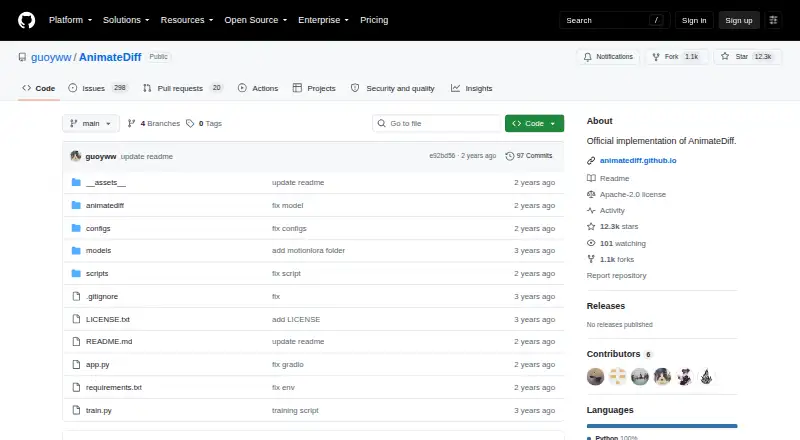
What AnimateDiff is
AnimateDiff is a plug-and-play module that turns many community text-to-image models into animation generators without additional training. Its main branch targets Stable Diffusion 1.5, with a separate branch for Stable Diffusion XL. MotionLoRA adapts motion modules for patterns such as camera zooming and rolling; SparseCtrl uses sparse RGB images or sketches to guide animation content. The project runs locally: install dependencies with pip and run its animation scripts, which save samples in a samples folder. A local Gradio demo can run at localhost:7860 by default. The project points to official Diffusers support and community integrations for Stable Diffusion WebUI and ComfyUI. Its scripts handle checkpoint downloads automatically, and model weights are linked through Hugging Face, Google Drive, and CivitAI. For SDXL beta inference, the project notes a typical need of about 13 GB of VRAM, depending on the personalized model and tuned settings. It lists small flicker and limited visual quality for general text-to-video as limitations, and recommends using images made by the same community model for closer style alignment. The repository lists an Apache-2.0 license and says the project is released for academic use.
Good
- Works with many community text-to-image models.
- MotionLoRA supports camera movement patterns.
- SparseCtrl accepts RGB images or sketches as input.
- Local Gradio demo is available.
- Scripts handle checkpoint downloads automatically.
Watch out
- SDXL beta inference usually needs about 13 GB of VRAM.
- Project notes small flicker.
- General text-to-video visual quality is limited.
- Released for academic use.
Who it suits
AnimateDiff suits people who want to animate personalized text-to-image models without model-specific tuning. It may fit users who can run the project locally and have the resources needed for their selected model.
Verdict
AnimateDiff adds animation workflows and motion controls to supported image models. Its stated limitations include flicker and limited general text-to-video quality, and SDXL inference can require substantial VRAM.
Plans and prices
From AnimateDiff's own pricing page, checked 4 Oct 2026.
| Plan | Price | What it gives you |
|---|---|---|
| AnimateDiff | Free | Released for academic use; no paid plans or pricing listed |
The facts
Each one read from AnimateDiff's own pages, with the date it was checked.
What it does
- Compute needs
- The SDXL beta section says inference usually requires about 13 GB of VRAM, depending on the personalized model and tuned hyperparameters.checked 4 Oct 2026
- Integrations
- The README points to official Diffusers support and community integrations for Stable Diffusion WebUI and ComfyUI.checked 4 Oct 2026
- Intended audience
- The project page presents AnimateDiff as a framework for animating personalized text-to-image models without model-specific tuning.checked 4 Oct 2026
- Interface
- A Gradio demo can be launched locally and runs at localhost:7860 by default.checked 4 Oct 2026
- Known limitations
- The project lists noticeable small flicker, limited visual quality for general text-to-video, and recommends using images made by the same community model for style alignment.checked 4 Oct 2026
- License and use
- The repository lists an Apache-2.0 license, while its disclaimer says the project is released for academic use and disclaims responsibility for user-generated content.checked 4 Oct 2026
- Model downloads
- The README links model weights through Hugging Face, Google Drive, and CivitAI, and says checkpoint downloads are handled automatically by the scripts.checked 4 Oct 2026
- Model support
- The main branch targets Stable Diffusion 1.5, while a separate branch is provided for Stable Diffusion XL.checked 4 Oct 2026
- Motion controls
- MotionLoRA adapts motion modules for patterns such as camera zooming and rolling.checked 4 Oct 2026
- Purpose
- AnimateDiff is a plug-and-play module that turns most community text-to-image models into animation generators without additional training.checked 4 Oct 2026
- Security
- The repository page does not state security certifications or compliance claims.checked 4 Oct 2026
- Setup
- The repository instructions install dependencies with pip and run animation scripts locally; generated samples are saved in a samples folder.checked 4 Oct 2026
- Sparse controls
- SparseCtrl accepts sparse RGB image or sketch inputs to control animation content.checked 4 Oct 2026
The full review of AnimateDiff
AnimateDiff is a plug-in framework that adds animation to many community text-to-image models without requiring model-specific retraining. It is best for technically comfortable creators who want local control over motion, image guidance, and model choice. Its free, open-source delivery is compelling for experimentation, but users seeking consistently polished video should weigh its documented visual limitations and hardware demands.
Overview
AnimateDiff works as a module layered onto personalized text-to-image models, turning still-image workflows into animation generators. The main branch is built around Stable Diffusion 1.5, with a separate branch for Stable Diffusion XL. That structure gives enthusiasts flexibility to keep using models they already prefer, rather than moving to a closed video service.
Installation uses pip, local scripts generate the animations, and output is written to a samples folder. A locally hosted Gradio interface is available at localhost:7860 by default. This is a good fit for self-hosters and developers; it is less suitable for anyone expecting a turnkey consumer editor.
Key features
Motion and content control
MotionLoRA adapts motion modules for patterns including camera zooms and rolling movement. In practice, that offers more deliberate camera behavior than relying on text prompts alone, although it does not address the project's stated small flicker. SparseCtrl accepts sparse RGB images or sketches, giving users a way to indicate what should appear and how content should develop across frames.
AnimateDiff supports image-to-animation workflows and exports MP4 files. For more consistent styling, the project recommends using images created with the same community model that will drive the animation; mixing unrelated model styles is therefore a weaker approach.
Model and ecosystem support
Stable Diffusion 1.5 is the primary target, while the SDXL branch extends compatibility to larger models. SDXL inference usually needs about 13 GB of VRAM, with the actual requirement changing according to the personalized model and tuned hyperparameters. Owners of modest GPUs may find the SD 1.5 path more practical.
The README points to official Diffusers support and community integrations for Stable Diffusion WebUI and ComfyUI. Model weights are linked through Hugging Face, Google Drive, and CivitAI, and the scripts handle checkpoint downloads automatically, reducing manual setup once the environment is configured.
Pricing
AnimateDiff — free. It is open source with no paid plans listed. That makes it suitable for students, hobbyists, and developers who can provide their own compatible computer and storage. The project is released for academic use, and its disclaimer disclaims responsibility for user-generated content, so commercial users should review whether that usage position fits their project before adopting it.
Platforms
AnimateDiff runs on Linux and supports self-hosted and web-based local access through its Gradio interface. The repository workflow is local rather than a hosted cloud service, so performance depends on the user's hardware, with SDXL commonly requiring around 13 GB of VRAM.
Who it's for
Choose AnimateDiff if you already work with community Stable Diffusion models, want motion modules or sketch-based guidance, and are comfortable installing Python dependencies and managing local checkpoints. It is particularly well suited to experimentation with personalized models and reproducible, self-hosted pipelines.
Look elsewhere if you need a polished general text-to-video result with minimal configuration. The project acknowledges limited visual quality for broad text-to-video use and noticeable small flicker, so demanding production work may require another workflow.
Pros and cons
- Pros: Free and open-source, with no subscription barrier.
- Pros: Works with many community text-to-image models without additional training.
- Pros: MotionLoRA and SparseCtrl provide camera-pattern and image-or-sketch guidance.
- Pros: Local scripts, Gradio, Diffusers, Stable Diffusion WebUI, and ComfyUI integrations support varied self-hosted workflows.
- Cons: Small flicker remains a documented limitation, which can undermine frame-to-frame polish.
- Cons: General text-to-video quality is limited, making it a weaker choice for broad prompt-only video generation.
- Cons: SDXL commonly needs about 13 GB of VRAM, excluding users with lighter hardware.
- Cons: Academic-use language and the content disclaimer may not suit every commercial deployment.
Alternatives
For hosted, consumer-oriented video creation, HeyGen offers a freemium web, Android, iOS, and API service; its free plan allows up to three one-minute videos per month. Pika is another freemium web, iOS, and API option, with a free tier based on packs rather than a monthly credit allowance.
Hedra suits users who prefer a credit-based hosted service, with Basic at $20 per month for 2,000 credits and Pro at $50 per month for 7,200 credits. Animate Photo AI is a web freemium alternative with a 50-credit free plan. LivePortrait is a free, self-hosted option across Linux, macOS, Windows, and web.
On mobile, Merge targets iOS with a free 300-credit monthly Starter plan, while PicAlive offers iOS animation with a free onboarding animation and usage limits. Immersity AI provides an API-based freemium route, including a free tier with watermarked conversions up to 720p for non-commercial use.
Browse AI Photo Animation Tools for more image-focused choices, or AI Animation Makers for a broader category comparison.
Verdict
AnimateDiff is a strong choice for technically capable creators who want a free, self-hosted way to animate personalized Stable Diffusion models with explicit motion and sparse-image controls. Choose it for model flexibility and local experimentation; look elsewhere when flicker, SDXL hardware requirements, or limited general text-to-video quality would compromise the final result.
Alternatives to AnimateDiff
- 1

HeyGen
Free planAndroidiOSWebAPI8.3From $24 a month - 2

PixVerse
Free planAndroidiOSWebAPI8.3From $8 a month - 3

Kling AI
Free planAndroidiOSWebAPI8.2From $6.99 a month - 4

Pika
Free planiOSWebAPI7.9From $8 a month - 5

Hedra
Free planWebAPISelf-hosted7.5From $20 a month - 6
Stable Video Diffusion
Free planOpen sourceAPISelf-hosted7.2Free plan