
Animate Old Photos
Animate Old Photos turns an uploaded image into a five-second video through a web tool, API, or browser extension.
What Animate Old Photos is
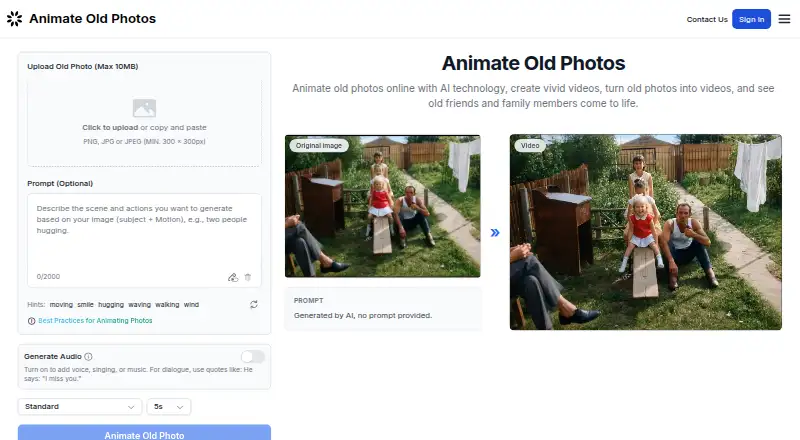
Animate Old Photos turns an uploaded image into a five-second video through a web tool, API, or browser extension. Face animation, camera motion, and lip-sync are supported, with output up to 1080p. Users may describe desired movement and optionally add generated voice, singing, or music. Uploads must be PNG, JPG, or JPEG files at least 300 × 300 pixels and no larger than 10 MB. The site also provides AI photo restoration, loved-one compositing, and an AI hug video generator. Animation uses 2–4 credits in Standard, 3–8 in Advanced, or 5–18 in Pro, depending on model and audio. Limited daily free trials may be available without sign-in, but there is no free plan. A Chrome and Edge extension works from a browser side panel. Storage depends on consent, while extension uploads and videos can remain up to 30 days.
Good
- Face, camera, and lip-sync animation
- Optional generated voice, singing, or music
- 1080p maximum output
- Chrome and Edge extension
- Limited daily trials may be available
Watch out
- No free plan
- Uploads limited to 10 MB
- Videos are fixed at five seconds
- Some credits expire after six months
Who it suits
Animate Old Photos suits people preserving family history, making gifts, exploring genealogy, or experimenting with old images. It also supports API, extension, and MCP-compatible workflows.
Verdict
Animate Old Photos combines short photo animation with restoration and compositing tools. Its file limits, credit-based pricing, and retention rules should be checked before uploading a collection.
Plans and prices
From Animate Old Photos's own pricing page, checked 7 Oct 2026.
| Plan | Price | What it gives you |
|---|---|---|
| Lite | $14.99, paid once | 30 credits · valid for 6 months · 7-day cloud history · One-time payment |
| Plus | $24.99, paid once | 50 credits · valid for 6 months · 7-day cloud history · One-time payment |
| Pro | $49.99, paid once | 110 credits · valid for 6 months · 7-day cloud history · One-time payment |
| 200 credits | $90, paid once | 200 credits · subscribers pay $81.00 · One-time payment |
| 500 credits | $220, paid once | 500 credits · subscribers pay $198.00 · One-time payment |
| 1000 credits | $430, paid once | 1000 credits · subscribers pay $387.00 · One-time payment |
The facts
Each one read from Animate Old Photos's own pages, with the date it was checked.
What it does
- Audio and prompts
- Users can optionally describe motion and enable generated voice, singing, or music for a video.checked 7 Oct 2026
- Extension retention
- The extension privacy policy says uploaded images and generated videos are retained for up to 30 days and can be manually deleted from the account dashboard.checked 7 Oct 2026
- Image privacy
- The privacy policy says uploaded images and generated content are stored only with explicit consent; otherwise they are processed temporarily and not stored on the servers.checked 7 Oct 2026
- Input requirements
- The uploader accepts PNG, JPG, or JPEG images with a minimum size of 300 × 300 pixels and a maximum file size of 10 MB.checked 7 Oct 2026
- Integrations
- The maker documents an MCP server for MCP-compatible clients and an agent skill/script workflow, with examples for Cursor, Claude, and Windsurf.checked 7 Oct 2026
- Photo animation
- The web tool turns an uploaded photo into a 5-second video, and the home page says limited free trials are available daily without sign-in while available.checked 7 Oct 2026
- Related tools
- The site also offers AI photo restoration, loved-one photo compositing, and an AI hug video generator.checked 7 Oct 2026
- Security
- The privacy policy says data is encrypted at rest and in transit and stored on servers provided by Clerk and Vercel in the United States.checked 7 Oct 2026
- Support
- The contact page says the team aims to respond to email inquiries within 24 hours and also offers Discord support.checked 7 Oct 2026
- Who it is for
- The maker describes uses including preserving family history, creating gifts, exploring genealogy, and personal curiosity about the past.checked 7 Oct 2026
Where it runs
- Browser extension
- A browser extension is available for Chrome and Microsoft Edge and can animate photos from a browser side panel.checked 7 Oct 2026
Money
- Credit costs
- The pricing FAQ lists animation at 2–4 credits in Standard, 3–8 in Advanced, and 5–18 in Pro, with costs depending on model and audio.checked 7 Oct 2026
- Other credit costs
- The FAQ lists AI Hug at 3 credits per video, restoration at 1 or 2 credits per photo, and Add Loved One at 2 or 3 credits per photo, depending on mode.checked 7 Oct 2026
The company
- Founded
- 2024checked 28 Sep 2026
- Maker history
- The about page says the team began creating Animate Old Photos in early 2024 and describes itself as independent full-stack developers, AI enthusiasts, and designers.checked 7 Oct 2026
Alternatives to Animate Old Photos
- 1

HeyGen
Free planAndroidiOSWebAPI8.3From $24 a month - 2

PixVerse
Free planAndroidiOSWebAPI8.3From $8 a month - 3

Kling AI
Free planAndroidiOSWebAPI8.2From $6.99 a month - 4

Pika
Free planiOSWebAPI7.9From $8 a month - 5

Hedra
Free planWebAPISelf-hosted7.5From $20 a month - 6
Stable Video Diffusion
Free planOpen sourceAPISelf-hosted7.2Free plan