
AI Meme Generator
AI Meme Generator is a web tool that turns an idea or text into memes.
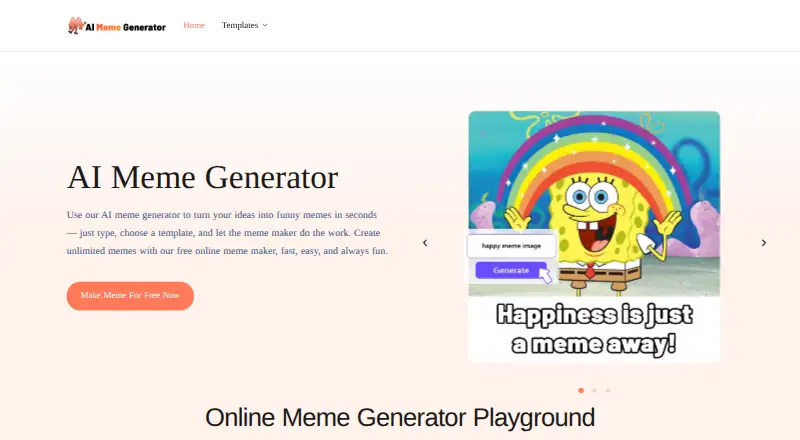
What AI Meme Generator is
AI Meme Generator is a web tool that turns an idea or text into memes. Users can select from more than 1,000 templates or upload an image, then generate four options to edit or download. The site says it supports image, video, and GIF creations, with PNG also listed as an export format. It says new templates are added regularly. The generator is free, with unlimited creation and no credits or daily caps. Downloads have no watermark, and using the tool does not require an account or login. AI caption generation and text-to-meme creation are listed features. The site also says users may use generated memes in commercial projects, provided they have the necessary rights to any images or characters they include. That condition matters when bringing in source material or selecting recognizable content. AI Meme Generator is listed for web use rather than as a desktop or mobile app, so its workflow is to provide text or an image, choose a template, and create options in the browser.
Good
- Free with unlimited creation and no daily caps.
- Offers more than 1,000 templates.
- No login or sign-up required.
- Downloads have no watermark.
- Exports include PNG, video, and GIF formats.
Watch out
- Only web use is listed.
- Commercial use depends on rights to included images or characters.
Who it suits
AI Meme Generator suits people who want to make memes from text or an image in a browser without creating an account. It may also suit users preparing commercial projects, provided they have rights to the images or characters used.
Verdict
AI Meme Generator offers a direct browser workflow with templates, uploads, and multiple meme formats. Users should check their rights to any images or characters they include.
Plans and prices
From AI Meme Generator's own pricing page, checked 29 Sep 2026.
| Plan | Price | What it gives you |
|---|---|---|
| Free | Free | Unlimited meme creation · no credits or daily caps · no watermark · no login required |
The facts
Each one read from AI Meme Generator's own pages, with the date it was checked.
What it does
- Account requirement
- No sign-up or login is required to use the generator.checked 29 Sep 2026
- Commercial use
- The site says created memes may be used for commercial projects, provided users have rights to any images or characters they use.checked 29 Sep 2026
- Generation flow
- Users enter an idea, choose a template or upload their own image, then generate four memes to edit or download.checked 29 Sep 2026
- Limits
- The site says meme creation is unlimited, with no credits or daily caps.checked 29 Sep 2026
- Media formats
- The site says users can create memes as images, videos, and GIFs.checked 29 Sep 2026
- Purpose
- Turns ideas or text into memes using AI.checked 29 Sep 2026
- Templates
- Offers more than 1,000 meme templates and says new templates are added regularly.checked 29 Sep 2026
- Watermarks
- Downloaded memes have no watermark.checked 29 Sep 2026
The full review of AI Meme Generator
AI Meme Generator is a browser-based tool for making memes from ideas, text, templates, or your own images. It is best suited to people who want flexible, watermark-free creation without an account; its web-only reach may not suit anyone seeking a mobile app.
Overview
The workflow moves from an idea or image to four generated memes that users can edit or download. That batch gives creators options to refine rather than forcing a single first result. With no signup, credits, or daily caps, it is a practical choice for both occasional jokes and repeated iteration.
Key features
Templates and uploads
More than 1,000 templates, with new ones added regularly, provide a broad starting point for familiar meme formats. Uploading an image gives users a way to build around their own material instead. That flexibility is useful, but it does not remove the need to have rights to images or characters, particularly for commercial projects.
AI generation and exports
AI caption generation and four results per generation make it easier to explore different takes on a prompt. The service supports PNG, image, video, and GIF creation, while downloads have no watermark. The combination favors people who want to iterate and share in different formats; those looking for a listed desktop or mobile app will need another option.
Pricing
The Free plan costs nothing and includes unlimited meme creation, no credits or daily caps, watermark-free downloads, and no login requirement. There is no stated usage allowance to manage, making this unusually straightforward for frequent creators as well as casual users. The plan's main compromise is not a creation quota but access: the product is web-only.
Commercial use is allowed, provided users have rights to the images or characters they include. That makes the free plan viable for some project work, but users remain responsible for the underlying material.
Platforms
AI Meme Generator runs on the web. Its browser access avoids an account requirement, but anyone who specifically wants an Android, iOS, or desktop app should consider a different product.
Who it's for
This is a strong fit for people who want a no-login meme maker with a sizeable template catalog, image uploads, several output formats, and no watermark or stated usage cap. It is less suitable for users who need a mobile app or cannot confirm rights to the images and characters they plan to use commercially.
Pros and cons
- Pros: Unlimited creation without credits or daily caps supports repeated attempts without quota tracking.
- Pros: More than 1,000 templates plus image uploads cover both established meme formats and user-supplied material.
- Pros: Four generated options, multiple media formats, and watermark-free downloads give creators room to edit and share.
- Pros: No login is required, and commercial use is permitted when users have rights to included images or characters.
- Cons: Web is the only listed platform, ruling it out for people who require a dedicated mobile or desktop app.
- Cons: Commercial permission does not grant rights to third-party images or characters, so users must check those rights themselves.
Alternatives
AI Meme Generators is the broader category directory for readers comparing meme-making options.
JustMeme is another free option for unlimited, no-signup, watermark-free memes, and also lists API access. GottaMeme may suit users who are comfortable with a daily AI allowance: it offers 10 AI captions and two AI visuals per day, alongside unlimited manual editing, sharing, and downloads.
MemeFast is worth considering for Android or iOS access and a full editor with effects, but its free plan includes ads and a watermark. MemeClip.ai is another cross-platform choice, though its free tier limits monthly meme creation to personal use.
Imgflip Meme Generator offers a catalog of more than one million templates, but its free plan includes ads and an Imgflip watermark. Meme Studio is a web alternative with no registration or watermarks and no hidden fees. MagicMeme keeps its classic editor and catalog browsing free, while guest AI use is limited to one batch a day and guest downloads carry a watermark. memeOS is another free option, with unlimited online memes, no watermarks or signup, and PNG downloads; it also lists iOS access.
Verdict
Choose AI Meme Generator if you want to create and iterate on memes in a browser without an account, watermark, or stated usage cap. Its combination of templates, uploads, multiple formats, and four-result generation makes the free plan compelling. Look elsewhere if web-only access is a deal-breaker or you need a different platform.
Alternatives to AI Meme Generator
- 1

Groki
Free planAndroidiOSWebAPI8.0From $4.99 a month - 2

Fai
Free planAndroidiOSWebAPI7.9$0.07 one-time - 3

Imgflip Meme Generator
Free planAndroidWebAPIExtension7.8Free plan - 4

Meme Maker Pro
Free planAndroidiOSmacOS7.8From $59.99 a year - 5
MagicMeme
Free planWebAPI7.3Free plan - 6

MemeFast
Free planAndroidiOSWeb7.1From $2.99 a month