What’s actually slowing this PC down?
Pick the symptom - the matching free tool is one click away.
Everything Xiaomi is reader-supported. When you buy through links on our site, we may earn an affiliate commission. As an Amazon Associate I earn from qualifying purchases. Learn more
Yes. You can make a song from a plain-language description on a Xiaomi, Redmi, or POCO phone without knowing music theory or using a desktop production setup. Start with a web tool or Android app, describe the sound and purpose you want, listen to the result, then revise one detail at a time. Android availability is listed for some tools below, but Xiaomi model compatibility and regional availability are not established here; check the vendor or app store before relying on a particular app.
What Makes AI Music Creation Accessible?
For a first track, accessibility means being able to begin with words rather than instruments, notation, or production software. Some of these services describe prompt-based creation for beginners; the amount of control and the free-plan terms differ. A phone is also useful for drafting a prompt and previewing an idea, while detailed editing or exports may depend on the service and plan.
As an Amazon Associate I earn from qualifying purchases.
Do these 3 things before closing this tab:
1Clear out junk files and repair common Windows errors2Scan for outdated or missing drivers - takes under a minute3Repair Windows errors before they cause bigger problemsBe concrete about the listening situation. A short background cue for a cooking clip needs a different feel from a calming instrumental for reading or a vocal song for a birthday. Name the mood, energy, intended use, vocal preference, and a few instruments or textures. Treat those as creative directions: the listed facts do not establish that every tool supports every genre, instrument, duration, language, or use case.
Which Tools Have Beginner-Friendly Access?
| Tool | Access Listed | Beginner-Relevant Creation | Free Access Detail |
|---|---|---|---|
| Suno | Web, iOS, and Android | Plain-language prompts can describe genre, mood, topic, or lyrics; creates songs with vocals, lyrics, and instrumentation. | Free plan; Suno says users can create up to 10 songs a day with no card required. Free outputs do not include commercial rights. |
| Soundverse AI Beat Maker | Web, iOS, and Android | Describe a vibe for a complete instrumental; BPM, key, and mood can be pinned for tighter direction. | Free tier starts with 1,000 tokens upon signup. |
| Musicful | Web and mobile apps | Turns text, lyrics, or a hum into songs; supports more than 100 music styles. | Free plan; exact free-use limits are not stated here. |
| Beatbot | iPhone and Android apps | A prompt can start a song, beat, lyric, or instrumental; genre and mood controls are listed. | Free plan; exact free-use limits are not stated here. |
| Sonus | Web, iOS, and Android | Describe a mood, genre, scene, instruments, or tempo in everyday language to start a song. | Freemium; specific free-plan limits are not stated here. |
For a Xiaomi phone, Android is explicitly listed for Suno, Soundverse AI Beat Maker, Beatbot, and Sonus. Musicful lists mobile apps but its supplied details do not specify Android. If an Android app is unavailable for your device or region, check whether the service offers a browser version; web access is listed for Suno, Soundverse AI Beat Maker, Musicful, and Sonus. Beatbot is described as a mobile app.
Shopping ad
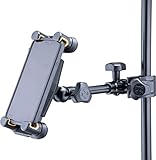
- Supports tablets or phones ranging from 6.1” to 13”
- Includes ¼”-20 threaded female camera mount adapter
- No need to remove most cases or rings
- Attaches to a desk, round and square tubes like keyboard stands, microphone stands or music stands
- Item Package Dimension: 12.35L x 4.68W x 3.85H inches
How To Write A Prompt That Gives You A Useful First Draft
Use a short brief with a purpose, mood, pace, sound, and vocal choice. For example: “Make a gentle instrumental for a five-minute evening reading video. Keep it warm and unhurried, with soft piano and light strings. No vocals; leave space so narration could sit over it.” This is a prompt example, not a claim that a particular service supports five-minute tracks, those exact instruments, or narration-aware mixing.
- Pick the occasion. Say what the music is for, such as a study session, a family montage, or a short social video.
- Describe the feeling and energy. Use everyday terms such as peaceful, playful, tense, or celebratory, and say whether the music should feel slow, steady, or energetic.
- Choose vocal or instrumental. If you want a song, add a topic or your own lyric idea. If you want background music, explicitly ask for an instrumental.
- Add only a few sound references. Mention instruments or broad styles you want to hear. Do not assume a service can reproduce a specific artist or exact sound.
- Generate, listen, and revise one thing. If the result is too busy, ask for a simpler arrangement; if it feels too sad, change the mood. Changing one instruction at a time makes the effect easier to judge.
What To Check Before Sharing Or Publishing
A generated track suitable for personal listening is not automatically cleared for every kind of reuse. Suno’s free plan does not include commercial rights, and the other listed tools’ applicable rights depend on their terms or plan. Check the current vendor terms for your intended use, including whether you may publish, monetize, or use an export in a video. Do not upload another person’s voice, recording, or lyrics unless you have permission; review the service’s terms for any voice, cover, or sample use. Specific cover and sample permissions are not established here.
Shopping ad
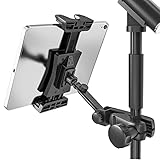
- Stage-Ready - Clips this ipad mic stand onto any 0.5–1 inch mic stand pole. Mount your iPad to view lyrics, chords, and sheet music, trigger backing tracks, or control live electronic sets. Perfect for open mics, festival stages,classroom lectures, or conference speeches — no bulky music stand needed, everything stays at eye level.
- Adjust Any Way You Want - 360° ball head rotation for instant portrait/landscape switching, plus a 90° tilt joint for the perfect viewing angle. Whether you're singing, playing keys, or triggering backing tracks – set your iPad exactly where you need it and keep your eyes on the show.
- Reach Anywhere - Total arm length up to 8.17 inches. Loosen the side knob to slide the extension arm from 3.54 to 5.5 inches — no tools needed. Works great whether you're standing, sitting, or using a short or tall mic stand. Easily adjust your iPad distance for any stage or rehearsal setup.
- Tool‑Free Setup, Slip‑Free Grip – No tools needed – attach or detach from your mic stand in seconds. The tablet clamp features non‑slip protective pads on all four corners, keeping your iPad or tablet firmly in place. It prevents accidental slips during performances and protects the device body from scratches, dings, and wear. Plus, it’s easy to pack – toss it in your gig bag and take it anywhere.
- Wide Compatibility. Fits tablets and smartphones with screen sizes from 4.7" to 12.9" – including iPad Pro/Air/Mini, Surface Pro, Galaxy Tab, and iPhone 17–11 series. Note: For very compact phones (under 4.7" body length), portrait orientation only. For large tablets (over 9.06" body length), clamp horizontally and rotate 360° to portrait when needed.
For a first experiment on a Xiaomi, Redmi, or POCO, choose a tool whose access route is available to you, write a purpose-led prompt, and treat the first generation as a draft. Before choosing based on a specific genre, language, export format, or publishing right, verify that exact support with the vendor.
Quick Recap
Shopping ad

- 1. DESIGNED FOR 4MM SQUARE SOCKET ONLY – PLEASE CHECK FIRST
- This alto saxophone phone holder is precision-engineered for saxophones (Alto, Tenor, Bari) with a standard 4mm x 4mm square lyre hole. IMPORTANT: NOT compatible with round screw holes or other socket types. To avoid fit issues, please measure your instrument's socket before ordering. Your satisfaction starts with the right fit!
- 2. HANDS-FREE SHEET MUSIC FOR MARCHING BAND & PRACTICE
- Perfect for musicians on the move! This adjustable lyre mount securely holds your smartphone, allowing you to view digital sheet music, tutorials, or lyrics hands-free during marching band performances, rehearsals, or practice sessions. Never miss a note while marching or playing.
- 3. 360° ADJUSTABLE ANGLE FOR COMFORTABLE VIEWING
Shopping ad
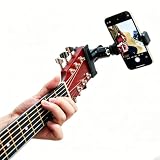
- 🤘 Easy for live broadcast teaching and cool video recording
- 🤘 Convenient adjustable to secuerly Clamp all smartphones(6.4cm~9.5cm(2.52~3.74 inches))
- 🤘 The cell phone can be rotated 360 degrees to see your fingers,lyrics or chords
- 🤘 Light weight and portable
- 🤘 Material: Metal + Plastic
Shopping ad

- Fits most sousaphones, contras, and saxophones
- Adjustable and secure phone mount – works vertical or horizontal
- Clamps to mouthpipe bits, mouthpiece tubing, random tubing
- Foam-padded grip protects your instrument from damage
- Lightweight, durable, and made in the USA
Product prices and availability are accurate as of the date/time indicated and are subject to change. Any price and availability information displayed on Amazon at the time of purchase will apply.




