Z64K
Z64K emulates the Commodore 128, Commodore 64, Spectrum 48/128K, VIC 20, and Atari 2600, aiming for pixel-exact display.
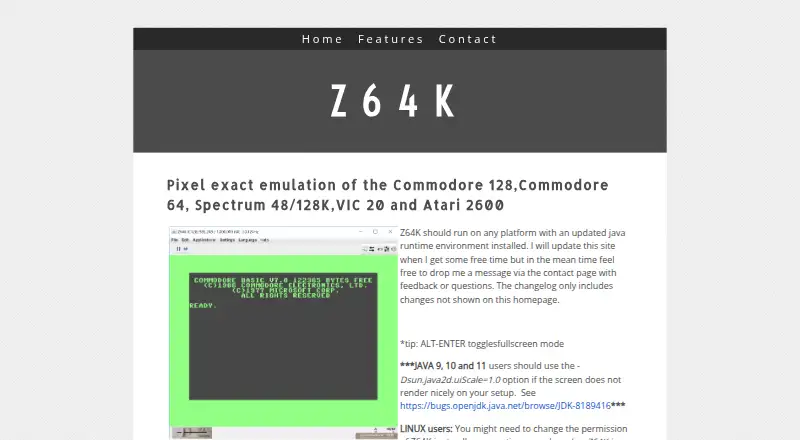
What Z64K is
Z64K emulates the Commodore 128, Commodore 64, Spectrum 48/128K, VIC 20, and Atari 2600, aiming for pixel-exact display. It runs through Java on Windows, macOS, and Linux and requires JRE 8 or later. The homepage offers the main JAR alongside command-line files, a changelog, and a quick guide. Controls include fullscreen, clipboard text copy and paste, reset, mouse capture, and warp mode. C128 shortcuts can switch display output and toggle the second display, with extended key mappings also described. A built-in debugger and a SID Analyzer add tools for examining emulation; the analyzer offers waveform, envelope, oscillator, and combined display modes. Supported disk and tape formats include D64, D71, G64, G71, IMD, and CRT. The changelog documents loading and saving some disk images, including G71 and IMD support. The Virtual FS device is experimental, and its scratch command simulates file deletion without removing host files. Linux users might need to adjust JAR permissions to allow execution.
Good
- Emulates five named systems
- Includes a built-in debugger
- SID Analyzer offers four display modes
- Supports D64, D71, G64, G71, IMD, and CRT
Watch out
- Requires JRE 8 or later
- Virtual FS is experimental
- Scratch does not delete host files
- Linux users might need to change JAR permissions
Who it suits
Z64K suits people looking to emulate the listed classic computer and console systems on a Java-capable Windows, macOS, or Linux device. Its debugger, SID Analyzer, and C128 controls may appeal to users who want additional emulation tools.
Verdict
Z64K covers several classic systems and includes debugging, audio-analysis, and format support. Its Java requirement and experimental Virtual FS behavior are worth noting before setup.
The facts
Each one read from Z64K's own pages, with the date it was checked.
What it does
- C128 controls
- The emulator supports C128-specific keyboard shortcuts, including toggling its second display and switching 40/80 display mode.checked 3 Oct 2026
- C128 display controls
- For C128, ALT+O toggles VICIIe/VDC output to the main screen and ALT+2 toggles the second display.checked 3 Oct 2026
- C128 keyboard
- The page describes extended C128 keys, including function key mappings and an option to enable or disable extra keys.checked 3 Oct 2026
- Disk image support
- The changelog documents support for loading and saving G71 images, including saving MFM tracks, and support for loading IMD images.checked 3 Oct 2026
- Download
- The homepage lists Z64K.jar and companion command-line, changelog, and quick-guide files for download.checked 3 Oct 2026
- Emulated systems
- Z64K describes pixel exact emulation of the Commodore 128, Commodore 64, Spectrum 48/128K, VIC 20, and Atari 2600.checked 3 Oct 2026
- Experimental feature
- The changelog describes the Virtual FS device as experimental and still a work in progress.checked 3 Oct 2026
- Keyboard controls
- Listed shortcuts include fullscreen, clipboard text copy and paste, reset, mouse capture, and warp mode.checked 3 Oct 2026
- Purpose
- Z64K describes itself as providing pixel exact emulation of the Commodore 128, Commodore 64, Spectrum 48/128K, VIC 20, and Atari 2600.checked 3 Oct 2026
- Recent changelog entry
- The homepage changelog lists a C128 VICIIe IRQ flag fix dated 14 April 2025.checked 3 Oct 2026
- Runtime
- The site says Z64K should run on any platform with an updated Java runtime environment and requires JRE 8 or better.checked 3 Oct 2026
- SID Analyzer
- The changelog says version 2 added a SID Analyzer with waveform, envelope, oscillator, and combined display modes.checked 3 Oct 2026
- Site updates
- The maker says the changelog includes changes not shown on the homepage.checked 3 Oct 2026
- Support
- The homepage invites users to contact the maker with feedback or questions via its contact page.checked 3 Oct 2026
- Virtual filesystem limit
- The changelog says the Virtual FS scratch command simulates deletion but does not currently delete files from the host file system.checked 3 Oct 2026
Where it runs
- Linux setup
- Linux users might need to change the Z64K.jar file permissions to allow execution.checked 3 Oct 2026
- Platform compatibility
- The maker says Z64K should run on any platform with an updated Java runtime environment installed.checked 3 Oct 2026
Alternatives to Z64K
- 1
TRX64
Free planOpen sourceWebAPILinuxmacOS7.5Free plan - 2
Frodo
Free planOpen sourceAndroidLinuxmacOSSelf-hosted7.4Free plan - 3
Avidemux
Free planOpen sourceWebLinuxmacOSWindows7.3Free plan - 4
VICE
Free planAndroidLinuxmacOSWindows7.1Free plan - 5
Power64
macOS6.7$30 one-time - 6
C64 Forever
Free planWindows6.6$19.95 one-time