WinShell
WinShell is free multilingual Windows desktop software for editing LaTeX and TeX documents.
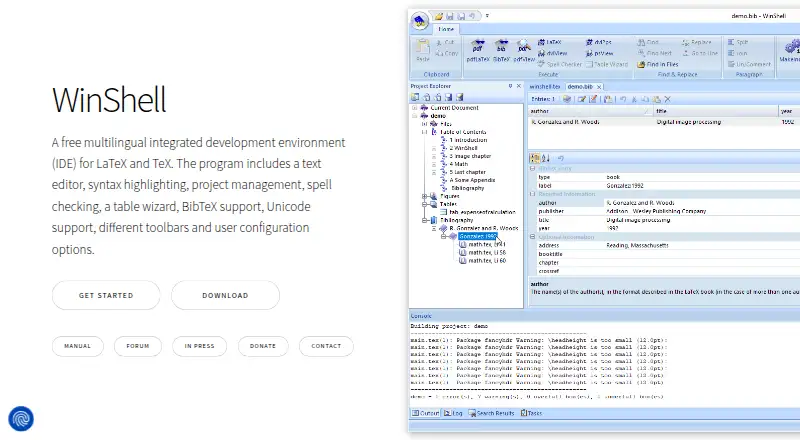
What WinShell is
WinShell is free multilingual Windows desktop software for editing LaTeX and TeX documents. It includes a text editor, syntax highlighting, project management, spell checking, a table wizard, BibTeX front end, toolbars, and configuration tools. Projects can organize a document’s table of contents, figures, tables, and bibliography. The Hunspell-based checker supports importing compatible dictionaries. Editing features include forward and inverse search, Unicode and multibyte text, and Windows and Unix file formats. WinShell requires a separate LaTeX package; the manual lists TeX Live, MiKTeX, and W32TeX as options. A PDF viewer is also required, with Sumatra PDF recommended for SyncTeX and search functions. The homepage offers WinShell 4.0 as an installer or portable package, file version 4.0.0.6 dated 2023-05-27. It is free binary software, with optional donations and unavailable source code.
Good
- Free multilingual LaTeX environment
- Project organization for document elements
- Hunspell dictionary importing
- Forward and inverse search
- Installer and portable versions
Watch out
- Requires a separate LaTeX package
- Requires a PDF viewer
- Source code unavailable
- Homepage and manual list different Windows requirements
Who it suits
It suits Windows users preparing LaTeX or TeX documents who already have a separate LaTeX package and PDF viewer. Users should check the differing operating-system requirements in the homepage and manual.
Verdict
WinShell offers a broad desktop toolkit for LaTeX and TeX editing at no cost. Its external package and PDF prerequisites should be arranged before use.
Plans and prices
From WinShell's own pricing page, checked 10 Oct 2026.
| Plan | Price | What it gives you |
|---|---|---|
| WinShell | Free | Free binary software · donations optional · source code unavailable |
The facts
Each one read from WinShell's own pages, with the date it was checked.
What it does
- Distribution
- The homepage offers WinShell 4.0 as an installation package or portable version and identifies its file version as 4.0.0.6, dated 2023-05-27.checked 10 Oct 2026
- Editor and project features
- It includes a text editor, syntax highlighting, project management, a spell checker, a table wizard, a BibTeX front end, toolbars, and user configuration tools.checked 10 Oct 2026
- External tools
- Users can configure programs and macros, and WinShell provides a table wizard and BibTeX front end.checked 10 Oct 2026
- Operating system
- The homepage lists support for Windows 7 SP1 and higher, while the manual lists Windows 10 or higher as its system requirement.checked 10 Oct 2026
- Other prerequisites
- The manual lists TeX Live, MiKTeX, or W32TeX as LaTeX package options and says PostScript viewing is optional.checked 10 Oct 2026
- PDF workflow
- A PDF viewer is a prerequisite, and the manual says WinShell supports and recommends Sumatra PDF for SyncTeX and forward and inverse search.checked 10 Oct 2026
- Projects
- Its project environment organizes a document’s table of contents, figures, tables, and bibliography.checked 10 Oct 2026
- Purpose
- WinShell is a free multilingual integrated development environment for LaTeX and TeX, and requires a separate LaTeX package.checked 10 Oct 2026
- Search and editing
- Features include forward and inverse search, Unicode and multibyte support, and Windows and Unix file format support.checked 10 Oct 2026
- Source availability
- The maker says the software is supplied as a free binary and its source code is unavailable.checked 10 Oct 2026
- Spell checking
- The built-in spell checker is based on Hunspell and supports importing compatible dictionaries.checked 10 Oct 2026
- Support
- The manual asks users reporting problems to include their computer and WinShell versions and reproducible steps, and accepts reports in English or German.checked 10 Oct 2026
Alternatives to WinShell
- 1

Overleaf
Free planOpen sourceWebAPIExtensionLinux8.4From $8.25 a month - 2
Verbosus
Free planAndroidiOSWebWindows8.0$15.99 one-time - 3
VerbTeX
Free planAndroidiOSWebmacOS8.0Free plan - 4
Papeeria
Free planAndroidiOSWeb7.4From $5 a month - 5
Avidemux
Free planOpen sourceWebLinuxmacOSWindows7.3Free plan - 6

Oleafly
Free planOpen sourceAPILinuxmacOSSelf-hosted7.2Free plan