
TurboTax
TurboTax is tax preparation software available online, on mobile and as desktop software.
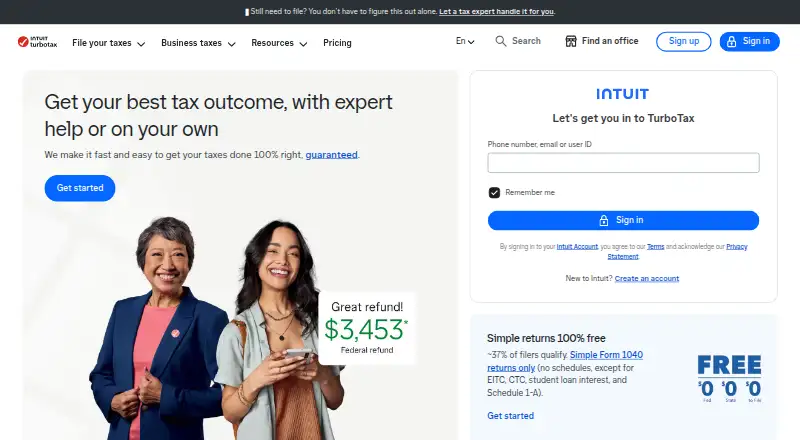
What TurboTax is
TurboTax is tax preparation software available online, on mobile and as desktop software. It supports returns involving self-employment, investments and rental income, and state filing is available for an additional fee on listed paid plans. Users can import, upload or photograph tax documents, including information from participating employers and financial institutions; the maker says information can be auto-imported from more than one million such organizations. Customers can get unlimited expert advice or have an expert prepare the return from start to finish. Free filing is limited to simple Form 1040 returns, and the listed estimate is that about 37% of taxpayers qualify. The free tier excludes itemized deductions, business income, stock sales, rental income and other schedules. Deluxe searches more than 350 deductions and credits, while Premium lists more than 450. The listed federal price for Do It Yourself Deluxe is $79, with state additional. The accuracy guarantee covers IRS or state penalties and interest caused by a calculation error, subject to terms.
Good
- Supports self-employment, investment and rental income.
- Documents can be imported, uploaded or photographed.
- Offers expert advice or expert-prepared returns.
- Accuracy guarantee covers calculation-error penalties and interest, subject to terms.
Watch out
- Free filing is limited to simple Form 1040 returns.
- Free tier excludes itemized deductions and several income types.
- State filing costs extra on listed paid plans.
- Mobile use requires internet access; standard data rates apply.
Who it suits
It may suit people who want tax preparation across web, mobile or desktop, including those with self-employment, investment or rental income. Users with more complex returns can consider the paid options or expert assistance.
Verdict
TurboTax covers multiple income types and offers both self-service and expert-assisted preparation. Check whether the free tier accepts your return, and account for additional state costs on paid plans.
Plans and prices
From TurboTax's own pricing page, checked 20 Sep 2026.
| Plan | Price | What it gives you |
|---|---|---|
| Free Edition | Free | Simple Form 1040 returns · $0 federal, $0 state, and $0 to file; eligibility is limited to simple returns |
| Do It Yourself Deluxe | $79 a month | 350+ deductions and credits · Federal price; state additional |
| Do It Yourself Premium | $139 a month | 450+ deductions and credits · Federal price; state additional |
| Expert Assist Premium | $209 a month | 450+ deductions and credits · Federal price; state additional |
| TurboTax Mobile Free Offer | Free | Start in the TurboTax or Credit Karma mobile app by February 28, 2026; eligibility restrictions apply. |
| TurboTax Free Edition | Free | Simple Form 1040 returns only; federal and state filing included. |
| TurboTax Do It Yourself Deluxe | $79, paid once | File by March 31 to save; pay only when you file. · $79 Federal; state additional |
| TurboTax Expert Full Service | Priced on request | Forms-based pricing varies by tax situation and forms used. |
The facts
Each one read from TurboTax's own pages, with the date it was checked.
What it does
- Accuracy guarantee
- TurboTax pays IRS or state penalties and interest caused by a calculation error, subject to terms.checked 27 Sep 2026
- Audit support
- Eligible customers receive one-on-one question-and-answer support; representation costs extra.checked 27 Sep 2026
- Document imports
- Users can import, upload, or photograph documents; imports can come from employers and financial institutions.checked 27 Sep 2026
- Expert assistance
- Customers can receive unlimited expert advice or have an expert file the return from start to finish.checked 27 Sep 2026
- Integration sources
- Information can be auto-imported from more than one million participating employers and financial institutions.checked 27 Sep 2026
- Investment income
- Yeschecked 20 Sep 2026
- Mobile access
- web_and_mobilechecked 20 Sep 2026
- Mobile requirements
- Mobile use requires internet access, and standard data rates apply for downloading and using the app.checked 27 Sep 2026
- Notable features
- Deluxe searches more than 350 deductions and credits and includes AI-powered Intuit Assist.checked 27 Sep 2026
- Paid from
- 79checked 20 Sep 2026
- Payment timing
- Most paid online and mobile products allow payment when filing, printing, mailing, or buying add-ons.checked 27 Sep 2026
- Refund policy
- Printing or electronically filing means satisfaction and generally waives the right to a refund.checked 27 Sep 2026
- Rental income
- Yeschecked 20 Sep 2026
- Security statement
- The page says security is built into everything TurboTax does.checked 27 Sep 2026
- Self-employment support
- Yeschecked 20 Sep 2026
- State filing
- State filing is free with Free Edition and additional with Deluxe.checked 27 Sep 2026
The company
- Founded
- 1983checked 23 Sep 2026
- Headquarters
- Mountain View, California, United Stateschecked 23 Sep 2026
Money
- Free plan
- Yeschecked 20 Sep 2026
- Free tier exclusions
- Free simple returns exclude itemized deductions, business income, stock sales, rental income, and other schedules.checked 27 Sep 2026
- Free tier limits
- Free filing is for simple Form 1040 returns; about 37% of taxpayers qualify.checked 27 Sep 2026
Where it runs
- Platforms and apps
- TurboTax is available online, on mobile, and as desktop software.checked 27 Sep 2026
The full review of TurboTax
Overview
TurboTax is tax-preparation software from TurboTax, founded in 1983 and headquartered in Mountain View, California. It suits people filing straightforward returns as well as taxpayers with investment, rental, or self-employment income who want access to expert help. Its main trade-off is a narrow free tier: returns with many common deductions or income types move to paid plans, and state filing costs extra on several of them.
Key features
TurboTax supports self-employment, investment, and rental income, but those needs rule out the simple-return free tier. Deluxe searches more than 350 deductions and credits, while Premium and Expert Assist Premium include more than 450; Deluxe also includes Intuit Assist, an AI-powered feature. That makes paid tiers more relevant for people with deductions or more involved income, though the price rises with the coverage.
Users can import, upload, or photograph tax documents. Information can be auto-imported from more than one million participating employers and financial institutions, reducing manual entry for people whose providers participate. Customers can get unlimited expert advice or have an expert prepare the return from start to finish. TurboTax also offers an accuracy guarantee: it pays IRS or state penalties and interest caused by a calculation error, subject to terms.
Pricing
TurboTax uses a freemium model. The free options are limited to simple Form 1040 returns; the Free Edition includes federal and state filing, while the free plan description also gives $0 federal, $0 state, and $0 to file. About 37% of taxpayers qualify. Itemized deductions, business income, stock sales, rental income, and other schedules are excluded, so the free tier is a poor fit once a return needs those items.
- Free Edition: free. For simple Form 1040 returns only; federal and state filing included.
- Do It Yourself Deluxe: $79 a month, billed at the federal price, with state additional. It searches more than 350 deductions and credits. A separate offer is $79, paid once, billed $79 Federal with state additional; file by March 31 to save and pay only when you file. This is the entry paid choice for people whose return exceeds the free tier but does not call for Premium's larger deduction search.
- Do It Yourself Premium: $139 a month, billed at the federal price, with state additional and more than 450 deductions and credits. It suits people who need broader deduction coverage, but the federal price and state add-on make it a substantial step up from Deluxe.
- Expert Assist Premium: $209 a month, billed at the federal price, with state additional and more than 450 deductions and credits. Choose it for expert assistance alongside the broader deduction search.
- Expert Full Service: custom pricing; forms-based pricing varies with tax situation and forms used. It is aimed at people who want an expert to handle the return from start to finish.
- TurboTax Mobile Free Offer: free. Start in the TurboTax or Credit Karma mobile app by February 28, 2026; eligibility restrictions apply.
Most paid online and mobile products allow payment when filing, printing, mailing, or buying add-ons. Printing or electronically filing means satisfaction and generally waives the right to a refund, so review the return before submitting or printing.
Platforms
TurboTax is available online, on mobile, and as desktop software. Mobile use requires internet access, and standard data rates apply for downloading and using the app. The service says security is built into everything it does.
Who it's for
TurboTax is a strong fit for taxpayers who value document importing, a wide range of supported income types, and the option to get expert advice or delegate filing. It is less compelling for people with simple returns who qualify for free filing but do not need paid-plan features, or for anyone whose return includes exclusions such as rental income or stock sales and is hoping to stay free. Those taxpayers should compare the paid price and state costs before choosing.
Pros and cons
- Pro: Support for self-employment, investment, and rental income covers needs that the free tier excludes, making paid plans relevant for more complex returns.
- Pro: Document uploads, photographs, and imports from participating employers and financial institutions can reduce manual data entry.
- Pro: Unlimited expert advice and full-service filing offer a path to human help without leaving TurboTax.
- Con: The free tier excludes itemized deductions and several common income types, so many returns will need a paid plan.
- Con: State filing is additional on Deluxe, Premium, and Expert Assist Premium, increasing the total beyond the federal prices.
- Con: Filing or printing generally waives refund rights, limiting recourse if a user changes their mind after submission.
Alternatives
For a narrower or differently priced fit, compare Taxation.ai, EZTax, H&R Block Online, TaxAct, Taxfix, Keeper, TaxTim, and IndiaTax.AI.
Taxation.ai is worth considering if a free plan with one federal return per year, five document uploads, and a basic AI assistant and deduction finder is enough; it also offers a free trial and web, API, and self-hosted platforms. EZTax may suit someone seeking Android, iOS, web, or Windows access and a self-service ITR filing plan at ₹249 a month. H&R Block Online is another free option for simple Form 1040 situations, with web, iOS, and Android apps; its free plan is billed per state filed.
TaxAct offers free federal filing for eligible standard returns, with state additional, and a Deluxe plan at 59.99 USD; it may suit a filer prioritizing a lower stated Deluxe price. Taxfix is a paid alternative with Android, iOS, and web access; its Basic individual annual plan is €39.99 a year and free until submission. Keeper may appeal to someone focused on expense discovery and deduction tracking, with a Standard plan at $199 a year and a free trial. TaxTim offers a Lite plan for standard salary and pension income, with TimAI answers and human helpdesk support. IndiaTax.AI offers AI Filing at ₹149, paid once for ITR 1, 2, 3, and 4, including business and professional income (non-audit), or Assisted Filing starting at 499.00 INR for expert CA review.
Browse more options in AI Tax Software, Small Business Tax Software, Tax Preparation Software, and Personal Tax Software.
Verdict
Choose TurboTax if you need support beyond a simple return and value document imports plus access to expert advice or full-service filing. Its breadth is the main reason to choose it; the narrow free tier, additional state charges on paid plans, and limited refund rights after filing are the reasons to compare alternatives first.
Getting started
- Open the TurboTax website
- Choose web, mobile or desktop access
- Create or access a TurboTax account
- Import, upload or photograph tax documents
- Select Free Edition or a paid plan
- Add state filing if required
- Choose self-service, expert advice or full-service preparation
Limits worth knowing
The free tier is limited to simple Form 1040 returns and excludes itemized deductions, business income, stock sales, rental income and other schedules. Listed paid plans charge additional state fees, and the mobile free offer has eligibility restrictions.
Questions
Does TurboTax have a free plan?
Yes. Free Edition is 0.00 USD for eligible simple Form 1040 returns, with federal and state filing included.
What does the free tier exclude?
It excludes itemized deductions, business income, stock sales, rental income and other schedules. About 37% of taxpayers are listed as qualifying.
What are the listed paid prices?
Do It Yourself Deluxe is listed at $79, paid once for federal filing, with state additional. Do It Yourself Premium is $139, paid once, and Expert Assist Premium is $209, paid once; state is additional on listed paid plans.
Which platforms can I use?
TurboTax is available online, on mobile and as desktop software. Mobile use requires internet access, and standard data rates apply.
Can TurboTax handle self-employment or rental income?
Yes. Self-employment, investment income and rental income are listed as supported.
What expert help is available?
Customers can receive unlimited expert advice or have an expert file the return from start to finish.
Alternatives to TurboTax
- 1
TurboTax Canada
Free planAndroidiOSWebAPI8.9C$27 one-time - 2
WISO Steuer
Free planAndroidiOSWebLinux8.9From €35.99 a year - 3

EZTax
Free planAndroidiOSWebWindows8.8Free plan - 4
TaxDown
Free planAndroidiOSWeb8.7From €35 a year - 5

Quicko
Free planAndroidiOSWebAPI8.7From ₹4,999 a year - 6

FreeTaxUSA
Free planAndroidiOSWeb8.6$7.99 one-time