Tier List Maker
Tier List Maker is a free browser-based tool for ranking games, characters, food, brands, and other topics in custom tiers.
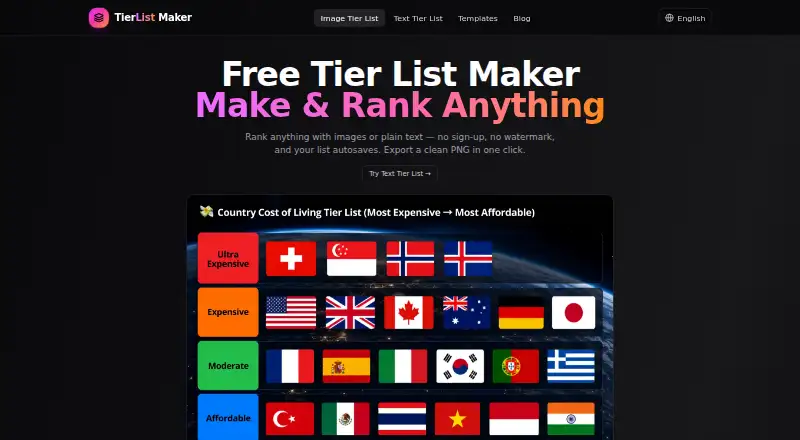
What Tier List Maker is
Tier List Maker is a free browser-based tool for ranking games, characters, food, brands, and other topics in custom tiers. Users can start with a ready-made template or create a list, choosing image-based or text-only items. Images can be uploaded as PNG, JPG, or WEBP files, including by pasting them from the clipboard. Items can be moved between tiers and reordered within a row on desktop, tablet, or mobile. Users can rename tiers, change their colours, add or remove rows, edit the board title, and choose square, landscape, portrait, wide, or round item shapes. Templates include preloaded items that can be edited, added to, or removed. Lists autosave in the browser, even after a page refresh; the maker says nothing is uploaded to a server. No account is required, and the free plan allows unlimited tier lists with no ads or watermark. Finished lists can be exported as PNG or JPG. The listed platforms are web, macOS, and Windows.
Good
- Free plan allows unlimited tier lists.
- Supports image and text-only lists.
- Accepts PNG, JPG, and WEBP images.
- Lists autosave in the browser.
- Exports PNG and JPG without ads or watermark.
Watch out
- Runs in a browser.
- Listed platforms are web, macOS, and Windows.
Who it suits
It suits people who want to rank topics such as gaming, anime, movies, food, sports, or brands. It can be used on desktop, tablet, or mobile without an account.
Verdict
Tier List Maker offers flexible tier layouts, templates, and image or text formats without requiring an account. Its browser-based saving and export options make it suited to creating and sharing custom rankings.
Plans and prices
From Tier List Maker's own pricing page, checked 15 Oct 2026.
| Plan | Price | What it gives you |
|---|---|---|
| Free | Free | unlimited tier lists · no sign-up · no watermark · PNG/JPG export · no ads |
The facts
Each one read from Tier List Maker's own pages, with the date it was checked.
What it does
- Access and limits
- The maker says no account is required and users can create unlimited tier lists.checked 9 Oct 2026
- Ad and watermark policy
- The official site describes the maker as ad-free and without export watermarks.checked 15 Oct 2026
- Audience
- The maker describes the tool for ranking topics including gaming, anime, movies, food, sports, and brands.checked 9 Oct 2026
- Autosave
- Work is autosaved in the browser so refreshing the page should preserve the list.checked 15 Oct 2026
- Chrome extension rating
- The Chrome Web Store listing for TierPanel shows 0 out of 5 with no ratings and 15 users; it is a separate extension, not an official tier-listmaker.com listing.checked 15 Oct 2026
- Crunchbase funding data
- The opened Crunchbase profile shows placeholder 1970 funding events and says fuller funding data requires Crunchbase Pro.checked 15 Oct 2026
- Crunchbase technology data
- Crunchbase reports 17 active website technologies for its similarly named profile, including Google Tag Manager, a CDN and Cloudflare.checked 15 Oct 2026
- Customization
- Users can rename tiers, change colors, add or remove rows, and edit the board title.checked 9 Oct 2026
- Custom tiers
- Users can rename tiers, recolor them, add rows, remove rows and edit the board title.checked 15 Oct 2026
- Documentation
- Opened official pages provide feature descriptions and FAQs but no API, SDK or developer documentation.checked 15 Oct 2026
- Drag and drop
- Items can be moved between tiers or reordered within rows on desktop, tablet and mobile.checked 15 Oct 2026
- Export
- Finished lists can be downloaded as high-quality PNG images, with JPG export also advertised.checked 15 Oct 2026
- Image and text modes
- Users can build image-based lists or switch to text-only mode.checked 9 Oct 2026
- Image formats
- The image maker accepts PNG, JPG and WEBP uploads and clipboard-pasted images.checked 15 Oct 2026
- Image ranking
- Users upload images or photos and drag them into ranking tiers.checked 15 Oct 2026
- Independent comparison
- MyTierMaker describes its similarly named tool as free, no-login, no-watermark and browser-local, indicating those are common differentiators in this category.checked 15 Oct 2026
- Independent creator disclosure
- MyTierMaker identifies Farasat Abbas Naqvi as its solo creator and says the site is independently maintained.checked 15 Oct 2026
- Item shapes
- Available item formats include square, landscape, portrait, wide and round.checked 15 Oct 2026
- Item styles
- The maker offers square, landscape, portrait, wide, and round item shapes.checked 9 Oct 2026
- Languages
- The site offers English, Portuguese, Japanese, German, Spanish, French and Italian interfaces.checked 15 Oct 2026
- Library management
- The item library supports adding, removing and resetting items or tiers.checked 15 Oct 2026
Where it runs
- App Store complaints
- Reviewers of that app repeatedly complain that premium restrictions make basic use difficult or expensive and one reports images disappearing.checked 15 Oct 2026
- App Store pricing
- That Apple listing shows weekly in-app purchase pricing of $3.99 and yearly pricing of $19.99.checked 15 Oct 2026
The company
- Crunchbase company record
- Crunchbase has a similarly named Tier List Maker profile marked private, active and for-profit, with a displayed headcount range of 11–50 and a tierlist.ai website link.checked 15 Oct 2026
The full review of Tier List Maker
Tier List Maker is a free browser tool for arranging images or labels into ranked rows. It fits creators making quick rankings of games, anime, food, sports, brands, and similar subjects who do not want an account. Its combination of flexible boards, unlimited lists, and unbranded exports makes it a strong choice for casual publishing, while browser-only saving is the main constraint for people who need dependable cross-device access.
Overview
You can begin with a ready-made template containing editable items or build a list from scratch. Drag and drop moves entries between tiers and changes their order within a row on desktop, tablet, or mobile. That keeps the core ranking process quick, whether you are comparing game characters, movies, products, or anything else that can be represented by an image or label.
Lists autosave in the browser, including after a refresh, and the maker says content stays out of its servers. This is a practical privacy advantage and removes the friction of registration. The compromise is equally clear: browser storage is not the same as an account-backed library, so people moving between devices should not treat it as a universal archive.
Key features
Image mode accepts PNG, JPG, and WEBP files, with clipboard pasting available for a faster workflow. Text-only mode is useful when a visual asset would add clutter or when a ranking is based on names alone. Tier labels can be renamed, colors changed, rows added or removed, and the board title edited, allowing the layout to match the subject rather than forcing every list into the same mold.
Items can use square, landscape, portrait, wide, or round shapes. Those choices matter when source images have different proportions: a portrait character or a wide logo can remain more legible than it would in a single fixed tile. Templates provide a head start, but editable, addable, and removable preloaded items keep them from locking you into someone else’s selection.
Finished boards can be exported as PNG, with the homepage also offering JPG export. The free plan removes ads and watermarks, so the resulting image is suitable for direct sharing without branding from the tool. Unlimited tier lists and no account requirement make repeated personal projects practical rather than trial-limited.
Pricing
| Plan | Price | Includes |
|---|---|---|
| Free | free | Unlimited tier lists, no account, no ads, no watermark, PNG/JPG export |
There is no free trial because the product is already free, and there are no paid seats or usage quotas to manage. This is an unusually complete free tier for individuals: the meaningful benefits are unlimited creation and clean exports, not a restricted sample of the editor. It is less suited to teams that expect account-based storage or a shared workspace, neither of which forms part of this plan.
Platforms
Tier List Maker runs on the web and is listed for macOS and Windows. Its drag-and-drop workflow also accommodates tablet and mobile screens, making it usable beyond a desktop without requiring a separate mobile account or plan.
Who it's for
Choose it for casual ranking projects, fandom debates, classroom-style comparisons, and social posts where custom labels, colors, rows, and image shapes matter. It is particularly well matched to users who want privacy-conscious browser use and an export without an account, ad, or watermark. Look elsewhere if your priority is persistent account synchronization between devices or a deeper collaborative system.
Pros and cons
- Pros: Unlimited lists at no cost support frequent projects; PNG and JPG exports have no watermark; image and text modes cover visual and label-based rankings; custom rows, colors, labels, titles, and item shapes provide meaningful layout control; clipboard image pasting speeds up collection; browser operation avoids account creation and server upload.
- Cons: Autosave is browser-based rather than account-based, which limits its usefulness for people switching devices; the product is centered on making and exporting boards rather than maintaining a synchronized online library.
Alternatives
For a broader directory of choices, see Game Tier List Tools.
TierMaker is the better pick if you want Android and iOS apps, a free trial, or an optional ad-free Pro plan at $1.99 a month; its free website plan remains available at no cost.
Choose Tier when Android and iOS access matter and ads in the app and on the website are acceptable.
TierList.ai suits users who want share-by-link publishing alongside unlimited, watermark-free PNG downloads without an account.
TierListMakerOnline is an alternative for unlimited exports and unlimited lists without an account or watermark.
TierPad is worth considering if five AI tier lists per day and Android access are useful.
GOATY focuses on browsing, creating, and sharing tier lists and breakdowns on the web.
NexusTierlist offers unlimited lists with no account, watermark, or locked features.
Supatier is a web option with free sign-up, up to 500 gallery images, and up to 50 tiers.
Verdict
Tier List Maker is the right choice for individuals who want a customizable ranking board and clean image exports at no cost, without registration or server upload. Its decisive weakness is browser-bound saving: choose another service if account-based access across devices is more important than a private, frictionless editor.
Getting started
- Open https://tier-listmaker.com/ in a browser
- Start a blank board or choose a ready-made template
- Add images by uploading PNG, JPG, WEBP, or pasting from the clipboard, or choose text-only mode
- Rename tiers, adjust colors, rows, title, and item shapes
- Drag items between tiers or reorder them within a row
- Export the finished list as PNG or JPG
Questions
Does it require an account?
No. The maker says no account is required.
How much does the Free plan cost?
The Free plan costs nothing and includes unlimited tier lists, no ads, no watermark, and PNG/JPG export.
Which image formats can I use?
PNG, JPG, and WEBP images are accepted, including images pasted from the clipboard.
Where are lists saved?
Lists autosave in the browser, including when you refresh the page. The maker says nothing is uploaded to a server.
Can I customize tier rows and labels?
Yes. You can rename tiers, change colors, add or remove rows, and edit the board title.
Which platforms are listed?
The listed platforms are web, macOS, and Windows.
Alternatives to Tier List Maker
- 1
TheTierMaker
Free planAndroidiOSWebmacOS8.0From $9.99 a year - 2
TierMaker
Free planAndroidiOSWebmacOS8.0From $9.99 a year - 3

TierListMakerOnline
Free planAndroidiOSWebmacOS7.4Free plan - 4
Tier
Free planAndroidiOSWeb7.3Free plan - 5
TierAny
Free planWeb6.5From $79.90 a year - 6

TierContest
Free planWeb6.5From $12 a month