thread.
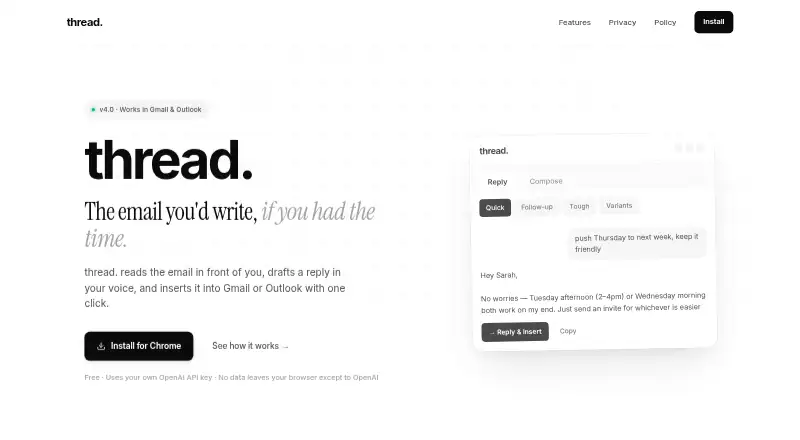
thread. is a browser extension that reads an open email conversation and drafts a reply for Gmail or Outlook.
What thread. is
thread. is a browser extension that reads an open email conversation and drafts a reply for Gmail or Outlook. It uses the messages in the full thread as context, and you can provide three to five past emails to help shape the draft to your writing style. The site describes seven drafting modes, including quick replies, follow-ups, difficult conversations, cold outreach, meeting recaps, and versions with three alternatives. You can also use tone controls and custom instructions. With Reply & insert, the extension opens the reply box, places the draft above your signature, and leaves the cursor ready for review. Draft text appears as it is generated, one word at a time.
The extension is free, with no subscription from thread.; you bring an OpenAI API key and pay OpenAI directly for AI use. Email content, prompts, and an optional voice profile are sent from your browser to OpenAI when you request a draft. The maker says there is no server, user account, usage analytics, or telemetry. Your key, voice profile, templates, and panel preferences are stored in browser local storage.
Good
- Uses the full open email thread as context.
- Supports seven drafting modes.
- Offers tone controls and custom instructions.
- Inserts drafts above the email signature.
- No subscription from thread.
Watch out
- Requires your own OpenAI API key.
- You pay OpenAI directly for AI usage.
- OpenAI may retain prompts and responses under its policy.
Who it suits
It suits people who write a lot of email and want replies drafted with the conversation as context. It is intended for Gmail and Outlook users who are comfortable supplying their own OpenAI API key.
Verdict
thread. combines thread-aware drafting with controls for voice, tone, and reply style. Consider its direct data flow to OpenAI and the need for your own API key before using it.
Plans and prices
From thread.'s own pricing page, checked 5 Oct 2026.
| Plan | Price | What it gives you |
|---|---|---|
| Free | Free | Uses your own OpenAI API key · No subscription from thread. |
The facts
Each one read from thread.'s own pages, with the date it was checked.
Money
- AI billing
- Users provide their own OpenAI API key and pay OpenAI directly for AI usage.checked 5 Oct 2026
What it does
- Audience
- The maker describes thread. as built for people who write a lot of email.checked 5 Oct 2026
- Data flow
- Email content, prompts, and an optional voice profile are sent directly from the browser to OpenAI when a draft is requested.checked 5 Oct 2026
- Deletion
- The privacy policy says uninstalling the extension removes its local storage data, while OpenAI may retain API prompts and responses under its own policy.checked 5 Oct 2026
- Draft insertion
- Reply & insert opens the reply box, places the draft above the signature, and positions the cursor for review.checked 5 Oct 2026
- Inbox context
- It reads the full open email thread to draft a reply based on its messages.checked 5 Oct 2026
- Local storage
- The API key, voice profile, templates, and panel preferences are stored in browser local storage.checked 5 Oct 2026
- Modes
- The site describes seven modes, including quick replies, follow-ups, tough conversations, cold outreach, meeting recaps, and three-variant drafts.checked 5 Oct 2026
- Privacy
- The maker says it operates no server, collects no usage analytics or telemetry, and has no user accounts.checked 5 Oct 2026
- Product
- thread. is an AI email assistant that reads an email thread, drafts a reply in your voice, and inserts it into Gmail or Outlook.checked 5 Oct 2026
- Streaming
- Drafts appear word by word as they are generated.checked 5 Oct 2026
- Support
- The maker lists [email protected] for questions and says it will try to clarify the privacy policy by email.checked 5 Oct 2026
- Voice matching
- Users can paste 3–5 past emails to help drafts match their writing style.checked 5 Oct 2026
Where it runs
- Platforms
- The extension runs in Chrome and works with Gmail and Outlook on the web.checked 5 Oct 2026
Alternatives to thread.
- 1
WPS AI Email Writer
Free planAndroidiOSWebAPI8.0From $5.83 a month - 2

WriteMail.ai
Free planAndroidiOSWebAPI8.0From $60 a year - 3

ForthWrite
Free planWebAPIExtensionmacOS7.6From $24 a month - 4

AI Perfect Assistant
Free planAndroidiOSWebExtension7.2From $16.99 a month - 5

GPT for Gmail
Free planAndroidiOSWebExtension7.2From $9 a month - 6
Kerna
Free planWebmacOSWindows7.1From €12 a month