
TextGears
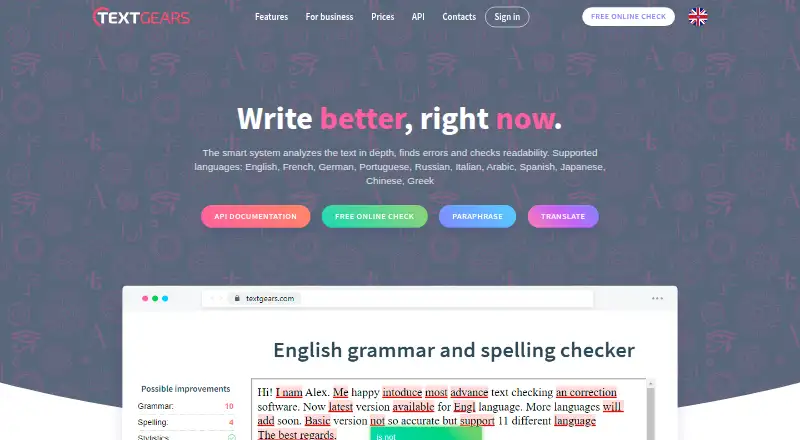
TextGears checks writing for spelling, grammar, style, and readability issues through its website and API.
What TextGears is
TextGears checks writing for spelling, grammar, style, and readability issues through its website and API. The API also supports autocorrection, text analysis, language detection, summarization, and keyword extraction, with results returned as JSON over HTTP or HTTPS. Its documentation lists 11 languages, including English, French, Arabic, Japanese, and Greek, plus dialect codes such as en-US, en-GB, pt-PT, and pt-BR. The maker also provides a Postman collection and a JavaScript library link for integrations. TextGears offers a free plan with 500 requests per month, 200,000 characters per month, and a 4,000-character request limit. The PRO plan is $2.48 a month and lists unlimited checks, translations, and paraphrases of long texts, along with custom dictionary rules and an option not to store texts. The pricing FAQ says its AI does not cover every language. Readability metrics are recommended for texts of at least 30 words because accuracy depends on text size.
Good
- Checks spelling, grammar, style, and readability.
- API offers autocorrection and text analysis.
- Supports 11 listed languages and multiple dialect codes.
- Free plan includes 500 requests per month.
- API responses use JSON over HTTP or HTTPS.
Watch out
- Free plan limits requests to 500 monthly.
- Each free request is limited to 4,000 characters.
- AI does not support all languages.
- Readability metrics are recommended for texts of 30 words or more.
Who it suits
It suits students, universities, and EdTech, HR, content, or advertising services that need text checks or API-based language tools. Teams choosing language coverage over AI analysis quality may prefer the standard plans, according to the pricing FAQ.
Verdict
TextGears combines writing checks with a broader API toolkit, and its listed language and dialect coverage is useful for varied text workflows. Check the plan limits and AI language caveat against your needs before choosing it.
Plans and prices
From TextGears's own pricing page, checked 20 Sep 2026.
| Plan | Price | What it gives you |
|---|---|---|
| PRO | $2.48 a month | Unlimited checks, translations, and paraphrases of long texts · Custom dictionary rules · Option not to store texts · From $2.48 per month |
| Silver | $29.95 a month | 50k text-check requests/month · 20,000k translation/rephrase characters/month · 4k-character request limit · 24/7 support · usage statistics · AI · data-center choice · no dictionary setup · $ 29 .95/month |
| Gold | $99.95 a month | 500k text-check requests/month · 100,000k translation/rephrase characters/month · 16k-character request limit · 24/7 support · usage statistics · AI · data-center choice · dictionary setup · $ 99 .95/month |
| Free | Free | 500 text-check requests/month · 200k translation/rephrase characters/month · 4k-character request limit · 24/7 support · usage statistics · AI · data-center choice · no dictionary setup · $ 0 .00/month |
| Platinum | Priced on request | Millions of text-check requests · individually set translation/rephrase characters · individually set request length · 24/7 support · usage statistics · AI · data-center choice · dictionary setup · Contact us |
The facts
Each one read from TextGears's own pages, with the date it was checked.
What it does
- AI limitation
- The pricing FAQ says TextGears AI does not support all languages and recommends standard plans when supported-language breadth matters more than AI analysis quality.checked 3 Oct 2026
- Annual discount
- The pricing page advertises a 20% discount when API plans are paid annually.checked 15 Oct 2026
- API features
- The API provides grammar and spelling checks, autocorrection, readability and text analysis, language detection, summarization, and keyword extraction.checked 3 Oct 2026
- API regions
- Requests can use independent clusters in Europe, the United States and Singapore.checked 15 Oct 2026
- API transport
- The public API accepts HTTP or HTTPS requests and returns JSON responses.checked 15 Oct 2026
- Authentication
- API keys may be supplied in POST or GET parameters, JSON bodies or an Authorization Basic header.checked 15 Oct 2026
- Availability
- The API documentation says TextGears guarantees 99.9% availability for each cluster.checked 3 Oct 2026
- Availability commitment
- The API documentation and SLA promise at least 99.9% availability for each cluster, with service credits for qualifying downtime.checked 15 Oct 2026
- Core licence
- The SLA reserves TextGears intellectual property and grants only limited, non-transferable, non-sublicensable use rights, indicating the hosted core is proprietary.checked 15 Oct 2026
- Correction depth
- The checker is advertised as detecting more than 200 grammatical error types.checked 15 Oct 2026
- Custom dictionaries
- Administrators can create dictionaries and exceptions so domain words are not flagged as errors.checked 15 Oct 2026
- Customer scale
- The home page states that more than 830 companies use the API and it receives over 10.8 million requests per day.checked 3 Oct 2026
- Dialect handling
- TextGears accepts dialect codes such as en-US, en-GB, fr-FR, de-DE, pt-BR, zh-CN and others.checked 15 Oct 2026
- Dialects
- The API supports dialect codes including en-US, en-GB, en-ZA, en-AU, en-NZ, fr-FR, de-DE, pt-PT, and pt-BR.checked 3 Oct 2026
- Hosting regions
- TextGears says its API clusters are in the United States, Estonia, and Singapore, and customers can choose a cluster.checked 3 Oct 2026
- Independent limit: AI language availability
- The Skywork review notes that TextGears AI quality improvements are not available for every supported language.checked 15 Oct 2026
- Independent limit: Chinese grammar
- The Skywork test found TextGears corrected several basic Chinese errors but missed structural cases involving comparative wording, adverb placement and separable verbs.checked 15 Oct 2026
- Independent praise: multilingual API
- A Skywork hands-on review praises the broad language coverage and considers the API a strong fit for developers building multilingual applications.checked 15 Oct 2026
- Integration
- The API uses HTTP or HTTPS requests and returns JSON, and the maker provides a Postman collection and a JavaScript library link.checked 3 Oct 2026
- Intended users
- The maker identifies EdTech, HR, content and advertising services, universities, and students as groups that use or may benefit from TextGears.checked 3 Oct 2026
- Language coverage
- The service lists English, French, German, Portuguese, Russian, Italian, Arabic, Spanish, Japanese, Chinese and Greek support.checked 15 Oct 2026
The company
- Company profile
- LinkedIn describes TextGears as a privately held software-development company with 11–50 employees, headquartered in Tallinn and founded in 2015.checked 15 Oct 2026
- Headquarters
- Tallinn, Estoniachecked 28 Sep 2026
Money
- Free plan
- Yeschecked 20 Sep 2026
The full review of TextGears
TextGears is a web text checker and an API for adding language analysis to other products. It is best suited to developers and organizations that need more than spelling corrections, including readability checks and text-processing tools. Its breadth and multilingual coverage make it a versatile option, but plan quotas and uneven AI language support call for a close fit check.
Overview
TextGears combines spelling, grammar, style, and readability checks with an API that also handles autocorrection, language detection, summarization, and keyword extraction. That makes it a stronger candidate for building into a service than for readers who want only a basic correction tool. A web plugin is documented for adding checking to web pages, though its current version cannot attach to a textarea element, which limits its usefulness in a common form-based workflow.
The API accepts HTTP or HTTPS requests and returns JSON; a Postman collection and JavaScript library link give developers starting points for integration. Customers can choose API clusters in the United States, Estonia, or Singapore, each with a 99.9% availability guarantee. TextGears says it is GDPR ready and will not share customer data with third parties. It also reports that more than 830 companies use the API and that it handles over 10.8 million requests per day.
Key features
The API supports 11 languages: English, French, German, Portuguese, Russian, Italian, Arabic, Spanish, Japanese, Chinese, and Greek. Dialect codes include en-US, en-GB, en-ZA, en-AU, en-NZ, fr-FR, de-DE, pt-PT, and pt-BR. That breadth is useful for services working across markets, but it should not be mistaken for equivalent AI coverage: TextGears says its AI does not support every language and recommends standard plans when broader language support matters more than AI analysis quality.
Readability metrics are best used with at least 30 words, since accuracy depends on text size. Short snippets may still be checked for other issues, but they are a poor basis for readability conclusions. Support is offered in English and Russian, and TextGears says it answers 96% of requests within 24 hours.
Pricing
TextGears has a free plan and paid options aimed at different workloads. The free tier is a practical way to evaluate a small integration or occasional checking, but its monthly request and character caps make it unsuitable for sustained volume.
- Free — free, billed monthly: 500 requests per month, 200k characters per month, and up to 4k characters per request. This is the lowest-risk starting point, provided the monthly caps and request size work for the intended use.
- PRO — $2.48 a month: unlimited checks, translations, and paraphrases of long texts, custom dictionary rules, and an option not to store texts. Its broad allowance is attractive for individual users or lighter workflows, though the plan description does not specify a seat count or additional quota terms.
- Silver — $ 29 .95/month: 50k text-checking requests per month, 20000k translation or rephrasing characters per month, up to 4k characters per request, a 0% payment fee, and no dictionary setup. It suits moderate API workloads, but gives up the PRO plan's custom dictionary rules and keeps the 4k-character request ceiling.
- Gold — $ 99 .95/month: 500k text-checking requests per month, 100000k translation or rephrasing characters per month, up to 16k characters per request, and a 0% payment fee. The higher request and input limits make it a better fit for heavier use than Silver, at a substantial monthly step-up.
- Platinum — custom pricing: millions of text-checking requests, individual character quotas and request lengths, 24/7 support, usage statistics, and AI. This is for large or specialized workloads that need tailored capacity and support rather than fixed limits.
Platforms
TextGears is available on the web and as an API. The API is the more compelling platform for product teams; the web checker is a direct option for writers, while the plugin's inability to attach to a textarea may matter to teams expecting a form-ready website integration.
Who it's for
TextGears identifies EdTech, HR, content and advertising services, universities, and students as audiences that may benefit. Developers building multilingual text workflows will get the most from its mix of correction, readability, and analysis endpoints. Individual writers can use the web checker or lower-cost plans, but readers seeking only a simple readability score may not need its broader API toolkit.
Pros and cons
- Pro: The API covers corrections, readability, language detection, summarization, and keyword extraction, giving product teams several text tools in one integration.
- Pro: Eleven supported languages, multiple dialect codes, and selectable clusters across three regions give multilingual and regional deployments useful options.
- Pro: The free tier and PRO plan offer entry points for small workloads, while Gold and custom Platinum capacity address larger usage.
- Con: AI does not cover all supported languages, so teams prioritizing breadth should choose standard plans rather than assume uniform AI capability.
- Con: Free-plan caps and fixed character ceilings on Silver and Gold may constrain growing or long-text workloads.
- Con: Readability metrics need at least 30 words for better accuracy, and the plugin cannot currently attach to a textarea element.
Alternatives
For writers who want an extension-oriented grammar tool with a defined free allowance, ProWritingAid offers 500 words per report run, two report runs per day, 10 rephrases per day, and three Sparks per day. For free readability options, Readability Formulas provides online calculators and a Readability Scoring System, while Check Readability requires no account or usage fees and permits personal and commercial use.
Readers who want a free desktop option can consider Readability Analysis Tool (RAT), a GPLv3 open-source project for Windows and Linux that supports .docx and German readability rules. AnchorKite Readability Checker is a free web tool with no signup that runs in the browser and works offline after loading. If an API is the priority, ApyHub Readability Scores Documents API has a free Starter tier with 3,000 atoms per month, one API key, and one team member; Botoi Readability API offers 1,000 free requests per day and access to more than 150 endpoints.
Text Inspector is another web and API option, with a free 250-word plan that automatically deletes data after six hours. For broader category browsing, see Readability Checkers and Grammar checkers.
Verdict
Choose TextGears if you are building a product or running a text workflow that benefits from combining correction, readability, and wider text analysis through one API. Its language range, selectable regions, and scalable plans are the main reasons to choose it. Look elsewhere if you need uniformly capable AI across all supported languages, reliable readability judgments on very short text, or a textarea-ready plugin.
Getting started
- Open the TextGears website.
- Choose the web interface or API route.
- Select the free plan or a paid plan.
- Send text through HTTP or HTTPS requests and process the returned JSON.
- Use the Postman collection or JavaScript library link when building an integration.
Limits worth knowing
The Free plan allows 500 requests per month, 200,000 characters per month, and 4,000 characters per request. Readability metrics are recommended for texts of at least 30 words, and the website plugin cannot attach to a textarea in its current version.
Questions
Is TextGears free?
Yes. The Free plan costs nothing and is billed monthly, with listed request and character quotas.
What does PRO cost?
The PRO plan is listed at $2.48 a month and includes unlimited checks, translations, and paraphrases of long texts.
Which languages are supported?
The API documentation lists 11 languages, including English, French, German, Arabic, Japanese, Chinese, and Greek, plus others.
How does the API integrate?
It accepts HTTP or HTTPS requests and returns JSON. TextGears provides a Postman collection and a JavaScript library link.
Can customers choose where API processing runs?
Yes. TextGears lists clusters in the United States, Estonia, and Singapore, and says customers can choose a cluster.
Does TextGears offer an AI option for every language?
No. Its pricing FAQ says TextGears AI does not support all languages and recommends standard plans when language breadth matters more.
Alternatives to TextGears
- 1
Text Inspector
Free planWebAPI7.4From £9.96 a month - 2

ProWritingAid
Free planExtension7.1From $120 a year - 3

Readable
WebAPI7.0From $12 a month - 4

Hemingway Editor
WebmacOSWindows6.8 - 5
Slick Write
Free planWebExtension6.8Free plan - 6
Analyze My Writing
Free planWeb6.6Free plan