Textadept
Textadept is a free, open-source text editor for programmers, with graphical and terminal interfaces for Windows, macOS, Linux, and BSD.
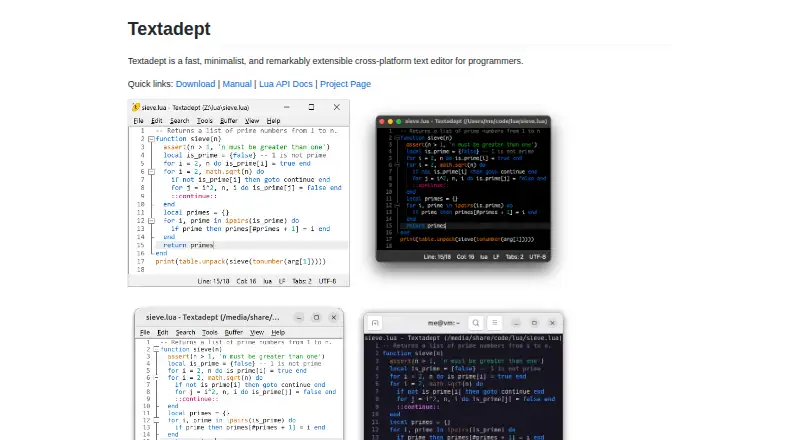
What Textadept is
Textadept is a free, open-source text editor for programmers, with graphical and terminal interfaces for Windows, macOS, Linux, and BSD. It supports more than 100 programming languages and offers multiple carets and selections, split views, configurable key bindings, nested snippets, column editing, macro recording, and large-file handling. Users can script and customize nearly every part of the editor with Lua, and shell commands can run code, build projects, and execute tests. Optional modules add tools such as language debuggers, file comparison, source formatting, an LSP client, scratch buffers, and spell checking. The project says Textadept does not connect to the internet. Its self-contained pre-built binaries need no installation, and source code is also available under the MIT License. Requirements vary by platform: Linux graphical use requires Qt 5 or GTK 3, while the terminal interface needs ncurses. Pre-built macOS binaries are for Apple Silicon only. The project provides documentation and community support resources.
Good
- Supports more than 100 programming languages.
- Offers graphical and terminal interfaces.
- Lua can customize nearly every aspect.
- Self-contained binaries require no installation.
- Free and released under the MIT License.
Watch out
- Pre-built macOS binaries are Apple Silicon only.
- Linux may require manual compilation if its binary fails.
- Linux GUI requires Qt 5 or GTK 3.
Who it suits
Textadept suits programmers who want an editor with both graphical and terminal interfaces, broad language support, and Lua-based customization. It may also appeal to users who prefer a free, open-source editor that the project says does not connect to the internet.
Verdict
Textadept combines programming-focused editing features with extensive Lua customization and command-line tools. Check platform requirements first, particularly the Apple Silicon-only macOS binaries and Linux dependencies.
Plans and prices
From Textadept's own pricing page, checked 7 Oct 2026.
| Plan | Price | What it gives you |
|---|---|---|
| Textadept | Free | Open-source text editor · MIT License |
The facts
Each one read from Textadept's own pages, with the date it was checked.
What it does
- Column editing
- Yeschecked 24 Sep 2026
- Command line tools
- Users can invoke shell commands to run code, build projects, and execute tests.checked 7 Oct 2026
- Customization
- Almost every aspect of the editor can be scripted, extended, and customized with Lua.checked 7 Oct 2026
- Distribution
- Pre-built binaries are self-contained and require no installation; source code is also available.checked 7 Oct 2026
- Editing features
- Features include multiple carets and selections, unlimited split views, configurable key bindings, and nested snippets.checked 7 Oct 2026
- Extension support
- Yeschecked 24 Sep 2026
- Interfaces
- It provides graphical and terminal interfaces with sensible defaults.checked 7 Oct 2026
- Language support
- It supports over 100 programming languages.checked 7 Oct 2026
- Large-file handling
- Yeschecked 24 Sep 2026
- License
- Textadept is an open-source project released under the MIT License.checked 7 Oct 2026
- Multi-cursor editing
- Yeschecked 24 Sep 2026
- Network and privacy
- The project states that Textadept does not connect to the internet.checked 7 Oct 2026
- Optional modules
- Optional modules add language debuggers, file comparison, source code formatting, an LSP client, scratch buffers, and spell checking.checked 7 Oct 2026
- Purpose
- Textadept is a fast, minimalist, extensible cross-platform text editor for programmers.checked 7 Oct 2026
- Requirements
- Pre-built binaries require Windows 10 or later, macOS 13 or later, or Linux with Qt 5 or GTK 3 for the GUI and ncurses for the terminal version.checked 7 Oct 2026
- Support
- The project provides a manual, Lua API documentation, issue tracker, discussions, wiki, and FAQ.checked 7 Oct 2026
The company
- Founded
- 2007checked 28 Sep 2026
Money
- Free plan
- Yeschecked 24 Sep 2026
Where it runs
- Linux limitation
- The FAQ says a single binary cannot run correctly on all Linux systems and advises compiling Textadept manually when it fails to run.checked 7 Oct 2026
- macOS limitation
- All pre-built macOS binaries are for Apple Silicon only.checked 7 Oct 2026
- Macro recording
- Yeschecked 24 Sep 2026
- Supported platforms
- Windows,macOS,Linux,BSDchecked 24 Sep 2026
The full review of Textadept
Overview
Textadept is a minimalist text editor built for programmers, with graphical and terminal interfaces and support for more than 100 programming languages. It suits developers who want to shape their editor through Lua and work from the command line as well as a GUI.
Its breadth of editing features and open customization make it a capable, no-cost choice, but setup is less straightforward on some systems—especially Linux and Apple Silicon-only macOS binaries.
Key features
Multiple carets and selections, column editing, nested snippets, unlimited split views, configurable key bindings, and macro recording give programmers several ways to tailor repetitive editing. Large-file handling is another practical strength for working with substantial source or text files.
Textadept supports extension modules, and Lua scripting reaches almost every part of the editor. That flexibility will appeal to users willing to configure their own workflow; those seeking a polished, fixed feature set may find the same openness unnecessary. Optional modules add debuggers, file comparison, formatting, an LSP client, scratch buffers, and spell checking, so those capabilities depend on choosing and configuring the relevant modules.
Shell commands can run code, build projects, and execute tests from the editor. The project says Textadept does not connect to the internet, which may suit users who prefer an editor without network connections.
Pricing
Textadept is free and open source under the MIT License. Its Textadept plan costs nothing and includes the open-source text editor. There is no paid tier or trial to weigh against that plan.
Platforms
Textadept supports Windows, macOS, Linux, and BSD. Pre-built binaries are self-contained and require no installation, but their system requirements narrow the practical fit: Windows 10 or later, macOS 13 or later, or Linux with Qt 5 or GTK 3 for the graphical interface and ncurses for the terminal version.
Every pre-built macOS binary is for Apple Silicon, so Intel Mac users will need another route. Linux builds may not work correctly on every distribution; when one fails, the project advises compiling from source. These caveats make it less convenient than a tool with broadly compatible installers.
Who it's for
Textadept is best for programmers who value fast, configurable editing, want both terminal and graphical interfaces, and are comfortable scripting or compiling software. Its language coverage and command-line tools make it relevant across many programming workflows.
It is a weaker fit for users who need a ready-made editor with minimal setup, rely on a pre-built Intel Mac version, or expect optional language services to be included without configuration.
Pros and cons
- Pro: Extensive Lua customization lets programmers adapt nearly every aspect of the editor to their own workflow.
- Pro: Multiple selections, unlimited splits, macros, column editing, and large-file handling cover practical editing needs.
- Pro: Graphical and terminal interfaces, plus shell commands for builds and tests, support command-line-oriented work.
- Pro: Free, MIT-licensed software avoids subscription costs and permits open-source use.
- Con: Optional modules mean debuggers, formatting, LSP, and other capabilities require added configuration.
- Con: Pre-built macOS binaries support Apple Silicon only, excluding Intel Macs from that installation path.
- Con: Linux binaries are not reliable across all systems, and manual compilation may be necessary.
Alternatives
For readers focused on JavaScript tooling rather than editing, the JavaScript Package Managers list is a better starting point. Textadept is a programming editor, not a package manager. The Text Editors list is the more direct route for comparing editors.
JSPM is a free open-source option for import-map package management. Choose it when managing JavaScript imports is the need, rather than editing source code.
npm is a package manager with a free plan for public package authors, unlimited public packages, and public registry access. Pick it for publishing and using public packages; its pricing model is freemium.
Pantry offers a free plan with public packages, 30 days of full analytics, 50MB artifacts, a standard build queue, and one seat. Choose it if those package and build services are what you need.
Yarn is a free package manager with no paid plans or usage limits stated. Bower is a free command-line utility, also with no paid plans or usage limits stated. Both address package management rather than Textadept's editing and scripting use case.
Bun is a free, open-source JavaScript runtime and toolkit; choose it when that runtime and toolkit are the goal. Flux is a free, MIT-licensed package manager for personal and commercial use. Rush is a free, open-source JavaScript monorepo manager installable via npm. These tools serve JavaScript package or runtime workflows rather than general code editing.
Verdict
Choose Textadept if you want a free, open-source programming editor with deep Lua customization, strong editing controls, and both graphical and terminal interfaces. Look elsewhere if you need turnkey language tooling or dependable pre-built installation across Intel Macs and varied Linux systems.