Table Habit (mHabit)
Table Habit, also called mHabit, is a free, open-source habit tracker for building and following micro habits.
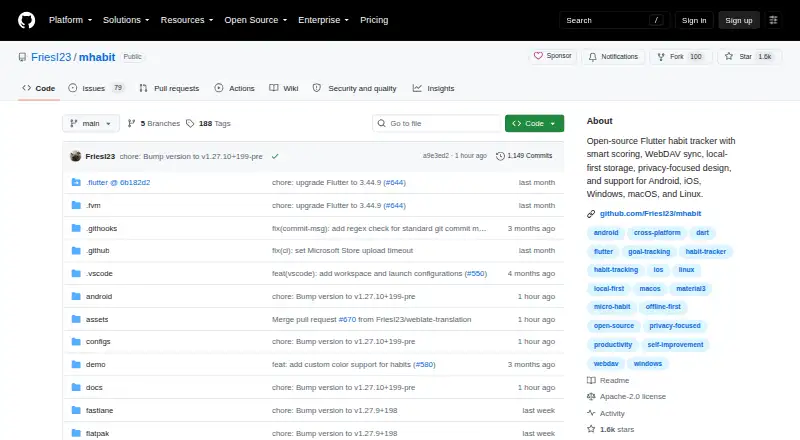
What Table Habit (mHabit) is
Table Habit, also called mHabit, is a free, open-source habit tracker for building and following micro habits. It supports positive and negative habits, daily and extra goals, completion rules, target days, reminders, and Markdown descriptions. Its scoring uses growth curves, with separate models for habits to do and habits not to do. Habit details include heatmaps, score-change graphs with day, week, month, or year views, and check-in charts. Habits can be placed in collapsible groups and reordered. The app works offline with local-first storage, and its applications do not send data to a service without user authorization. No sign-up is required, and the project states that it has no telemetry. WebDAV sync works with Nextcloud, Koofr, or self-hosted servers. Users can import and export native JSON data or migrate from Loop Habit Tracker. It is available for Android, iOS, macOS, Windows, and Linux, with stable distribution channels including Google Play, App Store, F-Droid, Flathub, and Microsoft Store. The project uses the Apache 2.0 license and is described as a one-person indie project.
Good
- Works offline with local-first storage.
- No sign-up required; project states no telemetry.
- Supports positive and negative habits.
- WebDAV sync works with Nextcloud, Koofr, or self-hosted servers.
- Native JSON import and export.
Watch out
- No home-screen widgets.
- Bug reports and questions go to GitHub issues.
- Described as a one-person indie project.
Who it suits
Table Habit suits people who want to track both positive and negative habits, including offline. It may also suit users who want WebDAV sync or portable JSON data.
Verdict
Table Habit offers detailed tracking and charts without requiring an account, with optional WebDAV sync and data export. Its project is described as a one-person indie effort, and it does not provide home-screen widgets.
Plans and prices
From Table Habit (mHabit)'s own pricing page, checked 30 Sep 2026.
| Plan | Price | What it gives you |
|---|---|---|
| Free | Free | no ads · no in-app purchases · offline-first · no account required |
The facts
Each one read from Table Habit (mHabit)'s own pages, with the date it was checked.
What it does
- Account and telemetry
- No sign-up is required and the README states that the app has no telemetry.checked 30 Sep 2026
- Charts
- Habit details include heatmaps, score-change graphs with day, week, month, or year aggregation, and check-in charts.checked 30 Sep 2026
- Data portability
- Table Habit supports native JSON import/export and migration from Loop Habit Tracker.checked 30 Sep 2026
- Distribution
- Stable distribution channels include Google Play, App Store, F-Droid, Flathub, and Microsoft Store.checked 30 Sep 2026
- Habit groups
- Habits can be organized into collapsible groups and reordered by drag and drop.checked 30 Sep 2026
- Habit types
- Habits can be positive or negative, with daily goals, extra goals, completion rules, target days, reminders, and Markdown descriptions.checked 30 Sep 2026
- Languages
- The app has community-driven translations, full RTL support, and more than 18 languages listed as growing.checked 30 Sep 2026
- License
- The project is licensed under Apache 2.0.checked 30 Sep 2026
- Offline use
- The app is fully functional without internet and uses local-first storage.checked 30 Sep 2026
- Privacy
- The Android, iOS, Windows, macOS, and Linux applications do not send data to any service without user authorization.checked 30 Sep 2026
- Purpose
- Table Habit is a free, open-source habit tracker for building and tracking micro habits.checked 30 Sep 2026
- Scoring
- The app uses smart scoring with growth curves and separate scoring models for do and don't habits.checked 30 Sep 2026
- Support
- The project is described as a one-person indie project and directs bug reports and questions to GitHub issues.checked 30 Sep 2026
- Sync integration
- WebDAV synchronization works with Nextcloud, Koofr, or self-hosted servers.checked 30 Sep 2026
The company
- Founded
- 2023checked 28 Sep 2026
The full review of Table Habit (mHabit)
Table Habit (mHabit) is a free, open-source tracker for people who want to build small routines while examining how those routines change over time. It suits privacy-minded users who prefer local data and detailed scoring to a social or gamified system. Its breadth of habit rules and charts is impressive for a no-cost app, but the absence of home-screen widgets matters if check-ins must be instant.
Overview
Table Habit treats micro habits as measurable projects rather than simple streaks. Separate scoring models for habits you want to do and habits you want to avoid, combined with growth curves, can show gradual improvement that a binary completion history misses. That approach is most useful to deliberate self-trackers; someone seeking only a one-tap daily tick may find the model more involved than necessary.
The app is local-first and remains fully functional without an internet connection. Its Android, iOS, Windows, macOS, and Linux applications do not transmit data without authorization, and the project states that it has no telemetry. No account is required. WebDAV synchronization can connect Nextcloud, Koofr, or a self-hosted server when you need multiple-device continuity, while native JSON import and export preserve an independent copy of your records. Migration from Loop Habit Tracker is an additional practical advantage.
Key features
Rules for real-world routines
Positive and negative habits can have daily goals, extra goals, completion rules, target days, reminders, and Markdown descriptions. You can pause or skip a habit instead of forcing an inaccurate failure or deleting its history. This flexibility accommodates schedules that vary by day and goals that involve quantity, not merely completion.
Scoring and visual history
Habit pages include heatmaps, check-in charts, and score-change graphs aggregated by day, week, month, or year. The combination supports both quick pattern spotting and longer-term review: heatmaps reveal consistency, while the different graph intervals help separate a bad week from a sustained trend. The app’s smart scoring is a reason to choose it over a basic checklist, although users who do not care about analysis will gain less from these views.
Groups and portability
Collapsible habit groups keep larger collections manageable, and drag-and-drop reordering lets you shape the list around your priorities. Community-driven translations, full right-to-left support, and more than 18 languages broaden its reach. Apache 2.0 licensing and distribution through Google Play, the App Store, F-Droid, Flathub, and the Microsoft Store make installation straightforward across supported systems. Bug reports and questions are directed to GitHub issues, reflecting the project’s one-person indie structure rather than a staffed support operation.
Pricing
Table Habit has one plan: Free at free. It includes no ads, no in-app purchases, offline-first operation, and no account requirement. There are no paid tiers, seat limits, trial period, or renewal terms to weigh. This is an unusually complete free package for users who want charts, reminders, export, and optional self-hosted synchronization without accepting a subscription. The trade-off is product scope: support runs through GitHub issues, and there is no paid service tier promising a different support model.
Platforms
Native versions support Android, iOS, macOS, Windows, and Linux. Stable releases are distributed through Google Play, the App Store, F-Droid, Flathub, and the Microsoft Store. WebDAV support extends synchronization to Nextcloud, Koofr, and self-hosted servers, but the app itself is not presented as a browser-based service. Users who depend on a home-screen widget should note that none is provided.
Who it's for
Choose Table Habit if you want nuanced positive and negative goals, inspectable progress charts, offline reliability, and control over where your data lives. It is particularly suitable for people moving from Loop Habit Tracker, operating across desktop and mobile, or running a Nextcloud or other WebDAV server. It is less suitable for anyone who expects widgets, built-in coaching, a web-first workflow, or a support team beyond an issue tracker.
Pros and cons
- Pros: detailed scoring with separate do and don't models; heatmaps and multi-period graphs; flexible goals, reminders, pauses, and skips; local-first offline use with no account or telemetry; JSON export and Loop Habit Tracker migration; optional WebDAV sync; broad desktop and mobile coverage.
- Cons: no home-screen widgets, so quick check-ins require opening the app; synchronization requires your own compatible WebDAV service; one-person project support through GitHub issues may not suit users wanting formal assistance.
Alternatives
Habit Tracker Apps is the broader category starting point when you want to compare several approaches.
- Habitify is the better fit if you want web and API access plus integrations such as Apple Health and calendar connections; its Premium plan costs $10 a month.
- OpenHabitTracker is a comparable free, open-source choice with web and self-hosted platforms, including no subscription or in-app purchases.
- Everyday suits users who want a simpler cross-platform routine tool with a free tier capped at three habits.
- Habo is worth considering if you want open-source tracking with an optional 1.99 USD monthly sync service for cloud backups and multi-device use.
- Coach.me is the alternative when community encouragement or paid habit coaching matters more than local-first privacy.
- Commitments fits Apple-oriented users interested in Circles, photos, nudges, and Pacts rather than analytical scoring.
- Habitica is the pick for users who want a role-playing game layer and group participation around habits.
- HabitKit is a mobile-focused option if a four-habit free limit is acceptable and you prefer a separate Pro tier.
Verdict
Table Habit is an excellent choice for analytical, privacy-conscious habit builders who want flexible definitions, serious charting, and portable local data at no cost. Choose it for the scoring depth and account-free offline design; look elsewhere if a widget, browser-first access, built-in coaching, or managed synchronization is essential.
Alternatives to Table Habit (mHabit)
- 1

Habitify
Free planAndroidiOSWebAPI8.1From $2.49 a month - 2

Coach.me
Free planAndroidiOSWeb7.5From $87 a month - 3

Everyday
Free planAndroidiOSWebExtension7.4From $7.49 a month - 4

Habitica
Free planAndroidiOSWebAPI7.4From $47.99 a year - 5

Habo
Free planAndroidiOSLinuxmacOS7.2From $9.99 a year - 6
HabitBull
Free planAndroidiOS7.1From $19.99 a year