SynthMaster One
SynthMaster One is a wavetable software synthesizer for creating and shaping sounds.
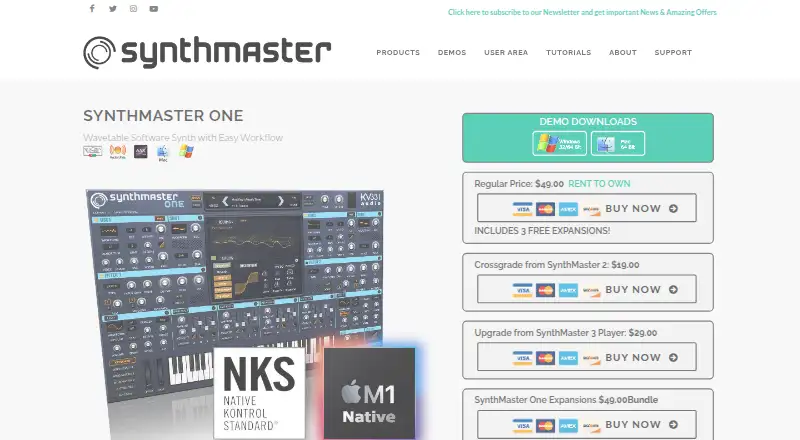
What SynthMaster One is
SynthMaster One is a wavetable software synthesizer for creating and shaping sounds. The desktop version includes 1,250 factory presets and, per instance, two oscillators, two sub oscillators, two filters, four ADSR envelopes, two LFOs, a 16-step arpeggiator/sequencer, and 11 effect types. Users can import wavetable files to expand its library, use Scala tuning files, and drag MIDI patterns into the arpeggiator. Desktop formats include VST on Windows and Mac, Audio Unit on Mac, and a standalone Windows application. On iOS, AudioUnits V3 support allows multiple instances in compatible DAWs, and the Files app can be used to import and export presets, waveforms, and scales. The iOS version has 16-voice polyphony and 650 presets, compared with 32 voices and 1,250 presets on desktop. Presets, waveforms, samples, favourites, and MIDI programs can be synchronized across machines and platforms.
Good
- Desktop version includes 1,250 factory presets.
- Users can import wavetable files.
- Supports Scala tuning files and MIDI pattern import.
- iOS supports multiple instances in compatible DAWs.
- Preset and waveform synchronization across machines and platforms.
Watch out
- iOS has 650 presets, versus 1,250 on desktop.
- iOS has 16-voice polyphony, versus 32 on desktop.
- Demo disables preset saving and stops after 15 minutes.
Who it suits
SynthMaster One suits musicians who want a wavetable instrument with built-in sound-shaping and sequencing tools on desktop or iOS. iOS users working in compatible DAWs can use its AudioUnits V3 support.
Verdict
SynthMaster One combines wavetable import, extensive desktop sound controls, and MIDI pattern support. Its iOS version offers DAW integration, with fewer presets and lower polyphony than desktop.
Plans and prices
From SynthMaster One's own pricing page, checked 7 Oct 2026.
| Plan | Price | What it gives you |
|---|---|---|
| SynthMaster One iPhone Only App | Free | Runs on iPhone, not iPad · 650 presets · 16 voice polyphony · iPhone Only App Price: FREE |
| SynthMaster One iOS Universal App | $9.99, paid once | For iPad and iPhone · Universal App Price: $9.99 |
| SynthMaster One | $49, paid once | Desktop version for Mac and Windows · Regular Price: $49.00 |
The facts
Each one read from SynthMaster One's own pages, with the date it was checked.
What it does
- Cloud sync
- The maker says users can synchronize presets, waveforms, samples, favourites and MIDI programs across multiple machines and platforms.checked 7 Oct 2026
- Demo limits
- The SynthMaster demo disables preset saving, stops working after 15 minutes and includes 650 factory presets.checked 7 Oct 2026
- Desktop formats
- The desktop version runs as a VST instrument on Windows and Mac, as an Audio Unit instrument on Mac and iOS, and as a standalone application on Windows.checked 7 Oct 2026
- Factory presets
- The desktop version includes 1,250 factory presets.checked 7 Oct 2026
- MIDI and tuning
- The product supports Scala tuning files and importing MIDI patterns into its arpeggiator by drag and drop.checked 7 Oct 2026
- Product
- SynthMaster One is an easy to use wavetable software synthesizer with an intuitive workflow.checked 7 Oct 2026
- Sound engine
- Each desktop instance has two oscillators, two sub oscillators, two filters, four ADSR envelopes, two LFOs, a 16 step arpeggiator/sequencer and 11 effect types.checked 7 Oct 2026
- Support
- KV331 Audio directs users with product support issues to the contact form on its support page.checked 7 Oct 2026
- Wavetable synthesis
- Users can import wavetable files and extend the included wavetable library by placing wavetables in the SynthMaster One Waveforms folder.checked 7 Oct 2026
The company
- Company founding
- KV331 Audio says Bulent Biyikoglu founded the company in 2004.checked 7 Oct 2026
- Founded
- 2004checked 28 Sep 2026
Where it runs
- iOS DAW integration
- The iOS app supports AudioUnits V3, allowing multiple instances in supporting DAWs such as GarageBand, Cubasis and Beat Maker.checked 7 Oct 2026
- iOS file integration
- The iOS app can import and export presets, waveforms and scales through the Files app on iOS 11 or later.checked 7 Oct 2026
- iOS version limits
- The iOS app has 16 voice polyphony and 650 presets, compared with 32 voices and 1,250 presets on desktop.checked 7 Oct 2026
The full review of SynthMaster One
SynthMaster One is a wavetable synthesizer for Windows, macOS and iOS. It is best suited to producers who want to shape sounds from imported waveforms and use a synth both in a DAW and on its own. The desktop edition makes the strongest case, pairing a deep sound engine with a large preset library.
Overview
KV331 Audio’s instrument combines an approachable workflow with tools for building sounds rather than relying only on presets. Desktop users get oscillators, filters, modulation, sequencing and effects in each instance, while wavetable imports let them expand the sound sources they work with.
The versions differ materially: desktop provides 32-voice polyphony and 1,250 presets, versus 16 voices and 650 presets on iOS. That makes the iPhone app a useful entry point, but not a like-for-like substitute for desktop when a project needs more simultaneous voices or the larger preset set.
Key features
- Wavetable import: Import wavetable files or add them to the SynthMaster One Waveforms folder. This gives sound designers room to work beyond the included waveforms.
- Desktop sound engine: Each instance has two oscillators, two sub oscillators, two filters, four ADSR envelopes, two LFOs, a 16-step arpeggiator/sequencer and 11 effect types. The range makes it possible to shape and sequence sounds within the instrument, rather than depending on separate tools for each stage.
- MIDI patterns and tuning: Drag MIDI patterns into the arpeggiator and use Scala tuning files. Pattern import is useful for adapting existing MIDI material to the synth’s sequencing workflow.
- Presets and sync: Desktop includes 1,250 factory presets. KV331 Audio says users can synchronize presets, waveforms, samples, favourites and MIDI programs across machines and platforms.
- iOS DAW and file support: The iOS app supports AudioUnits V3, including multiple instances in compatible DAWs such as GarageBand, Cubasis and Beat Maker. Through Files on iOS 11 or later, it can import and export presets, waveforms and scales.
Pricing
The desktop SynthMaster One costs $49.00 one-time for Mac and Windows. It is the clearest fit for producers who want the full preset library, 32-voice polyphony and desktop formats. The iOS Universal App costs $9.99 once for iPhone and iPad, offering a lower-cost option with 650 presets and 16-voice polyphony.
The iPhone Only App is free and runs on iPhone, not iPad; it also has 650 presets and 16-voice polyphony. It suits someone who wants to try the instrument on an iPhone, but its device restriction and lower capacity make it the least flexible choice. The desktop demo is another way to evaluate the synth: it includes 650 factory presets, disables preset saving and stops working after 15 minutes.
Platforms
On Windows, SynthMaster One runs as a VST instrument or standalone application. On Mac it runs as a VST or Audio Unit instrument, and on iOS as an Audio Unit instrument. The iOS app’s multi-instance DAW support is useful for mobile production, while standalone desktop operation suits users who want to open the instrument outside a host.
Who it's for
Choose SynthMaster One if you want a wavetable instrument with substantial desktop sound-shaping controls, MIDI pattern import and the option to expand its waveform library. The iOS version makes sense for mobile use or a lower-cost start, provided its smaller preset library and lower polyphony meet your needs. If you need the desktop capacity, the iPhone app is not an equivalent replacement.
Pros and cons
- Pros: Desktop combines two oscillators, dual filters, modulation, sequencing and 11 effect types in each instance, giving sound designers a broad toolkit in one instrument.
- Pros: Wavetable import and drag-and-drop MIDI pattern support let users bring their own source material and patterns into the workflow.
- Pros: iOS AudioUnits V3 support allows multiple instances in compatible DAWs, and the Files integration supports moving presets, waveforms and scales.
- Cons: iOS has half the desktop polyphony and 600 fewer presets, limiting its capacity compared with the desktop edition.
- Cons: The free iPhone app does not run on iPad, and the desktop demo cannot save presets and ends after 15 minutes.
Alternatives
Browse software synthesizers for more options. Consider Vital instead if you want a free Basic plan with full synth features, 75 presets and 25 wavetables, or its $5 monthly subscription with store credit and subscriber-only packs. Surge XT is a free, open-source virtual instrument plugin for Windows, macOS and Linux. Choose Cardinal if a free, open-source option across desktop and web is the priority; its builds include built-in modules, but modules cannot be added to an existing build. Dexed is a free option for users who want software under the GPL v3 license. Helm is another free choice, available as a standalone app or plugin on Linux, Mac and Windows. Sonic Pi is free and open source. VCV Rack offers a free, open-source core with free modules. DefleMask has a free legacy demo and a $14.99 one-time plan.
Verdict
SynthMaster One is a strong choice for producers who want a capable desktop wavetable synth, particularly if importing waveforms and MIDI patterns matters to their sound design. Its desktop engine and preset library are the main reasons to choose it; look elsewhere if you need a free desktop synth or want the iOS version to match desktop capacity.
Getting started
- Open the SynthMaster One website
- Choose the free iPhone-only app, $9.99 universal iOS app or $49 desktop version
- Install the iOS app or desktop edition for your platform
- Load it as a VST or Audio Unit, or open the Windows standalone app
- Add wavetables to the SynthMaster One Waveforms folder if needed
- Use Files on iOS to import or export presets, waveforms and scales
Limits worth knowing
The free iPhone-only app runs on iPhone rather than iPad and includes 650 presets with 16-voice polyphony. The demo cannot save presets, stops after 15 minutes and includes 650 factory presets; desktop has 32 voices and 1,250 presets.
Questions
What platforms does SynthMaster One support?
It is available on iOS, macOS and Windows. Desktop formats include VST, Audio Unit and a standalone Windows application.
How much does SynthMaster One cost?
The iPhone-only app is free. The universal iOS app costs $9.99 once, and the desktop version costs $49 once.
Is there a free trial or demo?
Yes. The demo stops working after 15 minutes, disables preset saving and includes 650 factory presets.
Can I use custom wavetables?
Yes. Wavetable files can be imported by placing them in the SynthMaster One Waveforms folder.
Does it support iOS music apps?
The iOS app supports AudioUnits V3 and multiple instances in compatible DAWs such as GarageBand, Cubasis and Beat Maker.
Who provides support?
KV331 Audio directs product support requests to the contact form on its support page.
Alternatives to SynthMaster One
- 1
DefleMask
Free planAndroidiOSLinuxmacOS8.1$6.99 one-time - 2

Vital
Free planOpen sourceLinuxmacOSSelf-hostedWindows8.0From $5 a month - 3
SynthMaster 3
Free planiOSmacOSWindows7.7$99 one-time - 4
Dexed
Free planOpen sourceiOSLinuxmacOSWindows7.6Free plan - 5

Cardinal
Free planOpen sourceWebAPILinuxmacOS7.5Free plan - 6
Helm
Open sourceLinuxmacOSWindows7.2