
StemDesk
StemDesk is desktop audio software for separating recordings into stems, building mixes with processing, and delivering editable DAW sessions.
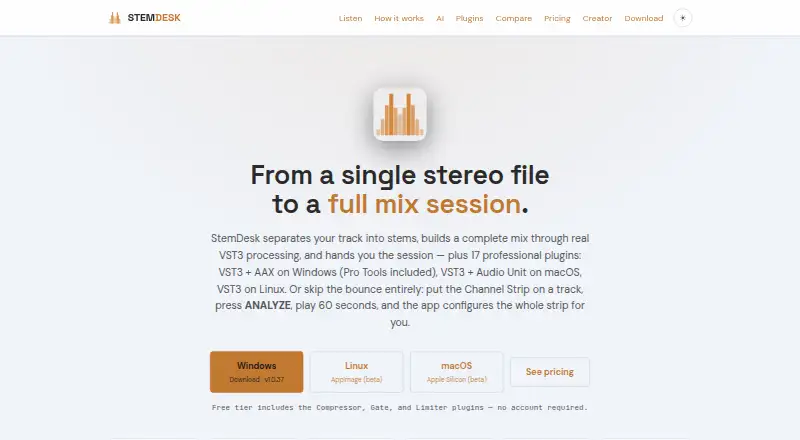
What StemDesk is
StemDesk is desktop audio software for separating recordings into stems, building mixes with processing, and delivering editable DAW sessions. Its auto-mix workflow measures stems and applies per-stem processing, gain staging, panning, sidechain ducking, vocal rides, and mastering. A local AI panel includes mix critique, spectral masking analysis, a session-aware coach, and vocal transcription; optional music generation requires a separate ACE-Step installation. Mixing, separation, and plugins work offline, while downloads and an optional one-time AI model fetch need internet access. The maker says the software does not transmit audio, projects, personal data, or telemetry while running. Its plugin suite has 17 plugins, with formats varying by operating system. The free plan includes stem separation, analysis, mix targets, local AI tools, and Compressor, Gate, and Limiter plugins. Pro is a 99.15 USD one-time purchase; Studio is a 179.25 USD one-time purchase. Listed downloads include Windows 10/11, macOS 13 or later on Apple Silicon (beta), and Linux x86_64 (beta).
Good
- Mixing, separation, and plugins work offline.
- Maker says runtime does not transmit audio or projects.
- Free plan includes stem separation and local AI tools.
- Studio includes one-click Auto-Mix and batch album processing.
- Refunds may be requested within 14 days of purchase.
Watch out
- Music generation requires a separate ACE-Step installation.
- macOS Apple Silicon and Linux downloads are listed as beta.
- Pro and Studio are one-time purchases.
Who it suits
StemDesk suits audio creators who want stem separation, mix processing, and editable sessions on desktop. It may also suit users who need offline mixing and separation, subject to the listed platform availability.
Verdict
StemDesk combines stem separation, mix processing, and DAW session delivery, with offline operation for core audio work. Check the beta platform listings and one-time plan costs against your setup and budget.
Plans and prices
From StemDesk's own pricing page, checked 15 Oct 2026.
| Plan | Price | What it gives you |
|---|---|---|
| Free | Free | Compressor, Gate and Limiter plugins · stem separation · analysis and mix targets · 154 genre profiles · local AI suite · WAV/MP3/FLAC/AAC export · one-time |
| Pro | $99, paid once | All 17 plugins · Channel Strip Analyze Track · AI button in all plugins · free v1.x updates · one-time |
| Studio | $179, paid once | Everything in Pro · one-click Auto-Mix · live Pro Tools session building · REAPER/Ableton/DAWproject export · batch album processing · one-time |
The facts
Each one read from StemDesk's own pages, with the date it was checked.
What it does
- AI critique
- The local AI panel grades mixes from A to F, ranks issues and offers undoable fixes.checked 15 Oct 2026
- AI features
- Its local AI panel includes mix critique, spectral masking analysis, a session-aware coach, vocal transcription, and optional music generation through a separate ACE-Step installation.checked 2 Oct 2026
- Auto-mix
- The full-mix workflow measures stems and applies per-stem processing, gain staging, panning, sidechain ducking, vocal rides, and mastering.checked 2 Oct 2026
- Auto-Mix
- Studio includes one-click per-stem mixing and mastering with gain, panning, sidechain, vocal rides and processing chains.checked 15 Oct 2026
- DAW compatibility
- The plugins are intended for hosts including Pro Tools, REAPER, Ableton Live, FL Studio, Cubase, Studio One, Bitwig, Logic and GarageBand.checked 15 Oct 2026
- Delivery targets
- The application provides eleven loudness and delivery targets including streaming, CD, club and broadcast workflows.checked 15 Oct 2026
- Developer connectivity
- Plugins communicate with the desktop application over local loopback address 127.0.0.1 on port 9800.checked 15 Oct 2026
- Documentation
- The user manual covers installation, tiers, workflows, exports, AI tools, settings, shortcuts, platform requirements, troubleshooting and support.checked 15 Oct 2026
- FabFilter integration
- StemDesk can render with installed FabFilter Pro plugins and generate FabFilter presets.checked 15 Oct 2026
- Founder announcement
- Asaf Fulks' LinkedIn announcement presented StemDesk as a fully local standalone application and plugin suite for Pro Tools and REAPER.checked 15 Oct 2026
- Generation limitation
- Local music generation requires an NVIDIA CUDA GPU or a separately configured remote ACE-Step server.checked 15 Oct 2026
- Independent AI detail
- The launch article says ACE-Step 1.5 is MIT-licensed, runs locally and has no per-generation API fees.checked 15 Oct 2026
- Independent description
- The launch article describes deep spectral analysis, conflict heatmaps, platform mastering targets and direct Pro Tools and REAPER workflows.checked 15 Oct 2026
- Independent integration detail
- The launch article says Pro Tools can receive real-time fader and pan control and that REAPER exports complete projects with plugins and presets.checked 15 Oct 2026
- Installation limitation
- The macOS first run installs about 1.7 GB of Python dependencies and Linux is distributed as an AppImage rather than a native package.checked 15 Oct 2026
- Launch news
- The OC Recording Company announced StemDesk on February 25, 2026 as a local AI mixing, mastering and music-generation product.checked 15 Oct 2026
- License activation
- Paid licenses are activated offline with a key, and the maker says no account is required.checked 2 Oct 2026
- License model
- The EULA grants a non-exclusive, non-transferable license and identifies StemDesk as Fulks-owned software with third-party components listed separately.checked 15 Oct 2026
- License validation
- License keys are verified offline using Ed25519 signatures and no account is required.checked 15 Oct 2026
- Local operation
- StemDesk's mixing, mastering, separation and AI functions run locally by default and audio is not uploaded.checked 15 Oct 2026
- Local processing
- The desktop mixing pipeline runs on the user's machine, and the maker says audio is never uploaded.checked 2 Oct 2026
The company
- Company legal identity
- Fulks, Inc. is identified as a California corporation mailing from Wildomar, California.checked 15 Oct 2026
- Company ownership
- Fulks, Inc. says it was founded by Asaf Fulks and Yakira Shimoni Fulks and operates four ventures.checked 15 Oct 2026
- Company size
- Fulks, Inc. describes itself as a holding company with four active ventures rather than publishing an employee count.checked 15 Oct 2026
The full review of StemDesk
Overview
StemDesk is desktop software for splitting audio into stems, shaping a mix with plugins, and exporting an editable DAW session on its Studio tier. It suits producers who want those steps in one local workflow; the free plan makes it possible to assess core separation and analysis before paying.
Its strongest case is breadth: StemDesk combines stem work, mix assistance, plugins, and session delivery, while core audio tasks work offline. The trade-offs are a substantial one-time cost for automation and session exports, plus beta status for its macOS and Linux downloads.
Key features
Stem work and mixing
StemDesk separates audio into stems and supports automatic EQ and dynamics. Studio's Auto-Mix measures stems and applies per-stem processing, gain staging, panning, sidechain ducking, vocal rides, and mastering. That makes Studio the relevant tier for users who want a guided full-mix pass rather than only separated tracks; its spatial processing is stereo.
AI and plugins
The local AI panel offers mix critique, spectral masking analysis, a session-aware coach, and vocal transcription. Music generation is optional and requires a separate ACE-Step installation. The suite has 17 plugins: Compressor, Gate, and Limiter are free, while Pro adds all 17, a Channel Strip with Analyze Track, and an AI button in every plugin. Formats vary by operating system: Windows gets VST3 and AAX, macOS gets VST3 and Audio Units, and Linux gets VST3.
Sessions and offline use
Studio can build a live Pro Tools session and export to REAPER, Ableton Live, and DAWproject. Sessions can also be exported to Pro Tools. The maker lists tested or validated support for Pro Tools, REAPER, Cubase, Ableton Live, Studio One, Bitwig Studio, FL Studio, GarageBand, and Logic Pro, though export destinations are a narrower set.
Mixing, separation, and plugins work offline. Paid licenses activate offline with a key, and no account is required. The maker says audio is never uploaded; its EULA says runtime does not transmit audio, projects, personal data, or telemetry. Downloads and update checks are user-initiated, and internet is required for downloads and the optional one-time AI model fetch.
Pricing
The Free plan costs nothing and includes Compressor, Gate, and Limiter; stem separation, analysis, and mix targets; the local AI suite; and WAV, MP3, FLAC, and AAC export. It is a meaningful starting point for separation and evaluation, but does not include all 17 plugins or Studio's one-click Auto-Mix and session delivery.
Pro costs $99.15, paid once. It adds all 17 plugins, the Channel Strip with Analyze Track, an AI button in every plugin, and free updates through v1.x. It fits users seeking the fuller plugin set without Studio's automation and export workflow.
Studio costs $179.25, paid once and includes everything in Pro, one-click Auto-Mix, live Pro Tools session building, REAPER, Ableton, and DAWproject export, and batch album processing. It is the appropriate choice for users who need those production and delivery tools; otherwise Pro is the less costly paid tier. A separate pricing note says paid plans start at $149, which conflicts with the listed Pro price. Confirm the current offer before buying. There is no free trial; the maker says customers may request a full refund within 14 days of purchase. Email support is provided.
Platforms
StemDesk supports Linux, macOS, and Windows. Downloads are listed for Windows 10/11, macOS 13+ on Apple Silicon (beta), and Linux x86_64 (beta). Windows is the clear choice for a non-beta listing; Mac and Linux users should account for beta availability before relying on it in a production setup.
Who it's for
StemDesk is best suited to producers who want stem separation alongside mix processing, local AI assistance, and, at Studio level, DAW session delivery. The free tier suits exploration and basic stem work; Pro suits plugin-focused users; Studio is for those who value one-click mixing, batch albums, or its export targets. It is a weaker fit for anyone who needs a non-beta macOS or Linux release or does not need stem-to-session workflows.
Pros and cons
- Pros: Separation, analysis, mix targets, and the local AI suite are included in the free plan, with several common audio export formats.
- Pros: Core audio work can run offline, and paid activation uses a key without requiring an account.
- Pros: Studio combines automated per-stem mixing with batch processing and multiple session export paths.
- Cons: Auto-Mix and session delivery require the most expensive tier, so users who only need plugins can avoid that cost with Pro.
- Cons: macOS and Linux downloads are beta, which makes those platform choices less settled than Windows 10/11.
- Cons: The pricing note's $149 starting point does not match the listed $99.15 Pro price, so buyers should verify the purchase amount.
Alternatives
AI Audio Mixing Software is the broader category for comparing options. Choose StemMaster instead if you prefer a monthly license at $9.99 a month, with use on up to three Windows or macOS machines. TonalBrain is a low-cost one-time alternative for analysis: its Starter plan is $9, paid once for 50 credits, with each run using one credit and supporting up to 24 tracks.
Choose Box if you want a macOS-only option whose free tier includes session scanning, basic mix analysis, and a stereo field view. FUSER is an alternative paid one-time option at £59, paid once for compatible Mac or Windows plugin hosts. Waves Curves AQ is available through Waves Ultimate, including the monthly subscription at $24.99 a month, if you want Curves AQ as part of a larger plugin bundle.
NeuroMix AI is a free web alternative. iZotope RX is another paid option. MAutoDynamicEq is another paid alternative.
Verdict
Choose StemDesk if you want stem separation and mixing tools in an offline-capable desktop suite, especially if Studio's Auto-Mix and DAW exports match your workflow. Its free tier is a useful entry point, but the higher-tier capabilities, beta Mac and Linux releases, and conflicting price note make it less compelling for buyers who need only a conventional plugin or a settled non-Windows setup.
Getting started
- Open the StemDesk website.
- Choose the Windows, macOS, or Linux download listed for your system.
- Use the free plan or choose Pro or Studio.
- Activate a paid license offline with its key; no account is required.
- Connect to the internet for downloads and, if desired, the one-time AI model fetch.
Limits worth knowing
The free plan includes Compressor, Gate, and Limiter; Pro includes all 17 plugins. Studio adds one-click Auto-Mix, live Pro Tools session building, exports, and batch album processing.
Questions
Is StemDesk free?
Yes. Its free plan costs nothing and includes stem separation, analysis, mix targets, the local AI suite, and three plugins.
What do the paid plans cost?
Pro is $99.15, paid once. Studio is $179.25, paid once.
Which systems can run StemDesk?
Downloads are listed for Windows 10/11, macOS 13+ on Apple Silicon (beta), and Linux x86_64 (beta).
Does StemDesk work offline?
Mixing, separation, and plugins work offline. Internet is needed for downloads and the optional one-time AI model fetch.
Which DAWs can receive session exports?
Studio can export sessions to REAPER, Pro Tools, Ableton Live, and DAWproject.
Does it require an account?
The maker says no account is required, and paid licenses are activated offline with a key.
Alternatives to StemDesk
- 1
NeuroMix AI
Free planWeb6.6Free plan - 2

Box
Free planmacOS6.5From $29 a month - 3

EZmix 3
macOSWindows6.5€149 one-time - 4
FUSER
macOSWindows6.5£59 one-time - 5
Waves Curves AQ
macOSWindows6.5From $249.99 a year - 6
Zynaptiq ADAPTIVERB
macOSWindows6.4$149 one-time