SpriteForge
SpriteForge is a free, open-source browser editor for rigged 2D sprite animation.
What SpriteForge is
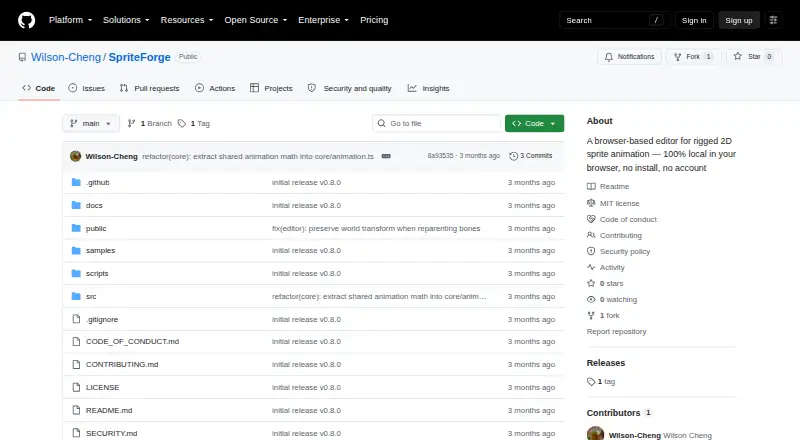
SpriteForge is a free, open-source browser editor for rigged 2D sprite animation. It runs locally in a browser tab without an account, server, or upload pipeline, keeping projects and images on the user's machine. Users can import PNG and JPG images or TexturePacker-style sprite sheets, build parent-child bone rigs, pose characters, and animate them on a timeline. The timeline includes keyframes, easing, curve previews, undo and redo, and two-bone inverse kinematics. Mesh attachments use GPU skinning and automatic weight recomputation. Editable projects use the .sfproj format and autosave in browser localStorage. Exports include Spine-style JSON, atlas and PNG files, a standalone runtime.html player, and MP4 previews. Exported bundles are intended for Spine-compatible runtimes, including Phaser, PixiJS, Unity, Godot, and custom runtimes. The project describes itself as an early release, with advanced features still in progress. Spine bundle import is partial, and mobile or touch editing is unsupported; the listed desktop browsers are the latest two versions of Chrome, Firefox, Safari, and Edge.
Good
- Runs locally without an account or uploads.
- Supports skeletal animation and mesh attachments.
- Exports Spine-style bundles and MP4 previews.
- Autosaves editable projects in browser localStorage.
Watch out
- Mobile and touch editing are unsupported.
- Spine bundle import is partial.
- Several advanced animation features remain in progress.
- MP4 export can be slow on first use.
Who it suits
SpriteForge suits small teams, game jam projects, tool hackers, and people seeking a lightweight 2D rigging workflow. It is intended for desktop browser use rather than mobile or touch editing.
Verdict
SpriteForge offers a local browser workflow for building and exporting rigged sprite animations. Its early-release status and partial import support are important considerations for projects relying on advanced tools or Spine bundle details.
The facts
Each one read from SpriteForge's own pages, with the date it was checked.
What it does
- Animation features
- The editor includes a timeline with keyframes, easing, curve previews, undo and redo, and two-bone inverse kinematics.checked 9 Oct 2026
- Development status
- The repository describes SpriteForge as an early open-source release and says several advanced animation features are still in progress.checked 8 Oct 2026
- Export formats
- Exports include Spine 4.x-style JSON, atlas and PNG files, a standalone runtime.html player, and MP4 previews.checked 9 Oct 2026
- Exports
- SpriteForge exports Spine-style JSON, atlas, and PNG bundles, plus MP4 previews using H.264 via ffmpeg.wasm.checked 8 Oct 2026
- Feature status
- The project describes itself as an early open-source release, and says some advanced animation features remain in progress.checked 9 Oct 2026
- How it works
- Users import images, create a bone rig, keyframe animation, and export a Spine-compatible JSON, atlas, and PNG bundle.checked 9 Oct 2026
- Image and mesh features
- It supports PNG/JPG insertion, TexturePacker-style sprite sheet import, mesh attachments with GPU skinning, and automatic weight recomputation.checked 8 Oct 2026
- Image import
- SpriteForge supports PNG and JPG images and TexturePacker-style sprite sheet import.checked 9 Oct 2026
- Import compatibility
- Spine bundle import is partial and may omit constraints, non-default skins, FFD, events, draw order, and linked meshes, with warnings.checked 9 Oct 2026
- Import limits
- Spine 4.x bundle import is partial and omits constraints, non-default skins, FFD, events, draw order, and linked meshes, with warnings.checked 8 Oct 2026
- Integrations
- The specification says exported Spine JSON can be used with runtimes including Phaser, PixiJS, Unity, Godot, and custom runtimes.checked 9 Oct 2026
- Intended users
- The project is aimed at small teams, game-jam projects, tool hackers, and people seeking a lightweight 2D rigging workflow.checked 9 Oct 2026
- License
- The repository lists an MIT license.checked 9 Oct 2026
- Local operation
- The editor runs in the browser, with no account, server, or upload pipeline; project data and images stay on the user's machine.checked 9 Oct 2026
- Local use
- The project says it runs in a browser tab without an account, server, or upload pipeline, keeping projects and images on the user's machine.checked 8 Oct 2026
- MP4 limitation
- MP4 export uses ffmpeg.wasm, whose large bundle can make the first export slow; GIF export is not supported.checked 9 Oct 2026
- Notable missing features
- Brush-based weight painting, full mesh edge split/merge tools, full FFD workflow, and multi-bone and path inverse kinematics are listed as incomplete.checked 8 Oct 2026
- Privacy and telemetry
- The repository describes its privacy model as local-first, with no telemetry or uploads.checked 8 Oct 2026
- Project files
- Editable projects use the .sfproj format, which stores project data and embedded image data.checked 8 Oct 2026
- Project storage
- Editable projects use the .sfproj format and autosave in browser localStorage.checked 9 Oct 2026
- Purpose
- SpriteForge is a browser-based editor for rigged 2D sprite animation.checked 9 Oct 2026
- Rigging and animation
- Users can import images, build a parent-child bone hierarchy, pose characters, and animate them on a timeline.checked 8 Oct 2026
- Runtime integration
- Exported bundles are intended for compatible Spine-style runtimes and can also be previewed in the included standalone runtime.html player.checked 8 Oct 2026
Where it runs
- Browser support
- The specification lists desktop support for the latest two versions of Chrome, Firefox, Safari, and Edge, and says mobile/touch editing is unsupported.checked 9 Oct 2026
Alternatives to SpriteForge
- 1

Animation Desk
Free planAndroidiOSmacOSWindows8.1From $2.49 a month - 2

Animaze
Free planAndroidiOSAPImacOS8.1From $19.99 a year - 3

FlipaClip
Free planAndroidiOSmacOS8.0From $29.99 a year - 4

VTube Studio
Free planAndroidiOSAPImacOS8.0$14.99 one-time - 5
Animaker
Free planAndroidiOSWebAPI7.8From $15 a month - 6

Adobe Character Animator
Free planmacOSWindows7.5Free plan