
Splice Sounds
Splice Sounds is a music-production catalog offering royalty-free samples, loops, one-shots, MIDI, and presets.
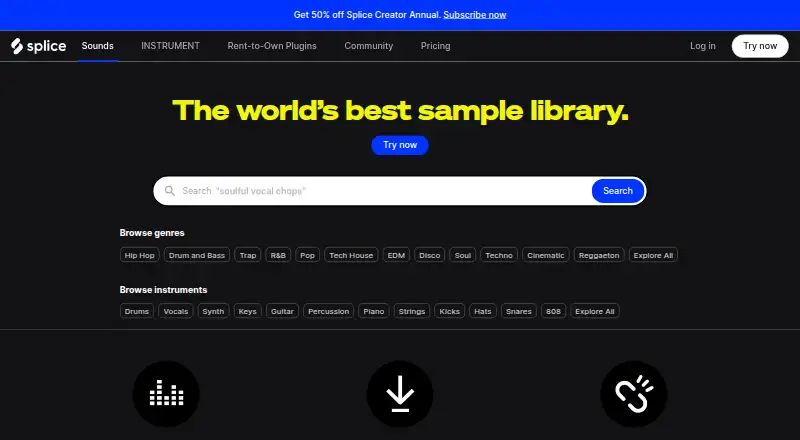
What Splice Sounds is
Splice Sounds is a music-production catalog offering royalty-free samples, loops, one-shots, MIDI, and presets. Users can browse by genre, instrument, key, or BPM, preview individual items, and search with text or audio. The Sounds Plugin page describes 3.5 million human-made items, and downloads are stored locally in WAV format. Splice says samples are cleared for commercial and non-commercial projects under its Terms of Use; downloaded sounds remain accessible after cancellation. Downloads use credits: each sample costs one credit, while MIDI patterns and presets can cost up to three, and unused credits roll over monthly. The desktop app for macOS 12+ and Windows 10+ supports browsing, previewing, and dragging sounds into a DAW. The Sounds Plugin works across major DAWs in AU, VST3, and AAX formats, but a subscription is required to download samples and presets. Splice lists direct integrations for Ableton Live 12.3, Fender Studio Pro 7+, and Pro Tools 2025.6+. Plans include Creator at $4.99 a month for the first month and Sounds at $12.99 a year, billed at $12.99 a month. There is no free plan, though a free trial is listed.
Good
- Catalog covers samples, loops, MIDI, and presets.
- Search by text or audio; browse by key and BPM.
- Downloaded sounds remain accessible after cancellation.
- Unused credits roll over monthly.
- Desktop app supports dragging sounds into a DAW.
Watch out
- There is no free plan.
- A subscription is required to download samples and presets.
- Each sample costs one credit.
- MIDI patterns and presets can cost up to three credits.
Who it suits
Splice Sounds suits musicians, producers, and sound designers looking for samples, MIDI, or presets for music projects. It offers browsing and preview tools across desktop and plugin workflows.
Verdict
Splice Sounds provides a broad catalog with multiple discovery options and DAW workflows. The credit system and subscription requirement for downloads are important to consider, even though downloaded sounds remain available after cancellation.
Plans and prices
From Splice Sounds's own pricing page, checked 30 Sep 2026.
| Plan | Price | What it gives you |
|---|---|---|
| Creator (first month) | $4.99 a month | ~200 monthly downloads · Full access to 3M+ sounds · 1,000+ presets · Rare Finds · $4.99 for the first month; page shows $19.99 crossed out |
| Sounds | $12.99 a month | ~100 monthly downloads · Full access to 3M+ sounds · $12.99 /mo billed yearly |
The facts
Each one read from Splice Sounds's own pages, with the date it was checked.
What it does
- AI and creator policy
- Splice says its catalog is human-made and that it will not train AI on users' work or generate from someone's work without paying them again.checked 30 Sep 2026
- Audience
- Splice describes its platform as serving musicians, producers, and sound designers.checked 30 Sep 2026
- Credit limits
- Each sample costs one credit, while MIDI patterns and presets can cost up to three credits; unused credits roll over monthly.checked 30 Sep 2026
- DAW integrations
- Splice lists direct integrations for Ableton Live 12.3, Fender Studio Pro 7+, and Pro Tools 2025.6+.checked 30 Sep 2026
- Discovery
- Users can browse by genre, instrument, key, and BPM, preview individual sounds, and search by text or audio.checked 30 Sep 2026
- Download format
- Sounds downloaded from Splice are stored locally in WAV format.checked 30 Sep 2026
- Library size
- The Sounds Plugin page describes a library of 3.5 million human-made samples, one-shots, presets, and MIDI.checked 30 Sep 2026
- Plugin
- The Sounds Plugin works across major DAWs and is offered in AU, VST3, and AAX formats; a subscription is required to download samples and presets.checked 30 Sep 2026
- Product
- Splice Sounds is a catalog of royalty-free samples, loops, one-shots, MIDI, and presets for music production.checked 30 Sep 2026
- Retention
- Downloaded sounds remain yours to keep, and the Sounds page says they can still be accessed after cancellation.checked 30 Sep 2026
- Support
- Splice directs users who need help to its Help Center and support team.checked 30 Sep 2026
- Variations
- The Sounds Plugin can generate new versions of catalog samples in a chosen key and tempo, and Splice says creators are compensated when a variation is used.checked 30 Sep 2026
Where it runs
- Desktop app
- The desktop app is available for macOS 12+ and Windows 10+ and supports browsing, previewing, and dragging samples into a DAW.checked 30 Sep 2026
The company
- Founded
- 2014checked 23 Oct 2026
- Headquarters
- New York, United Stateschecked 23 Sep 2026
Money
- Royalty-free license
- Splice says samples are cleared for commercial use and may be used in commercial or non-commercial work subject to its Terms of Use.checked 30 Sep 2026
The full review of Splice Sounds
Overview
Splice Sounds is a royalty-free library of samples, loops, one-shots, MIDI and presets for music production. It suits musicians, producers and sound designers who want to find sounds by musical attributes and bring them into a DAW. Its catalog and workflow are substantial, but downloads consume credits and require a subscription.
Key features
Genre, instrument, key and BPM filters make it practical to narrow a large catalog to sounds that fit a track; text and audio search add alternate ways to find a match. Individual previews help you assess sounds before spending a credit. The Sounds Plugin can also generate catalog-sample variations in a chosen key and tempo, with creators compensated when a variation is used.
Splice describes the library as containing 3.5 million human-made sounds, including samples, one-shots, presets and MIDI. Downloads are stored locally in WAV format. Each sample costs one credit, while a MIDI pattern or preset can cost as many as three; unused credits roll over monthly. This gives subscribers flexibility, though heavier use of presets and MIDI can consume an allowance faster than sample downloads.
The desktop app supports browsing, previewing and dragging samples into a DAW. The Sounds Plugin works across major DAWs in AU, VST3 and AAX formats, but a subscription is required to download samples and presets. Splice lists direct integrations for Ableton Live 12.3, Fender Studio Pro 7+ and Pro Tools 2025.6+. Commercial use is permitted under Splice’s Terms of Use, and downloaded sounds remain accessible after cancellation. Splice says it will not train AI on users’ work or generate from someone’s work without compensating them again.
Pricing
Splice Sounds is paid, with no free plan and a free trial. The entry price is 12.99 /mo. The listed Creator (first month) plan costs $4.99 a month, billed $4.99 for the first month with $19.99 crossed out. It includes about 200 monthly downloads, full access to 3M+ sounds, 1,000+ presets and Rare Finds. That larger allowance and preset access suit creators who expect regular use, but the first-month price is not the ongoing price.
The Sounds plan is $12.99 a year, billed $12.99 /mo billed yearly, with about 100 monthly downloads and full access to 3M+ sounds. It is the lower allowance option for subscribers who mainly need the core sound catalog; the monthly download estimate is smaller, and the listed plan does not include the additional preset and Rare Finds benefits shown for Creator. Credit costs vary by content, so a preset or MIDI-heavy workflow may stretch the allowance less far. Unused credits roll over monthly, and downloaded sounds remain accessible after cancellation.
Platforms
Splice lists Android, iOS, macOS, web and Windows support. Its desktop app requires macOS 12+ or Windows 10+. The plugin supports AU, VST3 and AAX, with direct integrations listed for Ableton Live 12.3, Fender Studio Pro 7+ and Pro Tools 2025.6+.
Who it's for
Splice is a strong fit for producers who regularly source commercial-use sounds, want broad discovery tools and work in a supported DAW. Credit rollover and retained downloads soften the subscription commitment. It is less suitable for occasional users who want a free library or unrestricted downloads without a paid plan. For licensing, commercial use remains subject to Splice’s Terms of Use.
Pros and cons
- Pros: Broad catalog with search by genre, instrument, key, BPM, text and audio, making focused discovery possible.
- Pros: Downloads stay accessible after cancellation, and unused credits roll over monthly.
- Pros: Plugin, desktop app and direct DAW integrations support moving from discovery to a production workflow.
- Cons: There is no free plan, and a subscription is required to download samples and presets.
- Cons: Credits make downloads finite; MIDI patterns and presets can cost up to three credits each.
- Cons: The Creator plan’s first-month price differs from its crossed-out $19.99 figure, so readers should not treat the introductory charge as a continuing rate.
Alternatives
Music Sample Libraries is the broader category to browse when comparing services.
- BandLab Sounds is the better starting point for a free option: its Free plan costs nothing and allows 20 BandLab Sounds claims per week. BandLab Pro costs $14.99 a month after a 3-day free trial and automatically renews at $14.99/month.
- Loopcloud may suit someone seeking a lower monthly entry price: Artist (monthly) is $7.99 a month with 100 points, 5 GB cloud storage and a 14-day free trial. Its Studio (monthly) plan is $11.99 a month.
- Noiiz offers a free plan and a lower-priced Light tier at $7.99 a month, which includes 100 MB sounds per month and Connect Light. Regular costs $12.99 a month and adds 300 MB sounds per month, Unlimited Expansions and Connect PRO.
- 99Sounds is worth considering for a free library: its sound libraries and plugins are free and royalty-free under the site license.
- WAVS may appeal to someone who wants to try a paid service on a small initial outlay: its $1 first-week offer is a one-time 1.00 USD charge, then renews monthly at the Pro plan price shown on its page; it includes 10 download credits and unlimited plays.
- UVI Soundbanks is another paid sound-library option.
- Wave Alchemy offers a free Triaz Player with 4,000 samples and 200 presets, though sequencer editing, Sound Browser and loading your own samples are disabled.
- LANDR Samples is another paid option with a free plan.
Verdict
Choose Splice Sounds if you need a large, searchable production catalog, DAW-oriented workflows and sounds you can keep after cancelling. Its strongest case is the combination of discovery, plugin access and credit rollover; look elsewhere if you need a free plan or want downloads without tracking credits.
Alternatives to Splice Sounds
- 1

Orchestral Tools
Free planWebmacOSWindows7.6€199 one-time - 2

BandLab Sounds
Free planAndroidiOSWeb7.3From $99 a year - 3

Function Loops
Free planWeb7.3$15.90 one-time - 4
ProjectSAM
Free planmacOSWindows7.3$119 one-time - 5
Soundiron
Free planmacOSWindows7.3$39 one-time - 6
Wave Alchemy
Free planmacOSWindows7.3£79 one-time