Skulpt
Skulpt is a free, web-based implementation of Python that runs code entirely in the browser, on the client side.
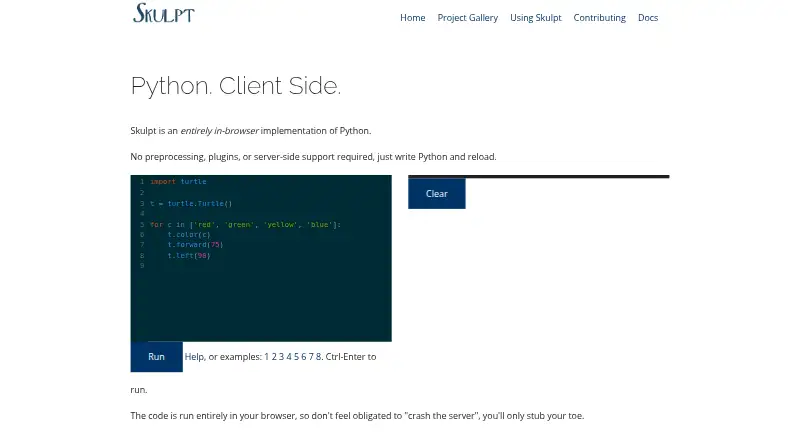
What Skulpt is
Skulpt is a free, web-based implementation of Python that runs code entirely in the browser, on the client side. The homepage says it needs no preprocessing, plugins, or server-side support. Its online editor supports cut, copy, paste, undo, redo, and indentation, with shortcuts to run all code or just a selection. Skulpt can be embedded in a webpage or added directly to HTML by including skulpt.js or skulpt-min.js and skulpt-stdlib.js. Users can also create and host custom modules. The usage guide describes embedding Trinket examples in a page with an iframe, then remixing examples or saving work to a free Trinket account. For learning or teaching Python, the guide points to Skulpt’s project gallery. The documentation describes the master branch as using Python 3.7.3 grammar and says Python 2 remains an option for projects that need it. Listed supported or partly supported modules include math, random, turtle, time, urllib, unittest, image, DOM, and re. However, Skulpt is incomplete: some Python features are missing or only partially implemented. Its runtime may be licensed under MIT or PSFLv2, though the dual license may not cover surrounding build-processing or testing code.
Good
- Runs code in the browser.
- Needs no server-side support.
- Can be embedded in HTML.
- Supports custom modules.
- Free to use.
Watch out
- Some Python features are missing or partial.
- The interactive feature is still getting started.
- Dual licensing may not cover surrounding code.
Who it suits
Skulpt may suit people learning or teaching Python, or developers who want to embed browser-based Python execution in a webpage. Its coverage limits matter for projects that depend on specific language features.
Verdict
Skulpt offers browser-based Python execution and embedding options for educational and web projects. Check its incomplete language coverage and license scope against your needs.
Plans and prices
From Skulpt's own pricing page, checked 7 Oct 2026.
| Plan | Price | What it gives you |
|---|---|---|
| Skulpt | Free | No paid plans or usage limits stated on the official pages opened |
The facts
Each one read from Skulpt's own pages, with the date it was checked.
What it does
- Community support
- The contributing page points users to a bug and issue tracker, contribution instructions, a mailing list, and developer documentation.checked 7 Oct 2026
- Custom modules
- Users can create and host custom modules for use in Skulpt.checked 7 Oct 2026
- Distribution
- The usage guide says to include skulpt.js or skulpt-min.js and skulpt-stdlib.js in a webpage to use Skulpt.checked 7 Oct 2026
- Distribution files
- The usage guide says to add skulpt.js or skulpt-min.js and skulpt-stdlib.js to a project to load Skulpt in HTML.checked 7 Oct 2026
- Editor
- The site’s editor supports cut, copy, paste, undo, redo, indentation, and running all or selected code with keyboard shortcuts.checked 7 Oct 2026
- Editor controls
- The online editor supports common cut, copy, paste, undo, and redo shortcuts, and runs code with Ctrl-Enter or selected code with Shift-Enter.checked 7 Oct 2026
- Educational use
- The usage guide recommends Skulpt's project gallery for people who want to learn or teach Python.checked 7 Oct 2026
- Embedding
- Skulpt can be embedded in an existing webpage or added directly to HTML.checked 7 Oct 2026
- Execution
- The homepage says code runs entirely in the browser.checked 7 Oct 2026
- Integration
- The usage guide describes embedding Trinket examples in a page through an iframe; users can remix examples and save work to a free Trinket account.checked 7 Oct 2026
- Intended use
- The usage guide presents Skulpt for learning or teaching Python and points to educational projects in its gallery.checked 7 Oct 2026
- Interactive feature status
- The homepage describes the interactive feature as new and still getting off the ground.checked 7 Oct 2026
- Language coverage
- The documentation says Skulpt is incomplete, with some Python language features missing or only partially implemented.checked 7 Oct 2026
- License
- The runtime may be licensed under either the MIT license or PSFLv2, while the homepage cautions that this dual license may not cover surrounding build-processing or testing code.checked 7 Oct 2026
- Licensing
- The homepage says Skulpt may be licensed under either the MIT license or PSFLv2, with that dual license applying to the runtime portion.checked 7 Oct 2026
- Limitations
- The documentation says Skulpt is incomplete and that parts of the Python language are missing.checked 7 Oct 2026
- Origin
- The homepage identifies Scott Graham as the creator of Skulpt.checked 7 Oct 2026
- Product
- Skulpt is an entirely in-browser implementation of Python that runs code on the client side.checked 7 Oct 2026
- Python compatibility
- The homepage says the master branch builds and runs using Python 3.7.3 grammar and that Python 2 remains an option for projects that need it.checked 7 Oct 2026
- Server requirements
- The homepage says Skulpt requires no preprocessing, plugins, or server-side support.checked 7 Oct 2026
- Standard library
- The repository README lists math, random, turtle, time, urllib, unittest, image, DOM, and re among supported or partially supported modules.checked 7 Oct 2026
- Support and community
- The contributing page directs users to GitHub issues, a contribution guide, a discussion mailing list, and developer documentation.checked 7 Oct 2026
- What it does
- Skulpt is an entirely in-browser implementation of Python.checked 7 Oct 2026
Alternatives to Skulpt
- 1
JSweet
Free planOpen sourceAndroidiOSWebAPI7.7Free plan - 2

SWC
Free planAndroidWebAPILinux7.1Free plan - 3
Transcrypt
Free planWebLinuxmacOSSelf-hosted6.7Free plan - 4
TypeScript Playground
Free planWeb6.6Free plan - 5
Google Web Toolkit
Free planWebExtensionLinuxmacOS6.5Free plan - 6
Haxelib
Free planAPILinuxmacOSWindows6.5Free plan