ShowYourWork
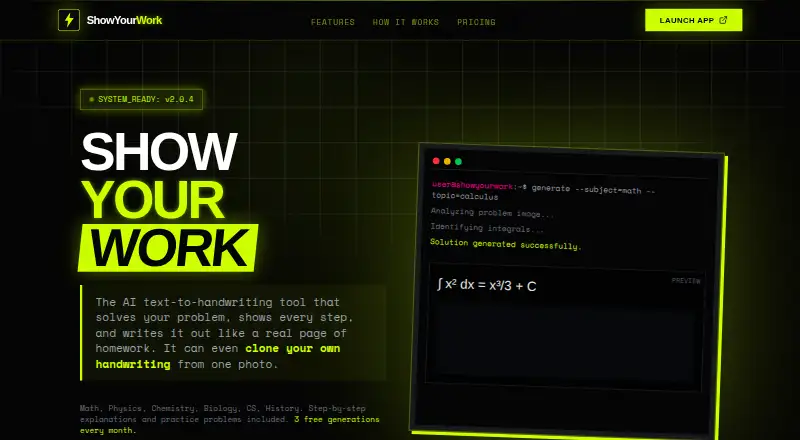
ShowYourWork turns typed, photographed, or URL-based problems into handwritten-looking solutions with step-by-step work.
What ShowYourWork is
ShowYourWork turns typed, photographed, or URL-based problems into handwritten-looking solutions with step-by-step work. It lists Math, Physics, Chemistry, Biology, Computer Science, and History, and is presented as a study tool for students, study groups, and test preparation. The web app accepts up to 350 characters, allows image attachments, and offers four handwriting styles plus a custom free try, three paper types, detailed or summary output, and square resolutions of 1024, 2048, or 4096. Solutions can be exported as PNG or PDF, copied, printed, or shared by link. Users can upload a handwriting sample for cloning; each account gets one free try, while paid plans include unlimited cloning. The Free forever plan is free, resets monthly, and allows 3 generations per month. A Weekly Pass costs $2.99, paid once for one week. Monthly plans cost 7.00 USD, 25.00 USD, and 45.00 USD. Android, iOS, and web are listed platforms; the iOS app lists voice input, camera upload, offline mode, and cloud sync.
Good
- Supports six listed subjects
- Accepts typed, photographed, and URL problems
- Exports as PNG or PDF
- Offers grader mode and batch processing
Watch out
- Free plan allows 3 generations per month
- Web input is limited to 350 characters
- Canvas LMS and Google Classroom are coming soon
Who it suits
ShowYourWork is aimed at students, study groups, and people preparing for tests. It may suit learners who want step-by-step problem work in a handwritten format or who want to export and share solutions.
Verdict
ShowYourWork combines problem input by text, image, or URL with handwritten-style output and step-by-step work. Its free monthly generation allowance and paid plan limits are worth checking against your study needs.
Plans and prices
From ShowYourWork's own pricing page, checked 14 Oct 2026.
| Plan | Price | What it gives you |
|---|---|---|
| Free forever | Free | 3 generations/month · explanations and practice problems always free · one free handwriting-cloning try · resets monthly |
| Weekly Pass | $2.99, paid once | all Starter features for one week · no monthly commitment · one week |
| Starter | $7 a month | 10 generations/month · 1K resolution · 2 handwriting styles · grader mode · monthly |
| Standard | $25 a month | 50 generations/month · up to 2K resolution · all 4 handwriting styles · grader mode · monthly |
| Pro | $45 a month | 100 generations/month · 4K Ultra-HD resolution · all 4 handwriting styles · grader mode · monthly |
The facts
Each one read from ShowYourWork's own pages, with the date it was checked.
What it does
- Accuracy claim
- ShowYourWork claims 99.9% accuracy for Math, Physics and Chemistry through its Smart Engine.checked 14 Oct 2026
- API and SDKs
- The opened official product page does not describe a public API, SDK or developer integration surface.checked 14 Oct 2026
- Batch processing
- The app can process multiple problems at once.checked 14 Oct 2026
- Custom styles
- Custom Styles control ink bleed, pressure, paper texture, and handwriting messiness.checked 30 Sep 2026
- Documentation and changelog
- The opened official product page does not provide product documentation, help-center material or a changelog.checked 14 Oct 2026
- Export and sharing
- The maker says solutions can be downloaded or exported as PDF and PNG files and shared through public links.checked 14 Oct 2026
- Exports
- Solutions can be exported as PNG or PDF, copied to the clipboard, printed, or shared by link.checked 30 Sep 2026
- Grader mode
- Grader mode accepts completed homework and returns teacher-style feedback with red-ink corrections.checked 14 Oct 2026
- Handwriting cloning
- Users can train the system on samples of their own handwriting; the maker describes uploading three samples on Product Hunt.checked 14 Oct 2026
- Handwriting styles
- Users can choose cursive, print, messy or neat handwriting styles.checked 14 Oct 2026
- Integrations
- Canvas LMS and Google Classroom are marked Coming Soon, Notion is Export Ready, and PDF Export and Public Links are marked Active.checked 30 Sep 2026
- Intended users
- The site presents the product as a study tool for students, study groups, and test preparation.checked 30 Sep 2026
- Licence and self-hosting
- The opened official product page does not state an open-source licence or provide self-hosting instructions.checked 14 Oct 2026
- Limit: academic-integrity risk
- AIPure flags ethical concerns because the product is designed to make AI-generated work resemble student handwriting.checked 14 Oct 2026
- Limit: pricing
- AIPure says the subscription model may be costly for some users.checked 14 Oct 2026
- Limit: usage caps
- AIPure notes that the number of generations is limited by the selected plan.checked 14 Oct 2026
- Offline and cloud features
- The maker lists offline mode and cloud sync for the iOS experience.checked 14 Oct 2026
Where it runs
- Apple listing privacy
- Apple's listing says contact information may be linked to users, while photos, videos and usage data may be collected without being linked.checked 14 Oct 2026
- Apple system requirements
- The iOS app requires iOS 15.1 or later; iPad requires iPadOS 15.1 or later, and Apple-silicon Macs require macOS 12.0 or later.checked 14 Oct 2026
- iOS features
- The iOS app lists voice input, camera upload, offline mode, and cloud sync.checked 30 Sep 2026
- Launch platforms
- The maker's Product Hunt listing describes a web app plus mobile apps for iOS and Android.checked 30 Sep 2026
The company
- Company size and headquarters
- No company size or headquarters is stated on the opened official homepage, Product Hunt page or Apple listing.checked 14 Oct 2026
- Maker identity
- The Apple listing identifies Gboyega Ofi as the developer and seller; the copyright line names Ophydami.checked 14 Oct 2026
- Maker origin
- The about section says it was built by an engineer who wished he had the tool during college and that 200+ students now save hours each week.checked 30 Sep 2026
The full review of ShowYourWork
ShowYourWork turns typed, photographed, or URL-based questions into handwritten-style worked solutions. It suits students who want answers they can review, export, or share; the three-generation monthly free allowance is too small for regular use.
Its mix of input methods and adjustable presentation makes it more flexible than a plain answer box, but students should treat its claimed accuracy as a claim, not a guarantee.
Overview
The service covers Math, Physics, Chemistry, Biology, Computer Science, and History. It is designed for students, study groups, and test preparation, with step-by-step work presented in a handwritten format. That presentation can help make a solution easier to follow, but the central value is seeing the working, not merely receiving an answer.
On the web, typed input is limited to 350 characters, with image attachment as another route for longer or visual problems. Users can choose detailed or summary output, three paper types, and square output at 1024, 2048, or 4096 resolution. These controls give room to tailor a result, while the shorter text cap may be restrictive for lengthy prompts.
Key features
Handwriting cloning uses a photo of one page of the user's writing. Each account gets one free try, while paid plans include unlimited cloning. The four standard handwriting styles and custom style controls—ink bleed, pressure, paper texture, and messiness—make the visual output more adaptable than a fixed template. That is useful for presentation, though it matters less to readers who only need a concise explanation.
Grader Mode provides red-ink corrections, detailed feedback, and step-by-step error analysis, making the service more than a generator of worked answers. Batch Processing handles 10 or more problems at once through a multi-threaded solution engine, a practical option for a worksheet or group study session. Both are included in the paid tiers described.
Exports include PNG and PDF, clipboard copying, printing, and shareable links. PDF Export and Public Links are active; Notion is export-ready, while Canvas LMS and Google Classroom are coming soon. The Smart Engine claims 99.9% accuracy for math, physics, and chemistry, but that claim should not replace checking solutions, especially when learning depends on understanding each step.
The iOS app lists voice input, camera upload, offline mode, and cloud sync. Those mobile features suit solving away from a desk, while the web app's detailed controls are useful when presentation settings matter.
Pricing
Free forever costs nothing, with billing resetting monthly. It allows 3 generations/month, with referral +3 generations; explanations and practice problems are always free. This is enough to sample the generation workflow, not to rely on it as a daily solver.
Weekly Pass costs $2.99, paid once, billed one week. It includes all Starter features for one week, has no monthly commitment, and can be canceled anytime. It is the lowest-cost way to access the paid feature set briefly, but it is a short pass rather than an ongoing monthly plan.
Starter costs $7 a month and includes 10 generations/month, 1K resolution, 2 handwriting styles, 50 history items, and 20 saved problems. It also includes grader mode, PDF export, batch upload, and priority processing. This is the clearest fit for occasional use, though the quota and resolution are the lowest among the monthly tiers.
Standard costs $25 a month. Its 50 generations/month, up to 2K resolution, all 4 handwriting styles, 200 history items, and 100 saved problems suit heavier study use. It retains the same listed grader, export, batch, and priority features as Starter, so its added value is chiefly capacity and output options.
Pro costs $45 a month and raises the allowance to 100 generations/month, 4K Ultra-HD resolution, 500 history items, and 500 saved problems, with all 4 styles and the same paid features. It is for frequent users who need the largest stated quota or highest resolution; those who do not need that capacity may find Standard more proportionate.
Platforms
ShowYourWork is available on Android, iOS, and the web. The listed iOS app features include voice and camera input, offline mode, and cloud sync; those capabilities are specifically stated for iOS.
Who it's for
Students preparing for tests, study groups working through multiple questions, and learners who benefit from visible step-by-step solutions are the strongest fit. Image input helps with photographed problems, while batch processing and shareable outputs serve group or worksheet workflows. It is a weaker fit for someone who needs many free generations each month or does not care about handwritten presentation.
Pros and cons
- Multiple ways to submit problems: typed text, photos, and URLs accommodate different question formats, though web text entry stops at 350 characters.
- Presentation is configurable: handwriting, paper, detail level, and resolution choices help tailor a solution, but the higher resolution and larger monthly allowances require more expensive plans.
- Useful review and sharing tools: grader feedback, batch processing, PDF/PNG export, and public links support practice beyond a single answer, with some classroom integrations still coming soon.
- Small free quota: three generations per month makes the free tier a sampler rather than a dependable study allowance.
- Paid tiers scale sharply in price: the move from $7 a month Starter to $25 a month Standard is worthwhile mainly for readers who need substantially more generations, saved problems, or resolution.
Alternatives
For a broad directory of homework-solving options, browse AI Homework Helpers.
Choose AskSia instead if daily problem solves, step-by-step solutions, and photo input on its free plan are a better fit; it also spans Android, iOS, web, desktop, and browser extension platforms.
Mathway is another freemium solver with free access to its solver and calculators and step-by-step solutions; an optional subscription unlocks additional access.
Choose Cymath for a focused math alternative with free step-by-step solutions, or Cymath Plus at $5 a month for ad-free use and detailed sub-steps on most problems.
Photomath offers a free Basic plan with step-by-step explanations, while custom visual aids and extra how-and-why tips are excluded from that tier.
Sovi.AI is a freemium alternative available on Android, iOS, and web.
OpenTutor is a free-to-download and use alternative on Android, iOS, and web.
Choose Kedovo AI if its Learner plan's 5 practice questions per chapter and AI chat tutor allowance of 10 per day suit your needs; it is web-only.
SnapSolve is an Android alternative with a free plan offering 20 solves per day and photo, text, and voice input.
Verdict
ShowYourWork is a good choice for students who want flexible problem input, handwritten-style working, and tools for reviewing or sharing solutions. Its paid plans make the most sense when batch processing, grader feedback, or higher monthly volume will be used regularly. Look elsewhere if a small free generation allowance is a deal-breaker or if handwritten output is not worth paying extra for.
Getting started
- Open the ShowYourWork web app or use its Android or iOS app
- Create an account to access the service and handwriting cloning
- Enter a problem, upload an image, or provide a URL
- Choose handwriting, paper, detail, and output-resolution settings
- Select a free or paid plan
- Generate, then export, copy, print, or share the solution
Limits worth knowing
The Free forever plan provides 3 generations per month and one free handwriting-cloning try; explanations and practice problems remain free. Starter includes 10 generations monthly at 1K resolution, while Standard and Pro raise quotas and resolution.
Questions
What platforms does ShowYourWork support?
It is listed for Android, iOS, and web. The iOS app includes voice input, camera upload, offline mode, and cloud sync.
Is there a free plan?
Yes. Free forever costs nothing, resets monthly, and includes 3 generations per month.
How much do paid plans cost?
Weekly Pass costs $2.99, paid once for one week. Monthly plans cost 7.00 USD, 25.00 USD, or 45.00 USD.
Can it copy my handwriting?
You can upload a photo of one page of handwriting. Each account gets one free cloning try, and paid plans include unlimited cloning.
What integrations are available?
Notion is marked Export Ready, while Canvas LMS and Google Classroom are marked Coming Soon. PDF Export and Public Links are active.
What subjects are supported?
The listed subjects are Math, Physics, Chemistry, Biology, Computer Science, and History.
Alternatives to ShowYourWork
- 1

Mathway
Free planAndroidiOSWebExtension8.2From $39.99 a year - 2

QuestionAI
Free planAndroidiOSWebExtension8.1From $4.90 a month - 3

CameraMath
Free planAndroidiOSWebAPI8.0From $59.99 a year - 4

Cymath
Free planAndroidiOSWeb7.3From $5 a month - 5
Photomath
Free planAndroidiOS7.3From $69.99 a year - 6
Solvely
AndroidiOSWebExtension7.2