SEOMER
SEOMER is a web-based monitoring and intelligence platform for website owners, SEO specialists, agencies and technical teams.
What SEOMER is
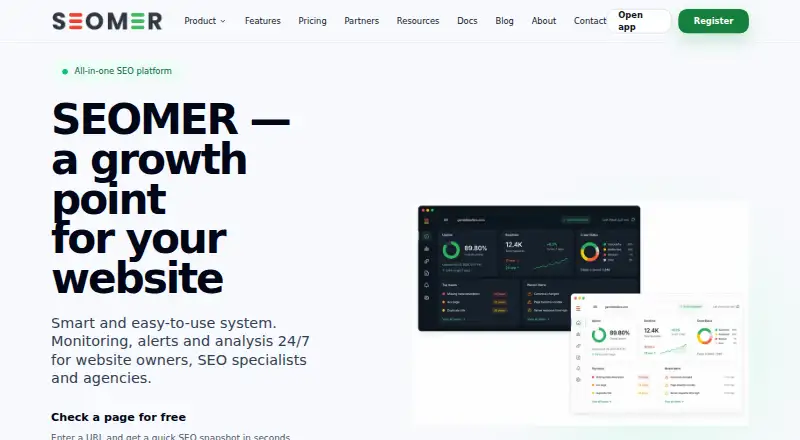
SEOMER is a web-based monitoring and intelligence platform for website owners, SEO specialists, agencies and technical teams. It tracks site health, uptime, pages, logs, SEO signals, indexation and changes. Its tools include Google Search Console insights, indexation and SERP monitoring, crawler audits, backlink monitoring and Web Archive analysis. Search Console connects through Google OAuth with read access to its data, and users can configure project alerts for critical drops, technical conflicts and visibility changes. Reports can combine SEO, Search Console, indexation, uptime, logs, Web Archive and competitor signals, with optional AI summaries. Workspaces offer roles and permissions for tools, alerts, billing and team invitations; alerts can be delivered by email, Telegram, Slack or webhooks. The free plan offers 10 page checks per day. Its free uptime tier is limited to one project, HTTP-only visibility and one worker pass every five minutes.
Good
- Free plan offers 10 page checks per day.
- Combines SEO, uptime, logs and indexation monitoring.
- Search Console connects through Google OAuth.
- Alerts can go to email, Telegram, Slack or webhooks.
- Workspaces provide roles and permissions.
Watch out
- Free uptime tier covers one project.
- Free uptime visibility is HTTP-only.
- Free tier runs one worker pass every five minutes.
- Individual module pricing details are not yet expanded.
Who it suits
SEOMER suits site owners and SEO or technical teams that want monitoring, Search Console data and alerts in one web platform. Teams should consider the free tier’s project and uptime limits before relying on it for monitoring.
Verdict
SEOMER brings several monitoring and SEO signals into reports, with team permissions and multiple alert channels. Its free uptime tier has clear limits, and paid plans start at $12 a month.
Plans and prices
From SEOMER's own pricing page, checked 30 Sep 2026.
| Plan | Price | What it gives you |
|---|---|---|
| Free | Free | Quick page checks · Limited daily usage · Basic platform access |
| 5,000 TOK | $5, paid once | 5k top-up · Small package for occasional extra usage · 5.00 USD |
| Light | $12 a month | More usage capacity · Basic monitoring workflows · Simple reports · 12.00 USD / month |
| 25,000 TOK | $25, paid once | 25k top-up · Balanced package for regular additional checks · 25.00 USD |
| Starter | $29 a month | Workspace monitoring · Alerts and reports · SEO intelligence workflows · 29.00 USD / month |
| Pro | $79 a month | Several active projects · Higher limits · Advanced monitoring usage · 79.00 USD / month |
| 100,000 TOK | $100, paid once | 100k top-up · Large package for active workflows and higher load · 100.00 USD |
| Agency | $199 a month | Team workflows · Extended limits · Modular platform usage · 199.00 USD / month |
The facts
Each one read from SEOMER's own pages, with the date it was checked.
What it does
- Alerts
- Users can configure project-level alerts for critical drops, technical conflicts and visibility changes in Google Search Console data.checked 30 Sep 2026
- Data retention
- The privacy policy says monitoring and analytics data may be retained according to the user's plan, workspace settings or product limits.checked 30 Sep 2026
- GSC integration
- SEOMER connects to Google Search Console via Google OAuth and requests read access to Search Console data.checked 30 Sep 2026
- Monitoring
- The platform tracks website health, uptime, pages, logs, SEO signals, indexation and changes continuously.checked 30 Sep 2026
- Other alert channels
- The features page lists Email, Telegram, Slack and Webhooks as alert delivery options.checked 30 Sep 2026
- Pricing limitation
- The pricing page says detailed pricing for individual modules will be expanded later.checked 30 Sep 2026
- Purpose
- SEOMER describes itself as a real-time website intelligence and monitoring platform for owners, SEO specialists, agencies and technical teams.checked 30 Sep 2026
- Reports
- The platform says its reports can combine SEO, Search Console, indexation, uptime, logs, Web Archive and competitor signals, with AI-powered summaries described as optional.checked 30 Sep 2026
- Security and privacy
- SEOMER says it does not sell personal data and uses technical and organizational measures designed to protect data against unauthorized access, loss, misuse or disclosure.checked 30 Sep 2026
- SEO tools
- Its listed tools include Google Search Console insights, indexation and SERP monitoring, crawler audits, backlink monitoring and Web Archive analysis.checked 30 Sep 2026
- Support
- The partner page says support can include help with launch, product answers, materials and guidance for first steps.checked 30 Sep 2026
- Uptime limits
- The free uptime tier includes one monitored project, HTTP-only visibility and one worker pass every five minutes.checked 30 Sep 2026
Money
- Free usage
- The homepage offers 10 free page checks per day.checked 30 Sep 2026
The company
- Team controls
- Workspaces support roles and permissions for viewing, editing, managing tools, configuring alerts, billing access and inviting members.checked 30 Sep 2026
The full review of SEOMER
SEOMER suits site owners and SEO teams who want search visibility and technical monitoring in one web workspace. Its range of signals, reports and team permissions is compelling; the free uptime tier is too limited for dependable broad coverage, and ongoing costs depend on both the plan and the usage needed.
Overview
SEOMER continuously monitors website health, uptime, pages, logs, SEO signals, indexation and changes. Bringing those signals together can help teams connect technical issues with search visibility rather than manage separate monitoring workflows. That breadth is most useful to agencies and technical teams coordinating work across projects; readers seeking only a narrow, local log-analysis tool may find the wider platform unnecessary.
The free plan provides quick page checks, limited daily usage and basic platform access. The homepage's 10 free page checks per day make it a low-cost way to explore the platform, but the free uptime tier covers just one project, uses HTTP-only visibility and runs one worker pass every five minutes. Those limits make it a starting point, not a strong fit for teams needing broad or frequent uptime checks.
Key features
SEO tools include Google Search Console insights, indexation and SERP monitoring, crawler audits, backlink monitoring and Web Archive analysis. The Search Console connection uses Google OAuth and requests read access to Search Console data. Project-level alerts can flag critical drops, technical conflicts and visibility changes in that data, with delivery through Email, Telegram, Slack or Webhooks. Multiple channels and project-level configuration suit teams that need alerts routed into existing workflows.
Reports can combine SEO, Search Console, indexation, uptime, logs, Web Archive and competitor signals, with optional AI-powered summaries. This range gives teams a way to view several kinds of evidence together, though teams focused on one module should account for the fact that individual module pricing is still being expanded.
Workspaces provide roles and permissions for viewing, editing, managing tools, configuring alerts, billing access and inviting members. That degree of control is useful where agencies or technical teams need to separate operational and billing responsibilities. SEOMER also says it does not sell personal data and uses technical and organizational measures designed to protect it; monitoring and analytics data may be retained according to the plan, workspace settings or product limits.
Pricing
The free plan costs nothing and includes quick page checks, limited daily usage and basic platform access. It is best for initial use or light checks, not substantial uptime coverage. Paid plans start at $12 a month:
- Light: $12 a month for more usage capacity, basic monitoring workflows and simple reports. It suits individuals or small workflows that need more than the free tier, but offers less scope than the workspace-focused plans.
- Starter: $29 a month for workspace monitoring, alerts and reports, and SEO intelligence workflows. It is the clearest fit for a team bringing monitoring and SEO work together.
- Pro: $79 a month for several active projects, higher limits and advanced monitoring usage. Choose it when one workspace needs more project capacity than Starter.
- Agency: $199 a month for team workflows, extended limits and modular platform usage. It is aimed at agency-scale work, but module-specific costs may matter when deciding the total spend.
SEOMER also sells usage top-ups billed once: 5,000 TOK costs 5.00 USD, 25,000 TOK costs 25.00 USD, and 100,000 TOK costs 100.00 USD. These provide additional usage without a monthly subscription, with package size ranging from occasional extra checks to higher-load workflows. The 14-day trial offers a way to evaluate paid use before committing. The listed subscriptions are monthly; the top-ups are one-time purchases. No seat quotas or renewal terms are stated.
Platforms
SEOMER is a web platform. That suits teams working across devices through a browser, but it does not provide a listed desktop platform for local analysis.
Who it's for
SEOMER is strongest for owners, SEO specialists, agencies and technical teams that want website health, uptime, logs, indexation and search signals in shared workflows. Agencies can benefit from workspace permissions, project-level alerts and reports that bring multiple signal types together. A single-site user who wants only occasional free checks may find the free tier enough; anyone relying on its limited uptime cadence for fuller monitoring should expect to move to paid usage.
Pros and cons
- Pros: Monitoring spans uptime, logs and SEO signals, so teams can work with several kinds of site evidence in one platform.
- Pros: Alerts can go to Email, Telegram, Slack or Webhooks, and workspace roles separate access to tools, alerts and billing.
- Pros: A free plan, a 14-day trial and one-time TOK top-ups provide several ways to start or add usage.
- Cons: Free uptime covers one HTTP-only project with one worker pass every five minutes, a narrow ceiling for continuous monitoring needs.
- Cons: Detailed pricing for individual modules is still being expanded, making total costs harder to judge for module-specific use.
- Cons: The web-only platform may not suit readers who want a local desktop log-analysis workflow.
Alternatives
For a broader comparison, see SEO Log File Analysis Tools.
- SEO Log Auditor is a free, open-source option that runs locally on Linux, macOS, web and Windows; choose it if local analysis matters more than SEOMER's combined monitoring and SEO workspace.
- Screaming Frog SEO Log File Analyser offers a free tier capped at 1,000 log event lines and one project, plus a paid plan at $139 a year. It may fit readers who want a log-file analyser on Linux, macOS or Windows rather than SEOMER's web platform.
- CrawlGenius Log Analyzer has a free tier with 10,000 log lines per month, one project and a seven-day visible window; its Starter plan costs €49 a month. It is worth considering when those stated log-volume and project limits match the need.
- LogLens offers a free tier with 500K requests per month, one website, 30 days of history and real-time analytics, and supports API, self-hosted and web use. Choose it when those request-based analytics and deployment options are a closer fit than SEOMER's wider SEO monitoring.
- AuditLabs SEO Log File Analyzer is a web-based alternative with a $7.99 a month Supporter plan; consider it for a narrower SEO log-analysis workflow.
- Log File Bot Traffic Cost Analyzer is free and supports Linux, self-hosted and web use; consider it as an alternative for bot-traffic cost analysis.
- Nirengi Log Analyzer is a free macOS app requiring macOS 14.4 or later, with no subscription or in-app purchase; consider it if a Mac-only option suits the workflow.
- Crawl Lab is a free web tool with no sign-up, no paid tier and no server-side size limit; it may suit readers seeking a free tool without a paid plan.
Verdict
SEOMER is a strong candidate for SEO teams and agencies that want monitoring, search signals, reports and permissions in one shared web workspace. Its central advantage is breadth across technical and SEO workflows; its main caveat is that free uptime is tightly capped and module-specific costs can complicate budgeting. Choose it when those combined workflows justify a paid plan or usage top-ups, and look elsewhere for a focused local log analyser or broader free uptime coverage.
Alternatives to SEOMER
- 1
Screaming Frog SEO Log File Analyser
Free planLinuxmacOSWindows7.6From $139 a year - 2

CrawlGenius Log Analyzer
Free planWeb6.7From €49 a month - 3

SEO Log Auditor
Free planWebLinuxmacOSWindows6.7Free plan - 4

LogLens
Free planWebAPISelf-hosted6.6From $19 a month - 5

AuditLabs SEO Log File Analyzer
Free planWeb6.5Free plan - 6
EdgeComet Log Analyzer
WebAPILinuxSelf-hosted6.5