Screenza
Screenza is a digital signage platform for restaurants to create and manage menu boards, promotions, and other display content.
What Screenza is
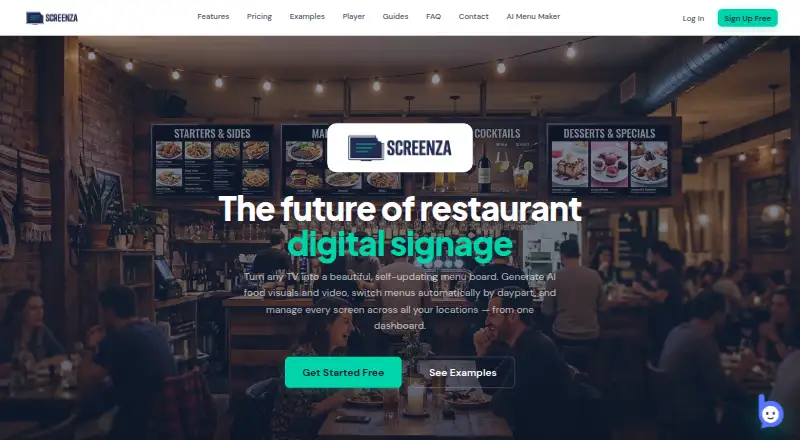
Screenza is a digital signage platform for restaurants to create and manage menu boards, promotions, and other display content. It can extract menu item names, descriptions, prices, and categories from an uploaded menu photo or PDF. AI tools generate menu boards, food imagery, promotional banners, and short looping videos. Restaurants can schedule dayparts, including custom weekdays and overnight windows, and use playlists to rotate boards and promotions. Templates offer widgets such as weather, alerts, QR codes, countdowns, and interactive menu search. A shared dashboard manages screens, menus, and schedules across multiple locations. Displays can run from a browser URL or a paired Android or Windows player app; cached content remains on display during an internet outage and syncs after connection returns. The free plan covers one screen and includes a Screenza watermark. Unused monthly credits do not roll over.
Good
- Imports menu details from photos or PDFs.
- Schedules support custom weekdays and overnight windows.
- One dashboard manages multiple restaurant locations.
- Cached content continues displaying during internet outages.
- Support can help with player installation and display troubleshooting.
Watch out
- Free plan is limited to one screen.
- Free displays include a Screenza watermark.
- Monthly AI credits and menu parses are plan-limited.
- Unused monthly credits expire without rollover.
Who it suits
Screenza suits restaurants that need to manage menus and promotions across one or more displays, including multiple locations. It may also fit teams that want menu imports, scheduled content, or offline playback.
Verdict
Screenza brings menu creation, scheduling, and multi-location display management into one platform. Check the per-screen plan limits and review AI-generated or parsed content for errors before displaying it.
Plans and prices
From Screenza's own pricing page, checked 14 Oct 2026.
| Plan | Price | What it gives you |
|---|---|---|
| Free | Free | 1 screen · 5 image credits/mo · 10 menu parses/mo · 100 MB storage · Screenza watermark · monthly |
| Starter | $16 a month | 20 image credits/screen/mo · 2 video credits/screen/mo · 40 menu parses/screen/mo · 1.0 GB storage/screen · own video uploads · no watermark · per screen monthly |
| Growth | $28 a month | 45 image credits/screen/mo · 5 video credits/screen/mo · 100 menu parses/screen/mo · 5.0 GB storage/screen · own video uploads · no watermark · per screen monthly |
| Multi-location | $42 a month | 80 image credits/screen/mo · 10 video credits/screen/mo · 200 menu parses/screen/mo · 15 GB storage/screen · own video uploads · no watermark · per screen monthly |
The facts
Each one read from Screenza's own pages, with the date it was checked.
What it does
- AI content limits
- The Terms say AI-generated or parsed content may contain errors and require customer review, and Screenza does not guarantee generated content is unique or non-infringing.checked 4 Oct 2026
- AI limitations
- Screenza says AI-generated and parsed content can contain errors and may not be unique, original or non-infringing, so customers must verify it.checked 14 Oct 2026
- AI visuals
- The platform generates food photography, menu boards and promotional banners from descriptions.checked 14 Oct 2026
- API terms
- The Terms refer to account API keys and permit automated access only through APIs explicitly provided and authorized by Screenza.checked 14 Oct 2026
- Credit expiration
- Unused monthly credits expire at the end of each billing cycle and do not roll over.checked 14 Oct 2026
- Daypart scheduling
- Menus and promotions can switch automatically for breakfast, lunch, dinner and other defined time windows.checked 14 Oct 2026
- Display options
- Displays can run by opening a browser URL or pairing a dedicated Android or Windows player app.checked 4 Oct 2026
- Google Play developer
- The same-name app listing identifies MOBILEDO YAZILIM HIZMETLERI SANAYI VE TICARET LIMITED SIRKETI in Istanbul, Türkiye as developer.checked 14 Oct 2026
- Google Play distribution
- The same-name app listing shows more than 1 million downloads and an update dated January 22, 2026.checked 14 Oct 2026
- Google Play privacy declaration
- The same-name app listing declares no data shared with third parties, no data collected, encryption in transit and user-requested deletion.checked 14 Oct 2026
- Hardware minimum
- The FAQ lists 2 GB RAM, network connectivity, HDMI for external devices and at least 720p resolution, with 1080p recommended.checked 14 Oct 2026
- Integrations
- The Terms identify Stripe as a payment processor and describe possible use of third-party AI, hosting, CDN, and analytics services; no named restaurant POS integration is specified on the pages reviewed.checked 4 Oct 2026
- License model
- The Terms grant a limited, non-exclusive, non-transferable, revocable subscription license and prohibit copying, reverse engineering, resale and derivative works.checked 14 Oct 2026
- Menu import
- Users can upload a photo or PDF of a menu for OCR extraction of item names, descriptions, prices, and categories.checked 4 Oct 2026
- Multi-location
- A single dashboard manages screens, menus, and schedules across multiple restaurant locations.checked 4 Oct 2026
- Multi-location management
- One dashboard manages menus, schedules and screens for multiple restaurant branches.checked 14 Oct 2026
- OCR menu import
- A menu photo or PDF can be parsed into editable item names, descriptions, prices and categories.checked 14 Oct 2026
Where it runs
- Android player
- The Android player is distributed as a 9.4 MB APK for Android 7.0 or newer on ARM or x86 devices.checked 14 Oct 2026
- Browser deployment
- A browser screen receives a unique URL that can run full-screen on Windows, macOS, Linux, Android or ChromeOS devices.checked 14 Oct 2026
- Google Play app scope
- That same-name Google Play app describes device-usage analysis, application-interaction tracking and screen-activity monitoring.checked 14 Oct 2026
- Limit: same-name app complaints
- Several Google Play reviewers of the unrelated same-name app reported waiting many hours for results, repeated subscription requests and alleged scams.checked 14 Oct 2026
Money
- Annual billing
- The pricing page advertises annual billing at about 14% less than monthly pricing.checked 14 Oct 2026
- Free tier
- The free tier includes one screen, monthly image credits, menu parses, and storage, and displays a Screenza watermark.checked 4 Oct 2026
The company
- Maker address
- The Terms identify Screenza as operating at 96 W Central St, Unit 2, Natick, Massachusetts 01760, United States.checked 14 Oct 2026
The full review of Screenza
Screenza is restaurant signage software for creating menus and promotions for display screens. It is best suited to restaurants coordinating content across service periods or multiple locations. Its broad display toolkit is appealing, but per-screen quotas and required review of AI content deserve attention.
Overview
Screenza combines menu creation with publishing and management for restaurant displays. It can generate menu boards, food imagery, promotional banners, and short looping videos, or extract menu details from a photo or PDF. That can help move an existing menu onto screens, but AI-generated and parsed content may contain errors; customers need to review it, and Screenza does not guarantee generated content is unique or non-infringing.
Displays can run from a browser URL or a dedicated Android or Windows player app. The player caches menus and promotional images for continued display during an internet outage, then syncs updates when connectivity returns. Support can help with player installation and display-device troubleshooting.
Key features
Scheduling and content
Automatic daypart changes, custom weekdays, and overnight windows suit restaurants whose menus or promotions vary by service. Playlists rotate boards and promotions, while templates can add weather, alerts, QR codes, countdowns, and interactive menu search. This is a practical set of options for keeping screens useful beyond static menus, though image credits, video credits, parses, and storage are capped by plan.
Multi-location management
A single dashboard manages screens, menus, and schedules across restaurant locations. That central control is useful for operators coordinating updates, while the per-screen billing structure means costs rise with the display count.
Pricing
The free tier costs nothing and allows one screen, 5 image credits per month, 10 menu parses per month, and 100 MB of storage. It includes a Powered by Screenza watermark, so it is better for a trial or a single low-volume display than polished customer-facing signage.
Starter costs $16 a month, billed at $16 /screen/mo. It provides 20 image credits, 2 video credits, and 40 menu parses per screen per month, 1.0 GB of storage per screen, video uploads, and no watermark. It suits a modest screen setup, but the per-screen terms matter as displays multiply.
Growth costs $28 a month, billed at $28 /screen/mo. It raises the monthly per-screen allowance to 45 image credits, 5 video credits, and 100 menu parses, with 5.0 GB of storage per screen. Choose it when Starter's quotas or storage are too tight; otherwise, those larger limits may not justify the higher per-screen price.
Multi-location costs $42 a month, billed at $42 /screen/mo. It includes 80 image credits, 10 video credits, and 200 menu parses per screen per month, plus 15 GB of storage per screen. This is the most capable listed tier for content-heavy multi-site operators, but it still scales by screen rather than offering a flat location-wide price.
Unused monthly credits expire at the end of each billing cycle without rollover. The free plan's watermark and tighter quotas are its main trade-offs; paid plans remove the watermark and add video uploads. No named restaurant POS integration is specified, so restaurants needing a particular POS connection should verify that requirement before choosing Screenza.
Platforms
Screenza supports Android, Linux, macOS, web, and Windows. Screens can run through a browser URL or dedicated Android and Windows player apps, with offline caching for menus and promotional images.
Who it's for
Screenza fits restaurants that want scheduled digital menus, rotating promotions, QR codes, and centralized control across screens or locations. It is less suited to operators who need a named POS integration, broad uncapped content production, or a fixed multi-location fee. Account credential security and authorized-user access controls remain the customer's responsibility; the terms do not establish a security certification.
Pros and cons
- Pros: Photo and PDF menu parsing can reduce manual re-entry, while daypart schedules, playlists, and widgets support changing service content.
- Pros: Local caching keeps menus and promotional images on screen through internet interruptions.
- Pros: The dashboard manages screens, menus, and schedules across multiple locations.
- Cons: Per-screen pricing and per-screen quotas can make larger deployments costly and require careful plan selection.
- Cons: Monthly credits expire without rollover, and AI-generated or parsed content requires review for accuracy and rights concerns.
- Cons: The free tier is limited to one screen and carries a watermark.
Alternatives
Digital Menu Software is a useful category starting point for comparing options. Consider GustoQR if its free plan's 500-customer annual allowance, team access, and full templates and AI features better match your needs. EatPe is worth comparing when POS billing or thermal-print-ready invoicing matters. Choose MenüQR if its free allowance of one restaurant, one menu, 50 items, and one language is a closer fit. square.menu offers a free option capped at one menu, 25 products, and three categories with QR sharing. Tabemi may suit an outlet eligible for its no-subscription Founding Partner offer. AviQR provides a free starter allowance of 20 menu items, 50 orders a day, one QR code, and basic analytics. Digmenu is another freemium option, with a 19.99 EUR monthly plan. Dmeals has a free starter tier for one restaurant and up to 30 dishes, with a QR code menu.
Verdict
Choose Screenza if your restaurant needs scheduled, multimedia signage managed across screens or locations, especially when offline playback is useful. Its main advantage is the combination of menu creation, scheduling, and centralized display control; look elsewhere if you need a named POS integration, predictable flat pricing across many screens, or AI quotas that do not expire monthly.
Getting started
- Visit https://www.screenza.tv/.
- Choose the Free plan or a paid plan starting at $16 a month per screen.
- Run a display from a browser URL, or pair a dedicated Android or Windows player app.
- Create or import menu content, then set schedules or playlists for your screens.
Limits worth knowing
The free plan allows one screen, 5 image credits and 10 menu parses per month, and 100 MB storage; it displays a Powered by Screenza watermark. Starter begins at $16 a month per screen and provides 20 image credits, 2 video credits, 40 menu parses, and 1.0 GB storage per screen each month. Monthly credits expire at the end of each billing cycle without rollover.
Questions
Does Screenza have a free plan?
Yes. The free plan includes one screen, 5 image credits per month, 10 menu parses per month, and 100 MB storage, with a Powered by Screenza watermark.
How much do paid plans cost?
Starter is $16 a month, Growth is $28 a month, and Multi-location is $42 a month.
Which platforms can run Screenza displays?
Displays can run by opening a browser URL or pairing a dedicated Android or Windows player app. Screenza lists Android, Linux, macOS, web, and Windows as platforms.
Can Screenza import an existing menu?
Yes. Users can upload a menu photo or PDF for OCR extraction of item names, descriptions, prices, and categories.
Does Screenza support QR menus?
Yes. Templates can include QR codes, and Screenza lists QR menu support.
Does Screenza integrate with restaurant POS systems?
No named restaurant POS integration is specified. The Terms identify Stripe as a payment processor and describe possible third-party AI, hosting, CDN, and analytics services.