ScreenGuard
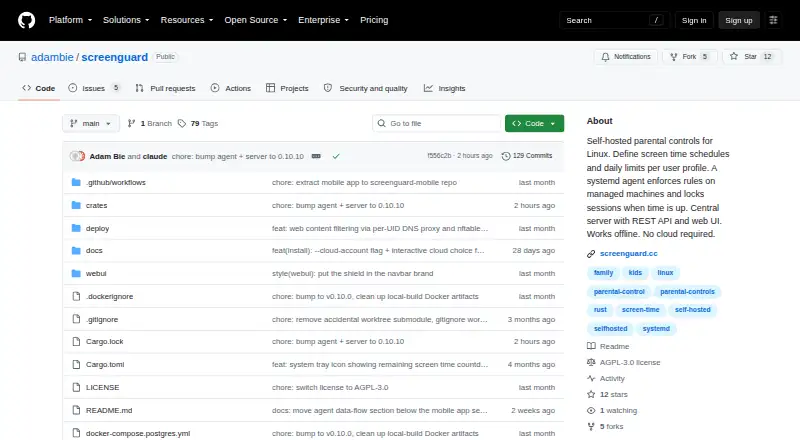
The facts below are what the maker publishes about ScreenGuard, checked and dated. Our editors have not written about it yet.
The facts
Each one read from ScreenGuard's own pages, with the date it was checked.
What it does
- Activity reports
- Yeschecked 22 Sep 2026
- Administration
- Administrators manage profiles and devices through a web UI or REST API.checked 12 Oct 2026
- Agent permissions
- The README says the server cannot run arbitrary commands, read files, or open a shell on the agent, but it can request a privileged agent update from GitHub releases.checked 12 Oct 2026
- Cloud status
- The README describes the hosted service as young and says its endpoint and enrollment flow may change.checked 12 Oct 2026
- Content filtering
- Yeschecked 22 Sep 2026
- Database options
- The server uses SQLite by default and can be configured to use PostgreSQL.checked 12 Oct 2026
- Data collected
- The agent reports machine and local account identifiers, active-time and usage totals, idle status, and open-session counts; the README says it does not send window titles, application names, keystrokes, screenshots, or file contents.checked 12 Oct 2026
- Data collection
- The README says the agent reports machine and user identifiers, active-time totals, idle status, session counts, and daily usage, but not window titles, app names, keystrokes, screenshots, or file contents.checked 12 Oct 2026
- Deployment
- ScreenGuard can be self-hosted on a LAN or used with a hosted cloud account; the project says LAN use works offline without cloud access.checked 12 Oct 2026
- Discovery
- Agents can discover a server automatically on the local network using mDNS.checked 12 Oct 2026
- Enforcement
- A systemd agent enforces limits and can lock graphical sessions when time runs out.checked 12 Oct 2026
- Hosted option
- The README describes hosted cloud accounts for managing machines without running a server, with device approval and account-specific profiles, devices, and usage history.checked 12 Oct 2026
- License
- The repository README identifies the project license as GPL-3.0.checked 12 Oct 2026
- Network behavior
- Agents initiate outbound connections, and cloud mode uses a TLS-protected WebSocket; LAN discovery uses mDNS.checked 12 Oct 2026
- Network security
- The agent always initiates connections, and the README says cloud connections use a TLS-protected WebSocket.checked 12 Oct 2026
- Notifications
- The agent can warn users 15, 10, 5, and 1 minute before lockout, and administrators can send desktop messages.checked 12 Oct 2026
- Offline and hosting
- The project says it works offline and can be self-hosted without requiring cloud service.checked 12 Oct 2026
- Purpose
- ScreenGuard provides parental controls for Linux, with screen-time schedules and daily limits enforced by an agent that can lock sessions.checked 12 Oct 2026
- Remote control
- The documented server messages include configuration updates, lock and notification actions, log retrieval, and a privileged agent update; the README says there is no message for arbitrary commands, file reads, or shell access.checked 12 Oct 2026
- Requirements
- Managed machines require Linux with systemd, an x86_64 or aarch64 CPU, and a graphical session manager supporting loginctl terminate-session.checked 12 Oct 2026
- Schedule controls
- Each user profile can have daily time limits and weekly schedules.checked 12 Oct 2026
- Schedules
- Administrators can set daily time limits and weekly schedules per profile.checked 12 Oct 2026
Money
- Free plan
- Yeschecked 22 Sep 2026
Where it runs
- Mobile app
- A companion Android app manages profiles, devices, schedules, and daily limits through the same REST API as the web UI.checked 12 Oct 2026
Alternatives to ScreenGuard
- 1
Kaspersky Safe Kids
Free planAndroidiOSWebmacOS8.8From $14.99 a year - 2

Qustodio
Free planAndroidiOSmacOSWindows8.6From $72.94 a year - 3

MMGuardian
AndroidiOSWebmacOS8.3From $59.90 a year - 4

OurPact
Free planAndroidiOS8.2From $69.99 a year - 5

Mobicip
AndroidiOSmacOSWindows8.0From $2.99 a month - 6

FamilyTime
AndroidiOSmacOSWindows8.0From $2.41 a month