RegexCraft
RegexCraft is a desktop workbench for creating and working with regular expressions.
What RegexCraft is
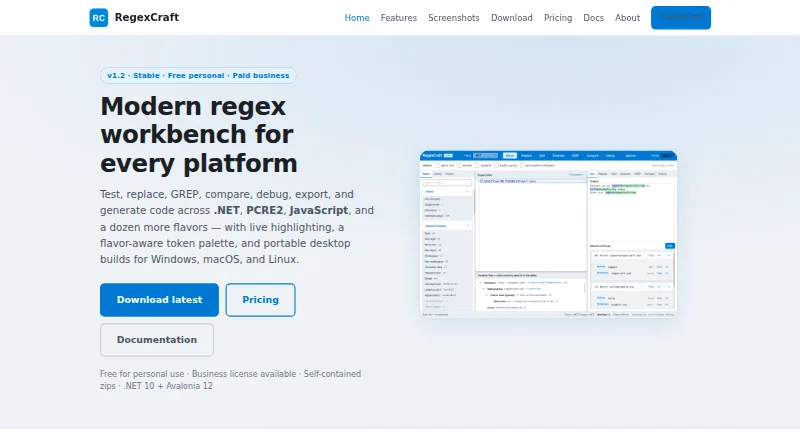
RegexCraft is a desktop workbench for creating and working with regular expressions. It supports testing, replacing, comparing, debugging, and generating expressions, with full-fidelity support for .NET, PCRE2, and JavaScript. Other listed flavors have High or Approximate fidelity. Match mode highlights matches and capture groups; Replace mode previews substitutions and supports backreferences. Compare mode puts results from two to four flavors side by side, including validity, matches, groups, fidelity, and known differences. Its step-through debugger is an educational walkthrough of the .NET engine, controlled with F10 and F11. A GREP tool searches and replaces across folders using include and exclude globs, with cancellation, dry-run, and backups. It can generate code snippets for languages including C#, JavaScript, Python, Go, and Swift. RegexCraft has a free Personal plan for non-commercial use; commercial, organizational, government, or revenue-generating use requires a paid license. The paid Business license is $49, paid once-time purchase.
Good
- Compares results across two to four flavors.
- GREP handles folder-wide search and replacement.
- Generates snippets for multiple programming languages.
- Portable downloads are available for Windows, Linux, and macOS.
Watch out
- Commercial use requires a paid license.
- Core product has no cloud sync or account system.
Who it suits
RegexCraft suits people who need to develop, compare, or debug regular expressions on desktop systems. Its Personal plan covers hobby, learning, side projects, and other non-commercial use; commercial use requires a paid license.
Verdict
RegexCraft combines expression editing, comparison, debugging, and folder-wide search in one desktop tool. Its free plan is limited to non-commercial use, and the core product does not sync data to the cloud.
Plans and prices
From RegexCraft's own pricing page, checked 29 Sep 2026.
| Plan | Price | What it gives you |
|---|---|---|
| Personal | Free | Personal, hobby, learning, side projects, and non-commercial use · Full app features · All portable platforms · CSV/JSON export |
| Business | $49, paid once | Commercial, business, or organizational use · Honor system with no activation · Same binaries as Personal · One-time purchase |
The facts
Each one read from RegexCraft's own pages, with the date it was checked.
What it does
- Code generation
- It generates code snippets for C#, JavaScript, TypeScript, Python, PHP, Java, Go, Rust, Ruby, Perl, Kotlin, and Swift.checked 29 Sep 2026
- Compare
- Compare mode shows side-by-side results for 2–4 flavors, including validity, matches, groups, fidelity badges, and known differences.checked 29 Sep 2026
- Debug
- Debug step-through is an educational walkthrough for the .NET engine using F10/F11.checked 29 Sep 2026
- Downloads
- Portable self-contained zips are available for Windows x64, Linux x64, macOS Intel, and macOS Apple Silicon; no installer is required.checked 29 Sep 2026
- File search
- GREP searches and replaces across folders with include/exclude globs, cancellation, dry-run, and backups.checked 29 Sep 2026
- Integrity
- A SHA256SUMS.txt file is attached to GitHub releases when present for integrity verification.checked 29 Sep 2026
- License limit
- Business, commercial, organizational, government, or revenue-generating use requires a paid commercial license.checked 29 Sep 2026
- Local data
- Library, history, and settings are stored in the operating system application-data folder; the core product has no account system or cloud sync.checked 29 Sep 2026
- Match and replace
- Match mode highlights matches and capture groups, while Replace mode previews substitutions and supports backreferences.checked 29 Sep 2026
- Product
- RegexCraft is a desktop workbench for testing, replacing, comparing, debugging, and generating regular expressions.checked 29 Sep 2026
- Regex flavors
- It supports .NET, PCRE2, and JavaScript with full fidelity, and lists other flavors with High or Approximate fidelity.checked 29 Sep 2026
- Security and licensing
- The maker states there are no license keys, activation servers, DRM, or phone-home, and describes RegexCraft as proprietary software.checked 29 Sep 2026
The company
- Maker
- RegexCraft is created and maintained by Marshall Moorman, and its application source is proprietary.checked 29 Sep 2026
The full review of RegexCraft
Overview
RegexCraft is a desktop workbench for building and examining regular expressions, particularly suited to developers who need to check behavior across engines or search and replace in files. Its combination of comparison, debugging, and folder-wide GREP is compelling; the main trade-offs are desktop-only use, no cloud sync, and a paid license for commercial work.
It supports .NET, PCRE2, and JavaScript with full fidelity, while other flavors are marked High or Approximate fidelity. That distinction is useful when matching behavior in a specific engine matters. The application is proprietary and maintained by Marshall Moorman; library, history, and settings are stored in the operating system’s application-data folder.
Key features
Match, replace, and explain
Match mode highlights matches and capture groups, while Replace mode previews substitutions and supports backreferences. That preview helps catch unintended changes before applying a replacement. Pattern explanation adds a learning aid, though the debugger’s step-through walkthrough is specifically for the .NET engine.
Compare and debug
Compare mode puts results for two to four flavors side by side, including validity, matches, groups, fidelity badges, and known differences. It is a practical way to spot engine-specific behavior without treating every supported flavor as equivalent. The .NET debugger advances with F10 and F11, making it useful as an instructional walkthrough rather than a universal engine debugger.
Search files and generate code
Folder-wide GREP supports include and exclude globs, cancellation, dry-run, and backups. Those safeguards make bulk replacement more manageable, though users should still review proposed changes. Code snippets can be generated for C#, JavaScript, TypeScript, Python, PHP, Java, Go, Rust, Ruby, Perl, Kotlin, and Swift.
Local storage and downloads
The core app has no account system or cloud sync, so saved patterns and history remain local rather than following a user between devices. Portable self-contained downloads are offered for Windows x64, Linux x64, macOS Intel, and macOS Apple Silicon, with no installer required. The maker says the app has no license keys, activation servers, DRM, or phone-home. GitHub releases include a SHA256SUMS.txt file when present for integrity verification.
Pricing
Personal: free. It includes full app features, all portable platforms, and CSV/JSON export for hobby, learning, side projects, and other non-commercial use. The limitation is consequential: business, commercial, organizational, government, or revenue-generating use requires a paid commercial license.
Business: $49, paid once, billed as a one-time purchase. It covers commercial, business, or organizational use, uses an honor system with no activation, and provides the same binaries as Personal. The free plan is therefore not a reduced-feature trial; it is restricted by use, while the paid plan changes the license terms rather than the app. No seat or usage quota is stated.
Platforms
RegexCraft is a desktop app for Linux, macOS, and Windows. Portable builds cover both Intel and Apple Silicon Macs, plus x64 Windows and Linux. It is not a web app, so users who want browser-based access or cloud-synced work should look elsewhere.
Who it's for
RegexCraft fits developers and learners who want a local regex workbench with cross-flavor comparison, a .NET teaching debugger, and guarded folder-level search and replacement. It is also a strong fit for organizations that prefer a one-time license without activation. It is less suitable for teams needing shared cloud data, browser access, or commercial use without purchasing a license.
Pros and cons
- Pros: Full-fidelity .NET, PCRE2, and JavaScript support makes its strongest engine coverage explicit.
- Pros: Side-by-side comparison across two to four flavors exposes differences in validity, matches, and capture groups.
- Pros: Folder search includes dry-run, cancellation, and backups, useful protections for bulk changes.
- Pros: The Personal plan includes the full app for non-commercial use, and Business is a one-time purchase with no activation.
- Cons: Commercial, organizational, government, and revenue-generating use is excluded from the free license.
- Cons: No cloud sync or account system means saved work stays on the device.
- Cons: The guided debugger is limited to the .NET engine, and other flavors may have only High or Approximate fidelity.
Alternatives
Browse Regular Expression Testers for a broader category comparison. Choose regex101 if web access or API and self-hosted platforms matter more than a desktop-first workbench. RegexPilot is another freemium option with extension, macOS, and web platforms, and its paid license covers 21 flavors. For a free option on Linux or Windows, consider The Regex Coach. Debuggex is a web alternative with a free tier. Choose RegEx Visualizer & Explainer for a free, no-account web tool focused on JavaScript RegExp. RegexStudio is a free, open-source web workbench. Regex Hero is a free option for web or Windows. RegexRegex is a free web alternative.
Verdict
Choose RegexCraft if you want a full-featured desktop regex workbench with engine comparison, file-level search safeguards, and local storage, especially if a one-time commercial license suits your work. Look elsewhere if you need cloud sync, browser access, or a debugger that steps through engines beyond .NET.
Getting started
- Visit https://www.regexcraft.com/.
- Download the portable zip for Windows x64, Linux x64, macOS Intel, or macOS Apple Silicon.
- Open the self-contained download; no installer is required.
- Use the Personal plan for personal, hobby, learning, side-project, or non-commercial work.
- Purchase the Business plan for commercial, business, organizational, government, or revenue-generating use.
Limits worth knowing
The free Personal plan is for personal and non-commercial use. Commercial, business, organizational, government, or revenue-generating use requires the Business license at 49.00 USD one time.
Questions
Is RegexCraft free?
Yes. The Personal plan costs nothing and includes full app features, all portable platforms, and CSV/JSON export.
What does the Business plan cost?
It costs 49.00 USD as a one-time purchase. Commercial, business, organizational, government, or revenue-generating use requires this paid license.
Which platforms does it support?
RegexCraft is a desktop app for Linux, macOS, and Windows, with portable downloads for Windows x64, Linux x64, macOS Intel, and macOS Apple Silicon.
Is RegexCraft open source?
No. The maker describes it as proprietary software, and the application source is proprietary.
Does the core app sync data to the cloud?
No. The library, history, and settings are stored in the operating system's application-data folder, and the core product has no cloud sync or account system.
Alternatives to RegexCraft
- 1

AppTools Regex Tester
Free planAndroidiOSWebLinux7.4Free plan - 2
Debuggex
Free planWebSelf-hosted7.3From $5 a month - 3
Regex Hero
Free planWebWindows7.3$15 one-time - 4

RegexPilot
Free planWebExtensionmacOS6.7€19 one-time - 5

regex101
Free planWebAPILinuxSelf-hosted6.6From €4.99 a month - 6

RegexRegex
Free planWeb6.4Free plan