raid_recovery
raid_recovery is a free, open-source set of Linux command-line utilities for recovering RAID5 data from disk images.
What raid_recovery is
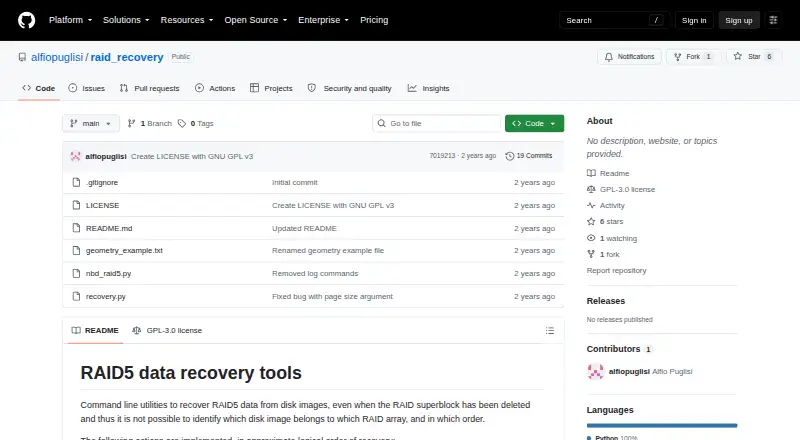
raid_recovery is a free, open-source set of Linux command-line utilities for recovering RAID5 data from disk images. It is intended for difficult cases such as a deleted RAID superblock or unknown disk order. The workflow includes page-size detection, image identification, parity checking, disk ordering, and reconstruction. Detection relies on heuristics, so its results are not guaranteed. Page-size detection examines one image and needs a long ASCII or similar text file on disk. Image identification requires the array size and page size, and the selected range should contain data rather than only zeroes. Once page size and image order are known, the restore command extracts RAID pages into one output file representing the virtual drive. Alternatively, a Python nbdkit plugin can expose a virtual drive, including from disks split across image files described by a geometry file. The utilities depend on numpy and tqdm; the virtual-disk setup uses nbdkit, nbd-server, and nbd-client. Reconstruction may require dozens of terabytes of free space beyond the raw images. The project identifies its license as GPL-3.0 and shows no releases.
Good
- Supports RAID5 recovery from disk images.
- Includes parity checking and data reconstruction.
- Can expose a virtual drive through nbdkit.
- Supports disks split across multiple image files.
Watch out
- Detection heuristics are not guaranteed.
- Reconstruction may need dozens of terabytes of free space.
- Requires numpy and tqdm.
- The repository page shows no releases.
Who it suits
It may suit Linux users working with RAID5 disk images who need to recover data despite a missing superblock or uncertain disk order. Be prepared to work with command-line tools and substantial storage requirements.
Verdict
raid_recovery offers several stages of RAID5 recovery, including reconstruction and virtual-drive access. Its heuristic limits and potentially large storage requirement are important considerations before starting.
The facts
Each one read from raid_recovery's own pages, with the date it was checked.
What it does
- Array identification
- The identification algorithm tests image file combinations against RAID5 parity and can report multiple matches.checked 9 Oct 2026
- Dependencies
- The recovery utilities list numpy and tqdm as dependencies.checked 9 Oct 2026
- Heuristic limitation
- Page-size detection and disk-order detection use heuristics, and the README says their results are not guaranteed.checked 9 Oct 2026
- Heuristic limits
- The README says page size and sequence detection use heuristics, so their results are not guaranteed.checked 9 Oct 2026
- Identification limitation
- Disk-image identification requires the array size and page size, and the selected page range should contain data rather than only zeroes for reliable identification.checked 9 Oct 2026
- Integration
- The virtual-disk setup uses nbdkit, nbd-server, and nbd-client; the README gives Ubuntu package installation instructions for the latter two.checked 9 Oct 2026
- Integrity check
- The parity check examines the full image length and returns a pass or fail result.checked 9 Oct 2026
- License
- The repository identifies its license as GPL-3.0.checked 9 Oct 2026
- Page size detection
- Page size detection uses ASCII file statistics and requires a long ASCII or similar text file on disk; one disk image is sufficient.checked 9 Oct 2026
- Page-size detection requirement
- The page-size heuristic needs a long ASCII file on disk, ideally a few megabytes, and examines one disk image.checked 9 Oct 2026
- Purpose
- Command-line utilities recover RAID5 data from disk images, including when the RAID superblock has been deleted and disk order is unknown.checked 9 Oct 2026
- Reconstruction
- After page size and image order are known, the restore command extracts RAID pages into one output file containing the virtual drive content.checked 9 Oct 2026
- Reconstruction output
- Reconstruction extracts RAID pages in sequence into one output file containing the virtual drive content.checked 9 Oct 2026
- Recovery steps
- The tools support page-size detection, disk-image identification, parity checking, disk ordering, and data reconstruction.checked 9 Oct 2026
- Release availability
- The repository page shows no releases.checked 9 Oct 2026
- Resource requirement
- The README says file reconstruction may require dozens of terabytes of free disk space in addition to space occupied by raw disk images.checked 9 Oct 2026
- Split images
- The virtual-disk plugin supports disks split into multiple image files, described by a geometry file.checked 9 Oct 2026
- Storage requirement
- Reconstruction into an output file may require dozens of terabytes of free disk space in addition to the raw disk images.checked 9 Oct 2026
- Virtual disk option
- A Python nbdkit plugin can export a virtual drive from RAID5 disk images without a RAID superblock, provided disk order and page size are known.checked 9 Oct 2026
Where it runs
- Linux setup
- The README gives Ubuntu installation instructions for nbd-server and nbd-client and describes building nbdkit.checked 9 Oct 2026
Alternatives to raid_recovery
- 1
EaseUS Data Recovery Wizard
Free planAndroidiOSmacOSWindows8.2Free plan - 2

Disk Drill
Free planmacOSWindows7.6From $89 a year - 3
DiskGenius
Free planWindows7.5From $99.90 a year - 4

R-Studio
LinuxmacOSWindows6.8From $49.99 a month - 5

Ontrack EasyRecovery
Free planmacOSWindows6.7Free plan - 6

ReclaiMe Free RAID Recovery
Free planWindows6.7Free plan