
Quizbot
Quizbot turns topics or uploaded materials into quizzes and tests with answer keys.
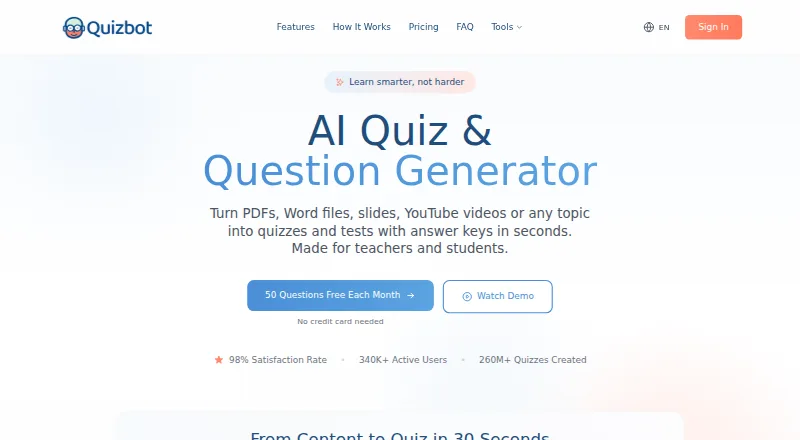
What Quizbot is
Quizbot turns topics or uploaded materials into quizzes and tests with answer keys. It accepts PDFs, PowerPoints, Word files, web links, videos, images, text and audio, and can generate multiple-choice, fill-in-the-blank, true/false, open-ended, calculation, matching and mixed questions. Its learning tools include concept-level performance feedback, personalized study plans, AI explanations, spaced-repetition reviews and daily practice. Users can add course materials to a Notebook and chat with an AI assistant described as trained on those materials. Quizzes and answer keys can be exported to Word, PDF, Google Classroom, Moodle, Canvas, Blackboard, Kahoot and Aiken. The site describes Quizbot as serving teachers, schools, companies, students, organizations and tutors. The Free plan provides 50 questions per month, one notebook, up to two sources and 10 questions per batch. The maker links to apps for iOS and Android. Quizbot says uploaded files go to a temporary cache and are removed after questions are successfully created; its privacy policy also describes encryption in transit and account-deletion retention terms.
Good
- Accepts documents, links, videos, images, text and audio.
- Generates multiple question formats with answer keys.
- Exports to Word, PDF and named learning platforms.
- Free plan includes 50 questions per month.
Watch out
- Free plan limits each batch to 10 questions.
- Free plan includes one notebook and up to two sources.
- Uploaded files are removed after successful question creation.
Who it suits
Quizbot suits teachers, students, tutors and organizations that want to create practice questions from materials or topics. Its Notebook and study tools may also suit learners who want material-based explanations and review sessions.
Verdict
Quizbot combines quiz generation, study tools and exports across a wide range of inputs. The free plan has clear monthly, notebook and batch limits; paid plans start at $7.50 a month.
Plans and prices
From Quizbot's own pricing page, checked 15 Oct 2026.
| Plan | Price | What it gives you |
|---|---|---|
| Free | Free | 50 questions/month · 1 Notebook up to 2 sources · 10 questions per batch · multiple-choice, true/false, fill-in-the-blank and open-ended questions · $0 forever |
| Standard Plan | $3.50 a month | 2,000 questions monthly · 50 high-quality images · AI rewriter · image generator · performance analytics · $3.5 ≈ ₹330 per month |
| Pro Plan | $6.50 a month | Unlimited questions · matching, calculation and mixed questions · study planner · spaced repetition · 100 high-quality images · $6.5 ≈ ₹620 per month |
| Educator Plan | $9.50 a month | Unlimited questions · Likert surveys · Bloom's Taxonomy · LMS export · teacher toolkit · 300 high-quality images · $9.5 ≈ ₹900 per month |
| 2000 Questions Package | $7, paid once | 2,000 questions · 50 high-quality images · valid for 6 months · $7.0 ≈ ₹660 Per One Time Payment |
| 4000 Questions Package | $14, paid once | 4,000 questions · advanced question types · 100 high-quality images · valid for 6 months · $14.0 ≈ ₹1,330 Per One Time Payment |
| 10000 Questions Package | $33, paid once | 10,000 questions · educator tools · LMS export · 300 high-quality images · valid for 6 months · $33.0 ≈ ₹3,130 Per One Time Payment |
| Standard Plan | $35 a year | 2,000 questions monthly · 50 high-quality images · AI rewriter · image generator · $35.0 ≈ ₹3,320 per year |
| Pro Plan | $65 a year | Unlimited questions · advanced question types · study planner · spaced repetition · 100 high-quality images · $65.0 ≈ ₹6,170 per year |
| Educator Plan | $95 a year | Unlimited questions · educator tools · LMS export · pedagogical frameworks · 300 high-quality images · $95.0 ≈ ₹9,020 per year |
The facts
Each one read from Quizbot's own pages, with the date it was checked.
What it does
- AI tutor
- Users can place course materials in a Notebook and chat with an assistant focused on those materials.checked 15 Oct 2026
- Bloom taxonomy
- Users can generate questions at different cognitive levels using Bloom's Taxonomy.checked 15 Oct 2026
- Chrome extension workflow
- The Quizbot.ai extension creates quizzes beside articles, YouTube videos or PDFs in Chrome and requires a free Quizbot account.checked 15 Oct 2026
- Data handling
- Quizbot's FAQ says uploaded files are parsed to a temporary cache, sent to its AI model, and removed after questions are successfully created.checked 29 Sep 2026
- Data retention
- The policy says deleted-account data is removed immediately while encrypted backups may retain data for up to 30 days.checked 15 Oct 2026
- G2 product description
- G2 describes Quizbot as an AI platform for educators and trainers that generates customizable questions and provides feedback and analytics.checked 15 Oct 2026
- Gamification
- Gamification features include points, badges, leaderboards, levels, quests and rewards.checked 15 Oct 2026
- Hosting and transfers
- The privacy policy states that Quizbot runs on AWS in the United States region us-east-1 and uses EU standard contractual clauses for EEA transfers.checked 15 Oct 2026
- Inputs and question formats
- It accepts PDFs, PowerPoints, Word documents, web links, videos, images, text and audio, and generates multiple-choice, fill-in-the-blank, true/false, open-ended, calculation, matching and mixed questions.checked 29 Sep 2026
- Input sources
- The service accepts PDFs, Word and PowerPoint files, text, URLs, YouTube videos, images and audio.checked 15 Oct 2026
- Integrations
- Exports include Word, PDF, Google Classroom, Moodle, Canvas, Blackboard, Kahoot and Aiken.checked 15 Oct 2026
- Integrations and exports
- Quizbot says quizzes and answer keys can be exported to Word, PDF, Google Classroom, Moodle, Canvas, Blackboard, Kahoot and Aiken.checked 29 Sep 2026
- Interactive quizzes
- Generated questions can be played as online self-assessments or class games, with performance insights and sharing.checked 15 Oct 2026
- Licence
- Terms reserve copyright in the service's HTML, CSS, JavaScript and visual design and grant no open-source licence.checked 15 Oct 2026
Where it runs
- Apple app capabilities
- The iOS app offers quiz generation, exam preparation, answer keys, work checking, AI rewriting, progress tracking and offline daily review.checked 15 Oct 2026
- Google Play app facts
- Google Play lists the Android app with 500-plus downloads, no third-party data sharing, encrypted data in transit and deletion requests.checked 15 Oct 2026
The company
- Company claim
- The About page claims more than 5 million active users, 100 million quizzes generated, presence in 150-plus countries and a 98% satisfaction rate.checked 15 Oct 2026
- Company location
- The site lists an address at 71-75 Shelton Street, Covent Garden, London, UK, WC2H 9JQ.checked 29 Sep 2026
- Company size
- LinkedIn lists Quizbot as a self-owned education company with 2–10 employees.checked 15 Oct 2026
- Founded
- LinkedIn and G2 both list Quizbot as founded in 2019.checked 15 Oct 2026
- Legal maker
- The Chrome Web Store lists CAPSTONE EDU LTD as the extension developer at 71-75 Shelton Street, London.checked 15 Oct 2026
Money
- Free access
- The free tier provides 50 questions each month without requiring a credit card.checked 15 Oct 2026
- Free plan
- Yeschecked 20 Sep 2026
- Free use and trial
- The site advertises 50 free questions each month without a credit card and describes this as a free trial in its FAQ.checked 29 Sep 2026
The full review of Quizbot
Quizbot turns course materials and topics into quizzes, then adds study tools for learners who want practice beyond a single test. It suits students, tutors and educators working across varied source formats; its standout breadth comes with meaningful free-plan caps.
Overview
Quizbot accepts PDFs, PowerPoints, Word documents, web links, videos, images, text and audio, and can produce quizzes with answer keys. Question formats range from multiple choice and true/false to open-ended, calculation and matching, with mixed sets also supported. That flexibility makes it useful when study material is not already in a quiz-ready format, though the free plan's 10-question batch limit can make larger jobs more incremental.
Key features
Learning tools give Quizbot more reach than a basic question generator. Concept-level feedback, personalized study plans, AI explanations, spaced-repetition reviews and daily practice sessions can help learners turn generated questions into ongoing revision. Its Notebook feature lets users upload course materials and chat with an AI assistant described as trained on those materials; the free Notebook allowance is one notebook with up to two sources.
Quizzes and answer keys can be exported to Word and PDF, as well as Google Classroom, Moodle, Canvas, Blackboard, Kahoot and Aiken. That range is useful for teachers and organizations moving content into teaching or quiz workflows, while students can keep materials in familiar document formats.
Quizbot says uploaded files are parsed to a temporary cache, sent to its AI model, and removed after questions are successfully created. Its privacy policy says data in transit is protected by SSL/TLS, access is restricted, and payment details are handled by PCI-compliant providers. It describes GDPR rights for EU, EEA and UK users; after account deletion, data is permanently deleted immediately, though encrypted backups may retain it for up to 30 days.
Pricing
The free plan costs nothing, billed $0 forever. It includes 50 questions per month, one Notebook with up to two sources, and batches of up to 10 questions. That is a practical way to try the workflow or generate occasional practice, but regular use will run into the monthly and batch ceilings. Quizbot advertises a free trial as 50 free questions a month without a credit card.
| Plan | Price | What it includes |
|---|---|---|
| Standard Plan | $7.50 a month | 2,000 questions and 50 high-quality images |
| Pro Plan | $12.50 a month | Unlimited questions and 100 high-quality images |
| Educator Plan | $18.50 a month | Unlimited questions and 300 high-quality images |
| 2000 Questions Package | Custom pricing | 2,000 questions, 50 high-quality images; valid for 6 months |
| 4000 Questions Package | Custom pricing | 4,000 questions, 100 high-quality images; valid for 6 months |
| 10000 Questions Package | $70, paid once | 10,000 questions; valid for 6 months |
Standard is the entry paid tier for users who can work within a 2,000-question allowance. Pro removes the question cap, while Educator keeps that unlimited allowance and raises the high-quality-image allocation to 300, making it the clearest fit for heavier teaching use. The question packages suit buyers seeking a fixed allotment with six-month validity rather than a monthly plan; two have custom pricing. Seat counts and renewal terms are not given.
Platforms
Quizbot is available on web, Android and iOS, so learners can use it in a browser or through the maker's mobile apps.
Who it's for
Students can use its practice tools and AI tutor to work from their own course materials. Teachers, tutors, schools and organizations get broad import options, varied question formats and exports to classroom platforms. It is less compelling for someone who only needs a small number of quizzes and does not need personalized practice or Notebook chat; the free quotas are modest for sustained use.
Pros and cons
- Pro: Broad source and question-format support accommodates varied course materials and assessment styles.
- Pro: Feedback, study plans, spaced repetition and Notebook chat extend use beyond generating a one-off quiz.
- Pro: Exports cover common document, learning-management and quiz destinations.
- Con: Free use is capped at 50 questions a month, one Notebook with two sources, and 10 questions per batch.
- Con: Unlimited questions require Pro or Educator, and the higher Educator price chiefly increases the high-quality-image allowance.
Alternatives
For a free general-purpose PDF utility rather than a quiz-and-study suite, consider PDFNoob, which is free forever and runs on Android, iOS, macOS, web and Windows. QuizFlight is worth considering when live participant sessions are the priority: its free session starts with up to 20 participants and then allows up to five, with no credit card required. For classroom assessment with a defined student allowance, IntelliAssess offers a free web plan for up to 25 students, with separate approximate question allowances for OpenAI, Gemini and Groq.
PDFQuiz is another option. QuizFlex AI is another option. Dende is another option. PrepAI is another option. Revisely is another option. Browse more tools in AI Quiz Generators or AI Study Tools.
Verdict
Quizbot is a strong fit for students and educators who want to turn varied course materials into quizzes and keep studying with feedback, explanations and spaced practice. Its combination of input flexibility, Notebook chat and exports is the main reason to choose it. Look elsewhere if your needs are limited to occasional small quizzes or if the free monthly and batch limits are too restrictive for your workload.
Getting started
- Visit https://quizbot.ai/ or use the Android or iOS app.
- Start with the free plan, which includes 50 questions per month without a credit card.
- Upload a supported file or provide a topic, link, video, image, text, or audio.
- Choose a question format and generate a quiz with an answer key.
- Export the quiz or answer key in a supported format.
Limits worth knowing
The free plan includes 50 questions per month, one notebook, up to two sources, and 10 questions per batch. Standard costs $7.50 per month and includes 2,000 questions and 50 high-quality images; Pro and Educator offer unlimited questions with 100 and 300 high-quality images, respectively.
Questions
Is Quizbot free?
Yes. Its free plan is billed at $0 and includes 50 questions per month, one notebook, up to two sources, and 10 questions per batch.
What do the paid plans cost?
Standard costs $7.50 per month, Pro costs $12.50 per month, and Educator costs $18.50 per month. A 10,000-question package costs $70 as a one-time payment and is valid for six months.
Which platforms does Quizbot support?
Quizbot is available on the web, Android, and iOS.
What can I use to create a quiz?
Quizbot accepts PDFs, PowerPoints, Word documents, web links, videos, images, text, and audio. It can generate multiple-choice, fill-in-the-blank, true/false, open-ended, calculation, matching, and mixed questions.
Where can I export quizzes and answer keys?
Exports include Word, PDF, Google Classroom, Moodle, Canvas, Blackboard, Kahoot, and Aiken.
What does Quizbot say about uploaded files?
Its FAQ says uploaded files are parsed to a temporary cache, sent to its AI model, and removed after questions are successfully created. Its privacy policy says data in transit is encrypted with SSL/TLS and encrypted backups may retain deleted-account data for up to 30 days.
Alternatives to Quizbot
- 1
PDFNoob
Free planAndroidiOSWebAPI7.4Free plan - 2
BrushUpIQ
Free planWeb7.3From £6.99 a month - 3

QuizFlight
Free planAndroidiOSWebAPI7.3From $8.25 a month - 4
Revisely
Free planWeb7.1Free plan - 5

Quizgecko
Free planAndroidiOSWeb6.8Free plan - 6
SimpleQuizMaker
Free planiOSWeb6.8From $2.99 a month