QuickBuild
QuickBuild is a continuous integration and deployment server for DevOps teams.
What QuickBuild is
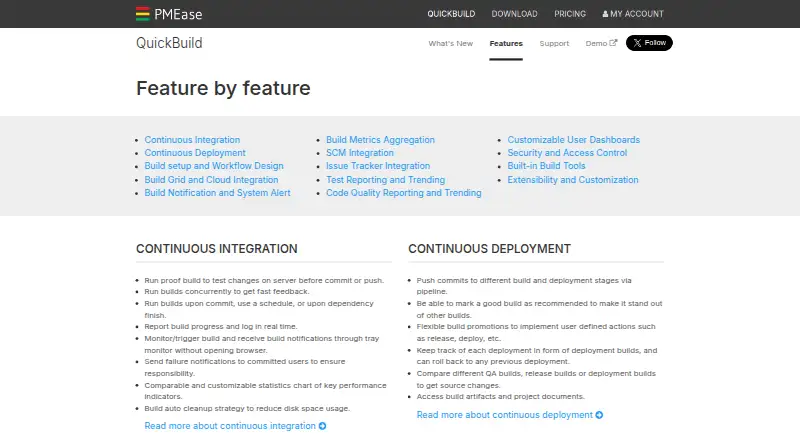
QuickBuild is a continuous integration and deployment server for DevOps teams. It can start builds when code is committed, on a schedule, or after a dependency completes, while showing progress and logs in real time. Pipelines support promotions, deployment tracking, and rollback to an earlier deployment. Teams can design workflows with drag-and-drop, then reuse them across projects through inheritance and variables. Its build grid distributes work across nodes and can launch on-demand nodes in AWS, Azure, and Kubernetes. Listed source-control integrations include Git, Subversion, Perforce, Mercurial, and Team Foundation Server. Issue-tracker support includes JIRA, Trac, Bugzilla, TeamForge, and Redmine. QuickBuild reports tests for JUnit and NUnit and provides code inspection and coverage reporting for several tools. Security controls include SSL, IP binding, role-based and project access, directory integration, single sign-on, and activity auditing. It is available through web, Windows, Linux, macOS, API, and self-hosted use.
Good
- Visual drag-and-drop workflow design
- Builds can run on commits or schedules
- Deployment tracking with rollback support
- AWS, Azure, and Kubernetes build nodes
- Extensible integrations and REST API
Watch out
- Hosted option is not available
- Enterprise Site License costs $3,600, paid once
- Community License allows up to 16 configurations
- Commercial support renewal costs $2,400 a year
Who it suits
QuickBuild suits DevOps teams that need self-hosted continuous integration and deployment with visual workflow design. It also fits teams needing deployment rollback, extensive integrations, and configurable access controls.
Verdict
QuickBuild combines visual pipeline design, broad source-control and issue-tracker support, and self-hosted execution. Its free licenses provide a starting point, while larger deployments require paid licensing or service renewal.
Plans and prices
From QuickBuild's own pricing page, checked 9 Oct 2026.
| Plan | Price | What it gives you |
|---|---|---|
| Community License | Free | Unlimited user accounts · unlimited servers · unlimited agents · up to 16 configurations · forum support |
| Open Source License | Free | Unlimited user accounts · unlimited servers · unlimited agents · unlimited configurations · forum support · qualifying open-source projects |
| Commercial Service renewal | $2,400 a year | Prioritized email support · licenses and source code for versions released before service expiration · per year per site for additional years |
| Enterprise Site License | $3,600, paid once | Unlimited user accounts · unlimited servers · unlimited agents · unlimited configurations · prioritized email support during commercial service · per physical site (including one year commercial service) |
The facts
Each one read from QuickBuild's own pages, with the date it was checked.
What it does
- Build automation
- It can run builds on commits, schedules, or dependency completion, and report progress and logs in real time.checked 9 Oct 2026
- Build grid
- The build grid can scale across nodes and launch on-demand nodes in AWS, Azure, and Kubernetes environments.checked 9 Oct 2026
- Deployment
- Build pipelines support promotions and deployment tracking, with rollback to a previous deployment.checked 9 Oct 2026
- Extensibility
- Custom plugins can add SCM systems, issue trackers, build steps, reports, statistics, notifiers, and authentication systems; external systems can use its RESTful API.checked 9 Oct 2026
- Integrations
- The product lists SCM support including Git, Subversion, Perforce, Mercurial, and Team Foundation Server, and issue tracker support including JIRA, Trac, Bugzilla, TeamForge, and Redmine.checked 9 Oct 2026
- Purpose
- QuickBuild is a flexible continuous integration and deployment server for DevOps teams.checked 9 Oct 2026
- Security
- Listed access controls include SSL, IP address binding, role-based and per-project access, LDAP and Active Directory integration, single sign-on, and user activity auditing.checked 9 Oct 2026
- Support
- Commercial service includes prioritized support by email with a guaranteed response time of two business days; community forum support is also listed.checked 9 Oct 2026
- Testing and quality
- It provides test reporting for frameworks including JUnit and NUnit, plus code inspection and coverage reporting for tools including Checkstyle, FindBugs, PMD, and Cobertura.checked 9 Oct 2026
- Version
- The download page lists QuickBuild version 16.0.26, released September 22, 2026.checked 9 Oct 2026
- Workflow design
- Build workflows can be designed visually with drag and drop, and reused across projects through inheritance and variables.checked 9 Oct 2026
Money
- Free evaluation
- A 60-day site evaluation license with unlimited configurations is available by contacting PMEase.checked 9 Oct 2026
Where it runs
- Platforms and deployment
- The download page offers Windows, Linux, Mac, and Unix packages, and describes an enterprise site license for installation on physical servers.checked 9 Oct 2026
Alternatives to QuickBuild
- 1

Codemagic
Free planAndroidiOSWebAPI8.2From $99 a month - 2

TeamCity
Free planAndroidWebAPILinux8.2From $15 a month - 3

Azure Test Plans
Free planWebAPIExtensionLinux8.1From $6 a month - 4
Bitbucket Pipelines
Free planWebAPILinuxmacOS8.0From $3.65 a month - 5

AppVeyor
Free planWebAPILinuxmacOS7.9From $29 a month - 6

AWS CodeBuild
Free planWebAPILinuxmacOS7.9From $0.01 a month